Five-Second Heart Rate: What Changes for HealthKit Apps
This post has not been translated yet, so you are reading the English original. Read it at the English URL
What do the new Apple Watch sensors change for HealthKit apps? Apple Watch Series 12 and Apple Watch Ultra 4 “now measure heart rate every five seconds, all day long,” and heart rate variability “as often as every five minutes,” which Apple calls “24x more frequently.”2 Apple’s releases describe what the watch measures, not what it writes to HealthKit; the documentation index has no readiness type and one new HRV type, heartRateVariabilityRMSSD.8 Apple’s 2024 white paper puts the earlier background cadence at one attempt every five minutes while still, so prepare for potentially far denser background quantities in HealthKit, whether as more samples or as longer series, then measure the real publication density after a first full day of wear.11
Apple announced the two watches on September 9, 2026, with a Health Sensing System of new optical and electrical heart sensors on both.13 The consumer story is readiness. The developer story is density, and Apple gave two numbers that let you plan for it.
TL;DR: Heart rate every five seconds is 17,280 readings a day if every one is retained; HRV as often as every five minutes is up to 288 a day. Apple’s 2024 white paper gives the earlier baselines: background heart rate attempted once per five minutes while still, workout readings published once per five-second window, and HRV tachograms every four hours by default, two hours with irregular rhythm notifications, or 15 minutes with AFib History, so Apple’s “24x” implies the two-hour baseline, though Apple does not identify its comparison setting.211 Nominally, the all-day heart-rate cadence is 60 times the old background attempt rate; how much of it reaches HealthKit is unpublished, readiness has no HealthKit type, and a second HRV identifier, heartRateVariabilityRMSSD, arrives unexplained.8 Move to anchored queries, statistics collections, and aggregation before storage, then measure on a Series 12 after its first full day of wear.56
What Apple said, verbatim

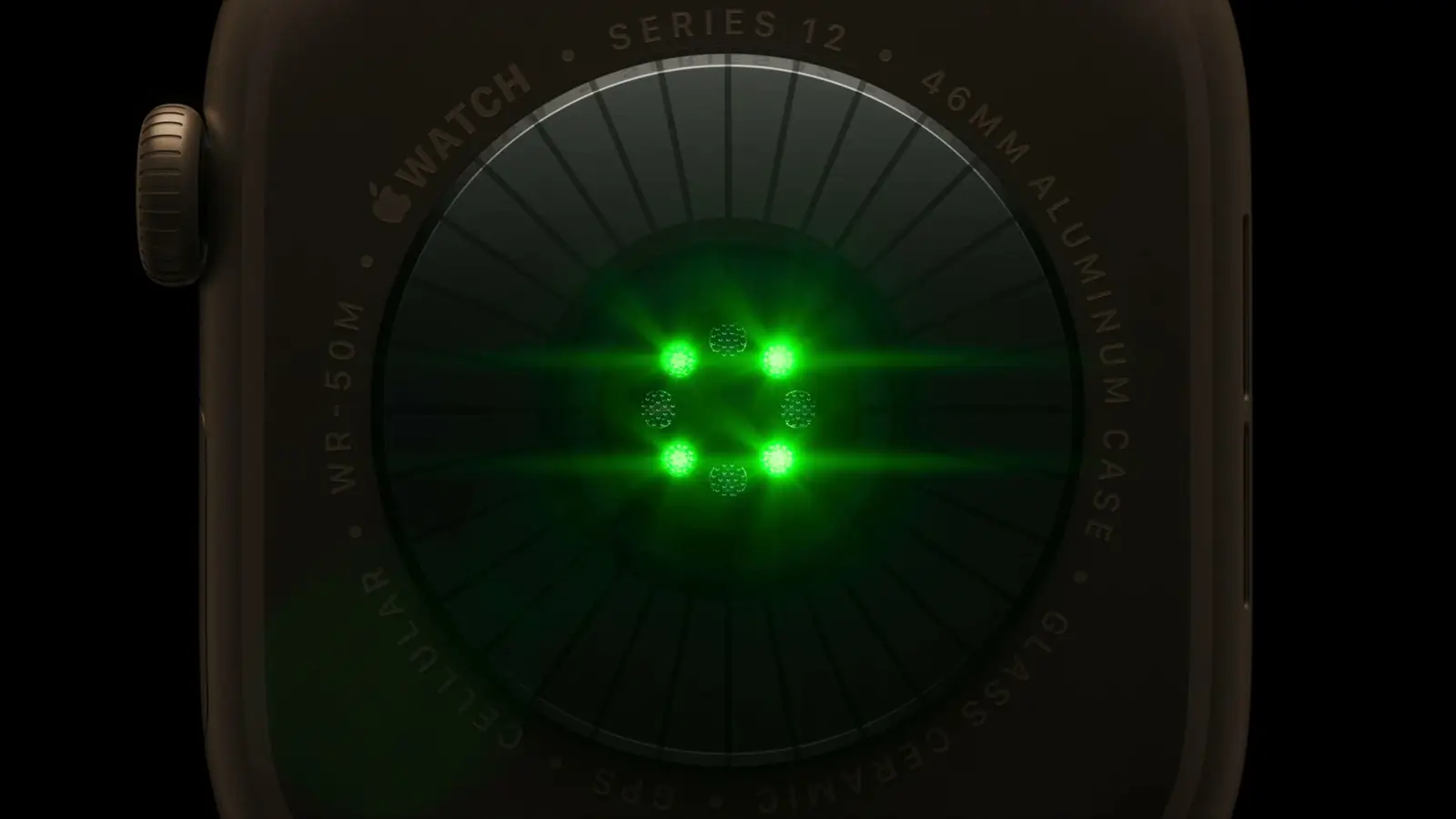
Frame from Apple’s September 9, 2026 event stream, 10:37 a.m. PT: the Series 12 case back with the optical heart sensor lit; the larger green LEDs are what Apple credits for the five-second cadence.
Three claims carry the change, and they are worth quoting rather than summarizing.
On heart rate: “With larger, power-efficient green LEDs on the optical heart sensor, Apple Watch Series 12 and Apple Watch Ultra 4 now measure heart rate every five seconds, all day long. This continuous, passive measurement delivers deeper insight into a user’s fitness and physiological state while making Exercise and Move Activity rings even more accurate.”2
On HRV, the health release says it “is now measured as often as every five minutes,” which it calls “24x more frequently,” and is “available to view in a new section of the Heart Rate app”; the hardware releases say “up to 24 times more often.”123 And, from the Series 12 release: “Apple Watch provides two separate variants of HRV for better understanding of a user’s health status. Recovery HRV is best for identifying daily signals of stress and recovery, while overall HRV is best for insights into a user’s broader health, including cardiovascular health.”1
On readiness: the health release describes “a new feature that analyzes a user’s recent activity, vitals, and sleep score, and then provides a single 0-10 score each day with a clear, actionable recommendation: Recover, Pace Yourself, Ready, or Go For It.”2 Both hardware releases list a fourth input, training load; the health release omits it.13
The watches ship Friday, September 18, and watchOS 27 arrives for Series 9 and later, SE 3, and Ultra 2 and later on Monday, September 14.3
What the old cadence was
Apple’s support page on heart rate describes the background behavior of every Apple Watch since Series 1 in one sentence: it “measures your heart rate throughout the day when you’re still, and periodically when you’re walking,” and continuously during a workout plus three minutes after.4 Apple’s heart-rate white paper does publish the interval. The background algorithm “reports measurements only when the user is still. It attempts to report one heart rate in bpm every 5 minutes,” and the paper states the ceiling precisely: “In every non-overlapping five minutes window, Apple Watch attempts to publish one background heart rate to HealthKit, with availability subject to signal quality and user motion.” The workout and user-initiated algorithm already ran at the new cadence: “In every non-overlapping five seconds window, the algorithm chooses one heart rate measurement with the highest quality to display and publish to HealthKit.”11 So the background algorithm’s ceiling was 288 attempts a day, each conditional on stillness and signal quality; walking spot checks, which the paper says are “published to HealthKit” when signal quality allows, and Heart Rate app readings add to that, and the workout stream was already five seconds.11 For HRV, the paper is specific: “The default tachogram measurement cadence is every four hours, increasing to two hours or 15 minutes when a user enables irregular rhythm notifications or AFib History, respectively.”11 Apple’s “24x more frequently” against “every five minutes” works out to two hours, so the implied two-hour baseline matches the irregular-rhythm-notifications cadence, though Apple does not identify its comparison setting; my own SDNN stream, a handful of samples a day, mostly overnight, sits near the four-hour default.2
So the change is mostly not a new API. It is the same heartRate and heartRateVariabilitySDNN types, potentially carrying an order of magnitude more samples, plus one new type, heartRateVariabilityRMSSD.8 The iOS 27 HealthKit post covers the workout-zone and reproductive-health additions.
What reaches HealthKit is the open question
Apple’s releases are about measurement. Neither the releases nor the iOS 27 SDK documentation states, as of September 9, whether every five-second reading becomes an HKQuantitySample or whether the watch aggregates before writing. The heartRate page does carry a standing caveat, “Sample data may be condensed and/or coalesced by HealthKit,” and the article it points to scopes that to first-party workouts “at least a few months old,” where HealthKit “coalesces quantities that have the same value and occurred close together” into one interval quantity, which is one more reason to read statistics rather than samples.8 A 24-hour count is unaffected by it; a months-old count of first-party workout samples is not. Three specific unknowns:
- Sample density. Earlier watches already write workout heart rate at roughly one sample every five seconds; my own Watch logged 639 heart-rate samples in a 53-minute run and 870 in a 70-minute one. Background heart rate arrived at most once per five-minute window while still, plus walking spot checks.11 The new part is the five-second cadence outside workouts. If Series 12 writes at its measurement rate all day, the arithmetic is 17,280 individual heart-rate quantities over 24 hours per user; the number of
HKQuantitySampleobjects may differ, since one sample can carry a series.12 If it writes background readings at the old rate and keeps the five-second data for its own algorithms, nothing changes for you. Only a device will tell. - The two HRV variants. HealthKit has carried one HRV identifier,
heartRateVariabilitySDNN, and the iOS 27 SDK adds a second,heartRateVariabilityRMSSD, documented so far as a bare declaration with no discussion.8 Apple has not said whether Recovery HRV and overall HRV map onto RMSSD and SDNN, so read both types on day one and compare them with what the Heart Rate app shows. - Readiness. Apple describes it as a feature with a score and a recommendation. There is no readiness type in the HealthKit documentation index today, and the releases do not mention third-party access. Treat it as Apple-only until an SDK says otherwise.
What to change before September 18
None of these require the new hardware. They are the patterns that stay correct whether the density is one attempt every five minutes, 288 a day, or one every five seconds, 17,280.
Read deltas, not days. HKAnchoredObjectQuery returns only samples added or deleted since an anchor you persist, and it can stay open to receive updates.5 An app that re-runs a sample query over the last 24 hours on every launch does work that grows with the sample count, and at twenty thousand samples that cost lands on every launch; I have not measured where it starts to hurt, which is a reason to stop paying it.
Chart statistics for overviews, samples for detail. HKStatisticsCollectionQuery returns min, max, and average per interval you choose, computed by HealthKit, so a day view asks for a bounded number of results however many readings sit underneath.6 Keep raw readings for the views that need them, a single workout or a recovery window, and profile those views at the new density rather than assuming they hold; a five-second stream can put sixty points where a five-minute chart drew one.
Choose background delivery deliberately. enableBackgroundDelivery(for:frequency:) takes an HKUpdateFrequency, and the system wakes your app “at most once per time period defined by the specified frequency”; .immediate wakes your app “whenever a process saves or deletes samples of the specified type,” within the frequency limits Apple documents, and on watchOS the documentation says “most data types have an hourly maximum frequency” regardless.7 Hourly is enough for almost every non-medical use, and the anchored query picks up everything that arrived in between.
Aggregate before you store. Apps that mirror HealthKit into their own database, for offline charts or for sync, should store per-minute or per-five-minute aggregates and keep raw samples only for the windows that need them, such as a workout. The SwiftData performance post covers what happens to a store that grows by thousands of rows a day.
Cap your queries. HKSampleQuery takes a limit and sort descriptors; use both. For incremental reads, give HKAnchoredObjectQuery a limit and continue from the anchor it returns rather than paging by date.59
Keep beat-to-beat separate. Denser BPM readings are not RR intervals, so do not pour them into a heartbeat series. HKHeartbeatSeriesSample already exists for beat-to-beat intervals, written with HKHeartbeatSeriesBuilder; use it for RR-interval data your app collects, and keep BPM readings, at any rate, in heartRate samples.10
Where the product opening is

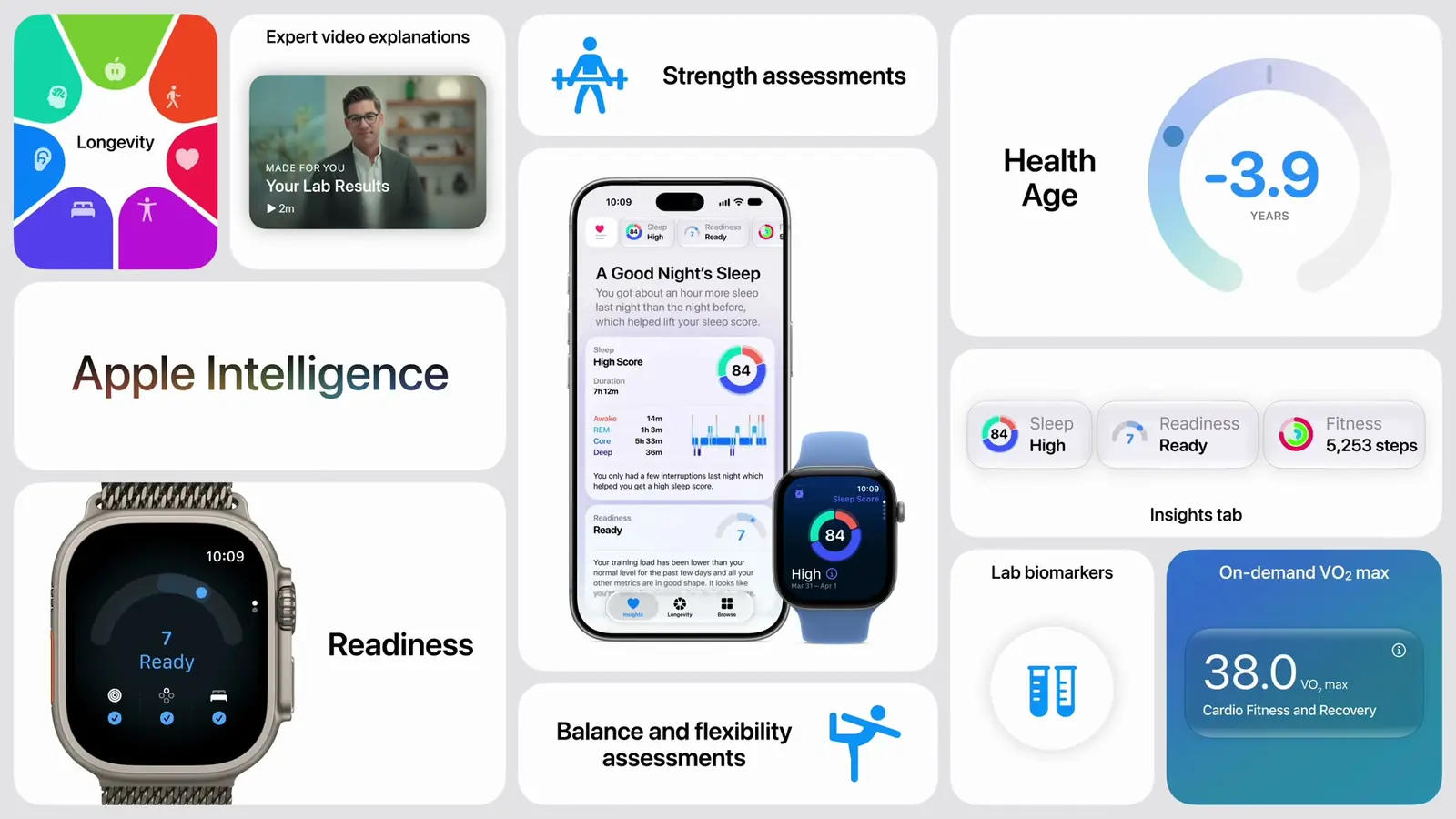
Frame from Apple’s September 9, 2026 event stream, 10:44 a.m. PT: the Health app recap slide, the surface a general fitness dashboard now competes with.
Readiness ships with the watches. A redesigned Health app arriving “later this year, starting in U.S. English” adds a Longevity tab, which includes Health Age and which Apple says draws on “third-party apps and devices” as well as its own data, and users “will be able to schedule and purchase” lab panels at $119 in the U.S.23 In my view a general fitness dashboard competes with that and loses. What Apple did not build is the specific: recovery for one sport, pacing for one condition, a coaching loop for one community, a view a clinician asked for. Denser heart-rate data makes those better. Apple says the Longevity view draws on “third-party apps and devices,” so samples your app writes to HealthKit may surface there when the redesigned Health app ships; Apple has not documented which data qualifies, and the reason to write good samples rather than none stands either way.2
The test to run on day one
Wear a Series 12 from September 18, and after a first full day measure a 24-hour window. Run a sample query for heartRate and record the number of HKQuantitySample objects that overlap the window; a quantity sample “contains one or more HKQuantity objects,” and its count covers the whole sample, so summing counts would include the parts of a series that lie outside the window.12 For the reading count, run an HKQuantitySeriesSampleQuery for the same type; its handler delivers each quantity with its own date interval, so keep the quantities whose start time falls in [start, end), count those, and compute the gaps between consecutive ones, grouped by hour, by source device, and by whether a workout was running; set the query’s includeSample to true so the handler also hands you the owning sample and its device.12 Do the same for heartRateVariabilitySDNN and heartRateVariabilityRMSSD. Report six things: the window, the watch and watchOS build, whether irregular rhythm notifications or AFib History are on, the container count, the in-window quantity count, and the median gap in and out of workouts. Those numbers decide whether the sections above are precautions or emergencies. Apple’s 2024 white paper gives the HealthKit publication cadence for earlier watches, and nothing Apple has published gives it for Series 12.11
Key Takeaways
For HealthKit developers: - Series 12 and Ultra 4 measure heart rate every five seconds and HRV as often as every five minutes; Apple has not said how much of that reaches HealthKit. Earlier watches attempted one background reading per five minutes while still, per Apple’s white paper.211 - Move to anchored queries and statistics collections now; both are correct at any density.56 - Leave background delivery at hourly unless a feature needs faster, and aggregate before storing.7
For product decisions:
- Readiness and Health Age have no third-party surface in Apple’s releases or the current HealthKit index; HRV gains a second type, heartRateVariabilityRMSSD. Build on the samples, not the scores.28
- The opening is specificity: one sport, one condition, one community, where Apple’s general dashboard stops.
FAQ
Does HealthKit receive every five-second heart-rate reading?
Apple has not said. The releases describe measurement on the watch, not storage in HealthKit. Apple’s 2024 white paper says earlier watches publish one workout reading per five-second window and attempt one background reading per five-minute window, and no updated paper covers Series 12. Measure it after a first full day of wear, September 19 or later: count the quantities an HKQuantitySeriesSampleQuery returns whose start time falls inside the 24-hour window, and report the HKQuantitySample container count separately.21112
Is the readiness score available to third-party apps?
Not in anything Apple has published. There is no readiness type in the HealthKit documentation index, and the releases do not mention third-party access.2
Are Recovery HRV and overall HRV separate HealthKit types?
Unknown. HealthKit has exposed heartRateVariabilitySDNN, and the iOS 27 SDK adds heartRateVariabilityRMSSD as a bare declaration. Apple has not said which variant, if either, each one carries.8
Do older watches change on watchOS 27?
Apple’s five-second and five-minute figures are specific to Series 12 and Ultra 4 and their new sensors. watchOS 27 runs on Series 9 and later, but the releases attribute the new cadence to the hardware.23
Will my heart-rate charts break?
Charts built on HKStatisticsCollectionQuery return a bounded number of interval results for a fixed time range, so their point count does not change with density, though the values can; charts that draw raw samples do work that grows with the sample count. Profile them at the new density before the watches ship, and switch the overview ones.6
Sources
-
Apple Newsroom, Introducing Apple Watch Series 12, with the all-new Health Sensing System, September 9, 2026. Quoted: the two HRV variants; HRV “up to 24 times more often”; readiness inputs including training load. ↩↩↩↩
-
Apple Newsroom, Apple advances health and fitness capabilities using Apple Intelligence, September 9, 2026. Quoted: heart rate every five seconds on both watches with the Activity-rings sentence; HRV “as often as every five minutes” and “24x more frequently”; the readiness definition and the four recommendations; the redesigned Health app “later this year, starting in U.S. English”; the Longevity tab’s third-party data. ↩↩↩↩↩↩↩↩↩↩↩↩↩
-
Apple Newsroom, Apple unveils Apple Watch Ultra 4, September 9, 2026. HRV “up to 24 times more often”; readiness inputs including training load; watchOS 27 availability on September 14; availability September 18; “will be able to schedule and purchase” lab panels at $119. ↩↩↩↩↩↩
-
Apple Support, Monitor your heart rate with Apple Watch, fetched September 9, 2026. Quoted: background measurement “throughout the day when you’re still, and periodically when you’re walking”; continuous measurement during workouts and for three minutes after. ↩
-
Apple Developer Documentation, HKAnchoredObjectQuery. ↩↩↩↩
-
Apple Developer Documentation, HKStatisticsCollectionQuery. ↩↩↩↩
-
Apple Developer Documentation, enableBackgroundDelivery(for:frequency:withCompletion:) and HKUpdateFrequency. ↩↩
-
Apple Developer Documentation, heartRateVariabilitySDNN, heartRateVariabilityRMSSD (introduced iOS 27.0, watchOS 27.0), and heartRate, which notes “Sample data may be condensed and/or coalesced by HealthKit”; the linked article Accessing condensed workout samples scopes it to first-party workouts “at least a few months old” and describes coalescing same-value heart-rate quantities into interval quantities; the HKQuantityTypeIdentifier and HKCategoryTypeIdentifier indexes list no readiness or Health Age identifier as of September 9, 2026. ↩↩↩↩↩↩↩
-
Apple Developer Documentation, HKSampleQuery. ↩
-
Apple Developer Documentation, HKHeartbeatSeriesSample and HKHeartbeatSeriesBuilder. ↩
-
Apple, Heart Rate, Calorimetry, and Activity on Apple Watch, November 2024, fetched September 9, 2026. Quoted: the background algorithm “reports measurements only when the user is still. It attempts to report one heart rate in bpm every 5 minutes”; “In every non-overlapping five minutes window, Apple Watch attempts to publish one background heart rate to HealthKit, with availability subject to signal quality and user motion”; “In every non-overlapping five seconds window, the algorithm chooses one heart rate measurement with the highest quality to display and publish to HealthKit”; walking spot checks: “If signal quality is adequate, a spot-checked walking heart rate is published to HealthKit”; HRV: “The default tachogram measurement cadence is every four hours, increasing to two hours or 15 minutes when a user enables irregular rhythm notifications or AFib History, respectively.” ↩↩↩↩↩↩↩↩↩
-
Apple Developer Documentation, HKQuantitySample: “A quantity sample contains one or more HKQuantity objects”; the
countproperty; and HKQuantitySeriesSampleQuery, “A query that accesses the series data associated with a quantity sample,” whose handler receives each quantity with its date interval, and whoseincludeSampleproperty determines “whether the query should return the series sample.” ↩↩↩↩