iOS 27.2 的歐盟追蹤提示:這一版該做什麼

從 iOS 27.2 與 iPadOS 27.2 開始,歐盟境內的 App 可以顯示另一種 App Tracking Transparency 提示;而在法國、德國、義大利、波蘭或羅馬尼亞發行的 App,不論呼叫新方法還是舊方法,都只會拿到這個版本。 27.2 beta SDK 新增了一個方法 requestTrackingAuthorization(usingExpandedInterface:additionalInformationAction:completionHandler:)(10 月 11 日:Apple 的 iOS 27.2 beta 3 發行說明把它改名兩次,先改為 requestTrackingAuthorization(preferExpandedInterface:...),再改為 requestTrackingAuthorizationPreferringExpandedInterface,也就是最後留下的名稱;10 月 26 日:這是 Objective-C 的 selector,Apple 的參考頁面列出的 Swift 方法是 requestTrackingAuthorization(preferExpandedInterface:additionalInformationAction:completionHandler:)7),只在 iOS 27.2 可用,macOS、tvOS、watchOS 與 visionOS 上都沒有;另外還加了一個選用的 Info.plist 鍵 NSUserTrackingMarkdownUsageDescription。在歐盟以外,新呼叫的行為和舊的一樣,何時必須詢問的規則也沒有改變,而歐盟使用者在上次回答滿一年後可以再被詢問一次。該做哪些事,本文逐項說明。在 27.2 beta 模擬器上,地區設為美國、德國、荷蘭或法國時,凡是我能在重新開機後重現的呼叫,出現的都是標準警示框,也就是 Apple 為不在歐盟的裝置所記載的後備行為;就這份證據來看,整頁表單得在實機上測。123456
10 月 26 日更新:iOS 27.2 今天以組建 24B119 推出,所以那五個國家的手機上現在已經會出現這張表單;Apple 的參考頁面也確定了這個方法的 Swift 名稱:
requestTrackingAuthorization(preferExpandedInterface:additionalInformationAction:completionHandler:),另有一個回傳狀態的async形式,列出的平台為 iOS 27.2、iPadOS 27.2 與 Mac Catalyst 27.2,沒有 beta 標記;第一個 beta 名稱(也就是下方程式碼片段與步驟清單所用的名稱)的頁面則回傳 404。發行說明以相同的 radar 編號保留這項功能,並把兩次改名列為已修正,第二次改名現在前後兩個名稱都以 Objective-C 寫出,因此 selector 以requestTrackingAuthorizationPreferringExpandedInterface:開頭,而 Swift 方法的第一個參數標籤仍是preferExpandedInterface:。這台 Mac 上沒有任何標頭檔宣告新名稱;應該會宣告它的 Xcode 27.2 RC 並未安裝在這裡,所以程式碼片段仍然使用第一個 beta 的名稱,也還沒有對著 27.2 RC SDK 編譯過。上線前請換掉參數標籤;如果您從 Objective-C 呼叫,也請一併換掉 selector。iOS 27.2 發行說明那篇文章收錄了正式版頁面的完整內容。7
重點摘要
- Apple 的公告,9 月 16 日。 「Beginning with iOS 27.2 and iPadOS 27.2, developers will have the option to use an alternative version of the App Tracking Transparency system prompt in the EU. The requirements for when you must seek permission to track users will remain the same. Due to legal requirements, only the alternative version of the system prompt is available for apps distributed in Germany, France, Italy, Poland, and Romania.」(自 iOS 27.2 與 iPadOS 27.2 起,開發者可以在歐盟選用另一種 ATT 系統提示;必須取得追蹤許可的時機不變;因法規要求,在德國、法國、義大利、波蘭與羅馬尼亞發行的 App 只能使用這個版本。)1
- 一個新方法。 27.2 beta SDK 的
ATTrackingManager.h宣告了requestTrackingAuthorizationUsingExpandedInterface:additionalInformationAction:completionHandler:,並標上API_AVAILABLE(ios(27.2)) API_UNAVAILABLE(macos, tvos, watchos, visionos)。標頭檔註解寫著:「This method behaves identically torequestTrackingAuthorizationWithCompletionHandler:in non-EU countries.」(在非歐盟國家,這個方法的行為與舊方法完全相同。)3(10 月 11 日:這是第一個 beta 給這個方法的名稱;Apple 的 iOS 27.2 beta 3 發行說明把它改名兩次,先改為requestTrackingAuthorization(preferExpandedInterface:...),再改為requestTrackingAuthorizationPreferringExpandedInterface,也就是最後留下的名稱;10 月 26 日:這是 Objective-C 的 selector,Apple 的參考頁面列出的 Swift 方法是requestTrackingAuthorization(preferExpandedInterface:additionalInformationAction:completionHandler:)7。)6 - 那五個國家連舊呼叫也會拿到整頁表單。 Apple 為
requestTrackingAuthorization(completionHandler:)寫的參考頁面說:「In France, Germany, Italy, Poland, and Romania, the system presents a full-page sheet; otherwise, the system prompts the person with an alert.」而這張表單會「displays theNSUserTrackingMarkdownUsageDescriptionstring with support for rich-text elements if you include it in your app’s target configuration in Xcode.」(只要您在 Xcode 的 target 設定裡放進那段 Markdown 字串,表單就會以格式化文字顯示它。)新呼叫多給您的,是歐盟其餘國家的整頁表單、「Additional Information」按鈕,以及要求表單的那個旗標。4 - 多了一個鍵,舊的那個仍然必要。
NSUserTrackingMarkdownUsageDescription是選用的 Markdown,支援「bold or italic style」、項目清單與段落分隔,「but it doesn’t support underline」;標頭檔則說,新呼叫同樣要求原本的NSUserTrackingUsageDescription「must be in」Info.plist。34 - 「Additional Information」按鈕既不是答應也不是拒絕。 Apple 的標頭檔:「If the user taps the ‘Additional Information’ button, the prompt dismisses without recording an authorization decision, your
additionalInformationActionruns so you can surface your own privacy information, and the completion handler receivesnotDetermined.」(使用者按下這顆按鈕時,提示會關閉而不記錄任何授權決定,您的additionalInformationAction會執行,讓您呈現自己的隱私說明,completion handler 則收到notDetermined。)您的程式碼之後必須再問一次。3 - 重新詢問,只限歐盟。 「you can reprompt a user via the App Tracking Transparency system prompt one year after the user’s previous choice in your app’s App Tracking Transparency system prompt, regardless of whether that choice was to accept or reject」(使用者在您的 App 裡上次做出選擇滿一年後,不論當時是接受還是拒絕,您都可以再次以 ATT 系統提示詢問),除非對方關掉了「Allow Apps to Request to Track」,而這個設定在歐盟改名為「Allow Apps to Request to Link Your Activity Across Companies」。2
- 模擬器顯示的是什麼。 在 iOS 27.2 beta 執行環境的 iPhone 18 Pro 模擬器上,地區設為美國、德國、荷蘭或法國,以
preferExpandedInterface: true呼叫新方法時,出現的是標準警示框,內容是原本的用途說明,沒有「Additional Information」按鈕;改成false、傳 nil action、或改用舊呼叫,結果都一樣,而 completion 會一直等待點擊,狀態停在notDetermined。有一種會立刻拿到notDetermined的情況可以隨時重現,下面會寫到:那是上一次啟動留下、還沒回答的提示。9 月 20 日另有兩次法國地區的啟動也是立刻返回,我找不到任何可以記錄的原因;而同樣的設定在後來幾次重新開機後的啟動都跳出了提示。5
Apple 自己怎麼說
Apple 已經用三份文字說明這項變更,最早是 9 月 16 日的公告,裡面也給了原因:「As part of agreements with select European competition authorities, Apple is introducing changes to its App Tracking Transparency framework in the European Union.」(作為與部分歐洲競爭主管機關協議的一部分,Apple 正在調整歐盟境內的 App Tracking Transparency 架構。)公告其餘部分給出規則和那五個國家。1 App Store 政策頁面補上了提示的樣貌:「The alternative version of the App Tracking Transparency system prompt has modified formatting and language and provides you the option to use a text button labeled “Additional Information.” This allows you to surface additional information about your request to link user or device data collected from your app with user or device data collected from other companies’ apps, websites, or offline properties for targeted advertising or advertising measurement purposes, or to share user or device data with a data broker.」(另一種 ATT 系統提示改了排版與措辭,並讓您可以加上一顆文字按鈕,用來進一步說明:您為何要把 App 收集到的使用者或裝置資料,與其他公司的 App、網站或線下管道收集到的資料結合,以投放或衡量廣告,或是把這些資料提供給資料仲介。)2 至於 iOS 與 iPadOS 27.2 beta 發行說明,在 App Tracking Transparency 的 New Features 底下只用一句話帶過:AppTrackingTransparency「now supports an alternative expanded prompt and re-prompting on a yearly basis for EU users. The alternative prompt is required for users in France, Germany, Italy, Poland, and Romania.」6
政策頁面也寫明了哪些事沒有變:追蹤之前必須先問的義務,以及按鈕背後的一切由您自己負責。「Any additional information related to your request or more granular consent controls provided via the text button are entirely your responsibility. However, you cannot access the device’s advertising identifier, or otherwise collect and use device or user data from your app as described in the App Tracking Transparency system prompt, until the user has granted your app permission in that prompt.」(透過文字按鈕提供的補充資訊或更細緻的同意選項,責任完全在您;在使用者於該提示中授權之前,您不得取得裝置的廣告識別碼,也不得以提示所述的方式收集或使用裝置或使用者資料。)2
Apple 在 9 月 21 日 10:00 PT 發布了 iOS 與 iPadOS 27.2 beta 2(24B5089g),沒有新的 Xcode。beta 2 的發行說明裡,App Tracking Transparency 那一行原封不動,radar 編號也還是 179504171;下文引用的 SDK 標頭檔沒有變化,因為 SDK 是隨 Xcode 27.2 beta(27B5019j)一起出的(10 月 11 日:Xcode 27.2 beta 2 之後已經推出,我還沒有讀過它的標頭檔;10 月 14 日:Xcode 27.2 beta 3,也就是 27B5038j,也已推出,它的標頭檔我同樣沒有讀過,而 10 月 13 日推出的 iOS 27.2 beta 4 的發行說明,以相同編號重複了 beta 3 的條目;改名一事請見註腳 6);本文的模擬器執行也都跑在第一個 beta 的執行環境 24B5084k 上。6
27.2 SDK 裡的 API
Xcode 27.2 beta(27B5019j)內附的 iOS 27.2 SDK 組建編號是 24B5084k,其中 AppTrackingTransparency.framework 的標頭檔在您已經在呼叫的那個方法旁邊,多加了一個類別方法:3
+ (void)requestTrackingAuthorizationUsingExpandedInterface:(BOOL)preferExpandedInterface
                               additionalInformationAction:(nullable void(^)(void))additionalInformationAction
                                         completionHandler:(void(^)(ATTrackingManagerAuthorizationStatus status))completion API_AVAILABLE(ios(27.2)) API_UNAVAILABLE(macos, tvos, watchos, visionos);
在 Swift 裡它是 ATTrackingManager.requestTrackingAuthorization(usingExpandedInterface:additionalInformationAction:completionHandler:)(10 月 11 日:上方的標頭檔與這個 Swift 名稱都是第一個 beta 的;Apple 的 iOS 27.2 beta 3 發行說明把它改名兩次,先改為 requestTrackingAuthorization(preferExpandedInterface:...),再改為 requestTrackingAuthorizationPreferringExpandedInterface,也就是最後留下的名稱;10 月 26 日:參考頁面為 Swift 方法定的標題是 requestTrackingAuthorization(preferExpandedInterface:additionalInformationAction:completionHandler:),而 PreferringExpandedInterface 是 Objective-C selector 的拼法),Apple 為第一個名稱所寫的參考頁面在 9 月 19 日讀取時,把它標為 iOS 27.2、iPadOS 27.2 與 Mac Catalyst 27.2,全部掛著 beta(該頁面現在回傳 404);新名稱的頁面在 10 月 26 日讀取時,列出同樣三個平台,沒有 beta 標記,最後修改日期是 10 月 12 日。7 標頭檔註解是 Apple 目前針對這兩個參數所公布最完整的說明,其中有四句話決定了這個呼叫該怎麼寫。346
- 「Pass
YEStopreferExpandedInterfaceto request the alternative prompt where permitted; passNOto request the original prompt.」(傳YES就在允許的地區要求另一種提示,傳NO則要求原本的提示。)而在參數說明裡:「Note that in France, Germany, Italy, Poland, and Romania, due to legal requirements, only the expanded interface version of the ATT prompt will be available regardless of what is passed in topreferExpandedInterface.」(在那五個國家,因法規要求,不論您傳入什麼,都只有擴充介面版本可用。) - 「If you pass
niltoadditionalInformationAction, this button will not be shown.」(傳nil就不會出現這顆按鈕。) - 「If the user taps the ‘Additional Information’ button, the prompt dismisses without recording an authorization decision, your
additionalInformationActionruns so you can surface your own privacy information, and the completion handler receivesnotDetermined.」 - 「iOS users may be re-prompted in eligible regions on a periodic basis even after a previous authorization decision. If the user is not eligible to be re-prompted and a previous authorization decision exists, the completion handler is called with that prior decision without showing the prompt.」(在符合條件的地區,即使先前已有授權決定,iOS 使用者仍可能被定期重新詢問;若使用者不符合重新詢問的條件而先前的決定又存在,completion handler 會直接帶著那個決定回來,不顯示提示。)
參考頁面把標頭檔只是暗示的地區規則整理成了一張表。在法國、德國、義大利、波蘭與羅馬尼亞:「The system displays markdown text you supply via NSUserTrackingMarkdownUsageDescription in a full-page sheet regardless of what you set for preferExpandedInterface, and includes an Additional Information button if you supply an action.」在歐盟其餘國家:「The system displays markdown text in the NSUserTrackingMarkdownUsageDescription, if you supply it. The system displays the full-page sheet if you set preferExpandedInterface to true, and includes an Additional Information button if you supply an action.」在其他所有地方:「Outside of the European Union, the system doesn’t use either parameter, and presents a system alert displaying the original NSUserTrackingUsageDescription, which is equivalent to calling requestTrackingAuthorization(completionHandler:).」頁面還補上了這套地區行為成立的條件:裝置必須「located in a specific European Union country and signed in with an Apple Account with a specific EU country or region.」(位於特定歐盟國家,且登入的 Apple Account 屬於特定歐盟國家或地區。)4
舊呼叫 requestTrackingAuthorization(completionHandler:) 的頁面現在也寫明,那五個國家從它同樣會拿到整頁表單:「In France, Germany, Italy, Poland, and Romania, the system presents a full-page sheet; otherwise, the system prompts the person with an alert.」而在 target 屬性那一段:「In France, Germany, Italy, Poland, and Romania, the full-page sheet displays the NSUserTrackingMarkdownUsageDescription string with support for rich-text elements if you include it in your app’s target configuration in Xcode.」這個頁面沒有為表單標出版本,方法本身仍列在 iOS 14 而且沒有 beta 標記,所以它的 27.2 下限來自發行說明,不是來自這個頁面。兩邊合起來讀:新呼叫為您換來的是歐盟其餘國家的表單、那顆按鈕,以及對旗標的發言權;在那五個國家,表單無論怎麼呼叫都會出現。46

兩個 Info.plist 鍵
NSUserTrackingUsageDescription 並沒有消失。新方法標頭檔裡的「Important」註記把舊要求一字不差地重述了一遍:這個鍵「must be in」Information Property List;而新鍵的參考頁面也說,「if your app’s target properties omit this key.」時,系統會退回使用它。34
NSUserTrackingMarkdownUsageDescription 才是新增的,標示為 iOS 27.2 與 iPadOS 27.2 beta。Apple 的頁面:「The format of the string is Markdown text; you can apply bold or italic style, but it doesn’t support underline. You can include bullet lists and paragraph breaks.」(字串格式是 Markdown,可以用粗體或斜體,但不支援底線,也可以放入項目清單與段落分隔。)它的地區規則和提示一樣:在那五個國家只要有就會用上,新舊呼叫皆然;在歐盟其餘國家,只有當您傳入 preferExpandedInterface: true 時才會用;在歐盟以外則被忽略。Apple 兩個頁面對中間這種情況的措辭並不一致,方法頁說只要「if you supply it」系統就會顯示 Markdown,鍵的頁面則多加了必須傳 true 的條件;鍵的頁面是比較嚴格的讀法,也是上面那張圖採用的版本。Apple 在這個頁面給的提醒,和原本那個追蹤用途鍵的頁面一樣:「Keep the text of your description short and specific. The system displays your app name in the prompt so you don’t need to include it in the string.」(說明要短、要具體;系統會在提示裡顯示您的 App 名稱,所以字串裡不必再寫一次。)4
每年一次的重新詢問
政策頁面給出了歐盟的規則:「you can reprompt a user via the App Tracking Transparency system prompt one year after the user’s previous choice in your app’s App Tracking Transparency system prompt, regardless of whether that choice was to accept or reject. A user cannot be re-prompted if they have disabled “Allow Apps to Request to Track” (renamed to “Allow Apps to Request to Link Your Activity Across Companies” in the EU) in their device’s Settings.」(上次選擇滿一年後,不論當時是接受或拒絕都可以再問一次;但若使用者在裝置的「設定」中關掉了那個開關,就不能再被詢問。)2 標頭檔則從 App 這一側描述了機制,而且講了兩次。在舊方法上:「In eligible regions, iOS users may be re-prompted after a year has passed since their last decision; otherwise the system remembers the user’s choice and doesn’t prompt again unless the user uninstalls and then reinstalls the app on the device.」在新方法上:不符合重新詢問條件、但先前已有決定的使用者,會從 completion handler 拿回那個決定,「without showing the prompt」,所以再呼叫一次是安全的,而且決定要不要顯示提示的是系統,不是您的程式碼。3 兩份文件都沒有給的,是在呼叫之前先問出某位使用者是否符合條件的辦法;呼叫本身就是查詢。
27.2 beta 模擬器的實際表現
我寫了一支單檔 SwiftUI 探測 App,對著 iPhoneSimulator 27.2 SDK 建置,Info.plist 裡兩個鍵都放了:NSUserTrackingUsageDescription 設為「Probe: the standard usage description.」,NSUserTrackingMarkdownUsageDescription 則放了一個粗體字、一段斜體,再加一份兩項的項目清單;接著在 iOS 27.2 beta 執行環境(24B5084k)的 iPhone 18 Pro 模擬器上執行,每一輪之前都先重開模擬器,並透過全域的 AppleLocale 偏好設定地區。9 月 19 日跑了六輪:美國、德國、荷蘭都用 preferExpandedInterface: true 加一個 action;德國再跑一次 false;法國用 true 但不給 action;德國再用舊呼叫跑一次。5
9 月 19 日每一輪的結果都一樣:標準警示框,標題是「Allow “ATTProbe” to track your activity across other companies’ apps and websites?」,顯示原本的用途說明,帶著「Ask App Not to Track」與「Allow」兩顆按鈕,沒有第三顆。Markdown 文字始終沒有出現,十六秒的擷取期間裡沒有任何 completion handler 觸發,而在五輪擴充介面的執行中,trackingAuthorizationStatus 在十二秒內每隔三秒檢查一次都讀到 notDetermined;用舊呼叫的那一輪印出 mode=legacy 之後就沒有下文,同樣一直等著。5 這正是 Apple 參考頁面對不在歐盟的裝置所預測的行為,而模擬器的地區設定是語言環境,不是位置;表單、Markdown 文字與那顆按鈕,得用一台登入歐盟地區 Apple Account 的實機來測。
9 月 20 日重開 Mac 之後重跑,美國、德國與荷蘭那幾輪和先前一樣跳出提示,但法國那一輪在送出請求的同一秒就把 notDetermined 交回 completion handler,而且沒有顯示警示框。當天早上另外兩次法國啟動也是如此,第三次則跳出了提示;三次立刻返回之中,只有 7:23 那次和檔案裡記錄到的事情重疊,也就是另一支腳本正在底下重新安裝探測 App,7:21 與 7:26 那兩次則沒有任何可記錄的原因。在沒有別的東西碰模擬器的情況下,又跑了三次全新開機的啟動,法國帶 action、法國不帶 action,以及美國,全部都跳出提示並等待。所以同樣的法國設定在後來的全新開機裡都跳出了提示,我沒有任何關於法國的規則可以報告,只有一個提醒:在 beta 模擬器上,沒有警示框而立刻返回的 notDetermined,要先在全新開機後重現一次,才值得相信。5
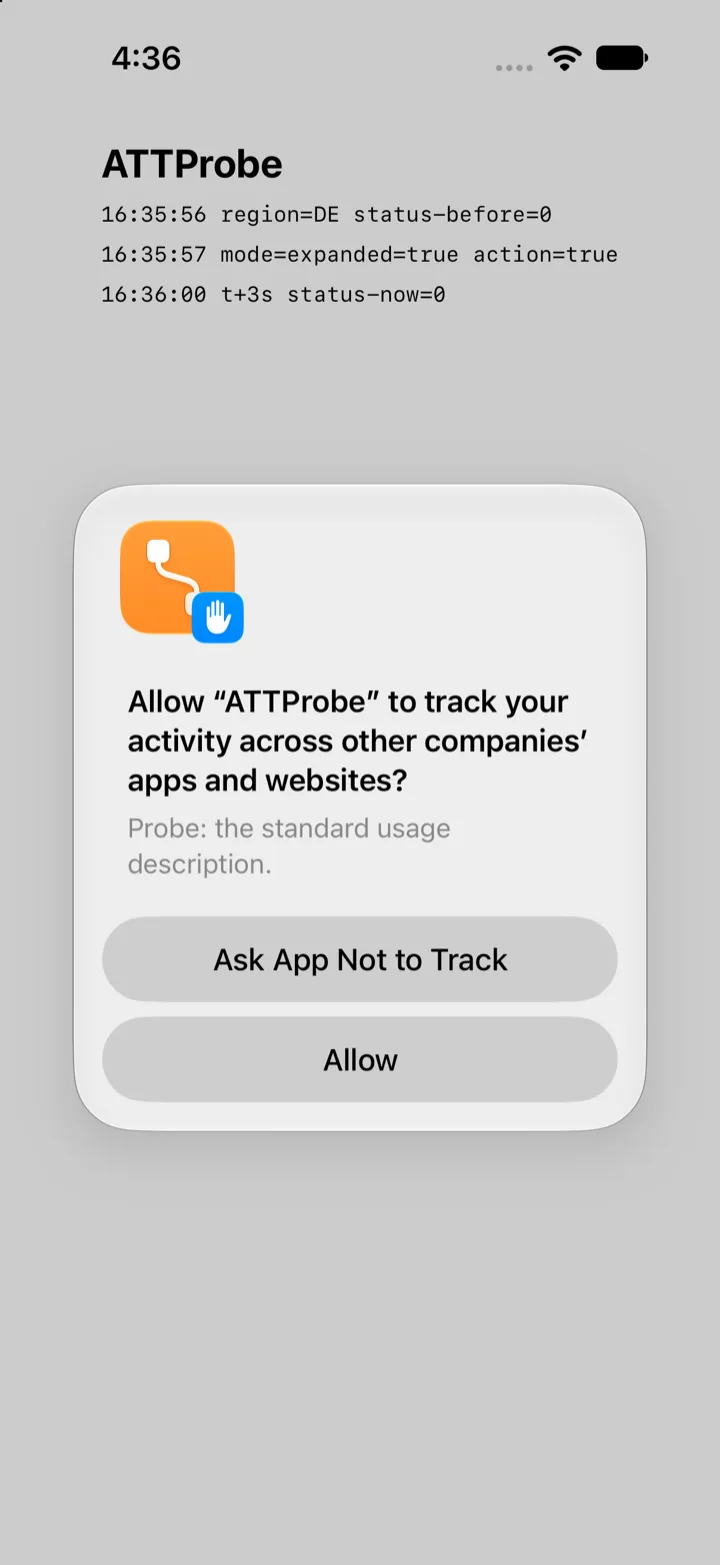
9 月 19 日,地區設為德國的 iOS 27.2 beta 模擬器,在擴充介面呼叫之後:標準警示框、原本的說明、兩顆按鈕。這張圖是那天其餘檔案被重開機清掉之前,唯一匯出成功的一張。
會穩定重現的那條歧路,是還沒回答的提示。啟動探測 App,把警示框放著不答,移除再重新安裝,然後再啟動一次:第二次啟動的擴充呼叫在送出請求的同一秒就把 notDetermined 交回 completion handler,而警示框還留在畫面上;第三次改用舊呼叫也一樣,一秒內就印出 legacy-request status=0 (notDetermined)。這正是標頭檔描述的情況:「The authorization prompt doesn’t display if another permission request is pending user confirmation. Concurrent requests aren’t preserved by iOS.」(若另一個權限請求還等著使用者確認,授權提示就不會顯示;iOS 不會保留同時發出的請求。)後面接著要您檢查 trackingAuthorizationStatus 是否為 notDetermined,「to determine if you need to make an additional call,」;而舊呼叫的頁面也把它列在系統不顯示提示、直接執行您的 completion handler 的情況之一:「An existing permission request is pending.」345 重新開機就會清掉。如果您的 App 會從多個地方詢問,或是會按時程再問一次,那麼第二個呼叫者拿到的就是這種立刻返回的 notDetermined。
該做什麼,一步一步來
- 保留
NSUserTrackingUsageDescription。 它仍然是必填的,而且所有歐盟以外的使用者,以及沒有 Markdown 鍵的歐盟使用者,看到的都是這段文字。34 - 加上
NSUserTrackingMarkdownUsageDescription,用簡短的 Markdown 寫同一個請求:粗體或斜體、項目符號、段落分隔,不要底線,也不要寫 App 名稱。4 - 把新呼叫包在可用性檢查裡,並把舊呼叫留作後備:iOS 27.2 以上呼叫
requestTrackingAuthorization(usingExpandedInterface:additionalInformationAction:completionHandler:)(10 月 11 日:Apple 的 iOS 27.2 beta 3 發行說明把它改名兩次,先改為requestTrackingAuthorization(preferExpandedInterface:...),再改為requestTrackingAuthorizationPreferringExpandedInterface,也就是最後留下的名稱;10 月 26 日:Apple 的參考頁面列出的 Swift 簽名是requestTrackingAuthorization(preferExpandedInterface:additionalInformationAction:completionHandler:);下方的程式碼片段使用的是第一個名稱,也還沒有對著 27.2 RC SDK 編譯過,因為這台 Mac 上沒有安裝它),更早的版本則呼叫requestTrackingAuthorization(completionHandler:)。傳true才能在歐盟其餘國家拿到表單;那五個國家會忽略這個旗標。以 iOS 26 為部署下限、對著 27.2 beta 1 SDK 能通過型別檢查的寫法如下:3456
#if os(iOS)
if #available(iOS 27.2, *) {
    ATTrackingManager.requestTrackingAuthorization(usingExpandedInterface: true,
                                                   additionalInformationAction: showPrivacyDetails) { status in
        handle(status)
    }
} else {
    ATTrackingManager.requestTrackingAuthorization { status in handle(status) }
}
#endif
- 決定要不要放那顆按鈕。 只有當您真的有一個頁面或畫面可以顯示時,才傳入 action。action 執行時,請把狀態當作
notDetermined,顯示您的說明,並且照政策頁面的說法,「you can redirect the user back to the App Tracking Transparency system prompt for your app to ensure their choice is recorded,」(可以把使用者導回您的 ATT 系統提示,確保他們的選擇有被記錄下來),但是「you should not redirect users to your ATT prompt if they have opted out of all relevant legal consent choices in the screen or page surfaced.」(如果他們在您呈現的畫面或頁面上拒絕了所有相關的法定同意選項,就不該再把人導回提示。)23 - 把重新詢問當成一次呼叫,而不是一個計時器。 在歐盟,再呼叫一次就是您查出滿一年了沒的方式;使用者不符合條件時,completion handler 會回傳先前的決定。23
- 用一台登入歐盟地區帳號的實機測。 模擬器每次跳出提示時,不管地區為何、也不管是不是全新開機,出現的都是標準警示框,從來不是表單;而 Apple 給的條件是裝置位置加上 Apple Account 地區,所以整頁表單必須在實機上測。45
- 檢查 Mac 這個 target。 標頭檔把這個方法標為在 macOS、tvOS、watchOS 與 visionOS 上不可用,所以共用的呼叫點需要用
#if os(iOS)把呼叫包住,裡面再放if #available(iOS 27.2, *);只做可用性檢查仍然編譯不過,錯誤是'requestTrackingAuthorization(usingExpandedInterface:additionalInformationAction:completionHandler:)' is unavailable in macOS,註腳 5 有記錄(10 月 11 日:這個錯誤點名的是第一個 beta 的方法;Apple 的 iOS 27.2 beta 3 發行說明把它改名兩次,先改為requestTrackingAuthorization(preferExpandedInterface:...),再改為requestTrackingAuthorizationPreferringExpandedInterface,也就是最後留下的名稱;10 月 26 日:這是 Objective-C 的 selector,Apple 參考頁面上的 Swift 方法是requestTrackingAuthorization(preferExpandedInterface:additionalInformationAction:completionHandler:)7)。參考頁面的 Mac Catalyst 27.2 條目與標頭檔的API_UNAVAILABLE(macos)說的是同一條界線的兩面:對#if os(iOS)來說,Catalyst 算 iOS。3456
常見問題
我一定要改用另一種提示嗎?
在法國、德國、義大利、波蘭與羅馬尼亞,依 Apple 的公告,在當地發行的 App 只有這個版本可用;而在 27.2 上,兩種呼叫都會給您它:新呼叫在那裡「regardless of what you set for preferExpandedInterface」都會顯示整頁表單,Apple 為舊呼叫寫的頁面也說「In France, Germany, Italy, Poland, and Romania, the system presents a full-page sheet; otherwise, the system prompts the person with an alert.」,而 Markdown 鍵只要「if you include it in your app’s target configuration in Xcode.」就會一起顯示。改用新呼叫換到的,是歐盟其餘國家的表單、「Additional Information」按鈕,以及對旗標的發言權。1346
它會改變我必須詢問的時機嗎?
不會。Apple:「The requirements for when you must seek permission to track users will remain the same.」(必須取得追蹤許可的時機維持不變。)1
Markdown 鍵會取代 NSUserTrackingUsageDescription 嗎?
不會。兩種呼叫都仍然需要原本那個鍵,而且只要 Markdown 鍵不存在、或裝置在歐盟以外,系統用的就是它。34
使用者拒絕之後我可以再問嗎?
在歐盟可以,上次選擇滿一年之後,「regardless of whether that choice was to accept or reject」(不論當時是接受還是拒絕),除非對方關掉了那個 Apple 在歐盟改名為「Allow Apps to Request to Link Your Activity Across Companies」的設定。2
macOS 或 visionOS 上有這個新 API 嗎?
沒有。27.2 SDK 的標頭檔把它標為 API_UNAVAILABLE(macos, tvos, watchos, visionos);參考頁面列出的是 iOS、iPadOS 與 Mac Catalyst 27.2。34
本站相關內容:iOS 27 發行說明文章追的是這篇文章跑在其上的 27.2 beta 建置;隱私清單深度剖析談的是 Apple 送審時會讀的另一份聲明;App Store 社群媒體聲明文章是 9 月的另一項政策變更;Xcode 27 彙整文章寫清了 SDK 與送審的時間線;UIKit 場景強制要求文章是同一個 SDK 週期裡另一項被強制的改動;On Demand Resources 棄用文章談的是在那之前的期限。
資料來源
-
Apple,Updates to App Tracking Transparency in the European Union,開發者新聞,2026 年 9 月 16 日,引用。 ↩↩↩↩↩
-
Apple,User privacy and data use,「ATT in the European Union」一節與「Can I provide additional information and consent controls with my app’s ATT prompt implementation」這個問題,2026 年 9 月 19 日取得,引用。 ↩↩↩↩↩↩↩↩
-
Xcode 27.2 beta(27B5019j)內 iPhoneOS 27.2 SDK(
ProductBuildVersion24B5084k、ProductVersion27.2)的AppTrackingTransparency.framework/Headers/ATTrackingManager.h,2026 年 9 月 19 日讀取:requestTrackingAuthorizationUsingExpandedInterface:additionalInformationAction:completionHandler:的宣告,連同API_AVAILABLE(ios(27.2)) API_UNAVAILABLE(macos, tvos, watchos, visionos)以及它的文件註解,引用;舊方法關於重新詢問與待處理請求的註解,引用。2026 年 10 月 11 日:Apple 的 iOS 27.2 beta 3 發行說明把這個方法改名兩次,先改為requestTrackingAuthorization(preferExpandedInterface:...),再改為requestTrackingAuthorizationPreferringExpandedInterface,也就是最後留下的名稱(註腳 6);我還沒有讀過宣告新名稱的標頭檔。 ↩↩↩↩↩↩↩↩↩↩↩↩↩↩↩↩↩ -
Apple,requestTrackingAuthorization(usingExpandedInterface:additionalInformationAction:completionHandler:)(截至 2026 年 10 月 26 日,此頁面回傳 404;其內容依 9 月 19 日讀取的版本引用)與 NSUserTrackingMarkdownUsageDescription,文件 JSON 於 2026 年 9 月 19 日取得:平台可用性為 iOS 27.2、iPadOS 27.2、Mac Catalyst 27.2(方法)以及 iOS 27.2、iPadOS 27.2(鍵),全部標示 beta;「Display a full-page sheet」與「Discussion」兩節,引用。Apple,requestTrackingAuthorization(completionHandler:),文件 JSON 於 2026 年 9 月 21 日取得:平台可用性為 iOS 14.0、iPadOS 14.0、Mac Catalyst 14.0、macOS 11.0、tvOS 14.0 與 visionOS 1.0,沒有 beta 標記;Discussion 中關於那五個國家的句子、「Configure the app’s target properties」裡關於 Markdown 鍵的句子,以及「the system doesn’t display the prompt」清單中的待處理請求那一項,引用。2026 年 10 月 11 日:第一個連結的標題是這個方法的第一個名稱;Apple 的 iOS 27.2 beta 3 發行說明把這個方法改名兩次,先改為
requestTrackingAuthorization(preferExpandedInterface:...),再改為requestTrackingAuthorizationPreferringExpandedInterface,也就是最後留下的名稱(註腳 6)。10 月 11 日沒有再次擷取參考頁面;10 月 26 日它回傳 404(註腳 7)。 ↩↩↩↩↩↩↩↩↩↩↩↩↩↩↩↩↩ -
作者在 macOS 26.6.2(25G83)上的實測,2026 年 9 月 19 日與 20 日。ATTProbe:一支採用
App與WindowGroup生命週期的單檔 SwiftUI App,在 Xcode 27.2 beta(27B5019j)下以xcrun swiftc -sdk <iPhoneSimulator27.2.sdk> -target arm64-apple-ios26.0-simulator -parse-as-library建置,Info.plist 中NSUserTrackingUsageDescription為「Probe: the standard usage description.」,NSUserTrackingMarkdownUsageDescription為「Probe: Markdown description with a bullet list:」後面接兩個清單項目。同一支探測 App 更早的 UIKit 版本沒有 scene manifest,以同一個 SDK 建置後在啟動時以EXC_BREAKPOINT中斷,還沒走到請求那一步;我直接換掉它,沒有追查下去。裝置:以simctl create在com.apple.CoreSimulator.SimRuntime.iOS-27-2(24B5084k)上建立的 iPhone 18 Pro 模擬器,由 Xcode 27.2 beta 的simctl驅動;地區以simctl spawn <udid> defaults write "Apple Global Domain" AppleLocale -string <locale>設定;每一輪之前都先simctl shutdown再simctl boot;App 以simctl launch --console-pty啟動並擷取它的print輸出;啟動七秒後以simctl io <udid> screenshot截圖,擷取在九秒後結束。各輪:en_US擴充加 action;de_DE擴充加 action;de_DE舊的requestTrackingAuthorization(completionHandler:);de_DE搭配preferExpandedInterface: false;nl_NL擴充加 action;fr_FR擴充但 action 為 nil。9 月 19 日,每一輪的記錄都印出region=<code> status-before=0,十六秒的擷取期間內沒有任何 completion 行;五輪擴充介面的執行另外在第三、六、九、十二秒印出status-now=0,這是舊呼叫分支不做的檢查;每張截圖都是標準警示框(那些檔案,以及更早一批 9 月 19 日、首次顯示待處理提示行為的檔案,都沒有撐過一次清掉工作階段暫存目錄的 Mac 重開機,所以 9 月 19 日的結果在此是依當時讀到的主控台輸出記錄的)。9 月 20 日第一批,同一支腳本,每輪之前全新開機:en_US7:16:37、de_DE7:17:42、de_DE舊呼叫 7:18:42、de_DE搭false7:19:33,以及nl_NL7:20:26,全都沒有 completion 行,且在探測 App 會輪詢的每個檢查點都是status-now=0,每張截圖都是標準警示框;fr_FR不帶 action,7:21:04,在 7:21:05 印出expanded-request status=0 (notDetermined),與它的mode=行同一秒,而它的截圖顯示的是探測 App 自己的記錄,沒有警示框。另一台模擬器,也就是 iPhone Duo 裝置,在 7:13 開機並在這一批期間一直開著;檔案裡沒有記錄到這段期間有別的東西碰過任何一台模擬器。第二批,7:23 到 7:27,前三次啟動與一次失敗兩回的待處理提示序列首次嘗試重疊:fr_FR不帶 action,7:23:57,立刻notDetermined;fr_FR帶 action,7:24:09,由那另一支腳本啟動,有跳出提示、沒有 completion 行;de_DE不帶 action,7:24:52,有提示;fr_FR帶 action,7:26:03,立刻notDetermined;en_US不帶 action,7:27:43,有提示;另有一次fr_FR在 7:23:09 於模擬器關機過程中啟動失敗,而 7:23:57 那份記錄在第六秒就結束,因為另一支腳本重新安裝了探測 App。這些列出來只為完整,我不給它們任何份量。第三批,一次只跑一輪,沒有別的東西碰模擬器,每輪之前全新開機:fr_FR帶 action 7:40:06、fr_FR不帶 action 7:40:45,以及 7:41:22 用語言環境字串us_US(探測 App 印出region=US),全都跳出提示、沒有 completion 行,且每個檢查點都是status-now=0。待處理提示的情況,同一支腳本,一次開機:de_DE在 7:42:00 跳出提示、沒有 completion 行;在警示框未回答的狀態下執行simctl uninstall與simctl install之後,7:42:18 的啟動在 7:42:19 印出expanded-request status=0 (notDetermined),而它的截圖顯示警示框還在畫面上;7:42:40 第三次改用舊呼叫,在 7:42:41 印出legacy-request status=0 (notDetermined)。步驟 3 的程式碼片段,把showPrivacyDetails與handle(_:)當作空實作,在-target arm64-apple-ios26.0-simulator下對 iPhoneSimulator 27.2 SDK 通過了swiftc -typecheck;同一個檔案移掉#if os(iOS)那幾行之後,對著 Xcode 27.2 beta 內的 macOS SDK 以-target arm64-apple-macos15.0編譯,則以error: 'requestTrackingAuthorization(usingExpandedInterface:additionalInformationAction:completionHandler:)' is unavailable in macOS失敗。2026 年 10 月 11 日:這些執行與型別檢查使用的都是這個方法的第一個名稱;Apple 的 iOS 27.2 beta 3 發行說明把這個方法改名兩次,先改為requestTrackingAuthorization(preferExpandedInterface:...),再改為requestTrackingAuthorizationPreferringExpandedInterface,也就是最後留下的名稱(註腳 6)。這裡沒有任何一項針對新名稱重跑過。 ↩↩↩↩↩↩↩↩↩ -
Apple,iOS & iPadOS 27.2 Beta Release Notes,透過文件 JSON 端點於 2026 年 9 月 17 日與 9 月 19 日取得,App Tracking Transparency、New Features,引用。 2026 年 9 月 21 日再次擷取,當時頁面標題為「iOS & iPadOS 27.2 Beta 2 Release Notes」:179504171 底下仍是同一行,分區也相同,為 Overview、App Tracking Transparency、Health、Shortcuts 與 StoreKit Testing in Xcode。Apple,Releases,RSS 摘要於 2026 年 9 月 21 日擷取:「iOS 27.2 beta 2 (24B5089g)」與「iPadOS 27.2 beta 2 (24B5089g)」日期為 Mon, 21 Sep 2026 10:00:00 PDT,同一時刻還有 macOS 27.2 beta 2 (26B5091g)、tvOS 27.2 beta 2 (24K5093g)、visionOS 27.2 beta 2 (24N5093f) 與 watchOS 27.2 beta 2 (24S5091f);最新的 Xcode 項目仍是 9 月 18 日的「Xcode 27.1 beta (27A9269)」。2026 年 10 月 11 日:同一個網址再次擷取,頁面標題已改為「iOS & iPadOS 27.2 Beta 3 Release Notes」(組建 24B5099f,發佈動態中的日期為 10 月 5 日),179504171 底下的 New Features 那一行保留,並新增兩則 App Tracking Transparency 的 Resolved Issues:「Fixed: The new
requestTrackingAuthorization(usingExpandedInterface:additionalInformationAction:completionHandler:)API is renamed torequestTrackingAuthorization(preferExpandedInterface:...). (187149729)」與「Fixed: The newrequestTrackingAuthorization(preferExpandedInterface:...)API is renamed torequestTrackingAuthorizationPreferringExpandedInterface:…). (187610745)」(已修正:新的 API 改名為下一個名稱。)Apple 印出的第三個名稱一半是 Objective-C、一半是 Swift,第二與第三個名稱也都有縮寫,所以發行說明沒有給出這兩個名稱中任何一個的完整簽章,也沒有說較早的名稱是否會以已棄用的寫法保留下來。同日擷取的發佈動態,在 9 月 28 日的 beta 2(27B5028f)之後沒有任何 Xcode 27.2。2026 年 10 月 15 日 04:36 UTC(太平洋時間 10 月 14 日 21:36)擷取的發佈動態,新增了「iOS 27.2 beta 4 (24B5110a)」,日期為 Tue, 13 Oct 2026 10:00:00 PDT,以及「Xcode 27.2 beta 3 (27B5038j)」,日期為 Wed, 14 Oct 2026 10:00:00 PDT;2026 年 10 月 15 日 04:38 UTC(太平洋時間 10 月 14 日 21:38)擷取的「iOS & iPadOS 27.2 Beta 4 Release Notes」,在 179504171 底下載有 App Tracking Transparency 這項功能,在 187149729 與 187610745 底下載有兩次改名,與 beta 3 的頁面相同;beta 3 SDK 的標頭檔與 beta 2 的一樣,尚未讀過。 ↩↩↩↩↩↩↩↩↩ -
Apple,requestTrackingAuthorization(preferExpandedInterface:additionalInformationAction:completionHandler:),文件 JSON 於 2026 年 10 月 26 日取得,回應的 Last-Modified 為 Mon, 12 Oct 2026 11:18:00 GMT:可用性為 iOS 27.2、iPadOS 27.2 與 Mac Catalyst 27.2,沒有 beta 標記;宣告為
class func requestTrackingAuthorization(preferExpandedInterface: Bool, additionalInformationAction: (() -> Void)?, completionHandler completion: @escaping @Sendable (ATTrackingManager.AuthorizationStatus) -> Void)與class func requestTrackingAuthorization(preferExpandedInterface: Bool, additionalInformationAction: (() -> Void)?) async -> ATTrackingManager.AuthorizationStatus。同一小時擷取的 ATTrackingManager 頁面列出這個方法與requestTrackingAuthorization(completionHandler:),沒有其他請求方法;requesttrackingauthorization(usingexpandedinterface:additionalinformationaction:completionhandler:)的 JSON 端點回傳 404。Apple,iOS & iPadOS 27.2 Release Notes,2026 年 10 月 26 日擷取(Last-Modified Mon, 26 Oct 2026 14:18:44 GMT):App Tracking Transparency,New Features(179504171,未變)與 Resolved Issues,「Fixed: The newrequestTrackingAuthorization(usingExpandedInterface:additionalInformationAction:completionHandler:)API is renamed torequestTrackingAuthorization(preferExpandedInterface:...). (187149729)」與「Fixed: The newrequestTrackingAuthorizationPreferExpandedInterface:...API is renamed torequestTrackingAuthorizationPreferringExpandedInterface:.... (187610745)」。Apple,Releases,2026 年 10 月 26 日擷取的 RSS 動態:「iOS 27.2 (24B119)」與「iPadOS 27.2 (24B119)」,日期為 Mon, 26 Oct 2026 10:00:00 PDT;最新的 Xcode 項目是 10 月 19 日的「Xcode 27.2 RC (27B48)」。Xcode 27.2 beta(27B5019j)內 iOS 27.2 SDK(24B5084k)的ATTrackingManager.h,2026 年 10 月 26 日重讀,仍宣告requestTrackingAuthorizationUsingExpandedInterface:additionalInformationAction:completionHandler:並標上API_AVAILABLE(ios(27.2));這台 Mac 沒有安裝 Xcode 27.2 RC。 ↩↩↩↩↩











