Xcode 27.1 Beta: Your App in the iPhone Duo Simulator

Xcode 27.1 beta (27A9269) shipped on Friday, September 18, 2026 with the first iOS 27.1 SDK and an iPhone Duo device type for the simulator, four days after Xcode 27.0. The SDK carries every iPhone Duo API that Apple’s preparation guide names, the device type’s profile defines the two displays at 1398 by 2034 and 2007 by 2853 pixels at 3x, which is 466 by 678 and 669 by 951 points, and the simulator runtime is a separate download that Xcode fetches on demand. Apple’s own notes list three things the simulator cannot do yet, and a probe app linked against the 27.1 SDK and run in Device Hub’s three poses fills a 466 by 678 point display closed, with its bars down the trailing edge, and a 951 by 669 one open, regular in both size classes there, with the fold reported as a division and the camera and status column as occlusions, and with UIScreen.main still answering for the outer display while the app is on the inner one. (Corrected October 2: until then this paragraph said the probe saw no reserved regions; that probe had been linked as an iOS 27.0 app.)1245613
TL;DR
- Dates and builds. Apple’s releases feed dates Xcode 27.1 beta (27A9269) to Friday, September 18.
xcodebuild -versionprintsXcode 27.1andBuild version 27A9269; the iPhoneOS and iPhoneSimulator SDKs both identify as iOS 27.1 build 24A94403; the Swift compiler reports the sameswiftlang-6.4.0.34.1version string as Xcode 27.0 and the linker the sameld-27037.1. The xip is 2,027,292,809 bytes and the expanded app is 3.6 GiB, and it installs next to Xcode 27.0 without replacing it.14 (October 11: Xcode 27.1 RC (27A9275) followed on October 5, and App Store Connect takes its builds for the App Store as well as TestFlight.14) (October 15: Xcode 27.1 shipped as the release, build 27A9275, the RC’s build, and App Store Connect’s entry for the day takes its builds for the store by that name.15) - The Duo APIs are in the SDK. The ten names my September 17 check could not find in the 27.0 SDK are all present in the 27.1 SDK, among them
ArrangementViewandreservedRegions(kind:options:layoutDirectionBehavior:)in SwiftUICore,toolbarVerticalBehavior(_:)in SwiftUI, andUIArrangementViewController,preferredVerticalBarBehavior, andverticalBarEdgein UIKit. SwiftUI marks them@available(anyAppleOS 27.1, *); UIKit’s headers mark the arrangement controller and the reserved-region methodsAPI_AVAILABLE(ios(27.1), tvos(27.1), visionos(27.1)), two platforms more than the documentation pages list.4 - The simulator profile writes the display sizes down. The iPhone Duo device type (
iPhone19,4, product classV68, model number A3447) defines two integrated displays:primaryat 1398 by 2034 pixels, scale 3, andprimary-1at 2007 by 2853 pixels, scale 3, with a native orientation of 270. Divided by three those are 466 by 678 and 669 by 951 points, the inner figure being the number my Duo developer post inferred from App Store Connect’s screenshot size on September 10. The profile requires runtime 27.1 or later.5 - What the simulator does with a real app (corrected October 2). Device Hub exposes three poses, Closed, Book, and Open, plus Rotate Right. A probe linked against the 27.1 SDK gets the whole outer display when closed, 466 by 678 points, compact width, with its toolbar and tab bar standing on the trailing edge,
toolbarVerticalEdgereading trailing, and two active occlusion regions, the camera and the status column. Open, it gets the whole inner display, a landscape-native 951 by 669 points, regular in both size classes, vertical bars again, and an inactive division 40 points wide down the middle that turns active in the Book pose; turned, 669 by 951 with horizontal bars.UIScreen.main.boundskeeps reporting 466 by 678 while the app is on the inner display. Until October 2 this bullet gave the display sizes, 466 by 678 and 951 by 669, with safe-area insets of 34 on each side open, a horizontal toolbar, and no reserved regions in any pose; the body gave the area the probe measured, 80 points narrower than the display (386 points closed, 803 inside 34-point insets open). All of it came from a probe that had been linked as an iOS 27.0 app by mistake: it is what the 27.0 SDK gets, and the update below has both builds.61213 - What the beta cannot do yet. Apple’s notes: “Initial Simulator launch can take several minutes.” (187708500), “StandBy is unavailable in the iPhone Duo Simulator runtime.” (187708663), and “Running and debugging most app extensions is unavailable in the iPhone Duo Simulator runtime.” (187708767). Add two Mac Catalyst Known Issues for anyone whose app also ships on the Mac, and one thing Apple does not list: the runtime download failed on my first attempt with
Download failed.and succeeded on retry.23
Update, October 2: the September probe was linked as an iOS 27.0 app
The simulator results this post carried from September 21 to October 2 were measured correctly and described wrongly. They are what the iPhone Duo simulator does with an app built against the iOS 27.0 SDK. I presented them as what it does with an app built against 27.1.
What went wrong. The probe was a single Swift file compiled by calling swiftc -sdk <iPhoneSimulator27.1.sdk> directly. That flag reaches the compiler. It does not reach the link step, where the driver fell back to the macOS SDK inside the same Xcode and recorded that SDK’s version in the binary: LC_BUILD_VERSION read sdk 27.0. iOS decides which behaviors an app gets from that number. Run again on October 2, the same command prints the cause as a warning, “using sysroot for ‘macOS 27.0’ but targeting ‘arm64-apple-ios27.1.0-simulator’”; if it printed that in September, I did not read it as the cause of anything.13
How it surfaced. On October 2 I ran a real app, built by Xcode 27.1 beta with the same SDK, on the same simulator. Its toolbar and tab bar stood down the side of the outer display where the probe’s had lain across the top. otool -l on the two binaries showed sdk 27.1 on the app and sdk 27.0 on a probe rebuilt the September way. Rebuilt with SDKROOT set, the probe reads sdk 27.1 and behaves like the app. And a plain version of the probe compiled by Xcode 27.0 itself, against the real iOS 27.0 SDK, gets the same windows the mis-stamped one got, so the September numbers are a fair picture of a 27.0 build.13
The re-run. The same source, linked both ways, in each pose, on the same Xcode 27.1 beta (27A9269) and runtime (24A94401):13
| Pose | Linked as SDK 27.0 | Linked as SDK 27.1 |
|---|---|---|
| Closed | window 386 by 678 points beside a black rail; bars horizontal; toolbarVerticalEdge nil; no regions |
window 466 by 678, the whole display; toolbar and tab bar vertical on the trailing edge; toolbarVerticalEdge trailing; two active occlusions |
| Closed, turned | window 678 by 386; bars horizontal; no regions | window 678 by 466; compact in both size classes; bars vertical; two active occlusions, the camera and the status column |
| Open | window 871 by 669; bars horizontal; no regions | window 951 by 669; bars vertical; one inactive division, one inactive and one active occlusion |
| Open, turned | window 669 by 871; bars horizontal; no regions | window 669 by 951; bars horizontal; toolbarVerticalEdge nil; the same three regions, turned |
| Book | as Open | as Open, with the division active |
| Book, turned | as Open, turned | as Open, turned, with the division active |
What is withdrawn. Three statements, each of which was true of the 27.0 build and false of a build stamped 27.1: that the toolbar never drew vertically; that reservedRegions returned nothing in any pose; and that the simulator gave the app only the screen beside the status rail. A fourth was wrong about the reason: I wrote that the split arrangement “stays side by side even though the container is now taller than it is wide” when turned. The arrangement view in the probe was itself wider than tall inside that screen, and it splits by its own shape; an arrangement that fills the turned display stacks, as Apple’s guide says it will. A fifth: the TL;DR gave the display sizes, 466 by 678 and 951 by 669, where the body gave the area the probe measured, 80 points narrower (386 points closed, 803 inside 34-point insets open); the 27.0 build never had the whole display.713
What stands. Everything outside the simulator section: the dates and builds, the SDK symbol table, the device profile and its pixel and point sizes, the runtime download, Apple’s Known Issues. Inside it: the display sizes, the size classes, the poses Device Hub offers, the screenConfig crash, and the UIScreen.main trap, which the re-run reproduced under the 27.1 stamp. The September 24 note that this update replaces guessed that the zeros came from reading the regions too early, and promised a re-run at several hinge angles. The guess was wrong: the 27.0 build returns none however long it asks. The observation it quoted from Molzahn holds: the correctly linked probe read no regions on its first six to nine evaluations and all of them after that. The hinge-angle runs were not made.1213
If you built a probe of your own from this post, check it: otool -l <app>/<binary> | grep -A4 LC_BUILD_VERSION. A project built by Xcode is stamped correctly. A file compiled by hand needs SDKROOT exported to the simulator SDK before swiftc runs. The worked example that turned this up has the three-way comparison, with an iOS 26 stamp as well.
Update, October 26: the phone shipped on 27.1, and the release SDK’s numbers
iPhone Duo reached stores on Friday, October 23 on iOS 27.1, per Apple’s newsroom and its security releases page, which lists “iOS 27.1” for “iPhone Duo” alone with no published CVE entries; no iOS 27.1 item ever reached the releases feed, no 27.1 release-notes page appeared, and the index lists 27 and 27.2. On this Mac, with Xcode 27.1 (27A9275) the release since October 15, the iPhoneOS and iPhoneSimulator SDKs identify as iOS 27.1 build 24A94232, a lower number than the beta’s 24A94403 recorded above, and the iOS 27.1 simulator runtime is 24A94425, which xcrun simctl list runtimes -j lists with one supported device type, iPhone Duo; simctl create of an iPhone 16 Pro against it fails with “Incompatible device.” iOS 27.2 shipped today, October 26 (24B119, with a second iOS 27.2 build, 24B91020, in the same minute), and the Xcode 27.2 RC (27B48, October 19) notes carry four iPhone Duo entries: “Fixed: In the iPhone Duo simulator, an app using CameraCaptureAccessory can use both displays at the same time without an active camera capture session.” (190155353); “When switching between the inner and outer display of the iPhone Duo simulator, modifier keys such as Shift and Command might stop working.” (189465196), workaround “Click with the mouse on the currently visible screen.”; and two Known Issues carried over from the betas, now both under Device Hub, screenshots “black for up to a few minutes after booting the device” (187146039) and accessibility tools that “cannot convey screen content on an iPhone Duo within Device Hub” (187148389). The Mac Catalyst entry for “APIs specific to iOS 27.1” is unchanged. One UIKit entry in the iOS 27.2 notes names 27.1, zero default UIView layout margins; a probe built from one source and run on the 27.1 runtime on an iPhone Duo simulator reports 8 points when its LC_BUILD_VERSION is stamped sdk 27.0 (the hand-compile trap the October 2 update above warns about) and zero when it is stamped sdk 27.1, so the change is gated on the SDK the binary links against as well as on the OS; the iOS 27.2 release notes post has the table.16
What is in the beta?
Apple’s releases feed lists “Xcode 27.1 beta (27A9269)” on Friday, September 18 at 10:00 a.m. PT and a “TestFlight Update” the same afternoon; App Store Connect’s release notes for that day say “You can now submit apps built with Xcode 27.1 beta using the SDK for iOS 27.1 beta or iPadOS 27.1 beta for internal and external testing.”1 The release notes’ Overview names the SDK line: “Xcode 27.1 beta includes Swift 6.4 and SDKs for iOS 27.1, iPadOS 27, tvOS 27, watchOS 27, macOS 27, and visionOS 27. Xcode 27.1 beta supports on-device debugging in iOS 17 and later, tvOS 17 and later, watchOS 10 and later, and visionOS. Xcode 27.1 beta requires a Mac running macOS Tahoe 26.6 or later.”2 Read that list as written: iOS is the only platform at 27.1, the SDK’s own SDKSettings.plist reports version 27.1, and App Store Connect calls the same SDK “iPadOS 27.1 beta,” a wrinkle the Xcode 27 post carries.
The download is smaller than the version number suggests. The xip is 2,027,292,809 bytes, Apple-signed under its Software Update certificate, and expands to a 3.6 GiB app, the same size as Xcode 27.0; xip --expand into a folder, a rename to /Applications/Xcode-27.1-beta.app, and DEVELOPER_DIR pointed at it is the whole install for command-line work. The first xcodebuild call under the beta then spent about two minutes installing the bundled CoreTypes.pkg and XcodeSystemResources.pkg on its own, the step xcodebuild -runFirstLaunch performs explicitly, and the second of those packages is what puts the iPhone Duo device type in place.4 What the app does not contain is a simulator runtime. The beta finds the iOS runtimes already on this Mac, 27.0 among them, and none for 27.1; xcodebuild -downloadPlatform iOS under the beta names the missing piece as “iOS 27.1 Simulator (24A94401)” and fetches it as a cryptex disk image through Apple’s mobile-asset service, while the developer downloads page’s own disk images stop at the iOS 18.2 Simulator Runtime.34 The first attempt ended in DVTDownloadable: Download Failed with Error Domain=DVTDownloadableErrorDomain Code=41 "Download failed."; the second, with -buildVersion 24A94401, reported the runtime as 7.85 GB, finished, and simctl list runtimes then listed “iOS 27.1 (27.1 - 24A94401)”. Budget the disk for it: the runtime is four times the size of the Xcode download.3
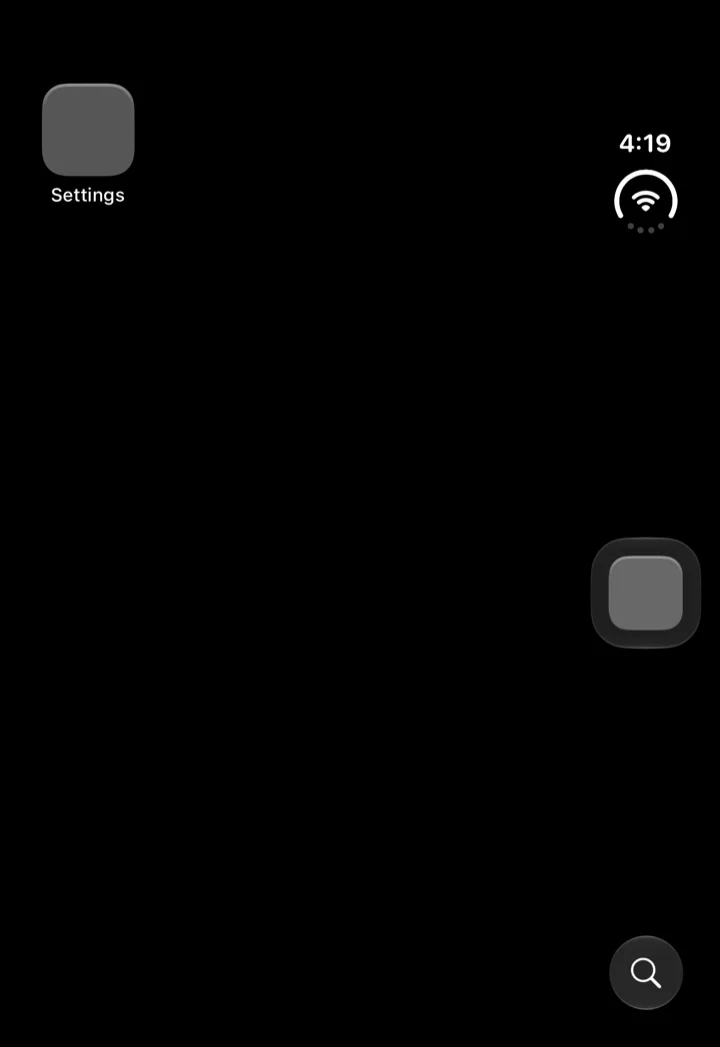
The outer display of the iPhone Duo simulator on first boot, 1398 by 2034 pixels: the status cluster runs down the right edge, the side where Apple’s Human Interface Guidelines put the Dynamic Island and the status bar on iPhone Duo.10
How do you get the iPhone Duo simulator?
Three steps, and none of them is a download button on a web page. Apple ships the simulator only inside Xcode, and only inside the 27.1 beta: the 27.2 beta notes carry an aside that says “Download Xcode 27.1 beta to get the iOS SDK and simulator support for iPhone Duo.”8 (October 11: Xcode 27.1 RC (27A9275) shipped October 5, and its notes list the same iPhone Duo Simulator known issues, so the beta is no longer the only Xcode 27.1 whose notes cover the Duo simulator; I have not installed the RC.14) (October 15: Xcode 27.1 shipped as the release, build 27A9275, the RC’s build, with the same two Duo simulator known issues in its notes; I have not installed it.15)
- Xcode 27.1 beta (27A9269) from the developer downloads, dated Friday, September 18 in Apple’s releases feed. Expand the xip, move the app to a versioned name such as
/Applications/Xcode-27.1-beta.appbeside Xcode 27.0, and pointDEVELOPER_DIRat it for command-line work; the beta requires macOS Tahoe 26.6 or later.12 - The iOS 27.1 runtime, which the xip does not contain. Run
xcodebuild -downloadPlatform iOSwithDEVELOPER_DIRset to the beta; it fetches the 27.1 runtime that makes theiPhone Duodevice type bootable, and Apple’s notes warn that the first Simulator launch “can take several minutes” on top of the download. My first attempt failed and the retry worked, so retry before diagnosing.23 - Device Hub, where the device and its poses live. Add or select the iPhone Duo device, boot it, and use the pose buttons, Closed, Book, and Open, plus Rotate Right;
simctlhas no pose command. The per-pose sizes and screenshots below come from that path.6
There is no browser version from Apple. A page found under “iPhone Duo simulator online” is not running Apple’s iOS 27.1 runtime, so whatever it draws, it is not the source of the size classes, the reserved regions, or the outer-display behavior measured here; for a layout check without the runtime, Xcode’s Previews canvas gained a Display group in this beta for the alternative display.2
Does the 27.1 SDK have the Duo APIs?
On September 17 I searched the iOS 27.0 SDK for the names in Apple’s “Preparing your app for iPhone Duo” guide and found none of the ten that are specific to the device. The same search against the 27.1 SDK, run the same way, a plain text search of the module interfaces and headers, finds all of them. The rows are the substrings searched: seven of them carry nine of the ten names, the two reservedRegions methods and the two axisBehavior members each sharing a row, and the other three are the types behind the names, ReservedRegion, ToolbarVerticalBehavior for toolbarVerticalBehavior(_:), and UIVerticalBarBehavior for preferredVerticalBarBehavior:4
| Substring searched | SwiftUICore interface | SwiftUI interface | UIKit interface | UIKit headers |
|---|---|---|---|---|
ArrangementView |
45 | 0 | 19 | 4 files |
UIArrangementViewController |
0 | 0 | 19 | 4 files |
ReservedRegion |
16 | 0 | 15 | 3 files |
reservedRegions |
2 | 0 | 5 | 1 file |
ToolbarVerticalBehavior |
0 | 5 | 0 | 0 |
UIVerticalBarBehavior |
0 | 0 | 0 | 1 file |
verticalBarEdge |
0 | 0 | 0 | 1 file |
toolbarVerticalEdge |
1 | 0 | 0 | 0 |
axisBehavior |
0 | 2 | 0 | 1 file |
preferredVerticalBarBehavior |
0 | 0 | 0 | 1 file |
Two details in that table matter for how you write the code. The SwiftUI types live in SwiftUICore, the module that import SwiftUI re-exports, so an ordinary import finds them; and the availability attributes disagree with the documentation about platforms. The SwiftUICore interface declares ArrangementView, and the SwiftUI interface declares toolbarVerticalBehavior(_:), both under @available(anyAppleOS 27.1, *), which is Apple’s shorthand for every platform at that version, while UIArrangementViewController.h and the reservedRegionsOfKind: methods in UIView.h carry API_AVAILABLE(ios(27.1), tvos(27.1), visionos(27.1)) with API_UNAVAILABLE(watchos); in UIVerticalBarEdge.h the enum and the verticalBarEdge trait carry that same pair while the Leading and Trailing cases carry API_AVAILABLE(ios(27.1)) API_UNAVAILABLE(visionos) API_UNAVAILABLE(watchos, tvos). Apple’s documentation pages for all five list only iOS 27.1 and iPadOS 27.1, marked beta.47 Write against iOS and let the compiler tell you about the rest.
The three names the guide uses that were already in the 27.0 SDK are unchanged: presentationPlacement(_:) still sits under @available(anyAppleOS 27.0, *), backgroundExtensionEffect() is still there from iOS 26, and of the two ToolbarItemPlacement cases the guide names, topBarPinnedTrailing sits under @available(iOS 27.0, visionOS 27.0, *) and cancellationAction carries no availability of its own beyond the type’s.4
What does the simulator profile say about the two displays?
The device type Apple installs for the beta, iPhone Duo.simdevicetype, is a plain bundle under /Library/Developer/CoreSimulator/Profiles/DeviceTypes, and its two property lists answer questions the spec sheet left open.5
profile.plist gives the identity: model identifier iPhone19,4, product class V68, an alias of com.apple.CoreSimulator.SimDeviceType.V68, minRuntimeVersion 27.1, and a rule to create the device by default for runtimes from 27.1 up. capabilities.plist gives the hardware: model number A3447, HomeButtonType 2, DeviceSupportsDynamicIsland true, DeviceSupportsEnhancedMultitasking false, IsLargeFormatPhone true, a CompatibleDeviceFallback of iPhone18,3, a device corner radius of 59, and a displays array with two integrated entries and three virtual ones.5
| Display in the profile | Pixels | Scale | Points | Native orientation | Corner radii | Colorspace |
|---|---|---|---|---|---|---|
primary (“LCD”, screen 1) |
1398 by 2034 | 3 | 466 by 678 | 0 | 8, 59, 8, 59 | P3 |
primary-1 (“LCD-1”, screen 3) |
2007 by 2853 | 3 | 669 by 951 | 270 | 55 on all four | sRGB |
The first row is the outer display and matches Apple’s spec sheet pixel for pixel. The second is the inner display, and its pixel count is App Store Connect’s screenshot size, 2007 by 2853, rather than the panel’s 1878 by 2670: the simulator renders the inner display at 669 by 951 points at 3x, which is the arithmetic my Duo developer post did on September 10 and labeled an inference. Apple’s own profile now carries the number. The 270-degree native orientation says the inner display is landscape-native, 951 points wide by 669 tall when the phone is open, which matches Apple’s dimensions for the open device. The two remaining numbers are simulator values rather than hardware ones: both displays are listed at 460 pixels per inch and 60 Hz, where the spec sheet gives the inner panel 430 ppi, so treat hdpi as a placeholder.5
The profile also ships the shapes. Each display references a framebuffer mask, a PDF of the visible area. The outer display’s mask has asymmetric corners, the profile’s values 8 on one long edge and 59 on the other, on my reading the small radius on the side that meets the center hinge Apple’s design guide describes; the inner display’s mask is a plain rounded rectangle with the profile’s corner value 55 and no cutout for the front camera, so the camera’s occlusion comes from the reserved-region API at runtime rather than from the framebuffer shape.510
What does the simulator show?
The device boots closed. On first boot the outer display shows the Home Screen and the inner display’s framebuffer is on but black, and simctl io enumerate lists both integrated screens by the profile’s names, primary at 1398 by 2034 and primary-1 at 2007 by 2853, beside the usual virtual ones.6 Device Hub is where the poses live. With the Duo device selected, its window exposes Rotate Right, Closed, Book, and Open as buttons the accessibility API can press, which is how everything in this section was driven; simctl has no pose command.6
The probe is a single-file SwiftUI app: a tab view holding a navigation stack with five toolbar items, a readout of the geometry, the size classes, the toolbarVerticalEdge environment value, the hinge, and the reserved regions of both kinds with includeInactive, and an ArrangementView in the split style. It reads the regions on every evaluation of its body and re-evaluates once a second. The numbers below are from the October 2 re-run, linked against the 27.1 SDK; the September runs, linked as 27.0 by mistake, follow under their own heading.13
Linked against the 27.1 SDK
Closed. The app gets the whole outer display: its window is 466 by 678 points, compact width and regular height. The toolbar and the tab bar stand on the trailing edge under the clock, toolbarVerticalEdge reads trailing, and UIKit’s verticalBarEdge trait reads raw value 2. The content inside the navigation stack measures 382 by 562 points with safe-area insets of 82 at the top, 34 at the bottom, and 84 on the trailing side, which is the rail. Two occlusion regions are reported, both active: one 37 points square where the outer camera sits, and one 84 by 170 covering the camera and the status column above the bars. No division is reported on this display. Turned on its side it is 678 by 466, compact in both size classes, with the bars still on the trailing edge.13
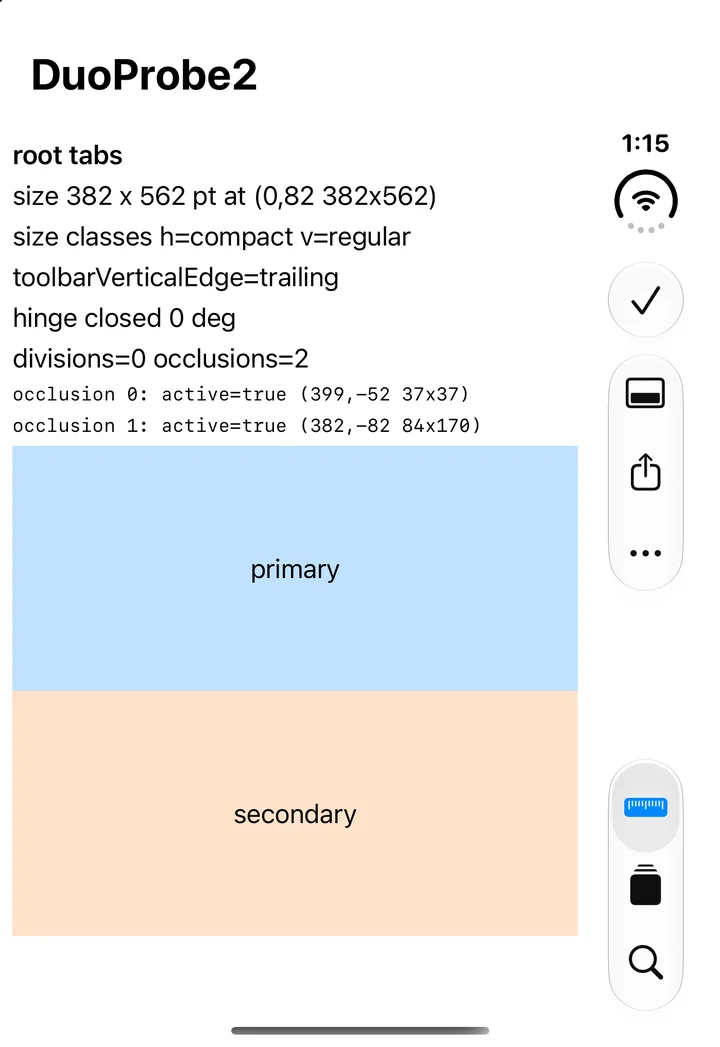
Closed, 27.1 SDK: the whole 466 by 678 point display, bars down the trailing edge.
Open. The app moves to the inner display in its landscape-native orientation: a 951 by 669 point window, regular in both size classes, bars still vertical on the trailing edge. Content measures 867 by 553 with the same three insets. Three regions come back. A division 40 points wide runs the full height at the middle of the screen, from x 455 to 495, with 20-point margins on each side, and it is inactive: the phone is flat. An inactive occlusion 58 by 37 marks the inner camera, which Apple’s guidelines say “stays hidden until the camera is active.”10 An active occlusion 84 by 120 covers the status column. The split arrangement puts its two panes side by side and divides the width evenly.13
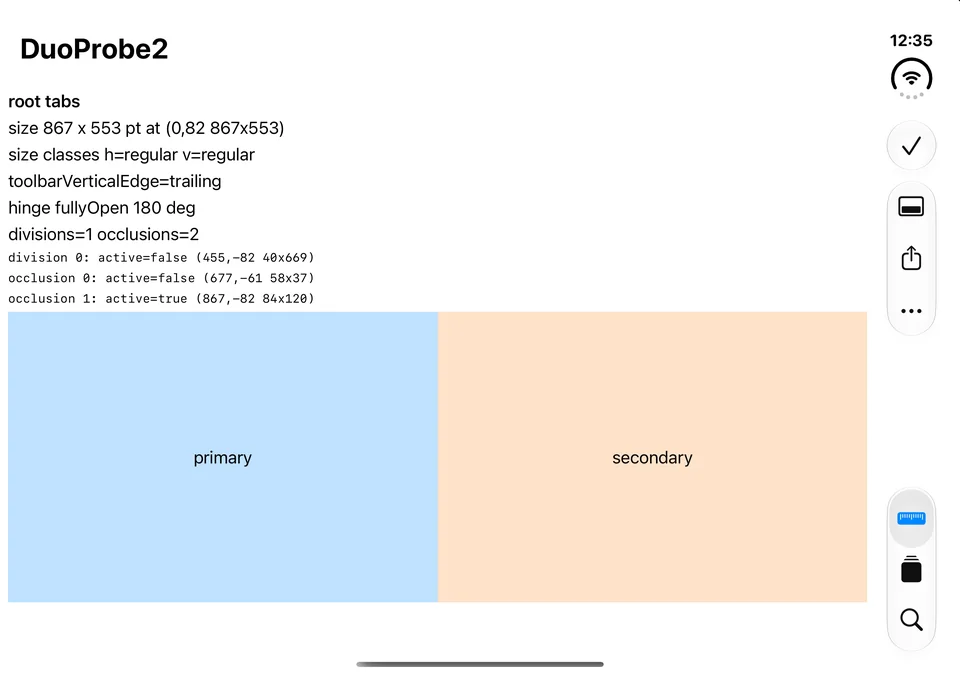
Open, 27.1 SDK: 951 by 669 points, the fold reported as an inactive division down the middle.
Book. Device Hub’s Book pose reports the hinge as partly open at 127 degrees. The window does not change size. What changes is the division: same frame, now active. The split arrangement responds by moving its divider onto the fold and leaving the 40-point band empty, so the primary pane ends at x 455 and the secondary begins at 495. A sheet presented in this pose moves off-center into the leading half.13
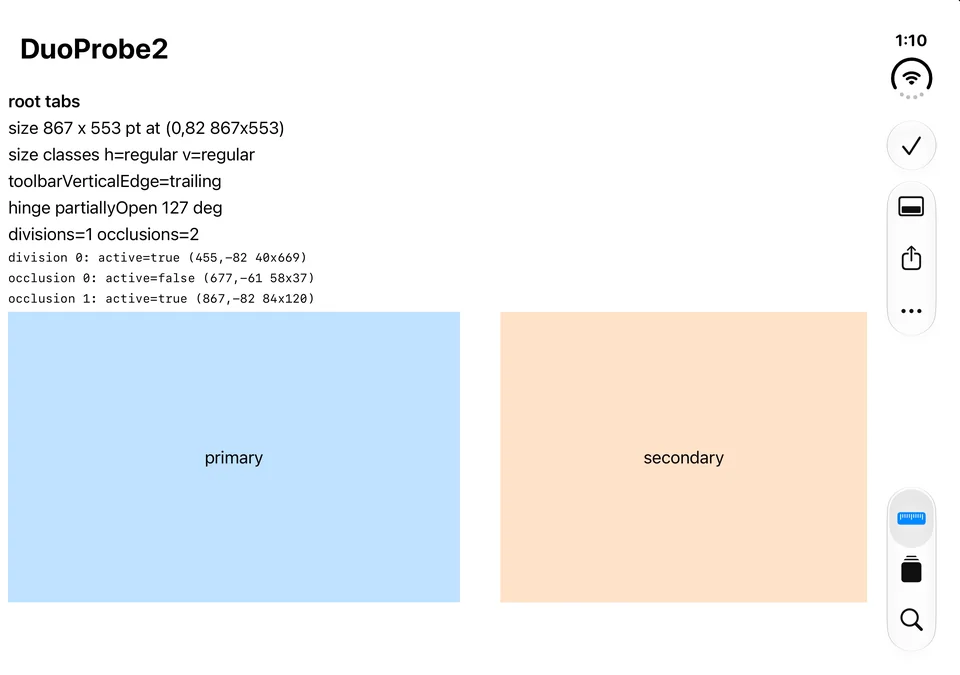
Book, 27.1 SDK: the division is active, and the split arrangement leaves the fold empty.
Turned. Rotate Right with the phone open gives a 669 by 951 point window, still regular in both size classes, and the bars go back to horizontal: toolbarVerticalEdge is nil, the toolbar sits at the top beside the clock, the tab bar floats at the bottom. That matches Apple’s design guidance, which keeps “standard horizontal bars” on the inner display in portrait.10 The same three regions are reported in the turned coordinate space: the division is now a horizontal band 40 points tall across the middle, inactive when flat and active in Book. The probe’s arrangement view, which is wider than it is tall inside that screen, stays side by side.13
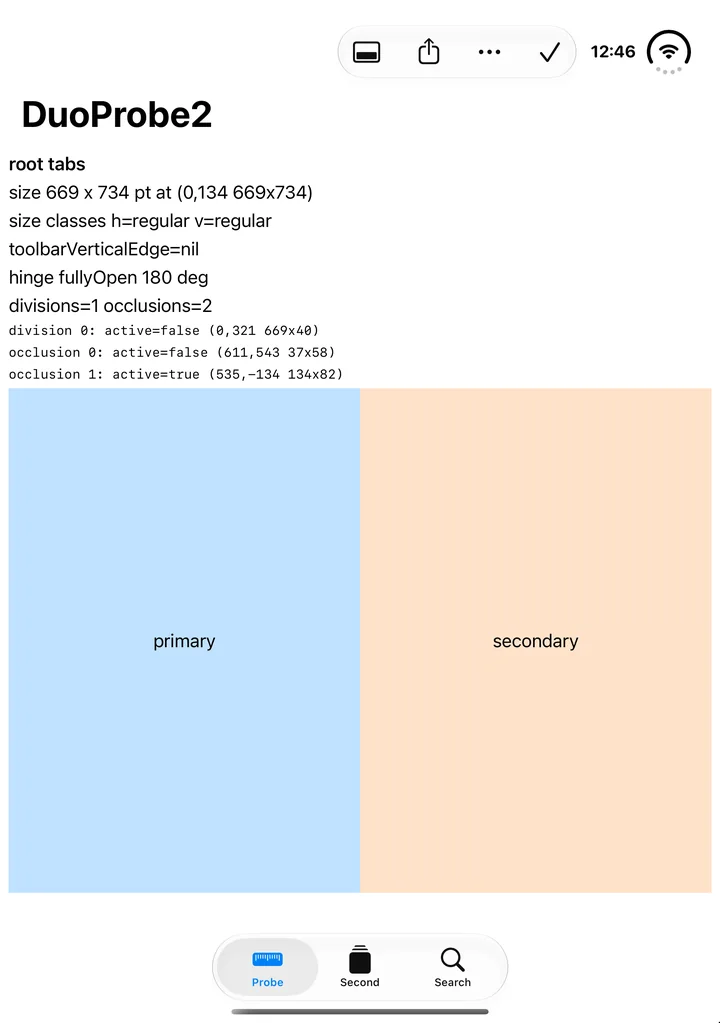
Open and turned, 27.1 SDK: horizontal bars, the fold now a horizontal band.
Two things hold across every pose. The regions arrive late: on each launch the first six to nine evaluations of the probe’s body read none, and every one after that read all of them, so a view that asks once, on its first layout pass, gets an empty answer. Sven-Eric Molzahn’s DuoProbe fixture documented exactly that on September 20 (“reservedRegions is empty on the first geometry evaluation and populated on a later one”) along with the 40-point band, and SwiftLee’s simulator guide of September 22 adds that “Holding Option ⌥ reveals a slider that you can use to control the hinge angle of the device with precision”, which I have not used.12 And UIScreen.main.bounds answers 466 by 678 points, the outer display, while the app is on the inner one, which is the trap Apple’s guide warns about when it says to make layout calculations “based on your scene or containing view’s bounds rather than screen dimensions”: the main screen is not the screen you are on. The window scene’s own screen reports the display the app is actually on.713
One route to the other poses does not work. simctl io screenConfig can power a screen off, and powering off the outer display while the inner one stayed on did not open the phone; it crashed the simulator’s system shell, simctl launch then failed with “The system shell probably crashed,” and a reboot was needed. Poses live in Device Hub’s window.6
Linked against the 27.0 SDK
These are the numbers this section carried until October 2, measured on September 19 and 20 with a probe that had a navigation stack and no tab view, and re-measured on October 2 with the current one. They describe what an app built with Xcode 27.0 gets on this simulator.613
Closed, the window is 386 points wide on a 466-point display: the system keeps the 80-point rail for itself, draws the clock and status there on black, and the app’s toolbar lies across the top. Open, the window is 871 by 669, the same 80 points are missing on the right, and the safe-area insets are 34 on each side. Open and turned, the 80 points come off the top instead. In every pose the size classes match the 27.1 build’s, toolbarVerticalEdge is nil, verticalBarEdge reads raw value 0, and both reserved-region queries return empty arrays even with inactive regions included and however long the probe keeps asking; Book is indistinguishable from Open.
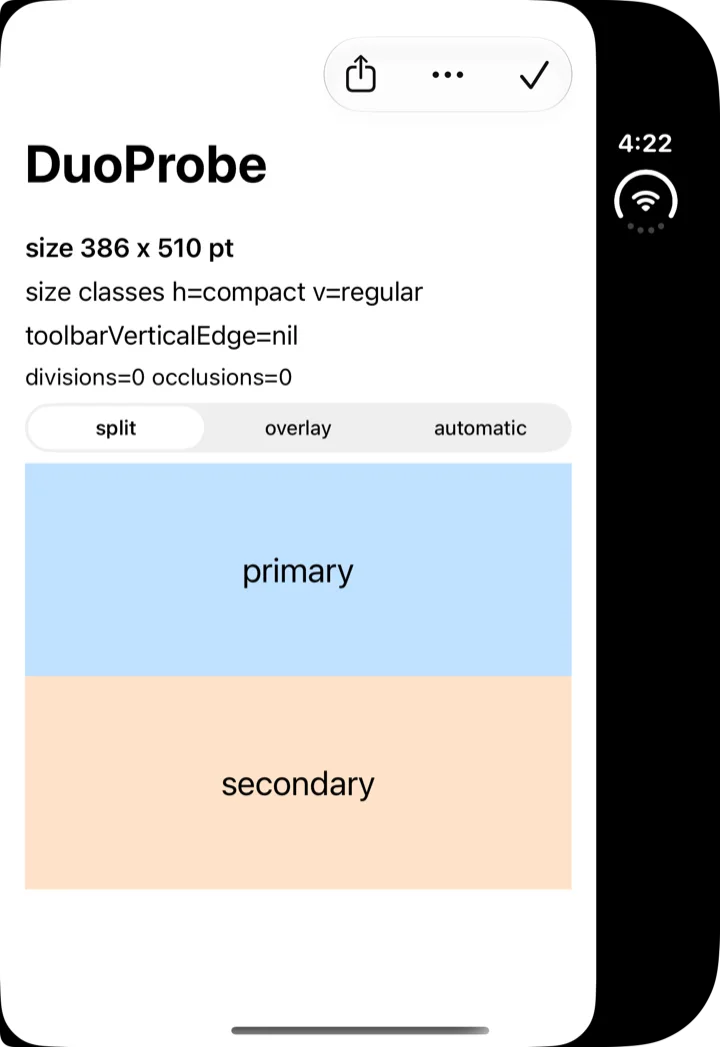
Closed, linked as 27.0: the app stops at the rail and its toolbar stays horizontal.
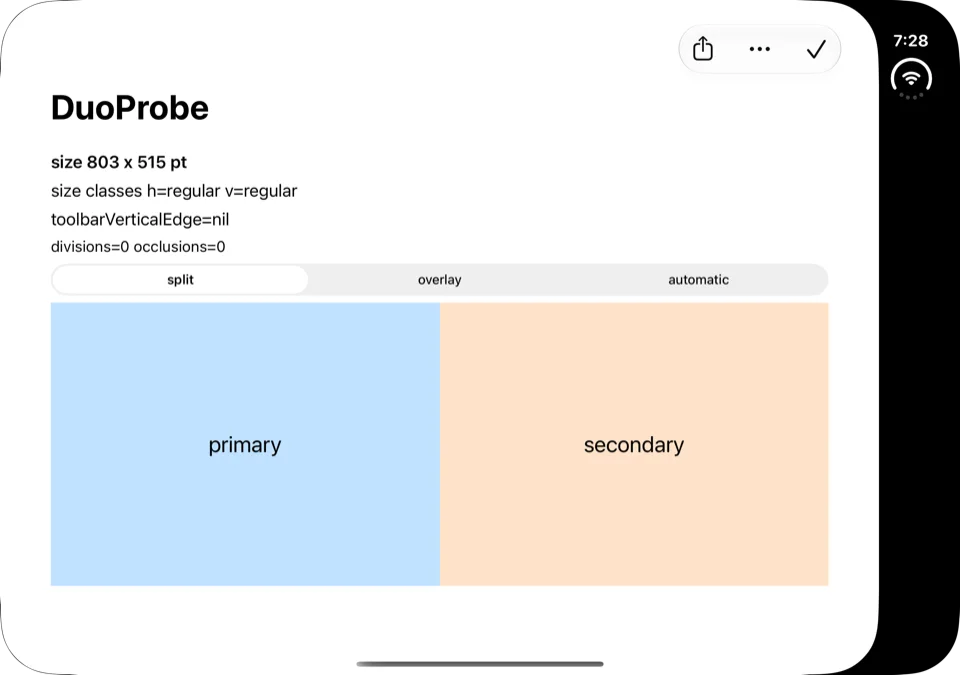
Open, linked as 27.0: regular in both dimensions, the rail kept by the system.
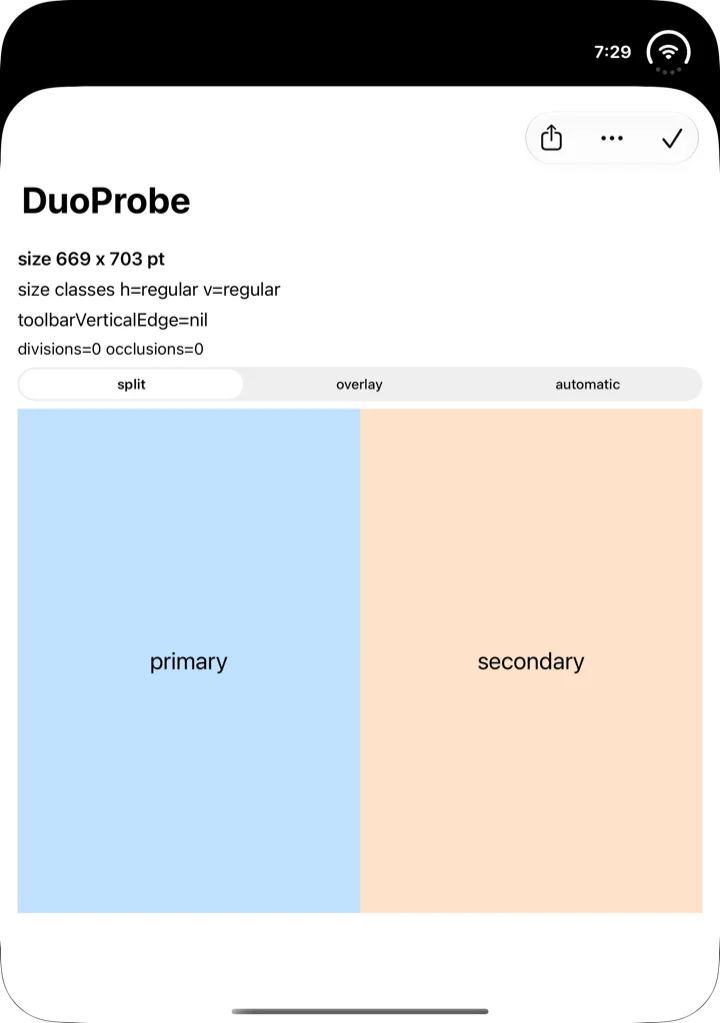
Turned, linked as 27.0: the band across the top is the system’s.
What the beta cannot do yet
Apple lists three limits under Simulator, Known Issues, in the beta’s own notes: “Initial Simulator launch can take several minutes.” (187708500), “StandBy is unavailable in the iPhone Duo Simulator runtime.” (187708663), and “Running and debugging most app extensions is unavailable in the iPhone Duo Simulator runtime.” (187708767).2 The StandBy one matters for anyone with widgets or Live Activities meant for it: Apple’s announcement says the phone “enters StandBy on either the outer or inner display” and calls it a “hub for widgets”, the Duo developer post covers what appears there, and until a later beta lifts the limit, StandBy on this device is something to check on hardware (October 15: the release’s notes still list it15).11
Two more sit under Mac Catalyst, Known Issues, and they bite any app that adopts these APIs and also builds for the Mac: “Projects that use APIs specific to iOS 27.1 show compile errors when building for Mac Catalyst (“undeclared identifier”, “not found”, “has no member”, “cannot find”, etc). (185924957)”, with Apple’s workaround of #if !targetEnvironment(macCatalyst) in Swift or #if !TARGET_OS_MACCATALYST in Objective-C, and “Projects that target iOS 27.1 show no Mac Catalyst run destination available. (187046347)”, with “Add a Mac Catalyst 27.0 minimum deployment in target settings.” as the workaround.2 The Xcode 27.2 beta notes add a third from the other direction: “macOS, watchOS, tvOS, and visionOS SDKs in Xcode 27.2 incorrectly report 27.1 as a valid deployment target,” and “Mac Catalyst builds with a 27.1 or 27.2 deployment target may be unable to use newly introduced API.” (187160501).8
What I would do this week
- Install the beta beside Xcode 27.0 rather than over it: expand the xip, rename the app, and point
DEVELOPER_DIRat it for command-line builds; nothing in the beta’s notes changes the 27.0 toolchain, and the compiler and linker carry identical version strings.4 - Start the runtime download before you need it, with
xcodebuild -downloadPlatform iOSunder the beta, and retry if it fails; the runtime is what makes the iPhone Duo device type bootable, and Apple warns the first launch takes minutes on top of that.23 - Build once against the 27.1 SDK with your Mac Catalyst target included, and read the two diagnostics Apple names before deciding whether to fence the new API with
#if !targetEnvironment(macCatalyst)or to lift the Catalyst minimum to 27.0.2 - Use the profile’s numbers as the sizes to preview and test against: 466 by 678 points closed, 669 by 951 open, with the inner display landscape-native. The beta’s Previews note adds a Display group to the canvas overrides picker “for previewing content on a device’s alternative display.” (182598534)25
- Read the reserved regions where they will be read again: in the view’s body through the geometry proxy, or on every geometry change, never once at first layout.
reservedRegions(kind:options:layoutDirectionBehavior:)with.includeInactivereturned nothing on the probe’s first six to nine evaluations and every region the display has on every one after (the camera and the status column closed; the fold, the inner camera, and the status column open), so a value cached from the first pass is an empty array for the life of the view. And before trusting any of it, confirm the build is stamped with the 27.1 SDK:otool -l <app>/<binary> | grep -A4 LC_BUILD_VERSION.713
FAQ
Is the iPhone Duo simulator in Xcode 27.1 beta?
Yes. The beta installs an iPhone Duo device type, com.apple.CoreSimulator.SimDeviceType.iPhone-Duo, whose profile requires an iOS 27.1 runtime that Xcode downloads separately through xcodebuild -downloadPlatform iOS. Apple’s notes warn the first launch “can take several minutes” and that StandBy and most app extensions are unavailable in that runtime.235
How do I get the iPhone Duo simulator?
Install Xcode 27.1 beta, download the iOS 27.1 runtime with xcodebuild -downloadPlatform iOS under the beta, and pick the iPhone Duo device in Device Hub, where the poses are buttons. The 27.2 beta does not include it; Apple’s 27.2 notes point at the 27.1 beta for “the iOS SDK and simulator support for iPhone Duo.”238 (October 11: Xcode 27.1 RC (27A9275) shipped October 5, and its notes list the same iPhone Duo Simulator known issues, so the beta is no longer the only Xcode 27.1 whose notes cover the Duo simulator; I have not installed the RC.14) (October 15: Xcode 27.1 shipped as the release, build 27A9275, the RC’s build, with the same two Duo simulator known issues in its notes; I have not installed it.15)
Is there an online iPhone Duo simulator?
Not from Apple. The simulator shipped only inside Xcode 27.1 beta before the RC and runs Apple’s iOS 27.1 runtime; a browser page under that name is drawing something else. For a quick layout check, the beta’s Previews canvas offers a Display group for the alternative display.2 (October 11: Xcode 27.1 RC (27A9275) shipped October 5, and its notes list the same iPhone Duo Simulator known issues, so the beta is no longer the only Xcode 27.1 whose notes cover the Duo simulator; I have not installed the RC.14) (October 15: Xcode 27.1 shipped as the release, build 27A9275, the RC’s build, with the same two Duo simulator known issues in its notes; I have not installed it.15)
How do I install Xcode 27.1 beta next to Xcode 27?
Expand the xip with xip --expand, move the resulting app to a versioned name such as /Applications/Xcode-27.1-beta.app, and set DEVELOPER_DIR to its Contents/Developer folder for xcodebuild, xcrun, and swiftc. The beta requires macOS Tahoe 26.6 or later, the same floor as Xcode 27.0.24
What size is the iPhone Duo inner display in points?
669 by 951 points, per the simulator’s device profile, which defines the inner display as 2007 by 2853 pixels at scale 3 with a landscape-native orientation; the outer display is 466 by 678 points from 1398 by 2034 pixels at scale 3.5
Does Xcode 27.1 beta change the iOS 27.0 SDK or the Xcode 27 toolchain?
No. The Swift compiler and the linker report the same version strings as Xcode 27.0, and the beta’s release notes have three sections, Mac Catalyst, Previews, and Simulator, none of which touches the toolchain. The iOS 27.1 SDK is an addition, identified as build 24A94403 in both the device and simulator SDKs.24
When does iPhone Duo ship, and on what?
October 23, on iOS 27.1, per Apple’s September 16 news post: “When iPhone Duo becomes available on October 23, it will run iOS 27.1.”9 (October 26: it did, and iOS 27.1 shipped on no other device; Apple’s security page lists it for iPhone Duo alone, and the 27.1 simulator runtime on this Mac accepts only the iPhone Duo device type.16)
Related on this site: the iPhone Duo developer post has the spec-sheet numbers and the API list this post checks against the SDK, the designing for iPhone Duo post reads Apple’s design guidance, the resizable iPhone checklist is the layout work the profile numbers feed, the Xcode 27 hub carries the dated beta sections, the Xcode 27 build failures post covers the toolchain this beta leaves unchanged, and the iOS 27 release notes post tracks the 27.x builds.
Sources
-
Apple, Releases, RSS feed fetched September 19, 2026: “Xcode 27.1 beta (27A9269)” dated Fri, 18 Sep 2026 10:00:00 PDT and “TestFlight Update” dated Fri, 18 Sep 2026 14:00:00 PDT. Apple, App Store Connect release notes, September 18, 2026, TestFlight update, quoted in full. ↩↩↩↩
-
Apple, Xcode 27.1 Beta Release Notes, fetched through the documentation JSON endpoint on September 19, 2026: Overview, quoted; Mac Catalyst, Known Issues 185924957 and 187046347 with their workarounds, quoted; Previews, New Features 182598534, quoted; Simulator, Known Issues 187708500, 187708663, and 187708767, quoted. The notes contain no other sections. ↩↩↩↩↩↩↩↩↩↩↩↩↩↩↩↩
-
Author’s runtime download on macOS 26.6.2 (25G83), September 19, 2026, with
DEVELOPER_DIRset to Xcode 27.1 beta:xcodebuild -downloadPlatform iOSprinted “iOS is already downloaded.” for the installed 27.0 runtime and then “Downloading iOS 27.1 Simulator (24A94401) (arm64)”, followed byDVTDownloadable: Download Failed. Downloadable: DVTDownloadable(identifier: 0a4e7582-0061-5907-bea9-fe234c1f9392, version: 27.1.0.1, category: simulator, contentType: cryptexDiskImage, downloadMethod: mobileAsset, platform: com.apple.platform.iphoneos)andError Domain=DVTDownloadableErrorDomain Code=41 "Download failed."; the retry,xcodebuild -downloadPlatform iOS -buildVersion 24A94401, printed “Downloading iOS 27.1 Simulator (24A94401) (arm64): 0.0% (66 kB of 7.85 GB)” and completed, after whichxcrun simctl list runtimeslisted “iOS 27.1 (27.1 - 24A94401) - com.apple.CoreSimulator.SimRuntime.iOS-27-1”. Apple’s developer downloads page, searched for “Simulator Runtime” while signed in the same day, lists disk images no newer than the iOS 18.2 Simulator Runtime. ↩↩↩↩↩↩↩ -
Author’s inspection of
/Applications/Xcode-27.1-beta.app, September 19, 2026:xcodebuild -versionprintsXcode 27.1andBuild version 27A9269;xcrun --sdk iphoneos --show-sdk-versionandxcrun --sdk iphonesimulator --show-sdk-versionboth print 27.1;SystemVersion.plistin both SDKs carriesProductBuildVersion24A94403 andProductVersion27.1;xcrun swift --versionprintsApple Swift version 6.4 (swiftlang-6.4.0.34.1 clang-2100.3.34.1)andxcrun ld -vprintsld-27037.1, the same version strings Xcode 27.0 (27A266a) prints on the same Mac.Xcode_27.1_beta.xipis 2,027,292,809 bytes;pkgutil --check-signaturereports “signed Apple Software” with a Software Update certificate chain;du -skon the expanded app reports 3,813,336 KB, against 3,804,188 KB for Xcode 27.0 (27A266a) as expanded at/Applications/Xcode-27.app. Name counts aregrep -cfor the substring inSwiftUICore.swiftmodule/arm64e-apple-ios.swiftinterface,SwiftUI.swiftmodule/arm64e-apple-ios.swiftinterface, andUIKit.swiftmodule/arm64e-apple-ios.swiftinterfacein the iPhoneOS SDK, andgrep -rlfile counts acrossUIKit.framework/Headers; availability attributes read from those files:@available(anyAppleOS 27.1, *)abovepublic struct ArrangementView<in the SwiftUICore interface and above theextension SwiftUICore.Viewthat declaresfunc toolbarVerticalBehaviorin the SwiftUI interface,API_AVAILABLE(ios(27.1), tvos(27.1), visionos(27.1))followed byAPI_UNAVAILABLE(watchos)inUIArrangementViewController.h, on bothreservedRegionsOfKind:declarations inUIView.h, and on theUIVerticalBarEdgeenum and theverticalBarEdgetrait andAPI_AVAILABLE(ios(27.1)) API_UNAVAILABLE(visionos) API_UNAVAILABLE(watchos, tvos)on itsUIVerticalBarEdgeLeadingandUIVerticalBarEdgeTrailingcases;@available(anyAppleOS 27.0, *)abovefunc presentationPlacement;@available(iOS 27.0, visionOS 27.0, *)abovepublic static let topBarPinnedTrailingand no attribute abovepublic static let cancellationAction. First launch: the firstxcodebuild -versionunder the beta’sDEVELOPER_DIRran past a two-minute timeout, and/var/log/install.logrecordsxcodebuildenqueuing a PackageKit install at 16:01:54 on September 19 that extractedCoreTypes.pkgandXcodeSystemResources.pkgfromXcode-27.1-beta.app/Contents/Resources/Packagesand finished at 16:03:04;xcodebuild -checkFirstLaunchStatusafterwards returned 0. ↩↩↩↩↩↩↩↩↩↩↩ -
/Library/Developer/CoreSimulator/Profiles/DeviceTypes/iPhone Duo.simdevicetype, installed by Xcode 27.1 beta and read withplutil -convert xml1on September 19, 2026.profile.plist:modelIdentifieriPhone19,4,productClassV68,aliasescom.apple.CoreSimulator.SimDeviceType.V68,minRuntimeVersion27.1,createByDefaultForRuntimeVersionsversionMin 27.1.capabilities.plist:ModelNumberA3447,ThinningProductTypeiPhone19,4,CompatibleDeviceFallbackiPhone18,3,DeviceCornerRadius59,HomeButtonType2,DeviceSupportsDynamicIslandtrue,DeviceSupportsEnhancedMultitaskingfalse,IsLargeFormatPhonetrue;ScreenDimensionsCapabilitymain-screen-width 1398, main-screen-height 2034, main-screen-pitch 460, main-screen-scale 3;displays:primary(displayName LCD, screenID 1, width 1398, height 2034, scale 3, hdpi and vdpi 460, refreshRate 60, nativeOrientation 0, cornerRadiusUL 8, UR 59, LL 8, LR 59, colorspace P3) andprimary-1(displayName LCD-1, screenID 3, width 2007, height 2853, scale 3, hdpi and vdpi 460, refreshRate 60, nativeOrientation 270, all four corner radii 55, colorspace sRGB), plusexternal-0(TVOut),wireless0(carPlay), andresizable(scene). The twoframebufferMaskIdentifierPDFs were rendered withqlmanageand inspected; Apple’s spec sheet figures for the panels are in the Duo developer post.xcrun simctl list devicetypesunder the beta lists “iPhone Duo (com.apple.CoreSimulator.SimDeviceType.iPhone-Duo)”. ↩↩↩↩↩↩↩↩↩ -
Author’s runs on macOS 26.6.2 (25G83), September 19 and 20, 2026. Device:
simctl create "Duo-27.1" com.apple.CoreSimulator.SimDeviceType.iPhone-Duo com.apple.CoreSimulator.SimRuntime.iOS-27-1, booted withsimctl bootandsimctl bootstatus -b(about a minute on this Mac);simctl io <udid> enumeratelists twocom.apple.framebuffer.displayports of display class 0 at 1398 by 2034 and 2007 by 2853 and, under Connected Screens, “LCD-1” with device nameprimary-1, screen ID 3, pixel size {2007, 2853}. Probe: DuoProbe, a single-file SwiftUI app built withxcrun swiftc -sdk <iPhoneSimulator.sdk> -target arm64-apple-ios27.1-simulator -parse-as-libraryunder Xcode 27.1 beta, installed withsimctl install, launched withsimctl launch --console-pty, screenshots withsimctl io <udid> screenshot --mask=alpha --display=primaryand--display=primary-1. Closed-pose console lines:DUOPROBE screen=(466.0, 678.0) scale=3.0 idiom=0 model=iPhone name=Duo-27.1;DUOPROBE size=386x510 h=compact v=regular verticalEdge=nil safe=EdgeInsets(top: 134.0, leading: 0.0, bottom: 34.0, trailing: 0.0);DUOPROBE uikit bounds=(354.0, 44.0) divisions=0 occlusions=0 verticalBarEdge=UIVerticalBarEdge(rawValue: 0); nodivision[orocclusion[lines. The--display=primary-1screenshot is black. Screen power:simctl io <udid> screenConfig --display=primary power offprinted “Screen 1 power state set to off”; the nextsimctl launchfailed withFBSOpenApplicationServiceErrorDomaincode 5, “The system shell probably crashed.”;simctl shutdownandbootrecovered the device. Pose runs on September 20 in two series, both pressing Rotate Right, Closed, Book, and Open through the accessibility API with theAXPressaction on the buttons Device Hub exposes for the selected device, and both driven by the 27.2 beta’ssimctlcommand-line tool, theDEVELOPER_DIRthose scripts set, against the 27.1 beta’s runtime, device type, and Device Hub. In the first series the probe from the previous pose was still running when the next button was pressed, then terminated and relaunched, with the console captured for twelve seconds and screenshots taken of both displays; the rotated readings below and the transitional lines come from it. In the second series the probe was terminated after each capture, so no app was in the foreground when the next button was pressed; the pre-relaunch screenshots come from it. Open:DUOPROBE size=803x515 h=regular v=regular verticalEdge=nil safe=EdgeInsets(top: 134.0, leading: 34.0, bottom: 20.0, trailing: 34.0),DUOPROBE uikit bounds=(771.0, 44.0) divisions=0 occlusions=0 verticalBarEdge=UIVerticalBarEdge(rawValue: 0), andDUOPROBE screen=(466.0, 678.0); the--display=primary-1screenshot shows the probe,--display=primaryshows black. Book: the same three lines after the relaunch; the screenshot of the inner display taken after the press and before the relaunch, with no app running, shows the Home Screen. Closed: the closed-pose lines above. After Rotate Right, Open:DUOPROBE size=669x703 h=regular v=regular verticalEdge=nil safe=EdgeInsets(top: 134.0, leading: 0.0, bottom: 34.0, trailing: 0.0)anduikit bounds=(637.0, 44.0), with the inner-display screenshot in portrait. No run printed adivision[orocclusion[line. A rotated closed state appeared only as transitional lines while a pose changed,DUOPROBE size=610x232 h=compact v=compact ... screen=(678.0, 466.0), and is not counted above. This build was stampedsdk 27.0; see the October 2 update and footnote 13. ↩↩↩↩↩↩↩ -
Apple, documentation JSON fetched September 19, 2026 for ArrangementView, UIArrangementViewController, reservedRegions(kind:options:layoutDirectionBehavior:), reservedRegions(kind:options:), and toolbarVerticalBehavior(_:): each page’s platform availability reads iOS 27.1 and iPadOS 27.1, marked beta. Apple, Preparing your app for iPhone Duo, fetched the same day, for the names the guide uses. ↩↩↩↩
-
Apple, Xcode 27.2 Beta Release Notes, fetched September 19, 2026, SDK, Known Issues, 187160501, quoted; re-fetched September 26, 2026 for the Overview aside, “Download Xcode 27.1 beta to get the iOS SDK and simulator support for iPhone Duo.”, quoted. ↩↩↩
-
Apple, “Get ready with the latest beta releases”, news, September 16, 2026, “Note about iOS 27.1 and iPhone Duo”, quoted. ↩
-
Apple, Designing for iPhone Duo, Human Interface Guidelines, fetched through the documentation JSON endpoint on September 20, 2026: “Controls on the side include both system and app elements: the Dynamic Island, the status bar, the toolbar (including navigation buttons), and the tab bar.” and “A hinge in the center lets people open and close the device”; re-fetched October 2, 2026, Vertical controls: “The exception is the inner display in portrait, which has enough vertical space to keep standard horizontal bars.”; Anatomy: “The inner camera is behind the display and stays hidden until the camera is active.” ↩↩↩↩
-
Apple Newsroom, Apple unveils iPhone Duo, September 9, 2026, fetched September 20, 2026: “Set iPhone Duo down and it enters StandBy on either the outer or inner display” and “hub for widgets”, quoted from the StandBy paragraph. ↩
-
Sven-Eric Molzahn, iphone-duo-probe, GitHub README fetched September 24, 2026 (latest commit September 20, 2026): “Two caveats before reaching for it:
reservedRegionsis empty on the first geometry evaluation and populated on a later one”, and “Half-folded, inner display, content 867 × 575, hinge band at x 455.5…495.5”, quoted. Antoine van der Lee, iPhone Duo Simulator: Testing and optimizing your SwiftUI app, SwiftLee, September 22, 2026, quoted. ↩↩↩ -
Author’s re-run on October 2, 2026: macOS 27.0 (26A428), Xcode 27.1 beta (27A9269), the iOS 27.1 runtime (24A94401), the same
Duo-27.1simulator. Probe: DuoProbe2, one Swift file, aTabViewwhose first tab holds aNavigationStackwith five toolbar items, the readouts described in the text, and a UIKit view logging its window, its window scene’s screen,UIScreen.main, and theverticalBarEdgetrait. Built twice from that file against the 27.1 simulator SDK with the linker told which SDK version to record (-Xlinker -platform_version -Xlinker ios-simulator -Xlinker 27.1 -Xlinker 27.0and... 27.1);otool -lprintedsdk 27.0andsdk 27.1. A third build made the September way,swiftc -sdk <iPhoneSimulator27.1.sdk>withSDKROOTunset, printedclang: warning: using sysroot for 'macOS 27.0' but targeting 'arm64-apple-ios27.1.0-simulator'and was stampedsdk 27.0; withSDKROOTexported to the simulator SDK the same command stampssdk 27.1. The real app that exposed the difference is Kiradex (941 Apps), built by Xcode 27.1 beta:minos 27.0,sdk 27.1. Console lines, 27.1 stamp, closed:size=382x562 ... h=compact v=regular verticalEdge=trailing safe=EdgeInsets(top: 82.0, leading: 0.0, bottom: 34.0, trailing: 84.0) divisions=0 occlusions=2,occlusion[0] active=true frame=(399,-52 37x37),occlusion[1] active=true frame=(382,-82 84x170),window=(466.0, 678.0),verticalBarEdge=2; closed and turned:size=594x350 ... h=compact v=compact verticalEdge=trailing,window=(678.0, 466.0); open:size=867x553 ... h=regular v=regular verticalEdge=trailing ... divisions=1 occlusions=2,division[0] active=false frame=(455,-82 40x669) margins=EdgeInsets(top: 0.0, leading: 20.0, bottom: 0.0, trailing: 20.0),occlusion[0] active=false frame=(677,-61 58x37),occlusion[1] active=true frame=(867,-82 84x120),window=(951.0, 669.0),hinge=fullyOpen 180 deg; Book: the same withdivision[0] active=trueandhinge=partiallyOpen 127 deg, andmainScreen=(466.0, 678.0)besidesceneScreen=(951.0, 669.0); open and turned:size=669x734 ... verticalEdge=nil safe=EdgeInsets(top: 134.0, leading: 0.0, bottom: 83.0, trailing: 0.0) divisions=1 occlusions=2,division[0] active=false frame=(0,321 669x40),occlusion[0] active=false frame=(611,543 37x58),occlusion[1] active=true frame=(535,-134 134x82),window=(669.0, 951.0),mainScreen=(466.0, 678.0),verticalBarEdge=0; Book and turned: the same withdivision[0] active=true. Frames are in the readout view’s coordinates, whose origin sits 82 or 134 points below the top of the window. 27.0 stamp:window=(386.0, 678.0)closed,(871.0, 669.0)open and in Book,(669.0, 871.0)open and turned,(678.0, 386.0)closed and turned, withverticalEdge=nil,verticalBarEdge=0, anddivisions=0 occlusions=0on every line. PlainProbe, the same tab view, navigation stack, and toolbar with nothing from the 27.1 SDK in it, compiled by Xcode 27.0 (27A266a) against its own iOS 27.0 SDK (otool:minos 27.0,sdk 27.0):window=(386.0, 678.0)closed and(871.0, 669.0)open. On each 27.1 launch the first six to nine evaluations loggeddivisions=0 occlusions=0before the regions appeared, three of them before the view had a size. The camera’s occlusion was compared with Apple’s “Outer Closed Portrait” bezel PNG, whose camera cutout spans 400.3 to 436.3 points across and 29.7 to 65.7 down at 3x; the occlusion spans 399 to 436 and 30 to 67 in window points, within 1.3 points on every edge. Pane positions were measured from the captures: primary from x 8 to 433.7 and secondary from 433.7 to 859 when flat; primary to 455.7, an empty band to 495.7, secondary to 859 in Book. The probe’s sheet measured653x501centered when open and459x501at the leading edge in Book. With a launch option that makes the probe’s arrangement view fill the content area, the turned display showed the primary pane above the secondary, and.split.axes(.horizontal)showed the primary pane alone. ↩↩↩↩↩↩↩↩↩↩↩↩↩↩↩ -
Apple, Releases, RSS feed fetched October 11, 2026: “Xcode 27.1 RC (27A9275)” dated Mon, 05 Oct 2026 10:00:00 PDT. Apple, App Store Connect release notes, fetched October 11, 2026, entry dated October 5, 2026: “You can now upload apps built with Xcode 27.1 RC using the SDK for iOS 27.1, iPadOS 27.0, macOS 27.0, tvOS 27.0, visionOS 27.0, and watchOS 27.0 for the App Store, and for internal and external testing through TestFlight.” Apple, Xcode 27.1 RC Release Notes, fetched October 11, 2026, Simulator, Known Issues: “StandBy is unavailable in the iPhone Duo Simulator runtime. (187708663)” and “Running and debugging most app extensions is unavailable in the iPhone Duo Simulator runtime. (187708767)”, as in the beta’s notes. ↩↩↩↩
-
Apple, Releases, RSS feed fetched October 15, 2026 at 17:16 Pacific (00:16 UTC, October 16): “Xcode 27.1 (27A9275)” dated Thu, 15 Oct 2026 13:00:00 PDT, the same build number as the October 5 RC item of the October 11 fetch, which the feed no longer carries. Apple, Xcode 27.1 Release Notes, fetched through the documentation JSON endpoint on October 15, 2026 at 17:21 Pacific, retitled from “Xcode 27.1 RC Release Notes”; Overview: “Xcode 27.1 includes Swift 6.4 and SDKs for iOS 27.1, iPadOS 27, tvOS 27, watchOS 27, macOS 27, and visionOS 27.”; the two iPhone Duo Simulator Known Issues, 187708663 and 187708767, unchanged. Apple, App Store Connect release notes, fetched October 15, 2026 at 17:20 Pacific, entry dated October 15, 2026, “App Store Connect updates”: “You can now upload apps built with Xcode 27.1 using the SDK for iOS 27.1, iPadOS 27.0, macOS 27.0, tvOS 27.0, visionOS 27.0, and watchOS 27.0 for the App Store, and for internal and external testing through TestFlight.” and “Submit your iPhone Duo optimized apps and games in App Store Connect today. Starting April 2027, any apps or games submitted will need to include screenshots for iPhone Duo.” Apple’s developer news feed, fetched the same hour, carries no item for the release. ↩↩↩↩↩
-
Apple Newsroom, “iPhone Duo arrives at Apple Store locations worldwide”, October 23, 2026, fetched October 26: “On Friday, October 23, the highly anticipated iPhone Duo made its debut at Apple Store locations worldwide.” Apple Support, “Apple security releases”, fetched October 26, 2026: the row “iOS 27.1,” “This update has no published CVE entries.,” “iPhone Duo,” “23 Oct 2026,” with no link. Apple, Releases, RSS feed fetched October 26, 2026 at 16:12 Pacific: “iOS 27.2 (24B91020)” and “iOS 27.2 (24B119)” dated Mon, 26 Oct 2026 10:00:00 PDT; “Xcode 27.2 RC (27B48)” dated Mon, 19 Oct 2026, the newest Xcode item; no item title names an iOS 27.1 release. The iOS & iPadOS Release Notes index, fetched October 26, lists “iOS & iPadOS 27 Release Notes” and “iOS & iPadOS 27.2 Release Notes” only; the 27.1 page’s JSON endpoint returned 404. Apple, Xcode 27.2 RC Release Notes, fetched October 26, 2026 (Last-Modified Mon, 19 Oct 2026 04:56:10 GMT): Device Hub, Known Issues (187146039, 187148389, 189465196 with workaround); Mac Catalyst, Known Issues (185924957); Simulator, Resolved Issues (190155353); quoted. Apple, iOS & iPadOS 27.2 Release Notes, fetched October 26, 2026: UIKit, New Features (186294594). Author’s Mac, October 26, 2026, macOS 27.0 (26A428), Xcode 27.1 (27A9275) at /Applications/Xcode.app:
iPhoneOS.sdk/System/Library/CoreServices/SystemVersion.plistand the iPhoneSimulator SDK’s plist both reportProductVersion27.1 andProductBuildVersion24A94232;xcrun simctl list runtimesprints “iOS 27.1 (27.1 - 24A94425)” and-jlists onesupportedDeviceTypesentry, “iPhone Duo”;xcrun simctl createofcom.apple.CoreSimulator.SimDeviceType.iPhone-16-Prooncom.apple.CoreSimulator.SimRuntime.iOS-27-1failed with “Incompatible device” (SimError 403); the margins probe and its outputs are in the iOS 27.2 release notes post’s footnote 4. ↩↩











