Prepare Your App for iPhone Duo: A Worked Example

How do you prepare an app for iPhone Duo? Build it with the iOS 27.1 SDK, walk it through every pose in the simulator, fix what the walk shows, and stage the submission around two dates Apple has not announced. iPhone Duo goes on sale October 23 on iOS 27.1.1 What an app gets on it is decided by the SDK version stamped in its binary: one source file linked as 26.0, 27.0, and 27.1 came up as a phone-sized box, a window beside the status rail, and the whole screen with its bars down the side and the fold reported.12 As of October 2 only Apple’s betas stamp 27.1 or later (Xcode 27.1 beta, which has the Duo simulator, and Xcode 27.2 beta), and App Store Connect takes their builds for TestFlight, not for the store.8 This post does the whole job on Kiradex, a card collector’s app we have in TestFlight: what came free, what the walk caught that reading the code had not, the screenshots for both displays, and a brief you can hand to a coding agent.
TL;DR
- The SDK stamp is the switch. iOS reads the SDK version in the binary’s
LC_BUILD_VERSION. Stamped 27.1, the probe got the whole screen, 466 by 678 points closed and 951 by 669 open, with vertical bars and reserved regions. Stamped 27.0, it stopped 80 points short of the edge where the status rail is, kept horizontal bars, and was told nothing about the fold. Stamped 26.0, it was a 375 by 667 phone in a box. Check yours withotool -l.12 - The calendar has two open dates. TestFlight has taken 27.1-SDK builds since September 18 and 27.2-beta builds since September 16; the App Store takes 27.0-SDK builds only; the Duo screenshot sizes are published and uploading them “will be available later this year.”89 A launch screen key is now required at upload.10
- System containers did most of it. A
TabView, aNavigationStackin four of its five tabs, and toolbar items with a title and a symbol put Kiradex’s bars on the side with no Duo code. OneArrangementViewsplit the open display and moved its divider onto the fold in the Book pose. OneonHingeChangereplays the app’s opening when the phone unfolds.13 - The walk caught what reading had not. A sheet whose only button is a text “Done” reserves the side rail and leaves it empty. The full-screen card runs under the outer camera. Turned to portrait, the split stacks. A card left open while the phone unfolds lands in the compact layout, stretched. The regular-width layout, written for the inner display, breaks on a 6.9-inch iPhone in landscape.13
- Until the store takes 27.1, one source tree needs two Xcodes.
#availabledoes not help; the 27.0 SDK has noArrangementViewto compile against. A compilation flag, or#if canImport(SwiftUI, _version: 8.0.85), fences the new calls.14 - Screenshots come out of the same run. The simulator’s captures are exactly App Store Connect’s sizes, and so are the openings in Apple’s Duo bezels. Apple’s rules still say straight-on, unmodified, and no 3D renders of the device.911
Where things stand on October 2
| State | Dated | |
|---|---|---|
| The phone | Pre-orders October 16, on sale October 23, “available with iOS 27.1”1 | September 9 |
| The SDK | Xcode 27.1 beta (27A9269) carries the iOS 27.1 SDK and the iPhone Duo simulator; Apple’s releases feed lists no second 27.1 beta and no release candidate. Xcode 27.2 beta carries the same APIs and no Duo simulator814 | September 18; feed read October 2 |
| TestFlight | Open to builds from Xcode 27.1 beta and from the Xcode 27.2 betas, internal and external8 | September 16, 18, and 28 |
| App Store | Open to builds from Xcode 27 and the 27.0 SDK. No entry opens it to the 27.1 SDK8 | September 14 |
| Duo screenshots | Sizes published; uploading them “will be available later this year”9 | September 9 |
| Launch screen | Required at upload for anything built with the iOS 27 SDK or later10 | Technote revised September 14 |
Three of those rows are waiting on Apple, and none of them blocks the work. The order that follows from the table: get the app onto the 27.1 SDK and into the simulator, walk it through every pose, fix what the walk shows, put that build in TestFlight, and hold the store submission and the Duo screenshots ready for the day each opens.
Apple’s own starting point is the first of its six Tech Talks, ten minutes long, and everything below assumes it:
Step one: the SDK stamp decides what the phone gives you
The talk opens with a compatibility promise in three tiers. An app not built with the iOS 27 SDK still runs: “When the device is closed, your app will use the screen space to the left of the status bar and camera. When the device is open, your app will be a familiar size and aspect ratio.” (0:36) An app that adopted the iOS 27 SDK “will extend to the left of the status bar area on the inner display.” (0:58) And then: “When you build your app with the iOS 27.1 SDK, your app extends to the edge of the screen. Standard navigation and toolbar buttons now lay out vertically under the status bar.” (1:05)3
Those tiers are not a property of your code. They are a property of one number in your binary, the SDK version the linker records in the LC_BUILD_VERSION load command, and iOS reads it at launch. To see how much rides on it I built one small probe, a TabView holding a NavigationStack with a five-item toolbar and an ArrangementView, three times from the same source file. The only difference between the three binaries is that number: 26.0, 27.0, 27.1. Then I ran all three on the iPhone Duo simulator in every pose.12
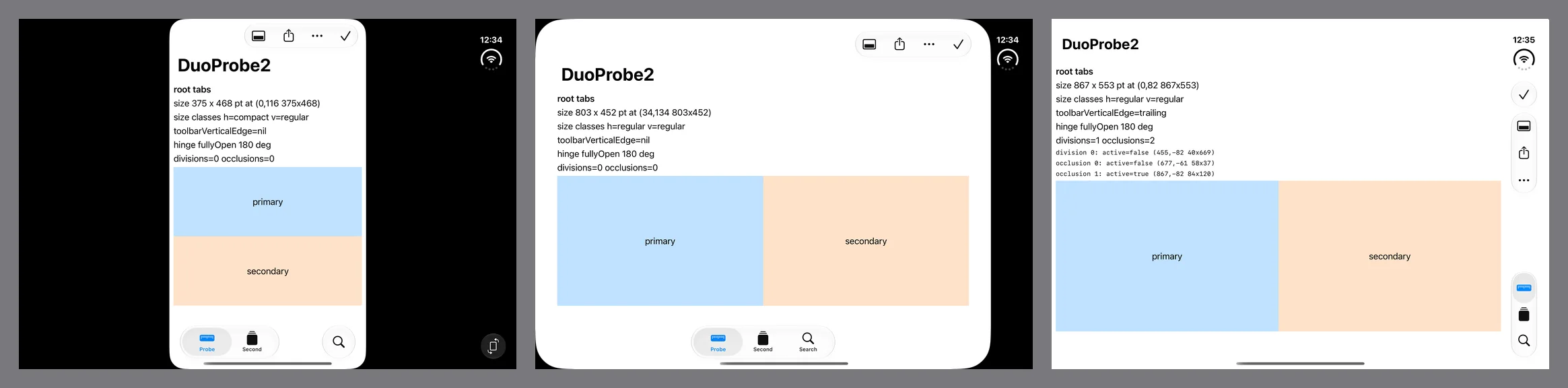
One source file, three SDK stamps, open and upright. Left to right: 26.0, 27.0, 27.1.
| Pose | Stamped 26.0 | Stamped 27.0 | Stamped 27.1 |
|---|---|---|---|
| Closed | 375 by 667, scaled into the space beside the rail | 386 by 678, beside the rail | 466 by 678, the whole display |
| Open | 375 by 667, a phone in the middle of the screen | 871 by 669 | 951 by 669 |
| Open, turned | 375 by 667 | 669 by 871 | 669 by 951 |
| Closed, turned | 667 by 375 | 678 by 386 | 678 by 466 |
| Width size class, open | compact | regular | regular |
| Bars | horizontal everywhere | horizontal everywhere | vertical, except open and turned |
toolbarVerticalEdge |
nil | nil | trailing, except open and turned, where it is nil |
| Reserved regions | none | none | the fold, both cameras, the status column |
| Partly folded | no change | no change | the fold becomes an active division; split arrangements open a gap on it |
Window sizes are in points, as each build’s own window reported them.12
Read the middle column twice, because it is the one most apps are about to ship. A build from Xcode 27 gets regular width on the inner display and most of the screen, which is a real improvement over the phone-in-a-box of the first column. It stops 80 points short of the trailing edge, where the status rail is, it does not get vertical bars, and the system tells it nothing about the fold or the cameras: every reserved-region query came back empty, in every pose, however many times the probe asked.12 To be sure the stamp was a fair stand-in, I also compiled a plain version of the probe with Xcode 27.0 itself, against its own iOS 27.0 SDK. It got the same windows: 386 by 678 closed, 871 by 669 open.12
Apple’s written guide is less exact here than the talk, and its wording moved. On September 17 its overview read “Build your app with Xcode 27.1 or later to use all of the available screen space on iPhone Duo. In earlier versions, your app doesn’t extend under the status bar and camera.” By September 19 it read, as it does on October 2, “Build your app with the latest version of Xcode to use all of the available screen space on iPhone Duo. When you build with Xcode 26 and earlier, your app doesn’t extend under the status bar and camera.”2 The new sentence names only Xcode 26 and earlier as falling short, and “latest version” does not say whether a beta counts, so a reader could take an Xcode 27.0 build to get the whole screen. In this beta’s simulator it does not. It gets the talk’s middle tier, and the earlier wording matched what I measured. Until hardware says otherwise, plan on the table.
So before anything else, check the stamp on the build you are testing:
otool -l Build/Products/Debug-iphonesimulator/YourApp.app/YourApp | grep -A4 LC_BUILD_VERSION
A debug build from Xcode keeps its code in YourApp.debug.dylib beside a small launcher, and both carry the command. You are looking for sdk 27.1 or later; the probe stamped 27.2, which is what the Xcode 27.2 beta’s SDK would write, got the same treatment as 27.1.12 Kiradex’s reads minos 27.0 and sdk 27.1: it installs on iOS 27.0 and gets the 27.1 behavior on a Duo.13
I am pressing on this because I got it wrong in public. My first report from this simulator, on September 21, said the toolbar never went vertical and the reserved regions were empty in every pose. The beta was fine. I had compiled that probe by calling swiftc -sdk directly, the link step took the macOS SDK inside the same Xcode as its root, and the binary went out stamped 27.0: everything I measured that day was the middle column. That post now carries the correction.12 If your Duo layout looks half-adopted in the simulator, bars across the top and a dead black strip down the side, check the stamp before you check your code.
The app on the bench
Kiradex is a collector’s app for trading cards that we have in TestFlight: every set, the cards you have and the ones you want, what they are worth over time, and each card as a 3D object you can turn over. It is free, iPhone only, runs on iOS 27.0 and later, and keeps a collector’s lists in their own iCloud with no server of ours in between.13 It is not finished. The scanner has never met a real camera, and until this week nobody had looked at the app on an open Duo: beside the inner-display layout, its roadmap carried the line “Seen on the open Duo’s inner display only by the column maths; the simulator was folded shut.”13 That makes it a fair test. The Duo work in it was written from Apple’s documentation and never checked against a screen.
What it does for the Duo is small, and it is worth listing because of how little of it is Duo code:
- Navigation is the system’s. A
TabViewwith five tabs, one of them the search role, and aNavigationStackin four of them; the scanner is a camera view with no bar of its own. Toolbar items areLabels with a title and a symbol, attached with.toolbar. There is no custom bar anywhere. - Layout follows the size class. Compact width gets a three-column binder page and pushes a card’s inspector onto the stack. Regular width, which on an iPhone-only app mostly means the Duo’s inner display, gets a wall of cards in an even number of columns; picking one splits the screen between the page and the inspector.
- Two calls from the 27.1 SDK. The split is an
ArrangementViewin the.splitstyle, with anHStackas the fallback below iOS 27.1. AndonHingeChangereplays the app’s opening animation, a red device swinging open, when the phone goes from closed to anything else. - No orientation lock, and a launch screen.
Info.plistlists portrait and both landscapes and declaresUILaunchScreen.13
That is the whole list: two availability checks in two files. Everything else the phone does to the app, it does to any app built this way.
The pictures in this post show the app as it runs, with card images from the public catalog it reads. Kiradex is an independent collector’s tool, not affiliated with or endorsed by Nintendo, Creatures Inc., GAME FREAK inc. or The Pokémon Company, and the card images belong to their owners.
Step two: walk every pose
Apple’s guide gives the walk as four checks:2
- “Confirm your views resize well in each supported orientation and pose.”
- “Inspect how the system presents your app’s navigation bars, toolbars, and tab bars vertically on the side of the display.”
- “Identify any views, sheets, or popovers that position awkwardly when you fold or open iPhone Duo.”
- “Identify elements or controls in your views that appear in the fold, and are difficult to see or interact with.”
Its design guidance says how many layouts that should take: “A compact width layout for the outer display and a regular width layout for the inner display give you the fundamentals for every pose.”7
The poses are buttons in Device Hub: Closed, Book, Open, and Rotate Right, and each combination is a different screen. SwiftLee’s guide adds a finer control I did not need: “Holding Option ⌥ reveals a slider that you can use to control the hinge angle of the device with precision”.17 Before looking at the app, it helps to know what the system hands any app in each one. These are the probe’s readings with the 27.1 stamp:12
| Pose | Window, points | Size classes (width, height) | Bars | Reserved regions reported |
|---|---|---|---|---|
| Closed | 466 by 678 | compact, regular | vertical, trailing edge | outer camera, 37 by 37, active; status column, 84 by 170, active |
| Closed, turned | 678 by 466 | compact, compact | vertical, trailing edge | outer camera, active; status area, 84 by 82, active |
| Open | 951 by 669 | regular, regular | vertical, trailing edge | fold, 40 wide at x 455 to 495, inactive; inner camera, 58 by 37, inactive; status column, 84 by 120, active |
| Book | 951 by 669 | regular, regular | vertical, trailing edge | the same three, with the fold active |
| Open, turned | 669 by 951 | regular, regular | horizontal | fold, 40 tall at y 455 to 495, inactive; inner camera, inactive; status area, 134 by 82, active |
| Book, turned | 669 by 951 | regular, regular | horizontal | the same three, with the fold active |

Three things in that table shaped everything after it.
The window does not change when the phone folds. Book and Open report the same size. The only difference the app can see is that the fold’s division goes from inactive to active, and the hinge reports partly open at 127 degrees where it had reported fully open at 180. An app that reads only its size never learns the phone was folded.
The fold is always there, and it is small. It is reported open or folded, at the exact middle, and the frame the API returns is 40 points wide in both states, with 20 points of margin on each side. Apple’s talk says of the fold’s region, “When flat, it’s inactive and has a width of zero.” (7:32) The simulator does not return a zero-width frame. Artem Novichkov’s field notes describe the same reading as “40 pt wide, with 20 pt margins on each side of a zero-width fold line,”17 and I read the talk’s zero the same way, as the line between the margins; that is a reading, not something Apple’s text says. The talk makes the practical point too: “By default, only active ones will be returned, but you can query for inactive ones”, and “in grid-like layouts, you could prefer even numbers of columns when a division region is present regardless of its active state.” (7:16, 7:41)5
The regions arrive late. On every launch the probe’s first few evaluations read no regions at all, and every evaluation after that read the full set. A view that asks once, in its first layout pass, caches an empty array. Read them in the view’s body, on every evaluation; the probe re-evaluated on a one-second timer, and Artem Novichkov’s notes put the rule directly: “Read them in the GeometryReader body so the view updates when they arrive. Don’t cache them.”1217
One practical note before the app. The iOS 27.1 simulator runtime in this beta supports exactly one device type, iPhone Duo; asking it for an iPhone 18 Pro Max fails with “Incompatible device”. So the comparison below, the same build on an ordinary iPhone, ran on the iOS 27.0 runtime, which is also a quick way to confirm that the #available fallbacks work.12
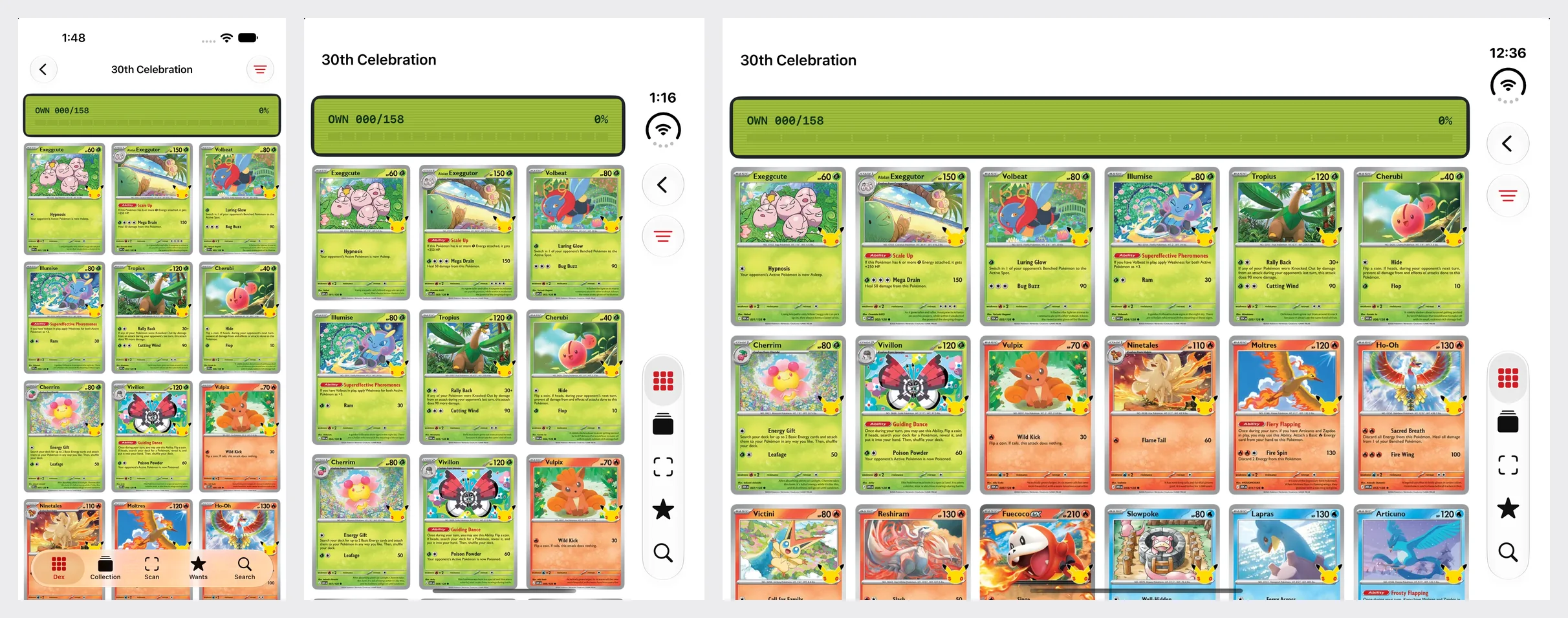
One build of Kiradex on a 6.9-inch iPhone, the closed Duo, and the open Duo. Nothing in the app’s code puts the bars on the side.
What the walk found
A UI test walked build 5 through eight kinds of screen in each of six poses (seven with the phone closed and turned, where the Settings button had moved into the overflow menu) while a script captured both displays at every stop: 1398 by 2034 pixels outside, 2853 by 2007 inside, the sizes App Store Connect lists.13 Read against Apple’s four checks, the app passed more than I expected and failed in places no reading of the code had flagged.
What came free
The bars. Closed, the toolbar and all five tabs stand in the rail under the clock; open, the same; open and turned, they go back to the top and bottom. Nothing in the app asks for any of it. The second talk gives the reason hand-built bars are left behind: “When used to build custom bars, content from sub-components like UIToolbar, UINavigationBar, or UITabBar won’t be considered.” (2:52)4 And because every toolbar item on the main screens is a Label, each has a symbol for the rail and a title for the overflow menu, which is the guide’s other condition: “If your item has a title and doesn’t have an icon, the system doesn’t present it vertically.”2
The fold. Open, a set’s cards hang six across, an even number, so no card sits on the middle of the screen. Pick one and the screen divides between the page and the card’s inspector at the middle of the app’s content area, x 433. That is 42 points left of the fold, because the rail takes 84 points off the right-hand side, and while the phone is flat it does not matter. In the Book pose the arrangement view moves the divider onto the fold and leaves the 40-point band empty: the inspector that began at x 433 now begins at 495. The app has no code for the Book pose at all; this is ArrangementView doing what the talk describes, “moving, resizing, or reorganizing what’s already there.” (6:04)513
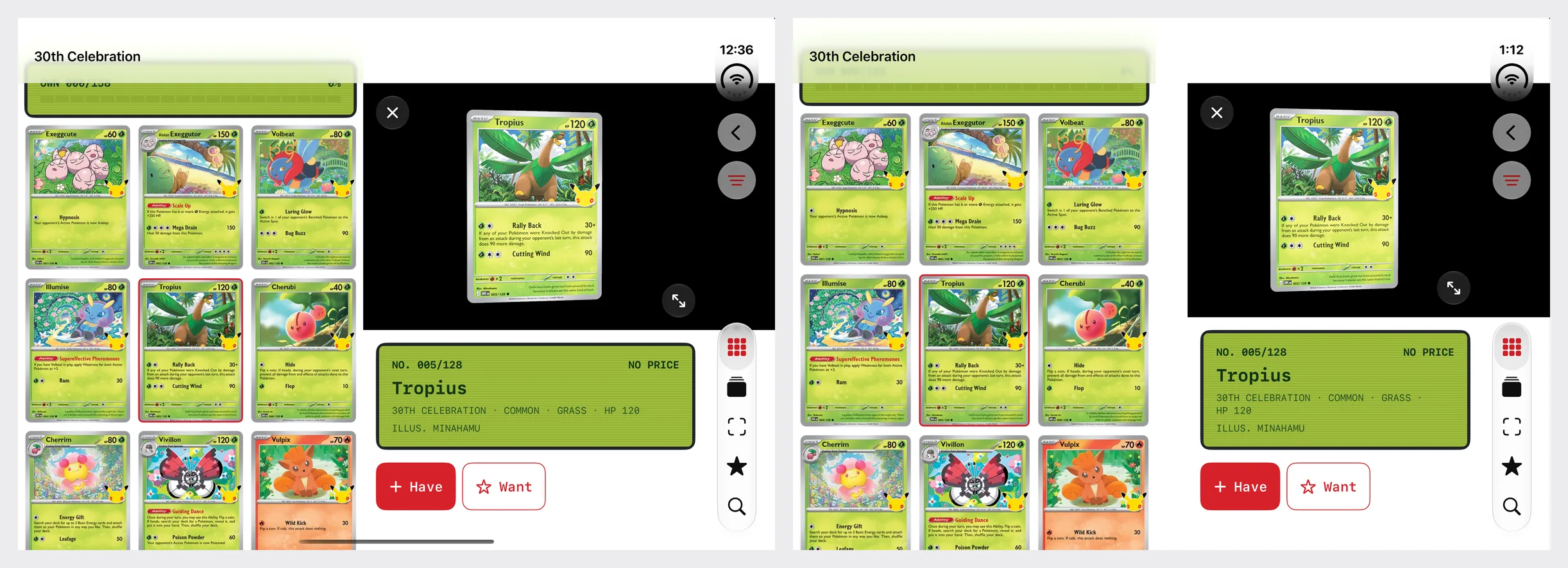
Open and flat, then in the Book pose. The gap in the second picture is the fold, and the app did not put it there.
Sheets, when open. On the inner display a sheet arrives centered and its Done button stays horizontal; in the Book pose the probe’s sheet moved itself to the leading side of the fold.12
The hinge, as an event. Unfold the phone while the app is running and its opening plays again on the inner display: the red device, closed, then swinging open into the app. That is one onHingeChange handler that fires when the status leaves closed, and it is the division of labor the fourth talk asks for: “Hinge data is observed live, and is ideal for driving interactions or effects. For layout, use the arrangement and region APIs.” (2:34)6

Unfolding with the app running: the opening is the app’s own device, drawn by the app, replayed by the hinge.
What it missed
A sheet with one text button reserves the rail and leaves it empty. Closed, the Settings sheet gives up a strip down its trailing edge for a vertical bar, and then puts nothing in it: the only toolbar item is a “Done” with a title and no symbol, and a text-only item stays horizontal. The form is squeezed into what is left. The probe measured the cost: 374 points of content width with the rail reserved, 450 with the vertical bar turned off.12 Apple’s talk names this case: “if a sheet is control-heavy with only one item, like the close button here, consider disabling a vertical bar so it doesn’t reduce available space.” (14:37)4 There are two repairs, and the probe ran both. Give the button a symbol, Button("Done", systemImage: "checkmark"), and it moves into the rail as a prominent check; or add .toolbarVerticalBehavior(.disabled) to the sheet’s content and the rail goes away, at the price of a shorter sheet.
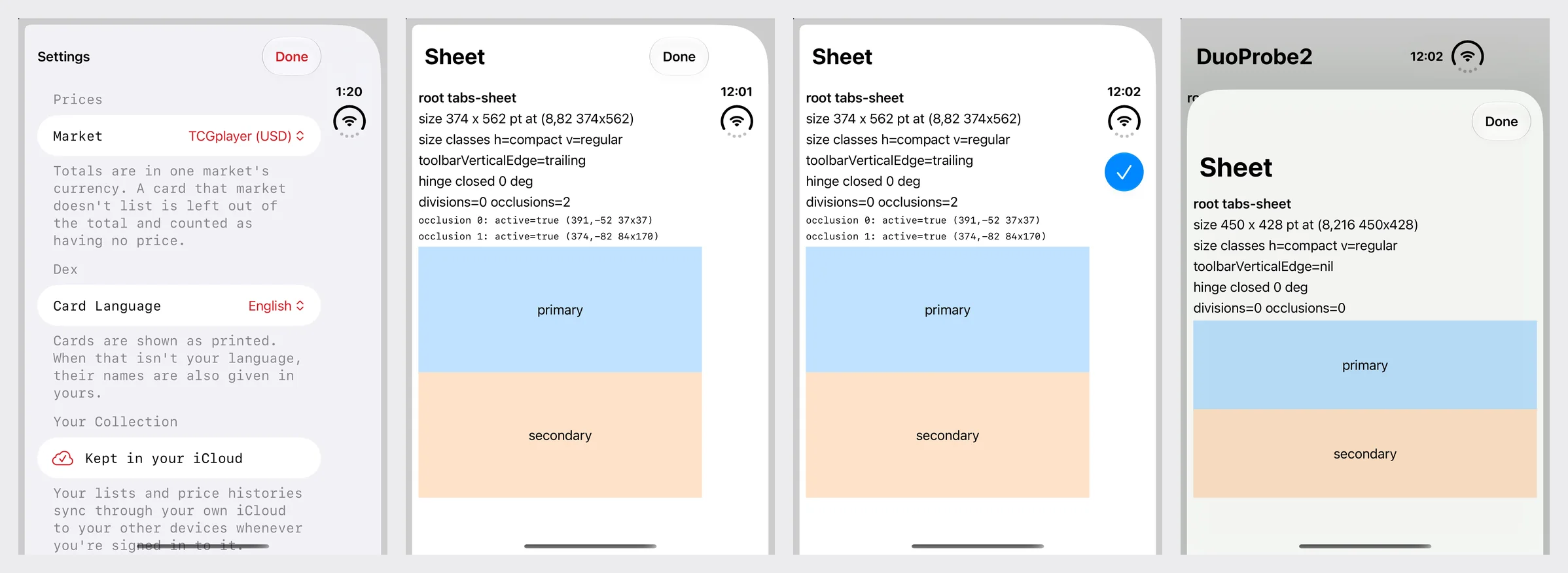
Left to right: the app’s sheet, then the probe with a text-only Done, with a symbol, and with the vertical bar disabled.
The full-screen card runs under the camera. The app’s showpiece is a card on a black stage with the bars hidden, and its stage ignores the safe area on every edge. On the outer display that sends the card’s top corner under the camera. The system reports that camera to any view that asks, as an active occlusion 37 points square, and its position matches the cutout in Apple’s own bezel artwork to within a point and a half.1112 Apple’s design guidance allows the full-width treatment “as long as nothing conflicts with the Dynamic Island or the status bar.”7 The repair is to keep the full bleed for the black ground and bring the card itself inside: either let the stage honor the trailing and top safe area on this display, or read reservedRegions(kind: .occlusion) and frame the card clear of what comes back.
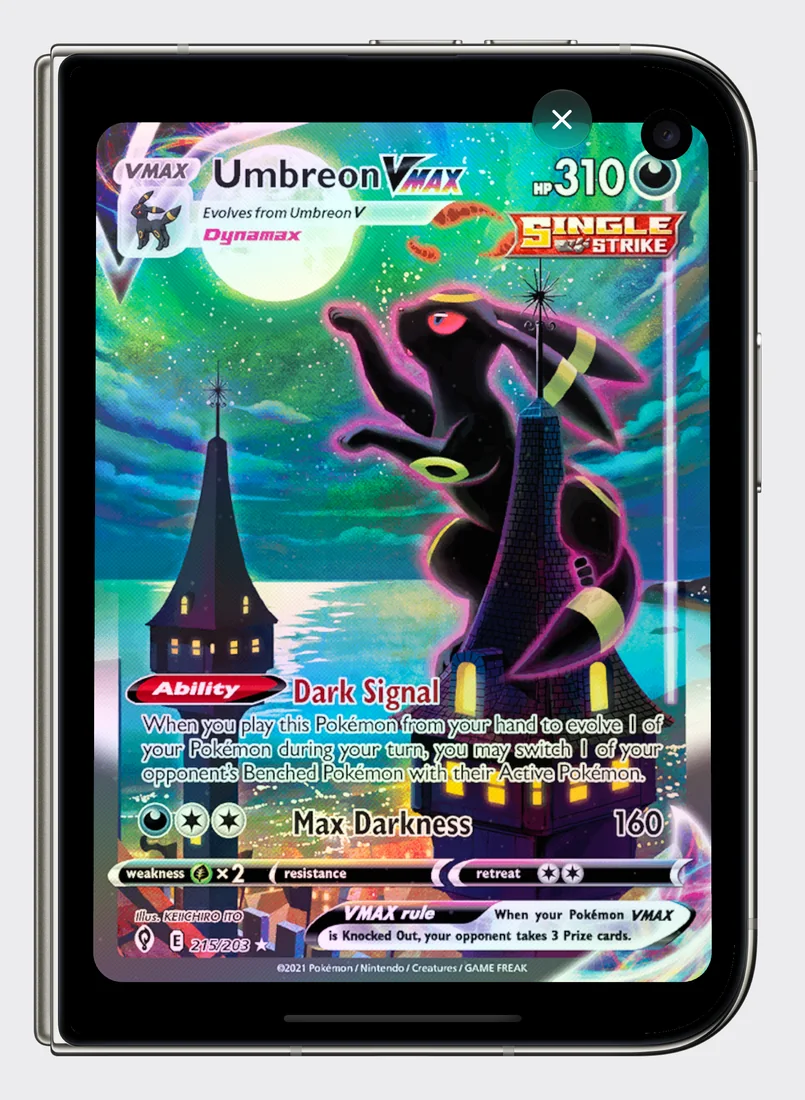
The viewer’s capture inside Apple’s bezel for the outer display. The simulator’s screenshot has no hole in it; the phone does.
Turned, the two panes stack. Open and turned to portrait, the display is 669 points wide and still regular width, so the app still splits. But an arrangement view that fills a taller-than-wide space splits top and bottom, per Apple’s guide: “it places the primary view on top and the secondary view below it when the containing view is taller than it is wide.”2 The result is a strip that shows one row of cards and the top of a second, above an inspector. The app’s own comment on that line says the pair “is only useful side by side,” and nothing enforced it. Limiting the style with .split.axes(.horizontal) is the documented control,16 with a catch the talk spells out: “If the split arrangement cannot split among an axis, and it’s the primary axis, the arrangement view chooses to only show a single view.” (12:44)5 The probe bears out both halves: filling the turned display, a plain split stacked, and the horizontal-only split showed the primary pane and nothing else.12 For this app that would hide the inspector, so the honest fix is a decision, not a modifier: when the space is taller than it is wide, push the inspector the way the compact layout does.
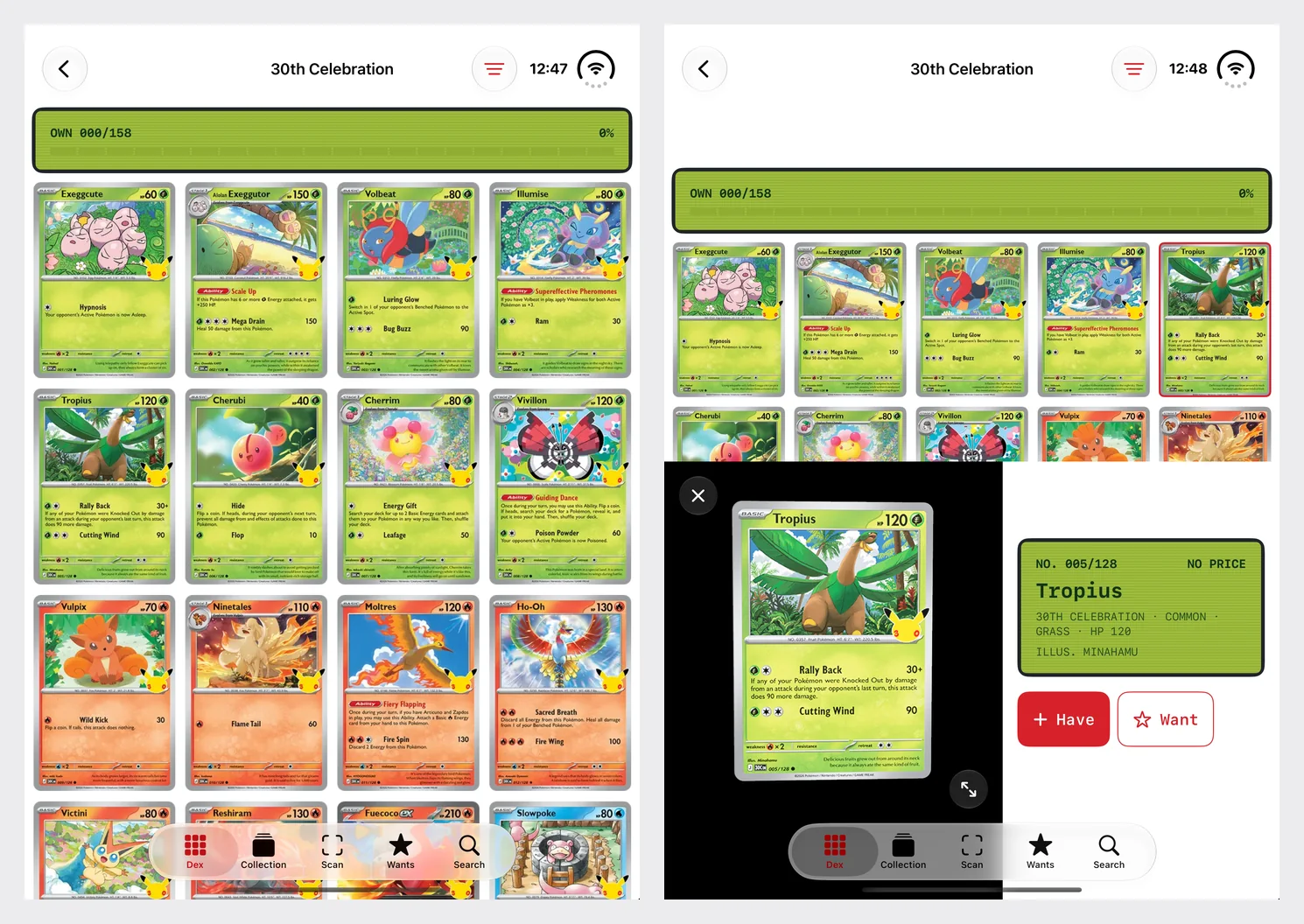
Turned: horizontal bars, as Apple’s guidance says, and a split that went the wrong way for this pair of views.
A card left open while the phone unfolds lands in neither layout. Closed, picking a card pushes its inspector onto the navigation stack. Unfold with that inspector showing and the card is still there, which is the part that is easy to get wrong. But it is still a pushed screen, now 951 points wide: the stage on the left, the details in a white box adrift on black, a Back button in the rail. The app’s design for this display is the wall with the card beside it, and the only way to reach it is to go back and pick the card again. One selection drives both layouts; one navigation path does not. The repair is to notice the change from compact to regular width with a card selected and pop the pushed screen, so the split takes over.
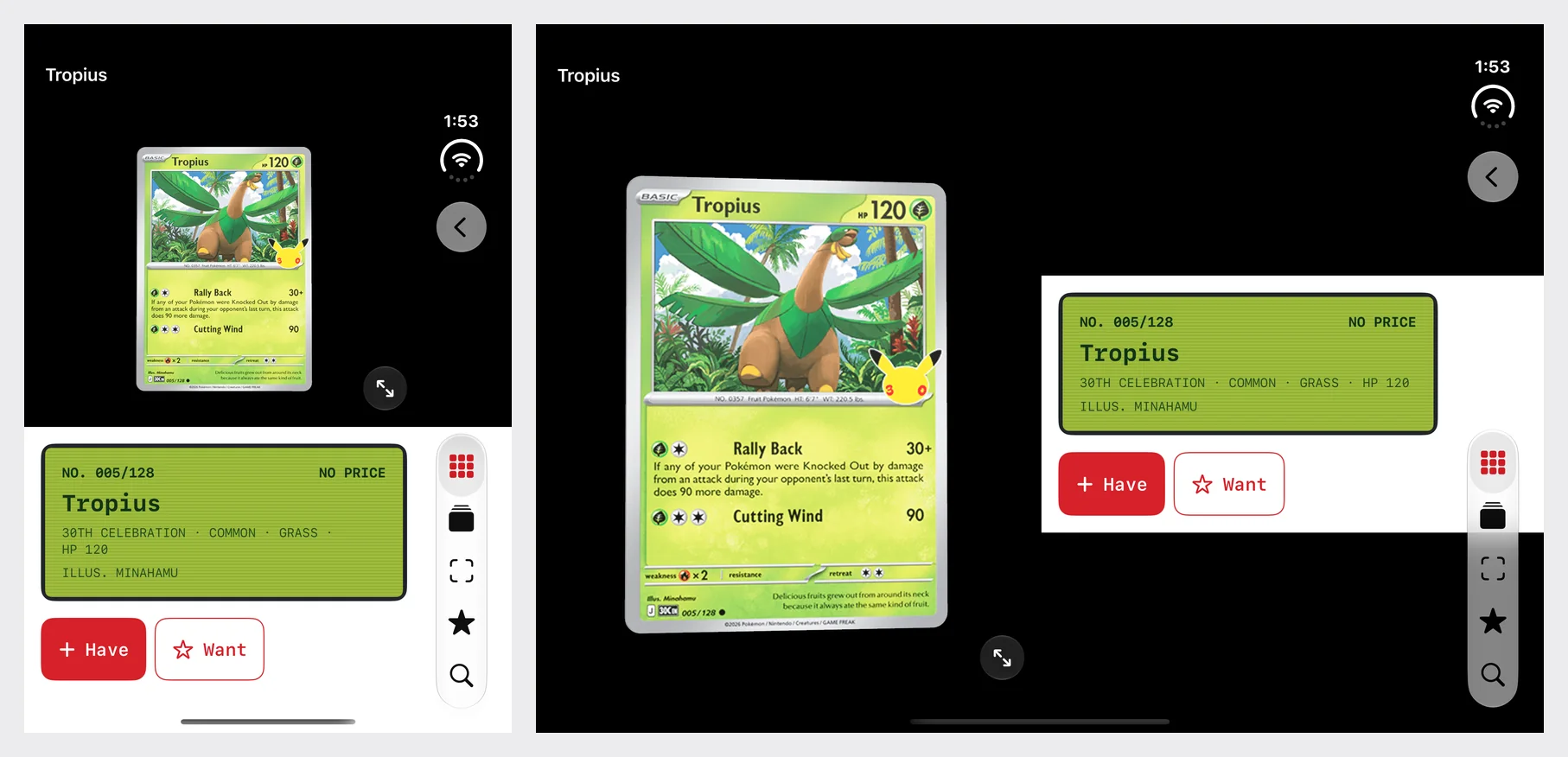
The same card before and after unfolding. The state survived; the layout is the compact one, stretched.
Regular width is not “the Duo”. The app treats regular width as the inner display: wall, even columns, split. A 6.9-inch iPhone on its side is regular width too, with a compact height, and the app does not lock orientation. Run there, the same branch produces a page inset from the left edge, an inspector whose details column is too narrow for the card’s name, and action buttons cut off at the bottom edge of the screen. Nothing about that is new in iOS 27, and it did not come up in any Duo pose I ran; the Duo work found it because it was the first time anyone walked the regular-width layout on every screen that reports one. The check that separates the two is the other size class: the inner display is regular in both, and Apple’s talk gives the outer display turned on its side as compact in both.3 A layout that needs room in two directions should ask for both.
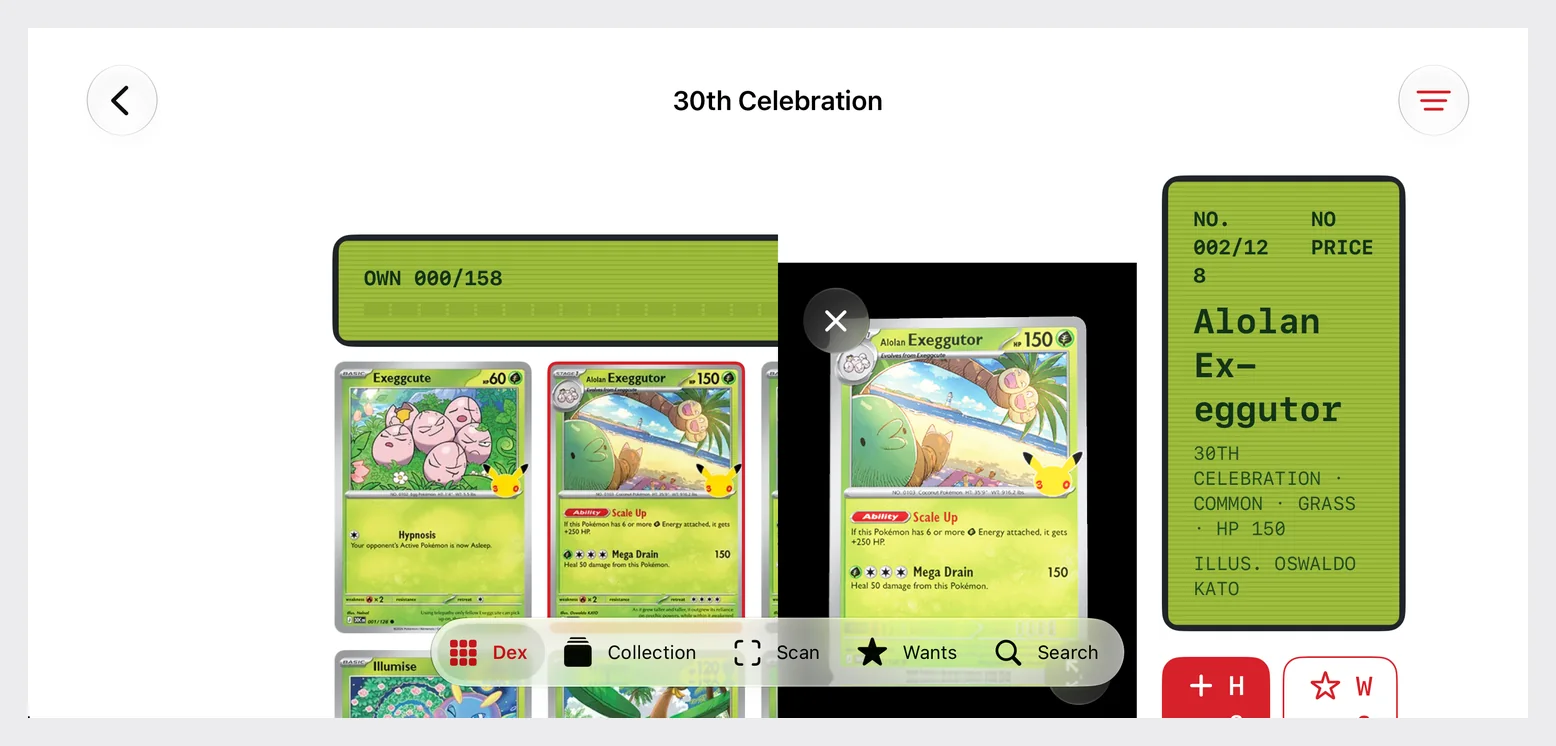
The regular-width layout on a phone that is not a Duo: a 6.9-inch iPhone on its side, iOS 27.0.
The keyboard covers the rail. With the keyboard up on the outer display, the tabs at the bottom of the rail are behind it. That is the system’s layout, not a defect; the talk says the bar may need to overflow “as other competing UI appears, like the keyboard” (11:50).4 It is on this list because it broke the tooling: my first tour tapped “Collection” with the search keyboard up, and the tap landed on the letter P. UI tests that assume a tab bar is always reachable fail here first.
Two smaller things. The app chooses even columns from the width size class, where the talk’s suggestion is the fold’s own region, present or not. And one that has nothing to do with folding: opened four times in a row on the 6.9-inch simulator, the full-screen viewer showed the card the first time and an empty black screen the next three. Neither stops a TestFlight build. Both were invisible until the app was on a screen and something was pressing its buttons in order.
What the simulator could not show
The scanner. It opens the rear wide camera and already uses a rotation coordinator, which is what the camera talk asks for: “On iPhone Duo, the rotation coordinator will update when your app moves displays.” (8:19)6 Whether the session survives the move from one display to the other is a question for hardware; the simulator has no camera at all. Apple’s release notes add StandBy and most app extensions to what this runtime cannot run, and the Xcode 27.2 beta 2 notes add one for anyone automating captures: “Screenshots and recordings in iPhone Duo may be black for up to a few minutes after booting the device.”20
One source tree, two Xcodes
The calendar creates a problem. The build the store accepts comes from Xcode 27 and the 27.0 SDK; the build that behaves properly on iPhone Duo comes from the 27.1 SDK. Until Apple opens the store to the second, an app that wants to ship an update and keep working on its Duo layout has to compile under both.
if #available(iOS 27.1, *) does not get you there. Availability is a run-time question; the compiler still has to find the symbol. Kiradex wraps its two Duo calls exactly that way, and its deployment target is 27.0, so the build installs on a phone that has not updated. Under the 27.1 SDK that compiles. Under Xcode 27.0 a file that does the same thing stops at error: cannot find 'ArrangementView' in scope, because the 27.0 SDK has no such type.14 Kiradex is not in the store yet, so it can simply stay on the beta toolchain; an app with customers cannot.
Swift’s documented conditions do not separate the two SDKs either. #if compiler(>=6.4) is true under both: Xcode 27.0, Xcode 27.1 beta, and Xcode 27.2 beta all print the same Apple Swift version 6.4 (swiftlang-6.4.0.34.1 clang-2100.3.34.1).14 That leaves two fences, and I ran both.
A compilation condition you set yourself. This is the documented route. Define a flag only in the configuration you build with the beta (in Xcode, SWIFT_ACTIVE_COMPILATION_CONDITIONS = DUO_SDK; on the command line, -D DUO_SDK) and fence the 27.1-only code with it:
struct Pair<Primary: View, Secondary: View>: View {
    @ViewBuilder var primary: Primary
    @ViewBuilder var secondary: Secondary

    var body: some View {
        #if DUO_SDK
        if #available(iOS 27.1, *) {
            ArrangementView { primary } secondary: { secondary }
                .arrangementViewStyle(.split)
        } else {
            HStack(spacing: 0) { primary; secondary }
        }
        #else
        HStack(spacing: 0) { primary; secondary }
        #endif
    }
}
Without the flag, that file type-checks under Xcode 27.0 and under the 27.1 beta. With the flag it type-checks under the beta and fails under 27.0 with the same missing-symbol error: the wrong pairing does not build.14
The SDK’s own version, read by the compiler. canImport takes an underscored second argument that compares against a module’s version, and SwiftUI’s module version differs between the SDKs: 8.0.84.1.104 in the 27.0 SDK, 8.0.85.27 in the 27.1 SDK, 8.1.6.1.101 in the 27.2 beta SDK.14 So this needs no build setting:
#if canImport(SwiftUI, _version: 8.0.85)
// ArrangementView, reservedRegions, onHingeChange, toolbarVerticalBehavior
#else
// what the app did before
#endif
I put a #warning in each branch and compiled it with all three Xcodes: 27.0 took the second branch, the 27.1 beta and the 27.2 beta took the first.14 The caution is in the underscore. The Swift book’s grammar for this condition is canImport(import-path) and nothing more, so _version: is a compiler feature without a documented contract, and the number 8.0.85 is something I read out of two SDKs, not something Apple published.14 Use it while the store is closed to 27.1 if a build setting is awkward in your setup; use the flag if you want something you can defend.
Either way the fence is temporary. The day App Store Connect accepts builds from an Xcode that carries the 27.1 SDK, delete it and keep the #available checks, which are what protects a phone still on iOS 27.0.
Submitting: what App Store Connect takes today
TestFlight takes the 27.1 build. App Store Connect’s release notes for September 18: “You can now submit apps built with Xcode 27.1 beta using the SDK for iOS 27.1 beta or iPadOS 27.1 beta for internal and external testing.” The entries for September 16 and September 28 say the same for Xcode 27.2 beta and beta 2.8 Kiradex goes up this way; its fifth build, the one this post tests, was uploaded on October 2 and App Store Connect lists it as valid.13
The App Store does not, yet. The newest entry that opens the store is September 14: “You can now upload apps built with Xcode 27 using the SDK for iOS 27.0, iPadOS 27.0, macOS 27.0, tvOS 27.0, visionOS 27.0, and watchOS 27.0 for the App Store, and for internal and external testing through TestFlight.”8 Nothing after it mentions 27.1 and the store in the same sentence, and Apple’s releases feed, whose newest items are dated September 28, lists one Xcode 27.1 build, the September 18 beta.8 Apple has not said when that changes. The device goes on sale October 23.1
Unless Apple opens the store to the 27.1 SDK before October 23, the store build your customers have on launch day is at best a 27.0-SDK build, and the comparison above says what it gets in the simulator, with Apple’s talk describing the same middle tier: the screen beside the status rail, horizontal bars, no fold. That is a usable app if it resizes well, which is the argument for shipping the resizing work now, with Xcode 27.
A launch screen is now mandatory. Not a Duo rule, but it arrives with the same SDK and it fails at upload, not at review. Apple’s technote: “Starting in iOS 27 and iPadOS 27, App Store Connect requires your app to include a launch screen configuration in its Info.plist,” and without one of UILaunchStoryboardName, UILaunchStoryboards, UILaunchScreen, or UILaunchScreens the upload is rejected with “ITMS-90870: Missing launch screen.”10 Kiradex declares UILaunchScreen with a color, the red of its cover, so launch runs straight into the opening animation.13
The screenshot slots exist on paper. App Store Connect’s screenshot specifications have listed iPhone Duo since September 9, in two pairs: 1398 by 2034 or 2034 by 1398 pixels for the outer display, and 2007 by 2853 or 2853 by 2007 for the inner one, with the note “Support for uploading assets for this device in App Store Connect will be available later this year.”9 The usual rules apply: “You can upload one to 10 screenshots in .jpeg, .jpg, and .png formats,” and “Images can’t include alpha channels or transparencies.”9
One sentence on the upload page decides how you plan around that: “Once your app is submitted for review and approved, you must create a new version to update the screenshots.”9 Duo screenshots cannot be slipped in later on their own; when the slots open, they ride on a version.
Put together, the sequence I would run, and am running for Kiradex:
- The 27.1 build in TestFlight now, with the findings from the walk fixed as they come.
- For an app already in the store: an update built with Xcode 27 that carries every fix that does not need the 27.1 SDK. Size classes instead of idiom and orientation checks, per-edge safe areas, bars owned by system containers, a title and a symbol on every toolbar item.
- Screenshots captured at the Duo sizes now, from the simulator, and kept.
- A version held ready for the day two things are true: an Xcode with the 27.1 SDK is accepted for the store, and the Duo slots take uploads. Apple has posted each change of this kind so far in App Store Connect’s release notes, the September 14 entry that opened the store to the Xcode 27 release and the September 9 entry that added the Duo screenshot specifications among them, so that is the page to watch, with the developer news page beside it.8
One more requirement sits further out. From April 2027, “iOS and iPadOS apps must be built with the iOS 27 & iPadOS 27 SDK or later” to be uploaded at all.18 An app still built with an iOS 26 SDK gets the smallest of the three pictures above on a Duo, and from April 2027 it cannot upload an update until it moves to the iOS 27 SDK.
Screenshots for two displays
The walk already produced the raw material: every stop was captured at 1398 by 2034 and 2853 by 2007 pixels, and turned, 2034 by 1398 and 2007 by 2853, all four sizes in App Store Connect’s iPhone Duo row.913 What remains is deciding what goes around them, and that is where a folding phone invites a mistake.
The picture everyone wants is the phone half open at an angle with the app pouring across the fold. Apple’s marketing guidelines rule it out line by line. For its own device images: “Use Apple product images ‘as is’ and without modification. Modifications include adding reflections, shadows, highlights, or graphic elements that appear to enter or come out of the product screen; cropping, tilting, or obstructing any part of the images; animating, flipping, or spinning the images”. For imagery you make yourself: “Straight-on product shots are preferred. Don’t use extreme angles or alter an Apple product in any way.” And under Unauthorized Uses, first on the list: “Rendering in 3D or creating any simulation of an Apple product”.11 My screenshots post goes through how the award winners treat those rules and what a set looks like when it keeps them; nothing about a hinge changes them.
What Apple gives you instead is a bezel pack for this phone, in two finishes and five views: the closed phone in portrait and landscape, the open inner display in landscape and portrait, and the open phone from the back with the outer display beside the cameras. The openings in those files are exactly the screenshot sizes, so a simulator capture drops in without scaling.11 There is no half-folded view and no angled one.
So the frames below are built from three parts: a ground in the app’s own colors, a short line of type, and the capture inside Apple’s bezel, whole and upright, with nothing over it. Variety comes from the ground, the size of the device, and one frame per set that has no device at all: the app’s full-screen card on black, which is the app’s own 3D and nobody’s hardware.
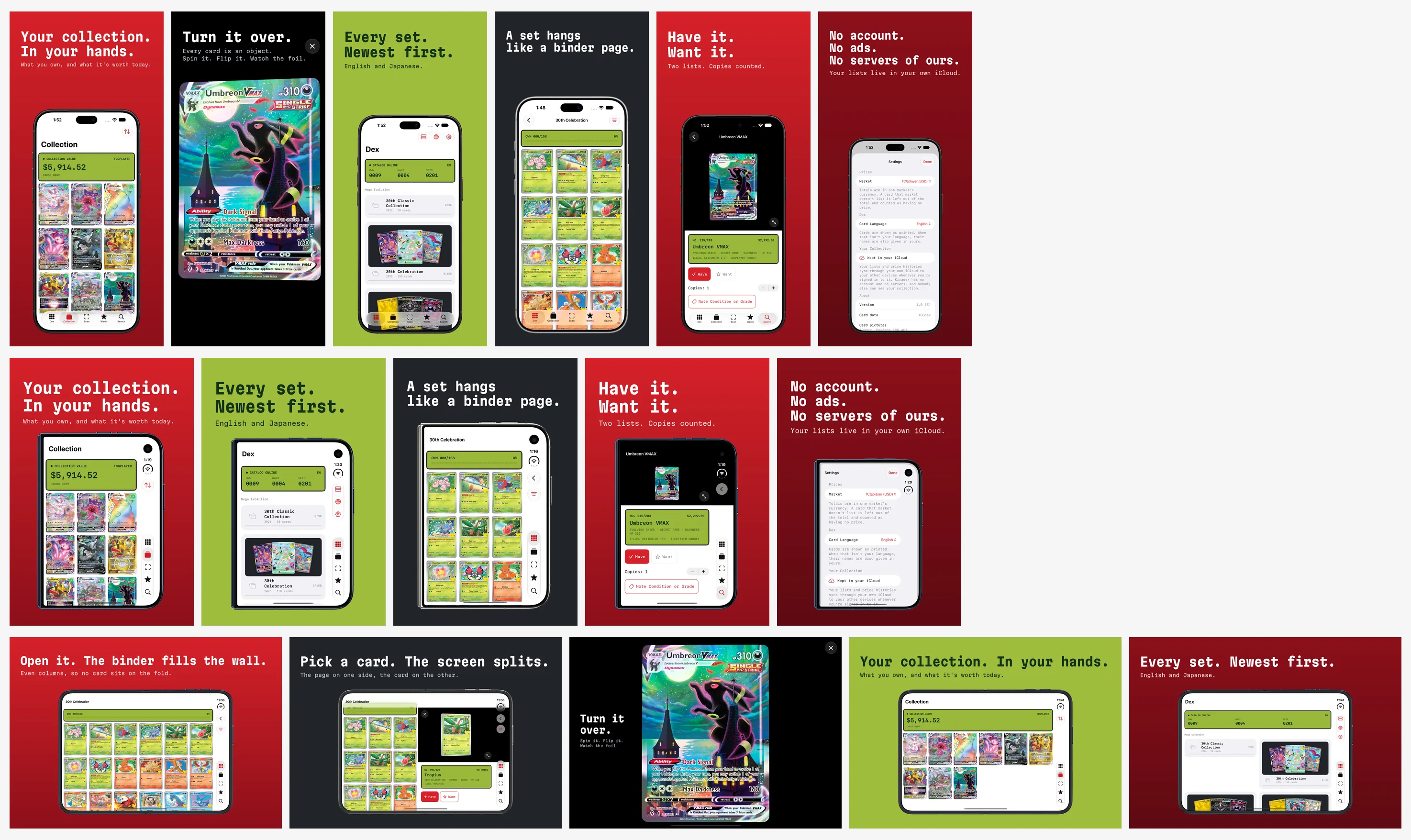
Three sets composed by script from the tour’s captures, at 1320 by 2868, 1398 by 2034, and 2853 by 2007 pixels. They show the method, not the listing: these captures carry catalog cards, and what the store set shows is the open question in the third note below.
Three practical notes from building them.
Compose by script. The sets above come out of one Python file that takes a capture, a headline, and a ground, and writes a PNG at the exact size with no alpha channel. When the app changes, and this one changed twice on the day I captured it, the tour runs again and the frames rebuild.
Screenshot what the phone adds. Apple’s upload page says a 6.9-inch set is enough when the interface is the same on every size: “provide only the highest resolution screenshots required. They automatically scale down to smaller device sizes.”9 On this phone it is not the same: the wall of cards and the split inspector exist only on the inner display. Those are the two frames the inner set opens with.
Mind what is on the screen. The same guidelines say “You are responsible for securing the rights to all materials used in screen content within your app.”11 A collector’s app shows other people’s artwork by its nature, and a store listing is marketing, which is a different thing from what the app displays in use. We have not made that decision for Kiradex, and the frames above will not be submitted as they are. The tour has a second mode that runs on six invented cards for this reason; they have no artwork yet, so a submitted set means designing stand-ins or settling the rights.
Kiradex has no listing yet. When it does, it starts with a 6.9-inch set, and the Duo sets wait with a version of their own for the day App Store Connect takes them.
Handing the job to a coding agent
Most of this work is the kind an agent does well, provided it can see the app. Two halves, and Apple ships one of them.
The static half is Apple’s. The first Tech Talk ends on it: “During the talk, Modernize Your UIKit App, we introduced a new app modernization skill. With Xcode 27.1, this skill has a new name: App Resizability. It now supports SwiftUI and iPhone Duo.” (9:19)3 The skill is a set of plain text files inside the beta: in Xcode 27.1 beta, Contents/PlugIns/IDEIntelligenceChat.framework/Versions/A/Resources/app-resizability.idechatprompttemplate and five reference files beside it.15 Its instructions say how wide to cast: “Treat a request about the foldable iPhone Duo as a request for every task in the Task Registry, because a screen that changes size exposes all of them at once.”15
It is worth reading even if you never run it, because it is Apple’s review checklist written down. It checks three project settings and changes none of them (a launch screen key, the iPad orientation declaration, UIRequiresFullScreen), then hunts five patterns: UIScreen.main, layout decided by interface orientation, layout decided by userInterfaceIdiom, application life cycle where scene life cycle belongs, and safe-area code that assumes the two sides match. The safe-area file has the line that explains half of what goes wrong on this phone: “Asymmetric horizontal insets are the normal case. Where a vertical bar is present, one horizontal edge usually carries the whole inset and the other carries zero.”15
Kiradex is a SwiftUI app written this year, and those five searches find nothing in it.13 Every finding above came from running it. That is the limit of the static half: it reads source, and the fold, the rail, and the keyboard are only visible on a screen.
The other half is a walk the agent can run and look at. What made the audit above possible was three small pieces, and none of them is specific to this app:
- A UI test that visits every kind of screen and stops at each one. Not assertions; a tour. Ours opens the Dex, a set, a card, a sheet, the collection list, a card from the collection, the full-screen viewer, and search with the keyboard up: eight stops.13
- A capture that happens on the Mac, not in the test. A UI test’s own screenshot is of one display.
simctlreaches both:
xcrun simctl io "$UDID" screenshot --type=png --display=primary   outer.png
xcrun simctl io "$UDID" screenshot --type=png --display=primary-1 inner.png
The test writes an empty file named for the stop; a shell loop on the Mac sees it, captures both displays, and answers with a second file; the test waits for that and walks on. The outer capture is 1398 by 2034 pixels with the phone closed and the inner one 2853 by 2007 with it open, so the audit’s pictures and the store’s screenshots come out of the same run.913
3. A way to change the pose without a hand on the mouse. simctl has no pose command and the UI-testing frameworks in this beta have no hinge call that I could find, so the script presses Device Hub’s Closed, Book, Open, and Rotate Right buttons through the accessibility API, which works with Device Hub in the background.13
With those, checking the app in every pose stops being a request for the agent’s opinion and becomes a folder of images per pose that it, and you, can read. The brief below is the one I would hand over. It is written to be pasted.
Goal: make this app correct on iPhone Duo in every pose, without device checks.

0. Toolchain. Build with Xcode 27.1 beta. Confirm the binary is stamped with the 27.1 SDK:
   otool -l <App>.app/<App> | grep -A4 LC_BUILD_VERSION      (debug builds: <App>.debug.dylib)
   If "sdk" is lower than 27.1, stop: nothing below will reproduce.

1. Static pass. Report every use, with file and line, of:
   UIScreen.main / UIScreen.mainScreen; userInterfaceIdiom; interface orientation used for layout;
   a UIApplicationDelegate doing scene work; one safe-area inset applied to both sides;
   a bare ignoresSafeArea() on anything a person reads or taps; fixed widths tied to a phone size;
   toolbars or tab bars built by hand instead of owned by NavigationStack, NavigationSplitView or TabView;
   toolbar items with a title and no symbol, or a symbol and no title.
   Confirm Info.plist has a launch screen key and no orientation lock the design does not need.

2. Walk. Run the screenshot tour in each pose and capture BOTH displays at every stop:
   closed; closed and turned; open; open and turned; partly folded; partly folded and turned.
   If no tour exists, write a UI test that stops at each kind of screen and signals a host script, and have
   the script capture with:  xcrun simctl io <udid> screenshot --display=primary     (outer)
                             xcrun simctl io <udid> screenshot --display=primary-1   (inner)
   Poses are buttons in Device Hub (Closed, Book, Open, Rotate Right); simctl has no pose command.

3. Read every capture and answer, per pose:
   - Are the bars where the system puts them (down the side closed and in open landscape, across the top
     and bottom in open portrait)? Is any toolbar item missing from the bar and from the overflow menu?
   - Does any sheet reserve the side rail and leave it empty?
   - With the keyboard up, what is covered? Can every tab still be reached once it is dismissed?
   - Does anything sit under the outer camera corner or the status column?
   - Open: does a grid have an even number of columns? Does any control or line of text cross the middle?
   - Partly folded: does content move off the fold? Do sheets and alerts land on one side?
   - Turned: did a two-pane layout stack when it should have stayed side by side, or the reverse?
   - Is the same selection, scroll position and navigation path still there after the pose changed?

4. Fix with, in this order: a system container that already adapts; size classes; ArrangementView for a
   custom two-pane layout; reservedRegions for hand-placed content. Never branch on the device model,
   the idiom, the orientation, or the raw hinge angle to decide layout.

5. Guard everything from the 27.1 SDK with `if #available(iOS 27.1, *)` and a fallback that keeps both
   panes reachable. If the same source must also build with Xcode 27.0, fence it at compile time.

6. Report what could not be checked in the simulator: cameras, StandBy, extensions, haptics, real reach.
Apple’s material, in the order I would use it
Everything Apple has published for this device hangs off one page, Get ready for iPhone Duo.19 In working order:
| What | Why you open it |
|---|---|
| Prepare your app for iPhone Duo (Tech Talk) | The three SDK tiers, size classes, safe areas. Start here |
| Preparing your app for iPhone Duo (guide) | The same ground as text, with every API named. The four checks under “Address common layout and resizing considerations” are the audit list2 |
| Raise the bar with iPhone Duo | Vertical bars: what goes in them, what stays out, overflow |
| Strike a pose with adaptive layouts on iPhone Duo | The fold: displacement, reserved regions, arrangement views |
| Designing for iPhone Duo (HIG) and Design for iPhone Duo | The rules a designer will hold you to7 |
| Leverage multiple displays and scenes on iPhone Duo | The hinge, Split View, a second scene on the outer display |
| Build a great camera experience for iPhone Duo | Only if you capture: two front cameras and which way each one faces6 |
| Group Lab recordings, day 1 and day 2, and the forum Q&As for SwiftUI, UIKit, and Photos and Camera | Apple engineers answering developers’ questions19 |
| Apple Design Resources | Figma and Sketch kits, and the product bezels for marketing11 |
| Outside Apple: SwiftLee’s simulator guide, iPhone Duo by Examples, BleepingSwift’s checklist, Adapty’s guide | A test list and the hinge slider; one runnable example per API, with field notes; a short checklist; the only one I found that works through a paywall17 |
| Workshops | In person. SwiftLee describes them as coming “with the opportunity to test your app on a physical device,” which before October 23 is the only way to check a camera1719 |
I have not read the Group Lab question-and-answer write-up or the forum threads: Apple’s forum pages answer an automated fetch with a human-verification page, and I did not go around it.
Key Takeaways
- If you ship an app today: send the resizing work out now, built with Xcode 27. It is what your customers will have on a Duo on October 23 if the store is still closed to the 27.1 SDK that day, and none of it needs the beta.
- If you are adopting the Duo APIs: build with Xcode 27.1 beta, confirm
sdk 27.1or later withotool, keep the build in TestFlight, and fence the 27.1-only calls if the same source still has to build for the store. - If you are testing: do not read the code, run the poses. Closed, open, partly folded, each of them turned, a sheet, the keyboard, a full-screen view, and one screen left open while the phone unfolds. Capture both displays every time.
- If you are making the store listing: capture at the Duo sizes now, compose by script, use Apple’s bezels straight-on, and keep a version ready for the day the slots open.
- If you are handing this to an agent: give it the walk, not just the files. Apple’s App Resizability skill covers what can be found by reading; everything in the findings above was found by looking.
FAQ
Does my existing app run on iPhone Duo without changes?
Yes. Apple’s talk describes what each SDK tier gets, beginning with apps not built with the iOS 27 SDK, and the simulator bears it out: a build stamped with the iOS 26 SDK ran as a 375 by 667 point window, and one stamped 27.0 filled the screen beside the status rail with horizontal bars. Neither gets vertical bars or reserved regions.312
Which Xcode do I need for the full iPhone Duo layout?
Xcode 27.1 beta (27A9269), which carries the iOS 27.1 SDK and the only iPhone Duo simulator. Its 27.1 simulator runtime supports only the iPhone Duo device type, so other iPhones are tested on the 27.0 runtime. The Xcode 27.2 beta’s SDK has the same APIs, and a probe stamped 27.2 behaved like 27.1 in the simulator, but that Xcode has no Duo to run on.81214
Can I submit an iPhone Duo build to the App Store today?
Not one built with the 27.1 SDK, as of October 2, 2026. App Store Connect accepts builds from the Xcode 27.1 and 27.2 betas for internal and external TestFlight testing and Xcode 27 builds for the store. Apple has not dated the change.8
What screenshot sizes does App Store Connect want for iPhone Duo?
1398 by 2034 or 2034 by 1398 pixels for the outer display, and 2007 by 2853 or 2853 by 2007 for the inner display, one to ten images with no alpha channel. Uploading them is listed as coming “later this year.”9
How do I capture both displays of the iPhone Duo simulator?
xcrun simctl io <udid> screenshot --display=primary for the outer display and --display=primary-1 for the inner one. A UI test’s own screenshot covers one display.13
Why are my app’s bars still horizontal in the iPhone Duo simulator?
Three causes, in the order to check them. The binary is not stamped with the 27.1 SDK. The bars are hand-built rather than owned by a TabView, NavigationStack, or NavigationSplitView. Or the inner display is in portrait, where Apple keeps the bars horizontal by design.2712
Do I need a layout for each pose?
No. Apple’s guidance is two layouts, compact width and regular width, plus a response to the fold where content would cross it. Kiradex has those two and one arrangement view; the Book pose needed no code.713
Related on this site: the simulator post has the install steps, the device profile, and the corrected per-pose measurements; designing for iPhone Duo reads Apple’s design guidance as rules; the Duo developer post has the hardware numbers and the dated history; the screenshots post is the case for what a set should say; the resizable iPhone checklist is the Xcode 27 work this post tells you to ship first; and the Xcode 27 hub tracks the toolchain.
Sources
-
Apple Newsroom, Apple unveils iPhone Duo, September 9, 2026, fetched October 2, 2026: “Pre-orders begin Friday, October 16, with availability beginning Friday, October 23.” and “iPhone Duo will be available with iOS 27.1.” ↩↩↩
-
Apple, Preparing your app for iPhone Duo, Technology Overviews, fetched through the documentation JSON endpoint on October 2, 2026; the Overview and the sections “Address common layout and resizing considerations,” “Organize items in your bars,” and “Arrange views in different poses,” quoted. The Overview sentence about Xcode versions read differently when this site quoted it on September 17, 2026 (“Build your app with Xcode 27.1 or later to use all of the available screen space on iPhone Duo. In earlier versions, your app doesn’t extend under the status bar and camera.”); this site’s Duo developer post recorded the present wording on September 19. The page carries no revision note. ↩↩↩↩↩↩
-
Apple Developer Tech Talk, Prepare your app for iPhone Duo, David Jackson, UI Frameworks. Quotations are from the talk’s English subtitle track at the times given. ↩↩↩↩
-
Apple Developer Tech Talk, Raise the bar with iPhone Duo, Anna, UI Frameworks engineer, and Maria, Human Interface Designer. Quotations are from the talk’s English subtitle track at the times given. ↩↩↩
-
Apple Developer Tech Talk, Strike a pose with adaptive layouts on iPhone Duo, Maria, Human Interface Designer, and Harry, UI Frameworks engineer. Quotations are from the talk’s English subtitle track at the times given. ↩↩↩
-
Apple Developer Tech Talks, Leverage multiple displays and scenes on iPhone Duo and Build a great camera experience for iPhone Duo, quotations from the English subtitle tracks at the times given; Apple, Choosing a camera by the direction it faces, AVKit, fetched October 2, 2026. ↩↩↩
-
Apple, Designing for iPhone Duo, Human Interface Guidelines, fetched through the documentation JSON endpoint on October 2, 2026; sections “Device poses” and “Vertical controls,” quoted. ↩↩↩↩↩
-
Apple, App Store Connect release notes, fetched October 2, 2026: entries dated September 14 and September 18, 2026, quoted; the entry dated September 9 adds the screenshot specifications for iPhone Duo and says uploading them “will be available later this year”, the sentence the specifications page repeats; the entries dated September 16 and September 28 open TestFlight to Xcode 27.2 beta and beta 2 in the same form, for six platforms; no entry dated after September 18 names Xcode 27.1 or the iOS 27.1 SDK. Apple, Releases, RSS feed fetched October 2, 2026, last build date Mon, 28 Sep 2026 14:00:00 PDT: one item names Xcode 27.1, “Xcode 27.1 beta (27A9269)” dated Fri, 18 Sep 2026; the newest Xcode item is “Xcode 27.2 beta 2 (27B5028f)” dated Mon, 28 Sep 2026. ↩↩↩↩↩↩↩↩↩↩↩
-
Apple, Screenshot specifications and Upload app previews and screenshots, App Store Connect Help, fetched October 2, 2026, quoted. ↩↩↩↩↩↩↩↩↩↩
-
Apple, TN3208: Preparing your app’s launch screen to meet App Store requirements, fetched October 2, 2026, quoted; revision history: “2026-09-14 Updated the ITMS-90870 error message to reflect the iOS 27 launch screen requirement.” and “2026-06-08 First published.” ↩↩↩
-
Apple, Marketing Resources and Identity Guidelines, sections “Apple Product Images,” “Unauthorized Uses,” “Screen Content,” and “Custom Photography and Video,” fetched October 2, 2026, quoted. Apple, Apple Design Resources, Product Bezels, iPhone Duo (Photoshop and PNG), fetched October 2, 2026. Bezel measurements are the author’s, from the PNG files in Apple’s
Bezel-iPhone-Duo.dmg: “Outer Closed Portrait” is 1574 by 2194 pixels with a transparent opening of 1398 by 2034; “Inner Open Landscape” is 3093 by 2247 with an opening of 2853 by 2007; the pack also has “Inner Open Portrait,” “Outer Closed Landscape,” and “Outer Open,” each in Star White and Night Sky. The camera cutout in “Outer Closed Portrait,” measured inside the opening at three pixels to the point, spans 400.3 to 436.3 points across and 29.7 to 65.7 down; the probe’s camera occlusion spans 399 to 436 and 30 to 67. ↩↩↩↩↩↩ -
Author’s runs on October 2, 2026: macOS 27.0 (26A428), Xcode 27.1 beta (27A9269), the iOS 27.1 simulator runtime (24A94401), and a simulator created from the iPhone Duo device type. The probe, DuoProbe2, is one Swift file: a
TabViewwhose first tab holds aNavigationStackwith five toolbar items, a readout ofGeometryProxysize, size classes,toolbarVerticalEdge,onHingeChange, andreservedRegionsof both kinds with.includeInactive, read on every evaluation of the body and re-evaluated once a second, anArrangementViewin the split style, and a UIKit view logging its window, its window scene’s screen,UIScreen.main, and theverticalBarEdgetrait. It was compiled three times from that file withswiftcagainst the 27.1 simulator SDK, deployment target 27.1, with the linker told which SDK version to record (-Xlinker -platform_version -Xlinker ios-simulator -Xlinker 27.1 -Xlinker <26.0, 27.0 or 27.1>);otool -lon each binary printed the matchingsdkvalue. Poses were set with Device Hub’s Closed, Book, Open, and Rotate Right buttons, pressed through the accessibility API. Console lines, 27.1 stamp, closed:size=382x562 ... h=compact v=regular verticalEdge=trailing safe=EdgeInsets(top: 82.0, leading: 0.0, bottom: 34.0, trailing: 84.0) divisions=0 occlusions=2,occlusion[0] active=true frame=(399,-52 37x37),occlusion[1] active=true frame=(382,-82 84x170),window=(466.0, 678.0),verticalBarEdge=2; open:size=867x553 ... h=regular v=regular verticalEdge=trailing ... divisions=1 occlusions=2,division[0] active=false frame=(455,-82 40x669) margins=EdgeInsets(top: 0.0, leading: 20.0, bottom: 0.0, trailing: 20.0),occlusion[0] active=false frame=(677,-61 58x37),occlusion[1] active=true frame=(867,-82 84x120),window=(951.0, 669.0),hinge=fullyOpen 180 deg; Book: the same withdivision[0] active=trueandhinge=partiallyOpen 127 deg; open and turned:size=669x734 ... verticalEdge=nil ... divisions=1 occlusions=2,division[0] active=false frame=(0,321 669x40),window=(669.0, 951.0),mainScreen=(466.0, 678.0),verticalBarEdge=0; closed and turned:size=594x350 ... h=compact v=compact verticalEdge=trailing,window=(678.0, 466.0). Frames are in the readout view’s coordinates, whose origin sits 82 or 134 points below the top of the window. 27.0 stamp:window=(386.0, 678.0)closed,(871.0, 669.0)open,(669.0, 871.0)open and turned,(678.0, 386.0)closed and turned, withverticalEdge=nilanddivisions=0 occlusions=0on every line in every pose. 26.0 stamp:window=(375.0, 667.0)closed, open, in Book, and open and turned, and(667.0, 375.0)closed and turned, withh=compactthroughout. On each 27.1 launch the first six to nine evaluations loggeddivisions=0 occlusions=0before the regions appeared, three of them before the view had a size. Pane positions in the open and Book poses were measured from the captures: primary from x 8 to 433.7 and secondary from 433.7 to 859 when flat; primary to 455.7, an empty band to 495.7, secondary to 859 in Book. Sheets, closed: content374x562with a text-only Done, the same with a symbol on Done,450x428andverticalEdge=nilwith.toolbarVerticalBehavior(.disabled); open:653x501centered withh=compact; Book:459x501at the leading edge. With the arrangement view filling the content area (a launch option), a plain.splitput the primary pane above the secondary on the turned display and.split.axes(.horizontal)showed the primary pane alone; open and flat the same view split side by side, and in Book it left the fold’s band empty. A probe compiled the way the September 21 post describes (swiftc -sdkwithSDKROOTunset) printedclang: warning: using sysroot for 'macOS 27.0' but targeting 'arm64-apple-ios27.1.0-simulator'and was stampedsdk 27.0. Two further builds were run closed and open. PlainProbe, the same tab view, navigation stack, and toolbar with nothing from the 27.1 SDK in it, compiled by Xcode 27.0 (27A266a) against its own iOS 27.0 SDK (otool:minos 27.0,sdk 27.0):window=(386.0, 678.0)closed and(871.0, 669.0)open. DuoProbe2 stampedsdk 27.2: the same lines as the 27.1 stamp in both poses.simctl list runtimes -jgives the 27.1 runtime’ssupportedDeviceTypesas one entry, iPhone Duo, andsimctl createwith the iPhone 18 Pro Max type on that runtime fails with “Incompatible device”. ↩↩↩↩↩↩↩↩↩↩↩↩↩↩↩↩↩↩ -
Kiradex is the author’s app (941 Apps), bundle version 1.0 build 5, uploaded to TestFlight on October 2, 2026 and listed as valid by App Store Connect that day. Project facts are from its source at that build: deployment target iOS 27.0, built with the 27.1 SDK (
otool -lon the app’s binary:minos 27.0,sdk 27.1),UILaunchScreenwith a color, portrait and both landscape orientations, aTabViewwith five tabs, and two#available(iOS 27.1, *)sites, one aroundArrangementViewand one aroundonHingeChange. The roadmap line is quoted from the project’s own notes. The walk is a UI test that stops at eight kinds of screen and asks a host script to capture the simulator withsimctl io <udid> screenshot --display=primaryand--display=primary-1; it ran in six poses on the iPhone Duo simulator (iOS 27.1 runtime), all eight stops in five of them and seven with the phone closed and turned, and on an iPhone 18 Pro Max simulator (iOS 27.0 runtime, portrait and landscape). Capture sizes: 1398 by 2034 and 2034 by 1398 (outer), 2853 by 2007 and 2007 by 2853 (inner), 1320 by 2868 (6.9-inch). The inspector’s left edge was measured from the inner-display captures at x 433.7 when flat and 495.7 in the Book pose. The unfolding test launched the app closed, captured the inner display continuously, and pressed Open; four consecutive frames show the opening. The held-card test opened a card closed, pressed Open, and captured twenty seconds later. The viewer test opened the full-screen viewer four times in one session on the 6.9-inch simulator and measured each capture: the first was 52 percent non-black pixels, the other three 0.3 percent. A text search of theXCTestandXCUIAutomationframeworks in the Xcode 27.1 beta’s simulator platform for “hinge”, “posture”, “DevicePose”, and “foldState” found nothing, andsimctllists no pose command. ↩↩↩↩↩↩↩↩↩↩↩↩↩↩↩↩↩ -
Author’s test on October 2, 2026. A file using
ArrangementViewbehindif #available(iOS 27.1, *)was type-checked withswiftc -typecheckagainst each installed Xcode’s simulator SDK: Xcode 27.0 (27A266a) failed witherror: cannot find 'ArrangementView' in scope; Xcode 27.1 beta (27A9269) and Xcode 27.2 beta (27B5019j) passed. The same file fenced with#if DUO_SDKpassed under 27.0 without the flag and under the 27.1 beta with and without it, and failed under 27.0 with-D DUO_SDK. Fenced with#if canImport(SwiftUI, _version: 8.0.85)it passed under all three, and a#warningin each branch showed 27.0 compiling the fallback and the two betas compiling the 27.1 branch.xcrun swift --versionprintsApple Swift version 6.4 (swiftlang-6.4.0.34.1 clang-2100.3.34.1)under all three. The SwiftUI module versions are the-user-module-versionvalues in each SDK’sSwiftUI.swiftinterface. The 27.2 beta installed here is beta 1 (27B5019j); its iOS 27.2 simulator runtime (24B5084k) does not list the iPhone Duo device type, and Apple’s 27.2 notes send developers to the 27.1 beta for it. The grammar for the condition is from The Swift Programming Language, Statements, “Conditional Compilation Block”, fetched October 2, 2026: “platform-condition →canImport(import-path)”. ↩↩↩↩↩↩↩↩↩ -
Xcode 27.1 beta (27A9269),
Contents/PlugIns/IDEIntelligenceChat.framework/Versions/A/Resources/:app-resizability.idechatprompttemplateandapp-resizability-ref-uiscreen-task.md.packaged,-orientation-task,-scene-lifecycle-task,-safe-area-task, and-idiom-task, read on October 2, 2026; quotations are from the template’s “When to Use” section and from rule 6 of the safe-area reference; the three project checks are its “Prerequisites” table and the five patterns its “Task Registry”. Xcode 27.0 (27A266a) hasuikit-app-modernization.idechatprompttemplateand four reference files in the same folder. ↩↩↩ -
Apple, documentation fetched through the JSON endpoint on October 2, 2026: ArrangementView, reservedRegions(kind:options:layoutDirectionBehavior:), onHingeChange(isEnabled:_:), toolbarVerticalBehavior(_:), and toolbarVerticalEdge. ↩
-
Antoine van der Lee, iPhone Duo Simulator: Testing and optimizing your SwiftUI app, SwiftLee, September 22, 2026, quoted. Artem Novichkov, iPhone Duo by Examples, GitHub README, “Good to Know”, fetched October 2, 2026: “Its frame is the same in both states: 40 pt wide, with 20 pt margins on each side of a zero-width fold line.”, “Reserved regions arrive after the first layout pass.”, and “When folded, the outer display has no reserved regions at all, not even inactive ones.” The first two agree with the probe here; the third does not, since the probe read two active occlusions on the closed outer display. Mick MacCallum, How to Get Your App Ready for iPhone Duo, BleepingSwift, September 18, 2026. Yurii Kleimenov, How to adapt your iOS app to iPhone Duo, Adapty, published September 11, 2026 and marked updated September 15. ↩↩↩↩↩
-
Apple, “App Store submissions now open for the latest OS releases”, developer news, September 9, 2026: from April 2027, apps uploaded to App Store Connect “need to meet the following minimum requirements”, the first of which is “iOS and iPadOS apps must be built with the iOS 27 & iPadOS 27 SDK or later”. ↩
-
Apple, Get ready for iPhone Duo, fetched October 2, 2026: six Tech Talks, two Group Lab recordings, a link to Group Lab questions and answers, forum Q&As for Photos and Camera, SwiftUI, and UIKit, Xcode 27.1 beta, the design guidance and resources, the preparation guide, and in-person workshops. The Group Lab Q&A page and the forum threads were not read; requests to them returned a human-verification page. ↩↩↩
-
Apple, Xcode 27.1 Beta Release Notes, fetched through the documentation JSON endpoint on October 2, 2026, Simulator, Known Issues: “StandBy is unavailable in the iPhone Duo Simulator runtime. (187708663)” and “Running and debugging most app extensions is unavailable in the iPhone Duo Simulator runtime. (187708767)”. Apple, Xcode 27.2 Beta 2 Release Notes, fetched the same way on October 2, 2026: Overview, “Download Xcode 27.1 beta to get the iOS SDK and simulator support for iPhone Duo.”; General, Known Issues, 187146039, quoted. ↩











