HealthKit + SwiftUI on iOS 26: Authorization, Sample Types, and Cross-Platform Patterns

HealthKit is one of the trickier Apple frameworks to ship correctly in a SwiftUI app. The authorization flow has a transient-failure trap that can permanently lock users out. The sample types split awkwardly between quantitative data (HKQuantitySample for water intake, steps, calories) and categorical data (HKCategorySample for mindful sessions, sleep, menstrual flow). The async API surface requires wrapping callback-based HealthKit calls in withCheckedThrowingContinuation. And on watchOS the patterns shift again.
I have shipped HealthKit in two production apps: Water (water-intake tracking, ~192-line HealthKitService)1 and Return (mindful-session logging, ~171-line HealthKitManager plus a 155-line HealthKitPermissionSheet).2 Together they cover both major HealthKit sample shapes, both directions (read + write vs. write-only), and both single-platform and cross-platform deployment.
This essay walks through the patterns that survived production: pre-permission UX, the SwiftUI .healthDataAccessRequest modifier vs. the legacy requestAuthorization API, the async wrapper for sample queries, and the watchOS-specific deltas.
TL;DR
- Authorization status reporting is asymmetric. Apple’s API tells you “share authorized” reliably but does not tell you “read denied” for privacy reasons. The article covers how to detect “user has been asked but did not grant” without inferring read state.
- Quantitative data uses
HKQuantitySamplewithHKQuantityTypeandHKUnit(Water uses.literUnit(with: .milli)for water intake). Categorical data usesHKCategorySamplewithHKCategoryType(Return uses.mindfulSession). - The pre-permission sheet is the most-skipped pattern. Apple’s system permission dialog is sterile; a custom
Viewshown first explains the value and dramatically improves grant rates. - watchOS HealthKit needs a separate
HKHealthStoreinstance, has stricter authorization re-prompt rules, and cannot show a SwiftUI sheet for pre-permission UX. - The
recordAuthorizationAttempt()pattern in Return prevents transient presentation failures from being treated as permanent denial.
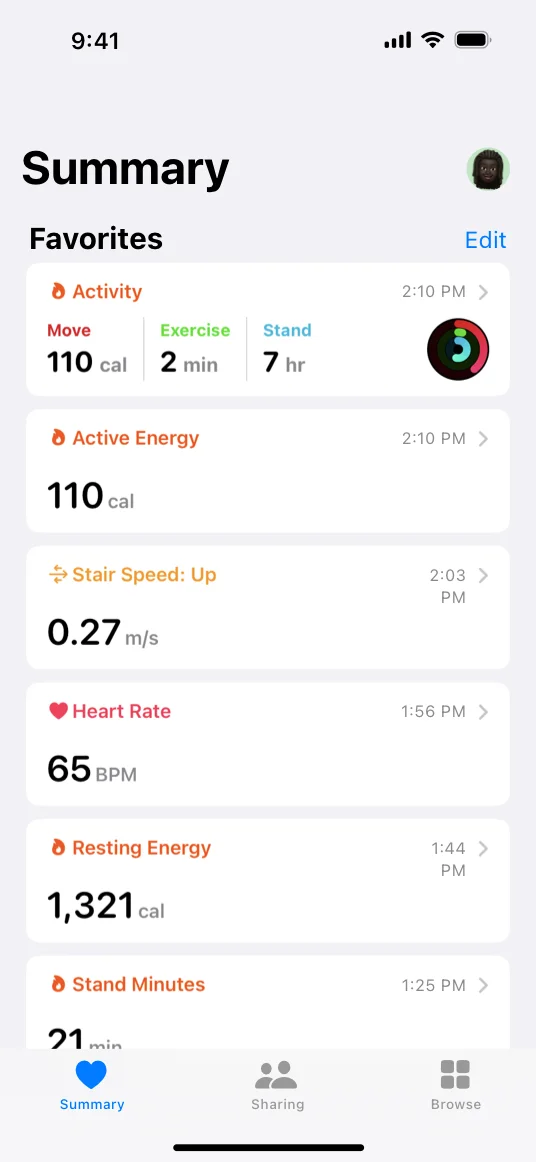
The Apple Health app summary screen, from Apple’s HealthKit framework documentation. Mindful sessions Return logs surface here as Mindful Minutes; Water’s HKQuantitySample water entries surface as Water under Nutrition.
The Two Sample Shapes
HealthKit splits its sample model along an axis that affects every line of code you write:3
| Sample shape | Typical use | API |
|---|---|---|
HKQuantitySample |
water, steps, calories, body mass, heart rate | HKQuantityType + HKUnit + HKQuantity |
HKCategorySample |
mindful sessions, sleep, menstrual flow, sexual activity | HKCategoryType + HKCategoryValue |
HKWorkout |
structured exercise (running, swimming) | HKWorkoutBuilder, HKWorkoutSession |
Water is a quantity. Real production code from HealthKitService.swift:1
import HealthKit

@Observable
final class HealthKitService {
    static let shared = HealthKitService()

    private let healthStore = HKHealthStore()
    private let waterType = HKQuantityType(.dietaryWater)

    func logWater(amount: Double, date: Date = .now) async throws -> UUID {
        guard isAuthorized else { throw HealthKitError.notAuthorized }

        let quantity = HKQuantity(unit: .literUnit(with: .milli), doubleValue: amount)
        let sample = HKQuantitySample(
            type: waterType,
            quantity: quantity,
            start: date,
            end: date,
            metadata: [HKMetadataKeyWasUserEntered: true]
        )

        try await healthStore.save(sample)
        return sample.uuid
    }
}
Three details from production:
.literUnit(with: .milli)is the canonical unit for water in milliliters. HealthKit will accept any unit (US fluid ounces, liters), but the constructor matters because Apple normalizes everything to liters internally. Picking.millilets you store integer values (240, 500) instead of fractional liters (0.240, 0.500).HKMetadataKeyWasUserEntered: trueflags the sample as manually entered rather than measured. The Health app shows a small “manually entered” indicator on these samples; the user trusts manually-entered data differently than scale-measured data.startandendare the sameDatefor instant samples. Quantities accumulate over a[start, end]window, but for “I drank 240ml just now” the window collapses to a point.
A mindful session is categorical. Real production code from Return’s HealthKitManager.swift:2
import HealthKit

@MainActor
class HealthKitManager {
    static let shared = HealthKitManager()
    let healthStore = HKHealthStore()
    let mindfulType = HKCategoryType(.mindfulSession)

    func saveMindfulSession(start: Date, end: Date) async -> Bool {
        guard isAvailable else { return false }
        guard end > start else { return false }

        let sample = HKCategorySample(
            type: mindfulType,
            value: HKCategoryValue.notApplicable.rawValue,
            start: start,
            end: end
        )
        // ... save via healthStore.save(sample) ...
    }
}
Two details:
HKCategoryValue.notApplicable.rawValueis the load-bearing sentinel. Mindful sessions have no meaningful “value” (they are duration markers), so HealthKit requires a sentinel category value (Int(0)) for the field to satisfy the type system. Other category samples have richer values: sleep usesHKCategoryValueSleepAnalysis.asleep, etc.- The
start/endwindow is real for category samples. A 10-minute mindful session isstartandend10 minutes apart, and HealthKit’s daily mindful-minutes tally sums these durations.
The Authorization Flow (And Its Trap)
HealthKit authorization is asymmetric on purpose. authorizationStatus(for:) reports share/write status truthfully (.sharingAuthorized, .sharingDenied, .notDetermined), but read grant or denial is not directly observable via that API. Apple intentionally hides read state to prevent apps from inferring what data exists in a user’s Health profile.4 You learn the read decision indirectly: queries return data if the user granted read, and queries return empty results if the user denied read. There is no “read was denied” signal for your code to branch on.
Both apps work around this differently.
Water reads its own samples. Because Water both writes and reads water entries (to populate “today’s history”), its authorization flow has to handle the read-denial-is-invisible case:1
private var typesToShare: Set<HKSampleType> { [waterType] }
private var typesToRead: Set<HKSampleType> { [waterType] }

func requestAuthorization() async throws {
    guard isHealthDataAvailable else { throw HealthKitError.notAvailable }

    try await healthStore.requestAuthorization(toShare: typesToShare, read: typesToRead)

    await MainActor.run { checkAuthorizationStatus() }
}

func checkAuthorizationStatus() {
    authorizationStatus = healthStore.authorizationStatus(for: waterType)
    isAuthorized = authorizationStatus == .sharingAuthorized
}
Note what checkAuthorizationStatus does NOT do: ask for read authorization status. Water just checks share status. If the user grants share but denies read, Water’s UI will display “no entries” because read returns empty (not because of an explicit error). Water trusts the share decision and lets the absence of data speak for itself. The user can fix it from Settings if they care.
Return only writes. Return logs mindful sessions but never reads them back; the session list it shows is from its own NSUbiquitousKeyValueStore, not from HealthKit. So Return’s authorization request is write-only:2
func requestAuthorization() async -> Bool {
    guard isAvailable else { return false }

    do {
        try await healthStore.requestAuthorization(
            toShare: [mindfulType],
            read: []  // We only need write access
        )
        hasRequestedHealthKit = authorizationStatus != .notDetermined
        return isAuthorizedToWrite()
    } catch {
        hasRequestedHealthKit = authorizationStatus != .notDetermined
        return false
    }
}
The read: [] empty set is intentional. Asking for read access you don’t need expands the permission scope you have to justify in App Review and confuses users who see “Return wants to read your mindful sessions” when the app obviously does not need to.
The trap. Both apps converged on the same defensive pattern: only mark an authorization attempt as “completed” if the status actually moved past .notDetermined. The naive code is:
hasRequestedHealthKit = true // ❌ wrong: treats transient failures as denial
The correct pattern from Return:2
hasRequestedHealthKit = authorizationStatus != .notDetermined // ✓ checks real state
Why it matters: the SwiftUI .healthDataAccessRequest modifier and the underlying requestAuthorization API can fail to present the system dialog under certain conditions (sheet conflicts, view lifecycle interruptions, transient OS state). If you mark the attempt as “completed” before checking the actual status, you trap users in a state where your app thinks they declined but no system dialog ever appeared. They have no path back unless they hit Settings → Privacy → Health and grant manually, which they won’t think to do because they never saw your prompt. Return’s recordAuthorizationAttempt() exists specifically for this case.
The Pre-Permission Sheet
Apple’s HealthKit permission dialog is correct but unsold. It shows a list of types your app wants to share or read, with toggles. There is no context for why the app wants the data, no benefits explanation, no app brand. Users tap Don’t Allow because the prompt is decontextualized.
Return ships a HealthKitPermissionSheet that appears before the system dialog. The sheet shows the Return app icon next to the Apple Health icon (HIG-correct: Apple Health icon must not be clipped or shadowed),5 states the benefit (“Track Your Practice” / “Save your meditation sessions as Mindful Minutes in Apple Health”), lists three benefit rows (“See your practice in Apple Health”, “Syncs across all your devices”, “Works with other wellness apps”), and ends in a single forward Continue button that triggers the system request. Real structure from HealthKitPermissionSheet.swift:6
struct HealthKitPermissionSheet: View {
    var onEnableRequested: () -> Void
    var theme: Theme

    var body: some View {
        VStack(spacing: 0) {
            HStack(spacing: 16) {
                Image("ReturnAppIcon")
                    .resizable().scaledToFit().frame(width: 80, height: 80)
                    .clipShape(RoundedRectangle(cornerRadius: 18))

                Text("+").font(.title)

                Image("AppleHealthIcon")
                    .resizable().scaledToFit().frame(width: 80, height: 80)
                    // No clipShape; Apple HIG forbids altering the Health icon
            }

            // Title + subtitle + benefits list

            // (See discussion below for the production comment.)
            Button { onEnableRequested() } label: {
                Text("Continue")
            }
        }
        .interactiveDismissDisabled(true)
    }
}
The interactiveDismissDisabled(true) plus the lack of any cancel button is a deliberate design choice. Apple’s App Review Guideline 5.1.1 requires apps to respect user privacy settings and prohibits manipulating, tricking, or forcing consent.10 The production code’s comment above the Continue button reads:
Single forward action: the system HealthKit dialog owns the real yes/no choice. Apple Guideline 5.1.1(iv): the priming screen may not include any exit/dismiss path that bypasses the system permission request.
That framing is stricter than the literal guideline text (which talks about respecting consent and not forcing it, but does not prescribe priming-screen UX in those words). It is Return’s interpretation, codified in the source. The intent: a user who declines should do so on Apple’s screen, not on Return’s. The result is a sheet with one forward action and no escape hatch. The copy and benefit rows have to earn the tap; there is no “I’ll think about it” branch.
The flow:
- User taps “Connect Health” in Return’s settings.
- The pre-permission sheet appears. User reads the explanation.
- User taps Continue. The sheet stays mounted while
requestAuthorizationruns and the system dialog appears. - User accepts (or denies) in the system dialog. Return calls
recordAuthorizationAttempt()to capture the result and the sheet dismisses.
Why bother. Apple has not published official numbers on grant-rate uplift from pre-permission sheets, but every iOS developer I have talked to with both an A/B test and the patience to run it has reported the same direction: pre-permission sheets dramatically increase the share-authorization grant rate. The pattern is now common enough that Apple’s own templates (Photos, Camera, Location) increasingly include their own pre-permission UX.
The watchOS Variant
watchOS HealthKit shares the same API surface as iOS HealthKit (HKHealthStore, sample types, authorization), but with three structural deltas:
- A new
HKHealthStoreper watch app. The watch app and the paired iPhone app each have their ownHKHealthStoreinstances. Both can write to the user’s HealthKit database, both can read their own samples. The store is not shared across the pair. - No SwiftUI sheets for pre-permission. watchOS view hierarchies do not support sheets the way iOS does. The pre-permission UX has to be a full screen.
- Stricter re-prompt rules. The watchOS
requestAuthorizationcall is more conservative about re-presenting the system dialog if the user previously denied; you may need to direct users to the Watch app on their iPhone to change the setting, since the watch itself has no Settings → Privacy → Health UI.
Real production code from WatchHealthKitManager.swift:7
@MainActor
class WatchHealthKitManager {
    static let shared = WatchHealthKitManager()
    let healthStore = HKHealthStore()
    let mindfulType = HKCategoryType(.mindfulSession)

    private init() {}

    var isAvailable: Bool { HKHealthStore.isHealthDataAvailable() }

    /// Returns true if the system request completed (success or already-authorized).
    /// Caller checks isAuthorizedToWrite() separately for the actual share state.
    func requestAuthorization() async -> Bool {
        guard isAvailable else { return false }
        do {
            try await healthStore.requestAuthorization(toShare: [mindfulType], read: [])
            return true
        } catch {
            return false
        }
    }

    func isAuthorizedToWrite() -> Bool {
        guard isAvailable else { return false }
        return healthStore.authorizationStatus(for: mindfulType) == .sharingAuthorized
    }
    // ... saveMindfulSession identical to iOS variant ...
}
The split is deliberate: requestAuthorization reports whether the system call succeeded, and isAuthorizedToWrite reports the result the user chose. Splitting these on the watch makes the code easier to reason about; on iOS the equivalent split shows up as the recordAuthorizationAttempt() plus isAuthorizedToWrite() pair on HealthKitManager.
The Watch class is roughly half the size of the iOS one because it does not need:
- The
hasRequestedHealthKitUserDefaults flag (the watch UX has fewer second-attempt paths to support). - The
HealthKitPermissionSheetplumbing (no sheet UI on watchOS). - The
recordAuthorizationAttempt()method (the watch’s narrower flow has fewer transient-failure edge cases).
The trade-off is that the watchOS app sometimes hits a denied-without-recourse state for users who declined the system dialog and don’t realize they can fix it from the Watch app on iPhone. Return shows a small in-app instruction in this case (“Open Watch app on iPhone → My Watch → Privacy → Health”) rather than trying to re-prompt.
What I Would Build Differently
Three lessons from shipping HealthKit in two production apps.
Both APIs work; the choice depends on presentation context. SwiftUI’s .healthDataAccessRequest modifier wraps the legacy API in a more declarative shape and handles presentation context correctly on iPadOS. Return uses the modifier, exposing its share types via a public mindfulShareTypes property on HealthKitManager so a SwiftUI parent view can wire it up. Water uses the legacy healthStore.requestAuthorization directly because Water’s authorization flow runs from a non-View context (an @Observable service). The split is a useful pattern: prefer the modifier when the request originates from a SwiftUI lifecycle event (button tap inside a sheet), fall back to the legacy API when the request originates from a service.
Pre-permission sheets are worth the engineering cost on iOS, not on watchOS. The pre-permission sheet adds maybe four hours of work (sheet view, copy, theming, integration). The grant-rate lift on iOS is large enough that the four hours are an obvious investment. On watchOS, the equivalent full-screen pre-permission is more intrusive (it takes over the entire watch screen instead of being a sheet), the user is less likely to read long copy on a small screen, and the watch UX flow has fewer entry points where the user is asking for a feature that requires HealthKit. I shipped Return without one on watchOS and have not regretted it.
Track hasRequestedHealthKit separately from the live authorization status. The HealthKit API tells you the current authorization status, but it does not tell you whether you have ever asked. The distinction matters because the right second-tap behavior depends on it: first tap should call requestAuthorization; second tap, if the user previously denied, should show a “Settings → Privacy → Health” alert rather than re-calling the API (which silently no-ops on a denied state). The hasRequestedHealthKit UserDefaults flag is what makes the second tap useful.
When Not To Use HealthKit
Refusal is part of the design.
Don’t write to HealthKit just because you can. A focus-timer app does not need to write a workout. A note-taking app does not need to log mindfulness. Adding HealthKit because it is “free integration” expands your privacy footprint, your authorization friction, and your App Review questionnaire scope without giving the user material value.
Don’t read HealthKit if you can avoid it. Read access is harder to justify at App Review and harder to explain to users. Many apps that read HealthKit could write only and let users see their data in Apple Health; the read flow doubles the surface area for negligible UX gain.
Don’t use HealthKit on Mac for cross-device-only data. macOS supports HealthKit since macOS 13, but most Health data originates on iPhone or Apple Watch. If your Mac app needs the same data, write to HealthKit on the iPhone and let Apple’s cross-device sync surface it on Mac. Direct HealthKit writes from Mac are valid but rare in practice.
Don’t ship without testing the denied-then-revoked path. Users grant permission, then revoke it from Settings → Privacy → Health. Your app needs to handle the revocation gracefully, usually by showing the Settings deep-link instruction the next time they try to use the feature. Both Water and Return ship this path; neither got it right on the first try.
What This Means For SwiftUI Apps Shipping HealthKit On iOS 26+
Three takeaways.
- Decide write-only vs. read+write before designing the UI. Write-only is a smaller surface and a faster App Review. Read+write is more flexible but adds the read-denial-is-invisible asymmetry.
- Ship a pre-permission sheet on iOS. The grant-rate lift is real. Use Apple’s icon correctly (no clipping, no shadow), state the benefit, then call the system API.
- Treat watchOS HealthKit as a smaller, simpler variant of the iOS pattern. Less ceremony, no sheets, single-purpose authorization. Direct users to the Watch app on iPhone for re-grant.
Pair this post with my prior writeups for the same family of apps: typed App Intents for Apple Intelligence; MCP servers for cross-LLM agents; Liquid Glass patterns for the visual layer; multi-platform shipping for cross-device reach. The full set lives at the Apple Ecosystem Series hub. For the broader iOS-with-AI-agents context, see the iOS Agent Development guide. HealthKit is the data-source layer, sitting under the visual layer and integration surfaces.8
FAQ
Can I share authorization between an iOS app and its watchOS extension?
No. The iOS HKHealthStore and the watchOS HKHealthStore are independent. The user grants authorization separately on each platform via separate system dialogs. Your code on each side checks its own authorization status; you cannot read iOS’s status from the watch or vice versa.
What happens to my samples if the user revokes write access?
Existing samples remain in HealthKit. The user can delete them manually from the Health app if they choose, but revoking your app’s access only stops new writes. Your app can no longer save or modify samples, but the user’s historical data is preserved.
Is .healthDataAccessRequest the SwiftUI modifier safe to use in production?
It works in iOS 17.4+ and has been refined in subsequent releases. Return uses the modifier (it exposes mindfulShareTypes on HealthKitManager for SwiftUI to consume). Water uses the legacy healthStore.requestAuthorization directly because Water’s request originates from a non-View @Observable service. Pick based on where the request is initiated: SwiftUI lifecycle event → modifier; service or non-View context → legacy API.
Why does HealthKit authorization status say .sharingAuthorized even when I never asked for share access?
It does not. The status is per-HKObjectType. If you check authorizationStatus(for: heartRateType) and you never requested heart rate, you will get .notDetermined. The status only goes to .sharingAuthorized after a successful authorization for that specific type.
Do I need a privacy manifest for HealthKit?
Yes. Apps that touch HealthKit must declare the use in PrivacyInfo.xcprivacy (the privacy manifest) and in the App Store Connect privacy questionnaire. The relevant entries are NSHealthShareUsageDescription and NSHealthUpdateUsageDescription in Info.plist, plus the corresponding declarations in the privacy manifest.9
References
-
Production code in
Water/Water/Services/HealthKitService.swift(192 lines). Author’s Water, a SwiftUI water-tracking app available on iOS, iPadOS, macOS, watchOS, and visionOS. UsesHKQuantitySamplewithHKQuantityType(.dietaryWater)and theHKMetadataKeyWasUserEnteredflag. ↩↩↩ -
Production code in
Return/Return/HealthKitManager.swift(171 lines). Author’s Return, a SwiftUI meditation-timer app available on iOS, iPadOS, macOS, watchOS, and tvOS. UsesHKCategorySamplewithHKCategoryType(.mindfulSession)andHKCategoryValue.notApplicable.rawValue. ↩↩↩↩ -
Apple Developer, “HealthKit framework”. The framework’s two main sample types are
HKQuantitySample(for measurable quantities like water, steps, calories) andHKCategorySample(for non-quantitative events like mindful sessions, sleep, menstrual flow).HKWorkoutcovers structured exercise. ↩ -
Apple Developer, “Authorizing access to health data”. Apple intentionally hides read-denial state to prevent apps from inferring what data exists in a user’s Health profile. The
authorizationStatus(for:)method only returns honest results for share access. ↩ -
Apple Developer, “Apple Health icon usage” Human Interface Guidelines. Apple’s Health icon must not be modified, clipped, shadowed, or recolored; reproduce it at 1:1 fidelity in promotional and pre-permission UIs. ↩
-
Production code in
Return/Return/HealthKitPermissionSheet.swift(155 lines). Pre-permissionViewshown before triggering the system HealthKit dialog. Pairs the Return app icon with the Apple Health icon, explains the benefit, and triggers authorization via a callback closure on user tap. ↩ -
Production code in
Return/ReturnWatch Watch App/WatchHealthKitManager.swift(86 lines). The watchOS variant ofHealthKitManager. IndependentHKHealthStore, nohasRequestedHealthKitflag, no permission sheet plumbing. ↩ -
Author’s analysis: HealthKit is the data-source layer of an iOS app, App Intents are the system-AI surface, MCP is the cross-LLM agent surface, Liquid Glass is the visual surface. The four layers compose into a single shipped product across all five Apple platforms. ↩
-
Apple Developer, “Privacy manifest files”. HealthKit usage must be declared in
PrivacyInfo.xcprivacyplusNSHealthShareUsageDescriptionandNSHealthUpdateUsageDescriptionkeys inInfo.plist. ↩ -
Apple Developer, “App Review Guideline 5.1.1”. Apps must respect user privacy settings, request consent before collecting personal data, and cannot manipulate, trick, or force consent. The exact phrasing about priming-screen exit paths in this article reflects Return’s interpretation rather than the literal guideline text. ↩











