Apple HomeView for Developers: What Apple Said on Day One

What is Apple HomeView, and what can a developer or designer do for it today? Apple announced HomeView on October 13, 2026: a 7-inch, 1088 by 1088 pixel touchscreen on a domed speaker base, an A18 chip, a 12MP Center Stage camera, Siri AI, and a separate wall-mounted model, each $299 in the U.S., shipping November 13.12 Apple’s pages list fifteen built-in apps, four Apple apps under “Apps Available from iPhone”, and “compatible third-party audio and video apps from your iPhone”.23 On Apple’s developer pages as I saved them on the day of the announcement there is no SDK, no simulator, no Human Interface Guidelines section, no developer news item and no design kit for it, and its app lists name no App Store; I checked each of those places and the first Xcode 27.2 beta on my own Mac.45 Three paths run through the devices people already own, App Intents for Siri AI on the paired iPhone or iPad, AirPlay and Handoff for media from an iPhone (or, for AirPlay, a compatible iPad or Mac), and the undocumented “compatible third-party audio and video apps from your iPhone”, and a fourth, Matter and HomeKit for accessories, reaches HomeView as a home hub; the widgets and Live Activities an iPhone app already ships are a fifth surface Apple has not said reaches HomeView. Whether each one reaches HomeView is, in every case, Apple’s consumer wording plus my reading, and this post keeps the two apart.
TL;DR
- What Apple shipped. Apple HomeView, a 7-inch Liquid Retina display (6.98 inches measured corner to corner, 1088 by 1088 pixels at 220 ppi) on a domed speaker base with a stainless steel hinge, and Apple HomeView (Wall Mounted); an A18 chip, a 12MP Center Stage camera, four microphones, Wi-Fi 6E, Bluetooth 6.0 and Thread; $299 (U.S.) for either model; pre-orders from October 13 (Singapore from October 15, South Africa through Apple Authorized Resellers) and availability November 13 in all eight countries; not for sale in the European Union.12
- The software. Apple writes “HomeView software version 27.2” in footnotes and names no operating system; its own boilerplate still counts six platforms. Setup needs an iPhone on iOS 27.2 or an iPad on iPadOS 27.2. Siri AI is in beta, in English, with daily usage limits and paid expanded access promised for the future.12
- Apps, in Apple’s words. Fifteen built-in apps. Audiobooks, Classical Music, News and TV listed as “Apps Available from iPhone”. On the product page, “compatible third-party audio and video apps from your iPhone”, and in the press release a footnote that “Select apps require a paired and compatible iPhone nearby.” Each of up to six face-recognized users gets a Home Screen “with apps and widgets”. Apple does not say whose widgets, or how an iPhone app reaches the screen.231
- Four paths exist today, and none is documented for HomeView. App Intents and App Schemas for Siri AI, documented for iPhone, while HomeView’s Siri is described as “taking action across apps” only with a paired iPhone or iPad. Matter, HomeKit and Thread for accessories, with HomeView called “a central hub” on its own page but absent from Apple’s home hub support article. AirPlay and Handoff for media apps, with HomeView in Apple’s multiroom audio sentences and in no developer document. And “compatible third-party audio and video apps from your iPhone”, for which Apple has published no framework, entitlement or instructions at all.
- One surface beside them. Widgets and Live Activities: Apple documents an iPhone app’s small widgets and Live Activities appearing in CarPlay with no changes, and Live Activities appearing on a paired Mac and Apple Watch; its HomeView pages say each user’s Home Screen has “apps and widgets” and do not say whose.671
- What is absent, checked on October 13. No HomeView entry in the Human Interface Guidelines, no developer news item, no documentation path, no design kit, no App Review Guidelines mention, no support article, and no platform, simulator, runtime or public symbol in the Xcode 27.2 beta 1 SDKs on my Mac; beta 2 and the iOS 27.2 beta 2 and beta 3 runtimes were not probed. The only link between HomeView and CarPlay’s framework is a Tom’s Guide live blog, and Apple has not said it.48
- The design brief Apple implies. A square canvas smaller than an iPad mini’s, at the lowest pixel density of the four screens I drew to scale, read from across a room and up close, by touch, voice and face, from 500 nits down to 0.3. Apple’s closest published guidance is for visionOS widgets at a distance, StandBy, tvOS, watchOS and Live Activities, and I read those by analogy and say so.910
What Apple announced
Apple’s press release, dated October 13, 2026 from Cupertino, introduces Apple HomeView as a device “designed to be central to the home and personal to everyone in it”.1 The one-paragraph version, in Apple’s order: a 7-inch Liquid Retina display connected to a domed speaker base by a stainless steel hinge that tilts; four tabletop colors, silver, starlight, rose pink and space gray, each with a matching cable; a separate Apple HomeView (Wall Mounted) in space gray and silver; recognition of up to six people by their faces, each with a personalized experience; Siri AI; FaceTime with Center Stage; faces for the display, including a Snoopy face; the Home app built in; and Apple Home Collection, a lineup of cameras, thermostats and a lock designed with LG Electronics and Schneider Electric, arriving in December with select accessories in early 2027.13
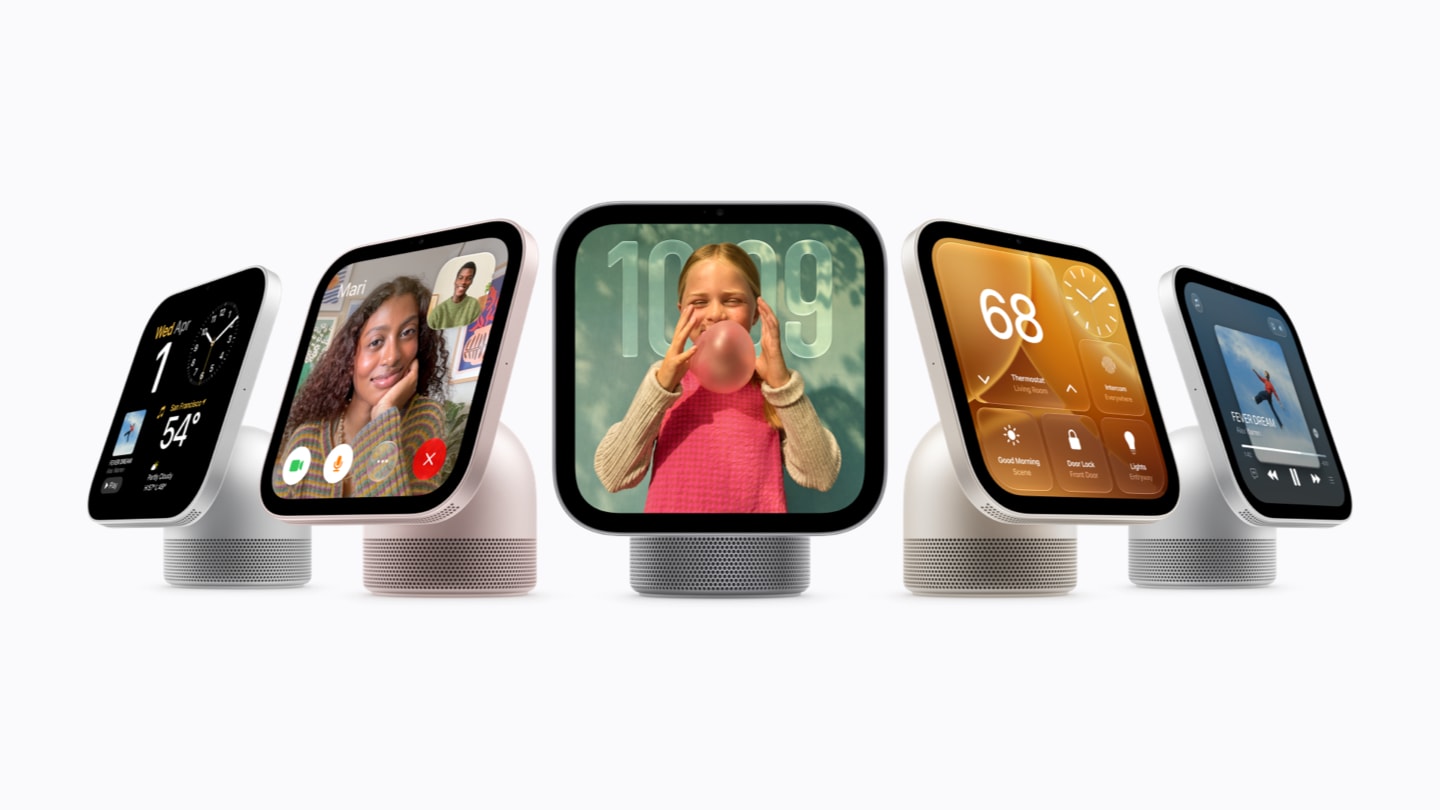
Apple’s lineup image from the press release, unmodified. Image: Apple.111
Greg Joswiak, Apple’s senior vice president of Worldwide Marketing, is the quoted executive: “Apple HomeView is designed to be shared by everyone in the home yet feel completely personal to each user,” he says, and the quote goes on to name face recognition, sound, FaceTime, smart home control, and Siri AI “drawing on personal context from your iPhone”.1 That last clause is the one this post keeps returning to. The device is personal because the phone in your pocket is.
Price, dates, and what is in the box
| Apple HomeView | Apple HomeView (Wall Mounted) | |
|---|---|---|
| Price (U.S.) | $299 | $299 |
| Colors | silver, starlight, rose pink, space gray | space gray, silver |
| Pre-order | October 13 (Singapore from October 15; South Africa through resellers, start not dated) | October 13 (Singapore from October 15; South Africa through resellers, start not dated) |
| Availability | Friday, November 13 | Friday, November 13 |
| Countries at launch | Australia, Canada, India, New Zealand, the UK, the U.S., Singapore; South Africa through Apple Authorized Resellers | the same |
| In the box | HomeView, USB-C cable (1.5 m), 30W power adapter, documentation | HomeView and documentation; mount, USB-C cable and a power adapter of at least 20W sold separately |
| Mounts | none needed | three Schneider Home Power Mounts: USB-C Wall Connector from $59.95 and AC Wired from $79.95 now, PoE Wired at $129.95 in early 2027 |
Sources: the press release for prices, dates, countries and mounts; the specs page for the box contents and the wall model’s adapter minimum.12
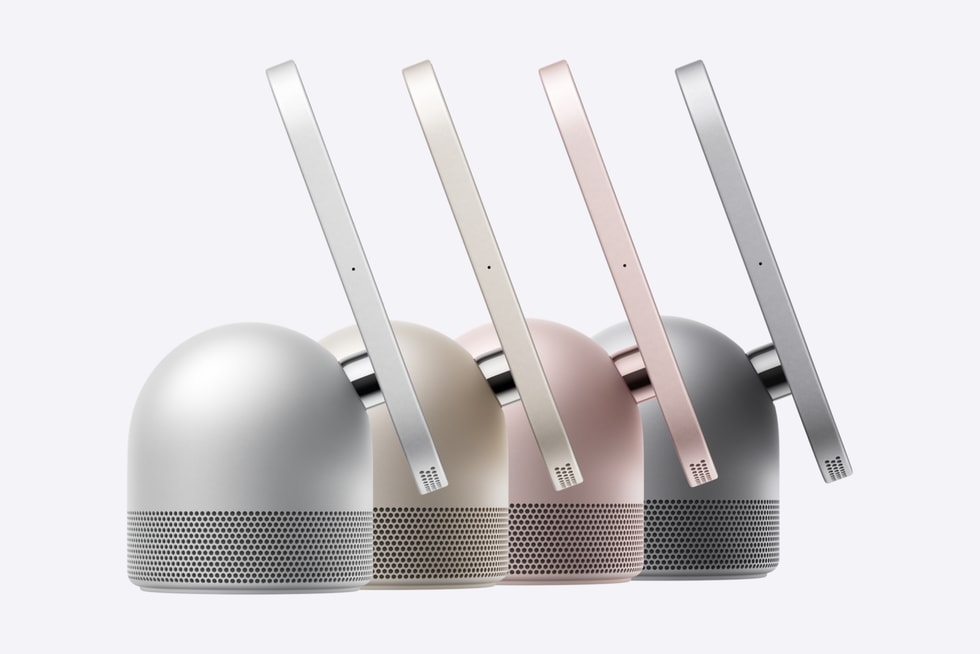
The four tabletop colors, from the press release. Image: Apple.111
Siri AI’s own rollout, and the EU note that came with it, are in my post on Apple’s September event. The European Union is excluded here too, and Apple says why in one sentence: “Apple HomeView is not available for sale in the European Union, as Siri AI is currently unavailable in iOS in the EU.”1 The same sentence appears, word for word, in the Apple Home Collection release.12
The hardware, from the specs page
The chip is the A18.2 The camera is a 12MP Center Stage camera with an ƒ/2.4 aperture, and FaceTime video runs over Wi-Fi to any FaceTime-enabled device.2 There are four microphones, which the specs page calls a “Four-microphone design for far-field Siri” and the product page calls “Four beamforming microphones”.23 The tabletop model’s audio is two custom full-range drivers in the display plus a custom down-firing woofer and two force-cancelling passive radiators in the base; the wall-mounted model has the two drivers and no woofer, with computational audio “tuned specifically for on-wall placement”.21 Sensors: ambient light, temperature and humidity, and an accelerometer; the temperature and humidity sensor is specified for indoor rooms at roughly 15 to 30 degrees Celsius and 30 to 70 percent relative humidity, and the footnote warns that long stretches of loud audio can reduce its accuracy and that it needs time to calibrate after startup.2 Wireless: Wi-Fi 6E with MIMO and simultaneous dual band, Bluetooth 6.0, and “Thread networking technology” with the footnote “Compatible with HomeKit- or Matter-enabled Thread accessories only.”2 One USB-C connector; wired power is required on both models.2
The specs page lists three dimensions per model without labeling them in the visible text. The labels exist in the accessibility text of the diagram: for the tabletop model a width of 5.73 inches, a height of 5.38 to 6.82 inches, and a depth of 3.78 to 5.13 inches, at 2.1 pounds; for the wall-mounted model 5.73 by 5.73 by 0.39 inches, at 0.63 pound.2 Apple does not say why two of the tabletop numbers are ranges. The hinge is the obvious reading, and it is mine, not Apple’s.
The display is the part a designer needs, and the design section gives it a figure of its own: 7 inches on the diagonal as marketed, 6.98 inches as measured with its rounded corners, 1088 by 1088 pixels at 220 ppi, LED backlit IPS, True Tone, 500 nits at the top and 0.3 nits at the bottom.2
The two products announced beside it
Apple announced two other home devices the same morning, and the three are described together. Apple TV 4K (4th generation) gets the A19 chip and Siri AI “available in beta in tvOS 27.2”, at $299 (U.S.) and in stores November 13.13 HomePod mini 2 is $149 (U.S.), ships October 30, “is compatible with HomePod software 27.2”, and gets Siri AI “in a future software update”.14 The Home Collection release names HomeView beside HomePod and Apple TV as the hubs its accessories lean on: “Additional features vary by accessory and require a compatible home hub such as Apple HomeView, HomePod, or Apple TV.”12 That footnote, repeated across the day’s releases, puts HomeView in a sentence with the words “home hub”, and so does the same release’s camera paragraph. The hub question, under path two below, is about why that matters and what the support pages still say.
Apple also published two films on its YouTube channel the same morning. The longer one is three minutes and thirteen seconds and carries the title “Welcome Apple HomeView: Designed for life at home.” The shorter one, one minute and four seconds, is titled “The new Apple HomeView: Keep the whole home connected, entertained, and in the know.”1516 They are embedded here through the site’s click-to-play component: the poster frame comes from YouTube’s image server, and the player loads from youtube-nocookie.com only when you press play.

Apple’s longer HomeView film, 3:13, published October 13, 2026 on Apple’s YouTube channel.15
The software Apple describes, and the name it does not give it
Apple names the operating system of every other device with a screen or a speaker it announced on October 13. Siri AI on Apple TV is “available in beta in tvOS 27.2”.13 HomePod mini 2 “is compatible with HomePod software 27.2”.14 For HomeView, the only version string on any Apple page I saved lives in a footnote, the same footnote on the press release, the product page and the specs page: “Siri AI is available in beta in HomeView software version 27.2.” The Apple Home page’s combined footnote gives the same version in passing, “and in HomeView software version 27.2”.13217 The press release’s “About Apple” boilerplate still counts “six software platforms” and lists them: iOS, iPadOS, macOS, watchOS, visionOS, and tvOS.1 HomeView is not among them, on the page that announces it.
The name “homeOS” is on none of Apple’s pages. It is also in none of the six press articles I saved on October 13; the only places the string exists in my evidence folder are my own searches for it, in the iOS 27.2 SDK’s public headers and at Apple’s documentation address for it, and both came back empty.418 The press release does say “the HomeView software” once in prose, in the sentence about Secure Exclaves: camera and microphone data processed there “cannot be accessed by the HomeView software, apps, the user, or Apple.”1 The product page’s version of the same sentence says the compartment “cannot be accessed by the operating system or by Apple.”3 So Apple’s own two pages call the thing an operating system and call it the HomeView software, and neither gives it a product name.
What the software requires
The specs page’s system requirements are three lines: “Apple HomeView with the latest version of software”, “iPhone with iOS 27.2 or later or iPad with iPadOS 27.2 or later”, and Wi-Fi internet access.2 The press release’s first footnote adds that “Apple HomeView setup and multiuser support require a compatible iPhone or iPad running the latest software.”1 There is no setup path that does not pass through iOS 27.2 or iPadOS 27.2. That is the first fact a developer should hold onto: the device’s personal layer is borrowed from a paired iPhone or iPad, and every developer path in this post except the accessory one runs through the devices a person already owns.
iOS 27.2 is still in beta. Apple’s “Get ready with the latest beta releases” item of September 16, 2026 names the iOS 27.2, iPadOS 27.2, macOS 27.2, tvOS 27.2, visionOS 27.2 and watchOS 27.2 betas and Xcode 27.2, and does not mention HomeView.5 My beta-by-beta post on iOS 27.2 tracks what Apple has documented in them so far.
What Siri AI needs, in Apple’s conditions
Siri AI on HomeView is a beta. It is available in English in eight countries, the U.S., Australia, Canada, India, New Zealand, Singapore, South Africa, and the UK, and “Canadian French-language support will be offered later via a free software update.”1 Three conditions govern what it can do:
- Without a paired device. Apple says users without an Apple Intelligence-enabled iPhone or iPad still get Siri AI’s broad world knowledge, natural conversation, and music discovery, and that “anyone in the home can ask Siri about virtually any topic”.1 Guests and unrecognized users can control accessories, check the weather, set timers and play music.3
- With a paired device. The footnote: “Personal context requests require a paired Apple Intelligence-enabled iPhone or iPad running the latest software version with Siri AI turned on and set to a supported language.”1 Only then does Siri take action across apps and surface Messages, Calendar and Apple Music playlists. Expressive voice customization is set on the paired device and carries over, and the device list for it is iPhone Duo, the iPhone 18 Pro models, iPhone Air, the iPhone 17 Pro models, or an iPad with the M4 chip or later and at least 12GB of unified memory, in English only.1
- Server-side limits. “Certain Apple Intelligence features that rely on server-side models are subject to daily usage limits. Expanded access to such features will be available for a fee in the future.”1 Apple’s usage terms page, which the footnote points to, says limits vary by feature and reset, that unreasonable use may be throttled, that “fees may apply” to certain software, and names no price for the expanded access.19
Conversations that start on HomeView continue in the Siri app, which Apple says “uses iCloud to privately sync history” across iPhone, iPad, Mac, Apple Watch and Apple Vision Pro.1 Requests “can use on-device processing or Private Cloud Compute”.1
One of Apple’s pages disagrees with the others on who must own what. The Apple Home overview page’s footnote, which covers Apple TV, HomePod mini 2 and HomeView in one sentence, says Siri AI requires the owner of the home in the Home app to have an Apple Intelligence-enabled iPhone or iPad.17 HomeView’s own footnotes require a paired device for personal context requests only, and the press release says users without one still benefit.1 I report both; the HomeView pages are the more specific, and the Home page’s footnote is the stricter.
The privacy model, because it shapes the app model
HomeView recognizes “up to six people” and, in the press release’s words, “content in apps like Messages and Calendar is only surfaced when the enrolled user is recognized by their face, and when their paired iPhone or iPad is present and has been recently unlocked.”1 The product page phrases the second condition as the paired device being “connected to the same Wi-Fi network and has been recently unlocked”.3 A footnote allows a fallback when the phone leaves Wi-Fi: personal information “may remain accessible” if the user is recognized by face and the device was recently on the same network, has a cellular connection, is in the same location, and was recently unlocked.1 The camera and microphone feeds used for recognition are processed in Secure Exclaves on the A18, which the product page describes as “a secure compartment that cannot be accessed by the operating system or by Apple”.3 Apple TV 4K’s Secure Exclaves, by contrast, are described as processing microphone data only.13
For a developer the consequence is simple. My reading of Apple’s pages is that HomeView has no personal account of its own: the shared layer of albums and music lives on the device for everyone, and everything personal is gated on a paired iPhone or iPad. Personal content arrives only through a paired iPhone or iPad that is enrolled, nearby and recently unlocked; third-party audio and video apps come, in Apple’s words, “from your iPhone”, with AirPlay also open to a compatible iPad or Mac; and where any third-party code would run, Apple does not say. That is why the four path sections below are mostly about iOS.
The app model, in Apple’s words only
Apple describes apps on HomeView in three places, and they do not say quite the same thing. Here is each, then the differences.
The specs page has two lists.2
| “Built-in Apps” (15) | “Apps Available from iPhone” |
|---|---|
| Alarms, Calendar, FaceTime, Find My, Home, Intercom, Messages, Music, Podcasts, Reminders, Safari, Settings, Timers, Weather, World Clock | Audiobooks, Classical Music, News, TV, and “Supported third-party audio and video apps” |
The product page has two short paragraphs under the entertainment section.3 The first: “A selection of Apple apps are available on HomeView.” It goes on to name Music with lyrics and artwork, audio stories on News and Audiobooks, “and so much more.” The second, headed “Additional apps.”: “HomeView supports compatible third-party audio and video apps from your iPhone for a familiar experience across devices.” Its footnote reads, in full: “Subscription may be required to access some content and services. Some applications are not available in all areas.”3
The press release lists “Apple Music, complete with animated album art and lyrics, as well as Apple Podcasts, Apple News”, then Apple TV, “and compatible third-party audio and video apps.”1 Its footnote on that sentence has a third sentence the product page’s does not: “Select apps require a paired and compatible iPhone nearby.”1
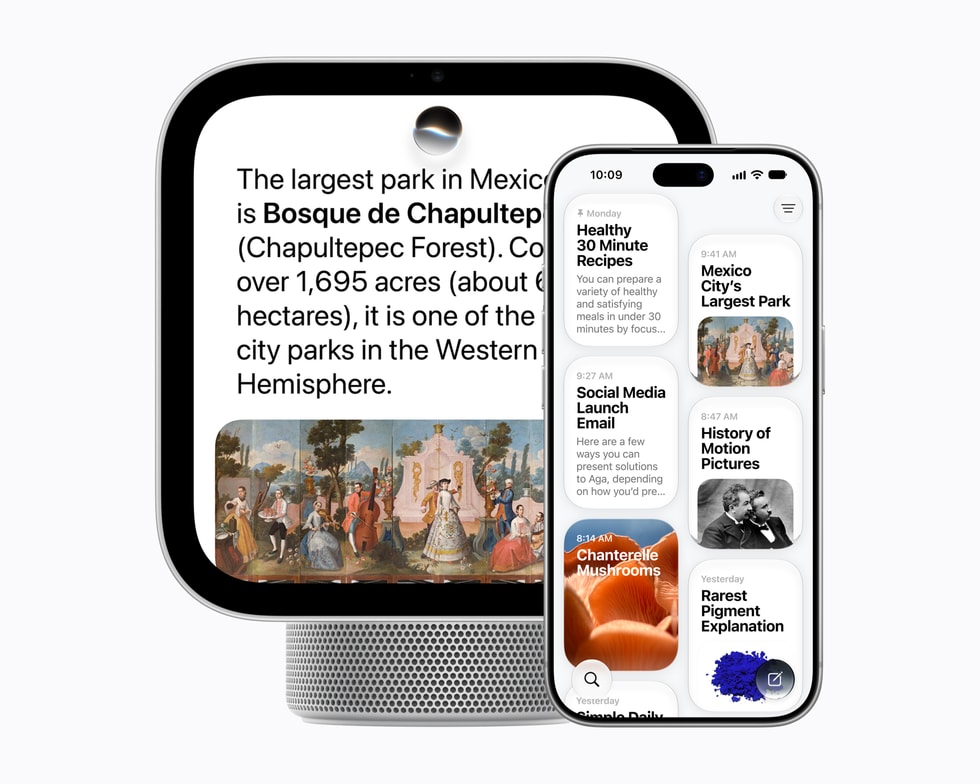
HomeView beside the iPhone it pairs with, from Apple’s press release. Image: Apple.111
Where Apple’s three pages differ:
- News and Audiobooks are among the Apple apps “available on HomeView” on the product page and under “Apps Available from iPhone” on the specs page.32
- Apple TV is named in the press release’s list and appears as “TV” under “Apps Available from iPhone” on the specs page; the product page’s app paragraph does not mention it.12
- Classical Music is on the specs page only.2
- Photos and Notes are on no list, though a Photos face exists and the press release names Messages, FaceTime, Calendar, Reminders and Find My as the apps whose personal content a recognized user can reach.231
- The iPhone-nearby condition is in the press release’s footnote and not in the product page’s.13
The other words Apple uses
Four more sentences describe how an iPhone and a HomeView share work, and each one is a developer surface somewhere else in Apple’s documentation.
- Widgets. “Each user gets their own personalized Home Screen with apps and widgets.”1 Apple does not say whose widgets.
- Live Activities. The product page says you can “keep an eye on them with Live Activities when you’re using other apps”, of timers; the press release says Live Activities surface “the song that’s currently playing, an active timer, or an incoming Intercom message from another room.”31 Every example is Apple’s own.
- Handoff. “Start a song, podcast, call, video, or recipe on iPhone, and continue on HomeView without missing a beat.”3 The press release calls the gesture Handoff as well: “With Handoff”, users continue a song “by placing their iPhone in front of the HomeView display”.1
- AirPlay. “Multiroom audio with AirPlay” on the specs page; “Use AirPlay to connect with HomePod, Apple TV 4K, and compatible speakers” on the product page; “Peer-to-peer discovery for easy guest access”, which the specs footnote ties to peer-to-peer AirPlay from a compatible Mac, iPhone or iPad.23
Add Intercom to HomePod speakers and personal devices, Find My for devices and AirTag items, Messages “read and answered by voice or with the onscreen keyboard”, and Safari with a Start Cooking button that turns a recipe page into steps, and that is the entire app vocabulary of Apple’s HomeView pages.13
What this adds up to, and what it does not say
Reading the three pages together, HomeView has three kinds of apps. Fifteen are built in. Four of Apple’s own, Audiobooks, Classical Music, News and TV, are listed under “Apps Available from iPhone”, which I read as rendered with the paired phone’s help, since the specs page distinguishes them from the built-in list and the press footnote says select apps need the phone nearby. And third-party audio and video apps are, in Apple’s words, “from your iPhone” too.
What the pages do not say is how. Apple documents three ways, for developers, that an iPhone app can appear on a screen it is not installed on: AirPlay, where the phone streams media to a receiver; CarPlay, where iOS draws an app’s templates and the car displays them; and widgets and Live Activities, where Apple documents an iPhone app’s small widgets and Live Activities appearing in CarPlay with no changes required, and Live Activities appearing on a paired Mac and Apple Watch; the iOS 26 widget post covers that surface on iPhone.67 Apple’s HomeView pages name AirPlay and Handoff. They do not name CarPlay, and they do not say the widgets are third-party. The next four sections take the four paths one at a time: what Apple documents today, what the HomeView pages say, and where the gap is.
Path one: Siri AI, through App Intents on the paired iPhone
Apple documents one way for a third-party app to reach Siri AI, and it is the same way on every platform Apple names: App Intents. The developer site’s Apple Intelligence page says the App Intents framework “is how you can connect your app to Apple Intelligence and features like Siri AI”, that adopting App Intents schemas makes an app’s content discoverable and its capabilities available through natural language, that the View Annotations API adds on-screen awareness, and that the App Intents Testing framework validates the integration with Siri, Shortcuts and Spotlight.20 The documentation page for Apple Intelligence and Siri AI lays out five steps: index your entities in Spotlight, choose Transferable types for your content, adopt the schemas that fit your app, associate entities with the views that show them, and donate actions and content as people use the app.21 The primary schema domains are Audio, Calendar, Camera, Clock, Mail, Maps, Messages, Notes, Phone, Photos, Reminders, and System and in-app search.22
The three WWDC26 sessions that teach this are the ones I would send a developer to now. “Build intelligent Siri experiences with App Schemas” covers AppEntity with AppSchema conformance, IndexedEntity for the semantic index, EntityStringQuery for content that cannot be indexed, view annotations, Transferable with IntentValueRepresentation, and the order to test things in: AppIntentsTesting first, then Shortcuts, then Spotlight, then Siri.23 “Explore advanced App Intents features for Siri and Apple Intelligence” adds custom dialog and snippet responses, interaction donations through IntentDonationManager, ownership-providing entities for confirmations, IntentValueQuery with AudioSearch for audio apps, and entity annotations on notifications, Now Playing and AlarmKit.24 The code-along builds a calendar app’s schemas end to end.25 I wrote up App Schemas when they were announced, and that post is the long version of this paragraph; the App Intents in iOS 27 post covers the background and Spotlight side.
Two of those hooks are the ones a media app would want on a kitchen screen: the Audio schema domain, and the entity annotations on Now Playing that let Siri act on what is playing, as in the session’s own example, “Play the live version”. Whether Siri on HomeView ever sees them is the question.
What Apple’s HomeView pages say about Siri and apps
The press release: with an Apple Intelligence-enabled iPhone or iPad, Siri AI does more for each person, “taking action across apps and surfacing relevant information from Messages and Calendar, playlists on Apple Music, and more by drawing on their personal context.”1 The product page’s FAQ: “When paired with an Apple Intelligence-enabled iPhone or iPad, Siri can do even more”.3 The specs page promises personal context understanding and expressive voices “when your paired iPhone or iPad is nearby”.2
Every example Apple gives in those sentences is an Apple app. The phrase “across apps” does not say third-party apps. No developer page, documentation page, WWDC26 transcript or Human Interface Guidelines page I hold says that Siri on HomeView, HomePod or Apple TV reaches a paired iPhone’s app intents; the App Intents platform lists include tvOS for apps that run on Apple TV itself, which is a different thing. The three Siri sessions name iPhone, AirPods and the car; the App Intents Testing platform list is iOS, iPadOS, Mac Catalyst, macOS, tvOS, visionOS and watchOS 27.0.2426
So the claim that adopting App Intents on iPhone makes Siri on HomeView act on your app is my inference, not Apple’s statement. The inference rests on three things Apple does say: HomeView’s Siri borrows its personal context and its ability to act across apps from the paired phone; the phone’s Siri AI reaches third-party apps only through App Intents; and the Siri Human Interface Guidelines, revised for Siri AI on June 8, 2026, tell developers to keep responses device-independent because “People can initiate a Siri request on one device and have it take effect on another, so device-specific wording can easily become confusing or misleading.”12027 That HIG page also says to write responses that work both audibly and visually, and that others nearby may hear them, which reads like a kitchen even though it does not say one.27
What a developer does with that today is the same thing they would do for Siri AI on iPhone: adopt the schemas that fit, index entities, annotate views, donate, and test. The cost is real engineering, and the benefit is certain on the phone and the AirPods and unconfirmed on the display. The checklist at the end prices it.
Path two: the home itself, where the rules already exist
If you make accessories or home apps, HomeView changes nothing about how you build, and may change how your product is used. Apple’s rules for the home were written for HomePod and Apple TV, and they were still written that way on October 13.
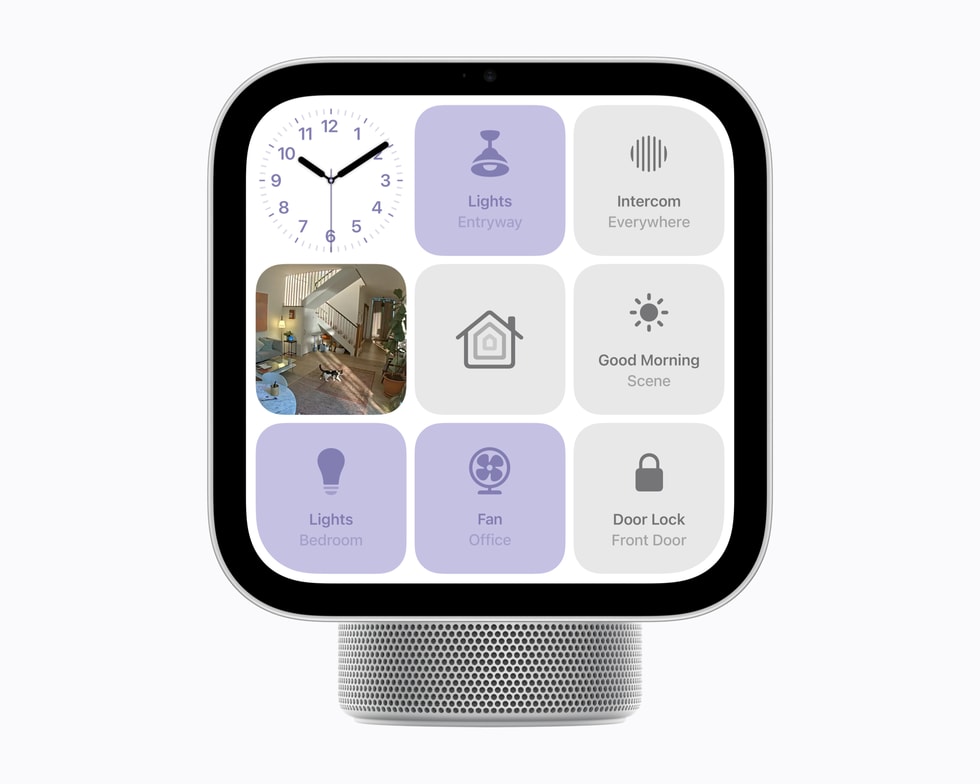
Smart home controls on HomeView, from Apple’s press release. Image: Apple.111
Accessory makers
Apple’s “Developing apps and accessories for the home” page is the hub for this, and it has not been revised for HomeView; the word does not appear on it.28 Its rules: a company that distributes or sells HomeKit accessories must be in the MFi Program, which provides the HomeKit Accessory Protocol Specification, the HomeKit Accessory Development Kit (ADK), certification tools and badge artwork. Xcode includes the certified Matter SDK, which Apple says is for Matter ecosystem apps; a Matter accessory you distribute or sell must go through Connectivity Standards Alliance certification.28 The Works with Apple Home badge adds its own steps for Matter accessories: CSA certification in a category Apple Home supports, CSA interoperability testing, a request form with the vendor and product identifiers, and the Artwork License Agreement; Apple asks for test results before it grants the artwork, and the badge has a minimum height of 10 mm in print and 30 pixels on screen.29 That badge page’s required compatibility statements are two. For accessories that are not Thread-based: an iPhone on iOS 18 or later or an iPad on iPadOS 18 or later “for pairing and local control, or a home hub such as HomePod or Apple TV running compatible software for automations, notifications, and remote access”. For Thread-based accessories: “a Thread-enabled Apple Home hub such as HomePod or Apple TV running the latest software”.29 HomeView is on neither sentence. The two Apple pages also disagree on when a hub is needed at all: the badge statement makes it optional for pairing and local control, while the home hub support article says “You must set up a home hub to add Matter accessories to the Home app.” I report both and pick neither.2930
Apple’s “Matter Accessory Best Practices for Apple Home” document, linked from the same page, is labeled Developer Preview 1.5 and dated October 7, 2025. It covers the open-source Matter SDK, the OpenThread SDK, Matter over-the-air updates, diagnostics clusters, CSA interoperability testing, and testing accessories with iOS and tvOS beta releases. It does not mention HomeView.31
App makers
The frameworks are the ones you already know. HomeKit, for apps on iOS, iPadOS, macOS, watchOS and tvOS by the marketing page’s list; its documentation page lists iOS, iPadOS, Mac Catalyst, tvOS, visionOS and watchOS, with no native macOS entry.2832 The Matter framework and MatterSupport.28 ThreadNetwork, for configuring Thread Border Routers to share a network and manage credentials.28 And EnergyKit, new in iOS 26 and iPadOS 26, which provides grid forecasts to apps that manage EV charging or smart thermostats.2833 None of the three framework pages I fetched, HomeKit, Matter and EnergyKit, lists HomeView among its platforms, and none would be expected to: on Apple’s pages, no third-party app is said to install on the device, and where one would run is not said.323433
The hub question
HomeView’s own page says it: “Apple HomeView is a central hub for your smart home accessories”.3 The specs list Thread. The Home Collection release says its cameras work “when using a home hub like Apple HomeView, HomePod, HomePod mini, or Apple TV 4K”, that a doorbell chime “plays through HomeView, HomePod, and HomePod mini”, and that its thermostats can read the sensors already built into HomeView, HomePod and HomePod mini.12 The Home Collection release’s HomeKit Secure Video footnote requires “a home hub such as Apple HomeView, HomePod (2nd generation), HomePod mini, or Apple TV 4K” for video summaries and natural language search, and the Home app’s page carries the same sentence.1235 The Home app’s marketing page says the app “can do even more with the help of Apple HomeView, HomePod, HomePod mini, or Apple TV 4K.”35
And then the pages that define what a home hub is. Apple’s support article “Set up your HomePod, HomePod mini, or Apple TV as a home hub”, published September 15, 2025, says a home hub is required to add Matter accessories and that Thread-enabled Matter accessories need a Thread-enabled hub such as HomePod mini or Apple TV 4K (3rd generation) Wi-Fi + Ethernet, or a third-party border router. It does not name HomeView.30 The iCloud User Guide’s HomeKit Secure Video pages say footage is end-to-end encrypted, that the hub analyzes video on device, that the 50GB plan supports one camera, the 200GB plan up to five and the 2TB plan an unlimited number, and that cameras can be added only from an iPhone or iPad. They name iPhone, iPad, Mac and Apple TV, and not HomeView.36 Even the Home app’s marketing page is split: its hub setup link reads “Set up your HomePod, HomePod mini 2, or Apple TV 4K as a home hub”, and three of its own footnotes still name only Apple TV or HomePod as the hub, one of them as “a home hub such as Apple TV or HomePod”.35
So HomeView is a hub in Apple’s marketing and in two repeated footnotes, and not yet in the documentation that defines the term. Whether it is a Thread border router Apple does not say; the specs say “Thread networking technology” and nothing more.2 The HomeKit API has nothing to add: the home hub surface in the iOS 27.2 SDK is still HMHomeHubState with three values, not available, connected and disconnected, plus two error codes for a missing or incompatible hub, and no device type.4
Camera makers
The Home Camera face “lets you stream up to nine videos at the same time”, and the press release says the same with “livestream up to nine video feeds at once”.31 One early-look article says five; that is the article’s number, not Apple’s, and Apple’s “up to five cameras” is the 200GB iCloud+ storage tier, a different thing.3736 Which cameras the nine-feed face accepts, Apple’s HomeView pages do not say beyond the footnote that the Home app’s controls require “a HomeKit- or Matter-enabled accessory”.3 Apple’s recognition and description features are for HomeKit Secure Video cameras, and the HomeKit Secure Video Open Source Compatibility Guide is linked from Apple’s “Developing apps and accessories for the home” page. The recognition of people, familiar faces, pets, packages and vehicles needs “a supported iCloud+ subscription”; the descriptions of footage, video summaries and natural language search need, in addition, setup from an Apple Intelligence-enabled iPhone or iPad and an eligible iCloud+ plan.281
What changes for an accessory maker, then, is not the build. It is that a screen now hangs in the entryway showing nine of your feeds and, on the Home Modular face, your thermostat and lock controls, to up to six recognized people and their guests, most of whom did not set it up. The HomeKit Human Interface Guidelines were written for phones and TVs, and the design section reads them for that wall.
Path three: AirPlay and Handoff, the one path a media app may already be on
Apple’s three HomeView pages each put the device inside AirPlay. The specs page lists “Multiroom audio with AirPlay” and “Peer-to-peer discovery for easy guest access”.2 The product page says “Use AirPlay to connect with HomePod, Apple TV 4K, and compatible speakers”.3 The press release describes multiroom audio across “multiple HomeView, HomePod, HomePod mini, and AirPlay-compatible speakers”.1
On the developer side, AirPlay is the lowest-cost surface Apple has. The media streaming overview says adopting AirPlay “requires only Configuring your app for media playback”, because AVFoundation has AirPlay support built in and AVKit provides the picker.38 The configuration page’s steps: set the AVAudioSession category to playback, and enable the “Audio, AirPlay, and Picture in Picture” background mode, after which an iOS app can stream over AirPlay.39 AVRoutePickerView presents “a list of nearby media receivers”.40 The AirPlay Human Interface Guidelines define the feature as streaming to “Apple TV, HomePod, and TVs and speakers that support AirPlay”, and its best practices are to prefer the system player, include every HLS resolution, support both streaming and mirroring, support remote control events, and keep playing in the background.41
None of those pages names HomeView. What I can say from Apple’s text is that HomeView takes part in AirPlay multiroom audio, which means it receives AirPlay audio. Whether it accepts AirPlay video, Apple’s pages do not say, and whether “third-party audio and video apps from your iPhone” use AirPlay at all is one of the open questions at the end of this post. If your app already plays through AVFoundation with the playback category and the background mode set, my reading is that it is already on HomeView’s speakers the way it is on a HomePod’s. That is a reading.
Handoff, and the gesture Apple also calls Handoff
The product page’s Handoff sentence is broad: “Start a song, podcast, call, video, or recipe on iPhone, and continue on HomeView without missing a beat.”3 For developers, Handoff is NSUserActivity: an app declares its activity types in Info.plist and marks an activity eligible for Handoff, on iOS, iPadOS, macOS, tvOS, visionOS and watchOS.42
The press release calls a second gesture Handoff too: “With Handoff, users can continue listening to a song they were playing in the car or on a walk by placing their iPhone in front of the HomeView display.”1 It matches the gesture Apple documents for HomePod. Apple’s HomePod User Guide says “To quickly hand off audio, bring your iPhone near HomePod”, with the phone held near the top of the speaker and Transfer to HomePod turned on in the AirPlay and Continuity settings; it adds that Siri on HomePod can start an AirPlay session from the nearby iPhone for services HomePod does not support, and that some music services “may not support Siri and AirPlay”.43 The guide does not say whether the proximity gesture works for third-party apps, and Apple documents no developer hook for it. My reading is that it is a system Continuity and AirPlay feature rather than the NSUserActivity API, which means there is nothing to adopt and nothing to opt out of; the song moves if the system can move it.
Path four: “apps from your iPhone”, which Apple has not documented
This is the path a developer most wants and the one Apple says least about. The whole of Apple’s public text on it is three fragments: “Apps Available from iPhone” as a heading over Audiobooks, Classical Music, News, TV and “Supported third-party audio and video apps”; “HomeView supports compatible third-party audio and video apps from your iPhone for a familiar experience across devices.”; and “Select apps require a paired and compatible iPhone nearby.”231 There is no list of compatible apps, no definition of compatible, no entitlement, no framework, no session and no news item on the pages I saved.
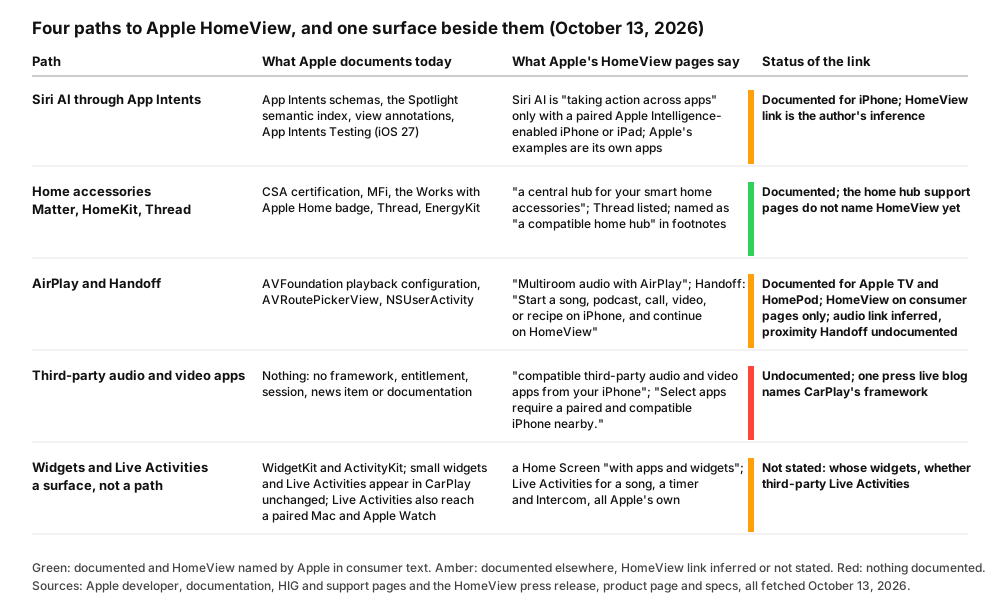
The four paths to HomeView on announcement day, and the one surface beside them: what Apple documents, what its HomeView pages say, and the status of the link between them. Drawn by script from the saved pages.202838931
The press claim, labeled
Tom’s Guide’s live blog of the announcement says that while there is no built-in App Store, “you will be able to find a few third-party media apps supported via the CarPlay app framework”, and earlier that HomeView “will launch without access to the App Store”.8 That is a press lead. It may come from an Apple briefing; it is not on an Apple page. I searched every Apple developer, documentation, Human Interface Guidelines, WWDC, App Review and support text in my evidence folder for the word HomeView, including the CarPlay developer page, the CarPlay Developer Guide dated June 2026 (June 8, 2026 in its title metadata; Apple serves it under its predecessor’s file name, CarPlay-App-Programming-Guide.pdf, and the CarPlay HIG still links it by that older name), the CarPlay HIG page, the CarPlay session from WWDC26, and the App Review Guidelines last updated June 8, 2026, and found it in none of them.644454647 The CarPlay guide’s four uses of the word “home” are all the CarPlay home screen.44
What the CarPlay framework is, so you can judge the lead
A CarPlay app is not a separate app. Developers add CarPlay support to an existing iPhone app, which people download from the App Store; the app uses the CarPlay framework’s templates, and “iOS manages the display of UI elements and handles the interface with the car”.44 Every CarPlay app needs a category entitlement, requested on the developer site, reviewed by Apple, and then carried in the provisioning profile; the categories are audio, communication, driving task, EV charging, fueling, navigation, parking, public safety, quick food ordering, video, and voice-based conversational apps.446 The scene is CPTemplateApplicationScene with its session role, and the templates an app may use are governed by its entitlement.44
Video is the category that makes the lead plausible, and it is new. The guide’s entitlement table puts the CarPlay video entitlement at a minimum of iOS 27, and the WWDC26 session “Rev up your CarPlay app” says that with iOS 27 you can build apps to browse and play video in cars that support it, that an app which already supports AirPlay video streaming needs no changes for basic playback, and that video apps must support AirPlay video streaming and use the framework for browsing; an app with only the video entitlement appears only in cars that support video, and the audio and video entitlements can be combined.4446 The pair “audio and video” is exactly the one Apple’s HomeView pages use. The session also says the CarPlay Simulator “is now available in Device Hub”, and that video developers get it through the Additional Tools for Xcode package.46
Against the lead stand the framework’s own rules. The guide says CarPlay app flows must be “meaningful to use while driving”, the driving task category says “Use cases outside of the vehicle environment are not permitted”, and the CarPlay HIG’s introduction says “CarPlay is designed for drivers to use while they’re driving”.4445 If Apple reused this framework for a kitchen screen, those sentences would have to change, and as of my fetches on October 13 they had not. That is my inference about a document, not a fact about HomeView.
What the SDK on my Mac shows
I ran the question against the Xcode 27.2 beta installed on my Mac: the first beta, build 27B5019j, beside Xcode 27.1 RC and Xcode 27.0. Apple has since shipped Xcode 27.2 beta 2 (27B5028f, September 28) and iOS 27.2 beta 3 (24B5099f, October 5), neither of which is on this Mac, and the iOS 27.2 simulator runtime installed here is the first beta’s (24B5084k), so the iOS 27.2 beta 2 (24B5089g) and beta 3 runtimes went unprobed too; my beta-by-beta post tracks what their notes say, and Apple’s releases feed on October 13 still listed those two as the newest 27.2 builds.48 Xcode 27.2 beta 1’s Platforms folder holds ten entries: AppleTVOS, AppleTVSimulator, DriverKit, iPhoneOS, iPhoneSimulator, MacOSX, WatchOS, WatchSimulator, XROS and XRSimulator. Its simulator device types, 130 of them, include nothing matching home, hub or view; its runtimes are iOS, tvOS, watchOS and visionOS. A search for the string HomeView over every text file in the iOS, tvOS, watchOS and visionOS 27.2 SDKs, headers, symbol lists and property lists, returned nothing, run once case-sensitively and once case-insensitively with the same result. The macOS 27.2 SDK returned five files both times, all private-framework symbol lists whose Swift symbols happen to contain the word: a HomeViewState in ShazamKitUI, a HomeViewModel each in iCloudSettings and ImagePlaygroundInternal, a view type whose name ends in SearchHomeView in PhotosSwiftUICore, and an environment value named lemonadeHomeViewLayoutMargins in PhotosUICore, which is to say screens called Home, not the product.4
The CarPlay headers in the iOS 27.2 SDK carry three scene session roles, application, dashboard and instrument cluster, and nothing for a home display. The video support is there, as CPPlaybackPresentationVideo and a session configuration property, supportsVideoPlayback, whose availability is marked iOS 26.4 and unavailable on tvOS, visionOS, macOS and watchOS.4 That is a header on my machine, read on October 13 from the first 27.2 beta; it tells you what that beta shipped to developers, nothing about beta 2, and nothing about what Apple will ship.
What to watch
If an Apple surface changes, one of these places would show it: a developer news item of the kind Apple posted for iPhone Duo on October 5, which pointed developers to Xcode 27.1, Device Hub, and the new screenshot and app preview specifications before that phone shipped, after a September 18 item had pointed to design kits; a revision date on the CarPlay Developer Guide later than June 2026; a new entitlement on the CarPlay request page; the iOS 27.2 release notes; or the specs page’s own footnote growing a sentence.544 Until one of them moves, “compatible third-party audio and video apps from your iPhone” is a promise with no instructions.
Designing for a square, shared, distance-aware screen
Apple has published no design guidance for HomeView. The Human Interface Guidelines’ platform list, its “Getting started” page, on October 13 was iOS, iPadOS, macOS, tvOS, visionOS, watchOS, games and iPhone Duo, and its technologies list, from AirPlay to Wallet, includes CarPlay, HomeKit and Siri and no HomeView entry; the design resources page offers kits for iOS and iPadOS 27, macOS 27, tvOS 18, watchOS 26 and visionOS 26, a HomeKit icon and glyph, a Live Activities template and iPhone Duo bezels, and nothing for HomeView.495051 What exists is the canvas, which Apple has specified exactly, and Apple’s own sentences about how the interface behaves. I take those first and the neighboring guidance second.
The canvas
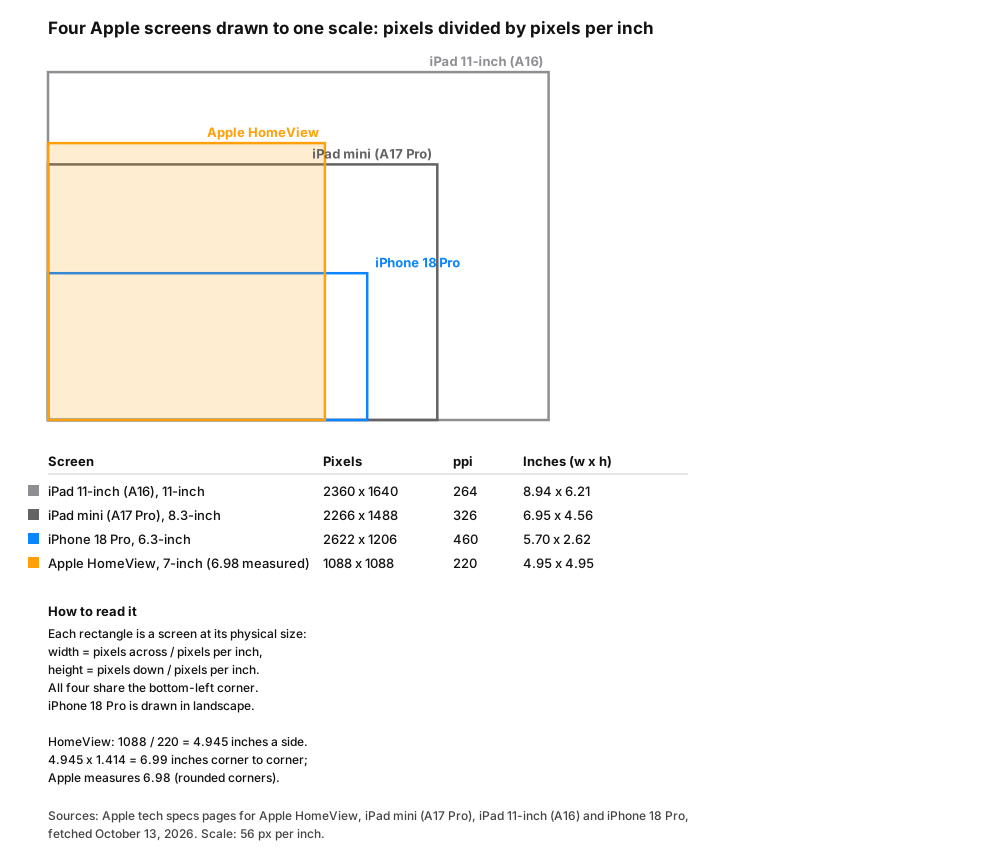
Four Apple screens at one scale, each rectangle’s width and height computed as pixels divided by pixels per inch from Apple’s tech specs pages; all four share a corner. HomeView’s 1088 pixels at 220 ppi give 4.945 inches a side, and 4.945 times the square root of two is 6.99 inches, against the 6.98 inches Apple measures with the rounded corners.2525354
Three things fall out of the numbers. The panel is square: 1088 by 1088 pixels, a ratio none of the other screens in the figure has, and the Home Screen, the faces, and the Home Camera face’s nine feeds are laid out on it.23 It is small: 4.95 inches a side, so its whole area is less than an iPad mini’s 6.95 by 4.56.252 And it is the coarsest of the four by a wide margin, 220 pixels per inch against the iPad mini’s 326, the 11-inch iPad’s 264 and the iPhone 18 Pro’s 460.2525354 At the 2x scale Apple uses on iPad, that would be a 544 by 544 point canvas; Apple has not published a point scale for HomeView, so that figure is my arithmetic, not a specification.
The 220 ppi figure is a design fact, not a complaint. A screen read from across a kitchen does not need an iPhone’s density, and Apple’s description of the interface says what the density is for.
Apple’s sentences about the interface
Collected from the press release and the product page, these are the only published statements of how HomeView’s interface behaves, and together they are the brief:
- Two distances. “The HomeView interface intelligently adjusts based on the user’s distance, showing simpler information that’s viewable from across the room and richer detail as they step closer.”1 The product page: “Select features respond to your proximity to show more information the closer you get.”3
- Two brightnesses. Automatic brightness from 500 nits in a sunlit room down to 0.3 nits on a nightstand, with True Tone.12
- Touch and voice. Users control the home “by touch or with just their voice using Siri AI”.1 Messages are answered “by voice or with the onscreen keyboard”.1 Siri is summoned by “Siri” or “Hey Siri”, or by swiping down from the top of the display.2
- Faces as the native unit. Photos (with Portrait-style depth), Snoopy, Calendar, Weather, Flow (which “reacts to your movements”), Home Modular, Home Camera, and dynamic faces that change through the day.31 Calendar and Weather faces are named only on the product page; Snoopy’s sports and holiday animations only in the press release.
- Six people, and guests. Recognition by face, a personal Home Screen each, and a shared layer of photo albums and music that guests can use.13
- Glanceable system state. Live Activities for the playing song, an active timer, an incoming Intercom message.1
- A hinge. The tabletop model tilts “for comfortable viewing on tabletops of any height”.1
- Accessibility, built in. VoiceOver, Zoom, Voice Control, Switch Control, AssistiveTouch, Real-Time Text, Live Speech, Live Captions, Siri and Dictation, Type to Siri, Vocal Shortcuts, and Subtitles and Closed Captioning.2
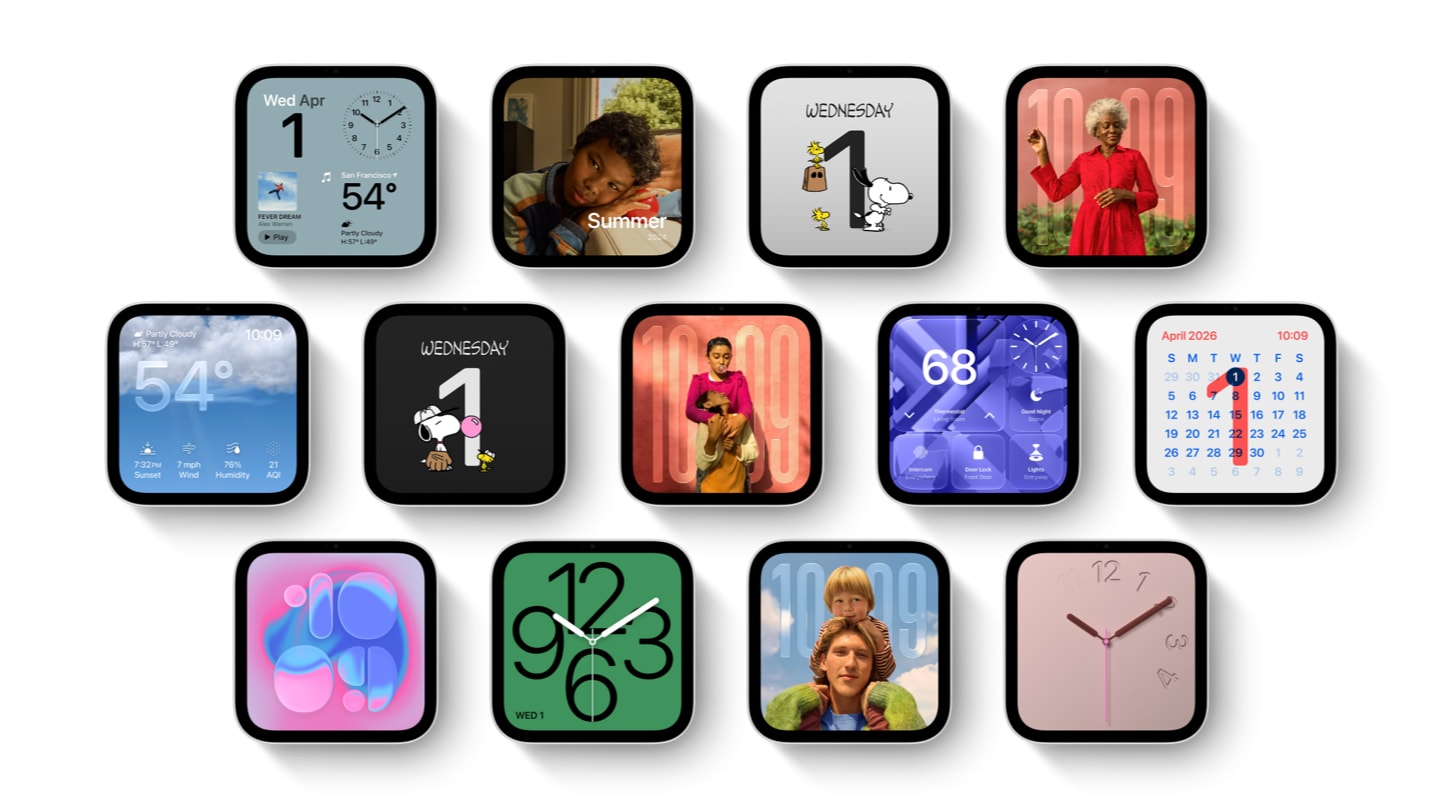
Apple’s collection of faces, from the press release. Image: Apple.111
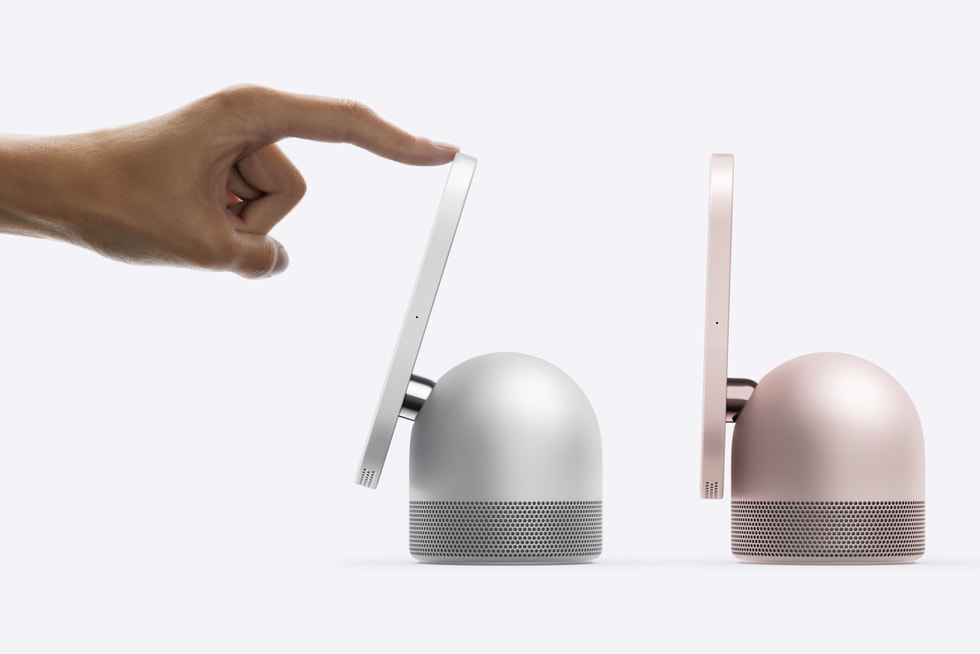
The hinge, from the press release. Image: Apple.111
The guidance that applies by analogy
With no HomeView page in the HIG, the pages that describe the same problems are the closest Apple has published. Everything in this list is my reading of guidance written for another device, and I say which.
- Distance, from visionOS widgets and StandBy. The widgets HIG gives visionOS widgets two distance thresholds: at a distance, fewer details, larger type, and no buttons or toggles; nearby, more detail; with the shared elements kept across both, and a note that people can scale widgets from 75 to 125 percent and should be able to read them from a range of distances.9 For StandBy it says to scale text up so people can glance from a greater distance and to limit rich images and color.9 That is the two-distance brief Apple describes for HomeView, already written down for two other screens.
- The room, from tvOS. “Designing for tvOS” says people sit “often 8 feet or more” from the screen, that content should be legible from across the room, and that multiuser support means shared sign-in and automatic profile switching.10 The multiuser line is the nearest Apple guidance to six recognized people at one display.
- The glance, from watchOS. Interactions that can last less than a minute, quick and single-screen; complications that show essential, dynamic content at a glance, with line widths of two points or more.5556 HomeView’s faces are, functionally, watch faces at arm’s length.
- The widget rules themselves. Balance density for glanceability, avoid app-like layouts, size tap targets so people can tap with confidence, keep the standard 16-point margins Apple sets for most widgets, with the tighter exceptions it allows, and in general use text at 11 points or larger.9 Whether third-party widgets reach HomeView is open; if they do, these are the nearest published rules, provisional until Apple writes HomeView’s own.
- Live Activities. Large, heavier-weight text, key information legible at a glance, layouts adapted for StandBy’s larger scale, and interactive elements deactivated in CarPlay.7
- Siri. Identify the actions to expose by their context, “such as in a hands-free environment or on a particular device”; provide responses that Siri can deliver both audibly and visually; and write them knowing that others nearby may hear them.27
- HomeKit, for the Home Modular face. The HomeKit HIG, written for iOS, tvOS and watchOS apps that integrate with HomeKit, asks developers to respect the home, room, zone, accessory and scene hierarchy, to say “scene” and not action set, to suggest Siri-friendly service names that do not contain the location, to show example Siri phrases after setup, never to block camera images, and to show a microphone button only for two-way audio.57 A name chosen for a phone’s list is now the label on a wall.
The missing page, as I would write it
If I had to draft the HomeView page of the Human Interface Guidelines from Apple’s own sentences, it would say: design for two distances and let the far one win ties; assume a square; assume the person looking is not the one who set the device up; assume voice is the first input and touch the second; assume the screen may be at 0.3 nits at two in the morning; and assume the paired phone may not be in the room. None of that is Apple’s text. All of it is implied by Apple’s text, and Apple will replace it with its own page or it will not.
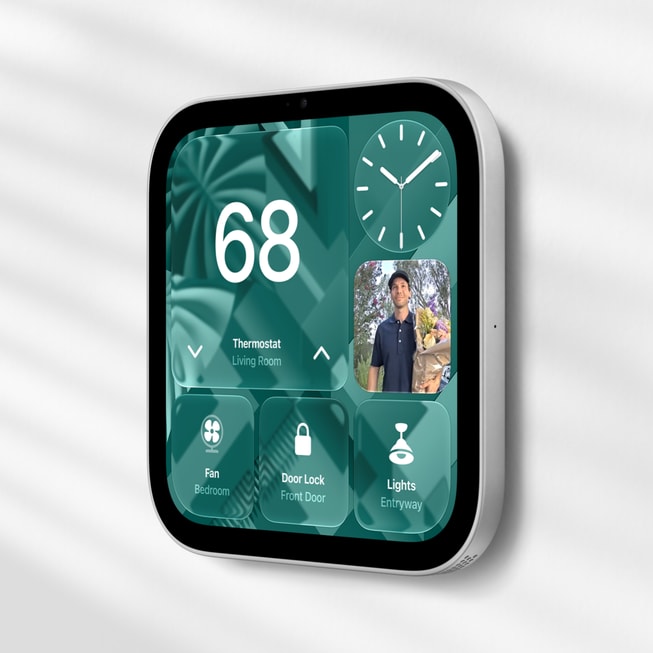
Apple HomeView (Wall Mounted), from the press release. Image: Apple.111
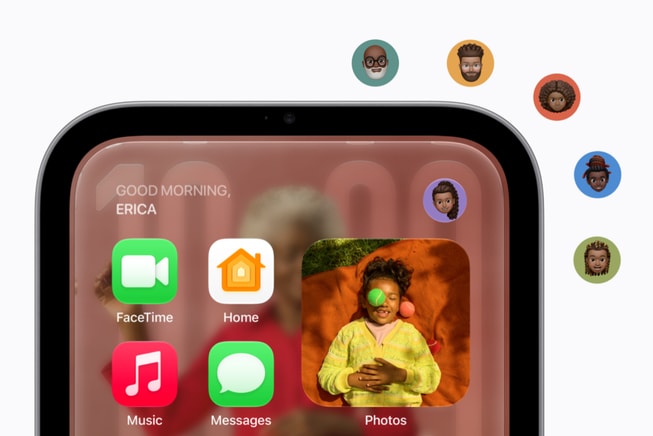
Apple’s illustration of user recognition, from the press release. Image: Apple.111
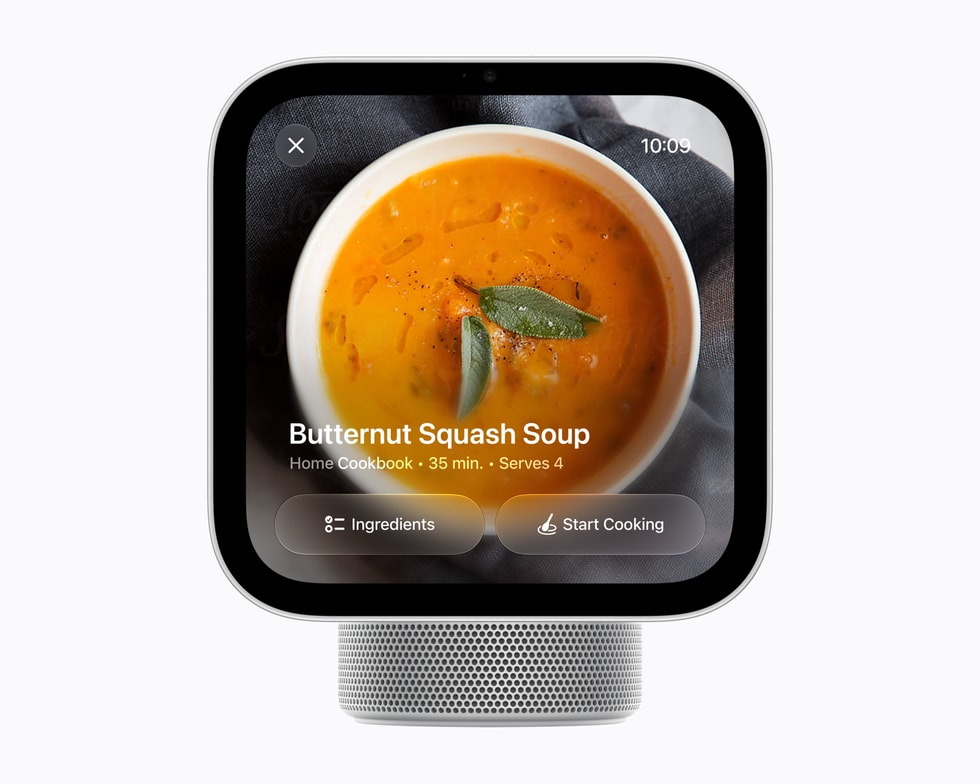
The cooking view, from the press release: a Safari recipe turned into steps. Image: Apple.111
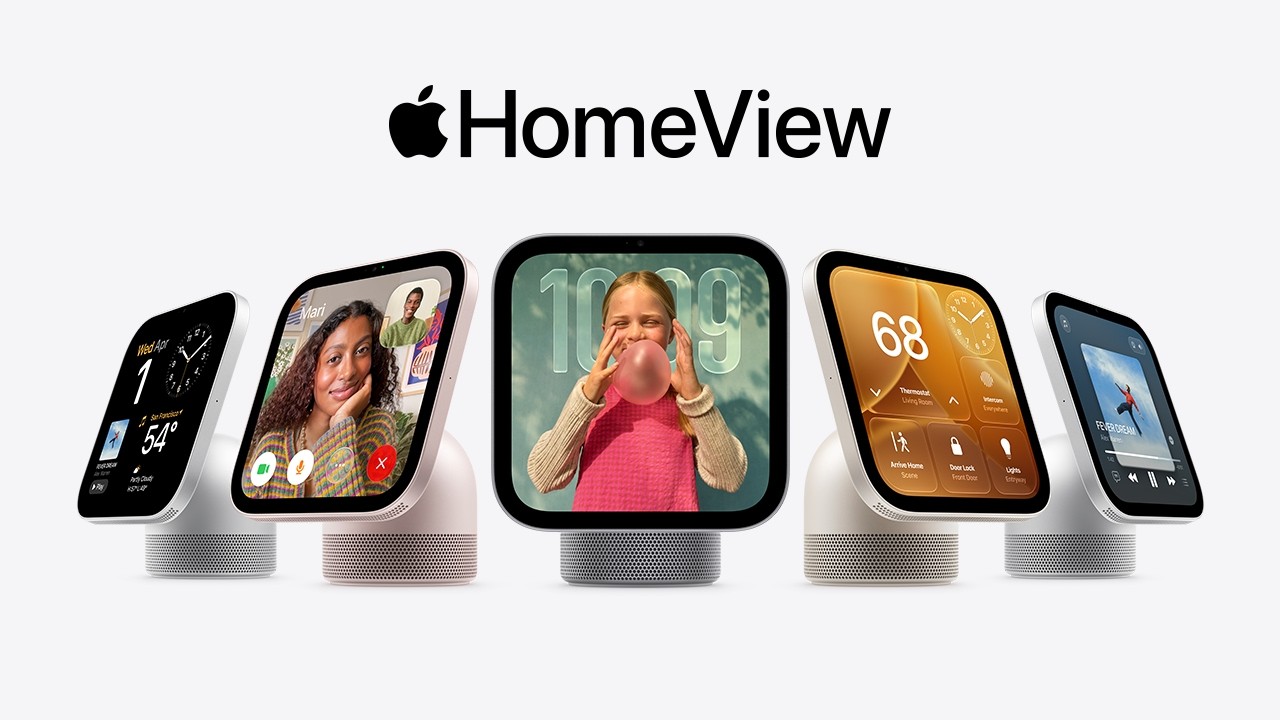
Apple’s shorter HomeView film, 1:04, published October 13, 2026 on Apple’s YouTube channel.16
What is absent on day one, with the searches
An absence claim is only worth the search behind it, so here is each one. All fetches are October 13, 2026, except the releases feed (October 11, re-fetched October 13), and the times are UTC.
| Surface | What I looked for | What I found |
|---|---|---|
| Human Interface Guidelines | A HomeView entry in the platform list and the technologies list; the pages homeview and designing-for-homeview |
No entry in either list; both page probes returned 404 (14:02 to 14:03; the platform list re-read at 15:53, unchanged)495018 |
| Developer documentation | The documentation paths homeview, homeos and homeviewkit; the platform lines of HomeKit, Matter, EnergyKit, CarPlay, App Intents, App Intents Testing, WidgetKit, ActivityKit, AVRoutePickerView and NSUserActivity |
All three probes returned 404, the first again at 15:53; no platform line names HomeView (14:02 to 14:05)18585960 |
| Developer news | Any item naming HomeView, fetched four times | None; the newest item is “Prepare and submit your apps for iPhone Duo”, October 5 (13:51, 13:59, 14:07, and again at 15:53 before publishing)5 |
| Design resources | A HomeView kit, bezel or template | None (13:51, and again at 15:53)51 |
| App Review Guidelines | Any HomeView mention; any CarPlay mention beyond the entitlement example | None; the guidelines were last updated June 8, 2026 (13:59)47 |
| WWDC26 transcripts | HomeView, HomePod, Apple TV or a hub in the three Siri sessions and the CarPlay session | No HomeView in any; no HomePod, Apple TV or hub in the Siri sessions (13:56 to 13:59)232446 |
| CarPlay Developer Guide | HomeView; any home display | None; the document is dated June 2026, June 8 in its title metadata (13:55)44 |
| Matter Accessory Best Practices | HomeView | None; Developer Preview 1.5, dated October 7, 2025 (14:05)31 |
| Works with Apple Home | HomeView in the badge rules or required compatibility statements | None; the statements name HomePod and Apple TV (14:01)29 |
| Support | The home hub article; the HomeKit Secure Video pages; the HomePod handoff page; a guessed HomeView user guide address | The hub article (September 15, 2025) names HomePod, HomePod mini and Apple TV; the HKSV pages name iPhone, iPad, Mac and Apple TV; the HomePod handoff page is about HomePod only; the guessed guide address, support.apple.com/guide/homeview/welcome/web, returned Page Not Found at 13:58 (13:58 to 14:05)303643 |
| Xcode 27.2 beta 1 (27B5019j) on my Mac | A HomeView platform, simulator device type, runtime, or any public symbol or string in the iOS, tvOS, watchOS, visionOS and macOS 27.2 SDKs | None; the five macOS hits are private-framework symbol lists whose unrelated symbols contain the word; the installed iOS 27.2 runtime is beta 1’s (24B5084k); Xcode 27.2 beta 2 (27B5028f) and the iOS 27.2 beta 2 and beta 3 runtimes were not probed (14:01 to 14:34)448 |
| Apple’s consumer pages | An operating system name; “App Store” or “CarPlay” in connection with HomeView | No OS name anywhere; “App Store” only in footers, boilerplate and an Apple Card promotion; “CarPlay” nowhere132 |
The contrast with iPhone Duo is the useful one. For that device Apple posted a developer news item, “Prepare and submit your apps for iPhone Duo”, pointing to Xcode 27.1, Device Hub, and screenshot and app preview specifications, eight days before this announcement and before the phone’s own ship date, after a September 18 item had pointed to Figma and Sketch design kits.5 For HomeView, on the day Apple described third-party apps “from your iPhone”, it posted nothing for the people who make them. Apple’s pre-order page is live and its developer site is silent, and this post is a snapshot of that silence with timestamps, so that the first change is measurable.
What to do this week, by who you are
Each item names its Apple source and its cost, and the costs are my estimates. Nothing here builds for a HomeView SDK, because there is none.
If you ship an audio or video app on iPhone.
- Confirm AirPlay works the way Apple documents it. AVAudioSession in the playback category, the “Audio, AirPlay, and Picture in Picture” background mode, the system route picker, every HLS resolution, remote control events.394041 Cost: an afternoon if you use the system player; a week if you do not. This is the only path where my reading says you may already be on HomeView’s speakers.
- Adopt the Audio schema domain and annotate Now Playing. IndexedEntity for your catalog, IntentValueQuery with AudioSearch, entity annotations on the Now Playing surface, then AppIntentsTesting.2422 Cost: real engineering, measured in weeks for a large catalog, and the benefit is certain on iPhone and AirPods whether or not HomeView’s Siri ever reaches it.
- Keep AirPlay video streaming working if you play video. It is a requirement of the CarPlay video category in iOS 27, and on the press lead it may be the requirement for HomeView too.468 Cost: nothing if you already have it.
- Do not request a CarPlay entitlement because of HomeView. The entitlement is reviewed against the car’s rules, which say flows must be “meaningful to use while driving”.44 If your app belongs in a car, request it for the car. Cost: nothing.
If you ship any iOS app.
- Do the App Intents work you were already going to do for Siri AI on iPhone. Schemas, the Spotlight semantic index, view annotations, donations, tests.2123 Cost: the same as before October 13. HomeView adds a possible second place it pays off and no new requirement.
- Leave your widgets and Live Activities alone. Apple documents an iPhone app’s small widgets and Live Activities appearing in CarPlay with no changes required, and Live Activities appearing on a paired Mac and Apple Watch, and says nothing about HomeView.67 If they appear, the widget and Live Activities rules are the nearest published guidance; if they do not, there is nothing to build. Cost: nothing.
If you make home accessories.
- Nothing changes in the build. Matter through the CSA, HomeKit through MFi, the Works with Apple Home badge through its request form and test results.2829 Cost: zero new work.
- Check your required compatibility statements against the badge page. They still say “a home hub such as HomePod or Apple TV”.29 Whether you may name HomeView is Apple’s call; ask through the badge program rather than guessing. Cost: the badge request form.
- Re-read your accessory and service names as wall labels. The HomeKit HIG’s naming rules were written for a list on a phone, and the Home Modular face puts them on a screen in an entryway for six people.57 Cost: an hour.
If you make cameras.
- Plan for nine feeds, and separately for descriptions of your footage. The Home Camera face shows up to nine, and Apple’s HomeView pages do not say which cameras it accepts beyond a HomeKit- or Matter-enabled accessory; the recording and intelligence features are HomeKit Secure Video’s and need an eligible iCloud+ plan, and the descriptions need an Apple Intelligence-enabled iPhone or iPad at setup; the HomeKit Secure Video Open Source Compatibility Guide is linked from Apple’s home developer page.3128 Cost: whatever your HKSV compliance already costs.
If you design.
- Mock up square. 1088 by 1088 pixels; at 2x that is 544 by 544 points by my arithmetic, which Apple has not confirmed.2 Cost: one artboard.
- Design the far state first. Fewer details, larger type, no buttons or toggles, per the visionOS widget and StandBy guidance; then the near state.9 Cost: a second artboard.
- Plan the test at both ends of the brightness range and with VoiceOver, for when the hardware ships. 500 nits and 0.3 nits, and the twelve accessibility features on the specs page, on November 13 or later; until then a mockup on another display shows layout, not HomeView’s brightness.21 Cost: an evening with the lights off, once there is a HomeView in the room.
Everyone.
- Watch five surfaces. Apple’s developer news page; the CarPlay Developer Guide’s date; the Human Interface Guidelines’ platform list; the home hub support article’s publication date; and the iOS 27.2 release notes.5444930 Cost: a bookmark each.
What could change, and the condition for each
I do not predict. Each line names the condition and what it would settle.
- If Apple posts a developer news item for HomeView, as it did for iPhone Duo eight days before this announcement, that item could say whether “compatible third-party audio and video apps” means an entitlement, a framework, or nothing to adopt; if it does, this post’s path four becomes a path with instructions.5
- If the CarPlay Developer Guide’s date moves past June 2026 and its text names HomeView, the press lead would have an Apple source, and the guide’s driving-only rules would show whether they still apply.448
- If Xcode 27.2 beta 2 or a later beta, or the iOS 27.2 release notes, carry a HomeView destination, scene role or simulator, the probe in this post, run on beta 1, would be out of date, and a rerun on that build would replace it.448
- If the Human Interface Guidelines gain a HomeView page with distance guidance of its own, the design section’s analogies would give way to it.49
- If the home hub support article is revised to name HomeView, the hub question would close, and that page is where a statement on Thread border routing would belong.30
- If the Works with Apple Home badge page adds HomeView to its required compatibility statements, accessory makers could print it.29
- If Apple’s footnote “HomeView software version 27.2” becomes a named operating system, the “six software platforms” boilerplate would be the place to look for it.1
- If Apple Home Collection ships in December as announced, Apple’s own accessories’ Home app presentation on HomeView could be inspected beside that of the thousands of existing Works with Apple Home and Matter accessories.12
Key takeaways
- HomeView is announced, priced and dated, and its software is a footnote. $299 for either model, November 13, “HomeView software version 27.2”, no operating system name, and a setup path that requires iOS 27.2 or iPadOS 27.2.12
- Apple’s app model is two lists, one sentence and one footnote. Fifteen built-in apps, four Apple apps “Available from iPhone”, third-party audio and video apps “from your iPhone”, and “Select apps require a paired and compatible iPhone nearby.” Nothing else.231
- Every developer path but the accessory one runs through the devices people already own, and none is documented for HomeView. App Intents for Siri AI, Matter and HomeKit for accessories, AirPlay and Handoff for media, and the undocumented apps “from your iPhone”; beside them, the small widgets and Live Activities that already appear in CarPlay, and the Live Activities that reach a paired Mac and Apple Watch. Each link to HomeView is Apple’s consumer wording plus my reading.
- The CarPlay story is a press lead. One live blog says it; no Apple page does; the framework’s own rules point at the car; the first 27.2 beta SDK on my Mac has no trace of a home display.8444
- The design brief is Apple’s, the guidance is borrowed. A square 1088-pixel canvas at 220 ppi, two distances, two brightnesses, up to six recognized people, touch and voice. Until Apple writes the page, visionOS widgets, StandBy, tvOS and watchOS are the nearest published rules.219
FAQ
Can I write an app for HomeView?
Not today. There is no SDK, no simulator, no platform in the Xcode 27.2 beta 1 SDKs I probed, no App Store in Apple’s app lists, and no developer documentation that names the device. Apple’s pages describe third-party audio and video apps “from your iPhone” and say some need the phone nearby; they do not describe how an app qualifies.431
Will my iPhone app’s widgets show up on HomeView?
Apple says each user’s Home Screen has “apps and widgets” and does not say whose. The widgets HIG and WidgetKit’s platform list do not include HomeView. Apple does document an iPhone app’s small widgets and Live Activities appearing in CarPlay with no changes, and Live Activities appearing on a paired Mac and Apple Watch, which makes the same pattern plausible here and unconfirmed.195967
Does Siri AI on HomeView use my App Intents?
Apple has not said. Siri AI on HomeView acts “across apps” only with a paired Apple Intelligence-enabled iPhone or iPad, and Apple’s examples are its own apps. App Intents is the only documented route to Siri AI on the phone, so adopting it is the only move available, and the only one that pays off regardless.120
Is HomeView a home hub?
Apple’s product page calls it “a central hub”, and the day’s footnotes list it with HomePod and Apple TV as “a compatible home hub”. The support article that defines a home hub, published September 15, 2025, does not name it, and neither do the HomeKit Secure Video pages. HomeView’s specs list Thread; Apple does not say it is a border router.312302
Does it receive AirPlay?
Audio, yes, by Apple’s own multiroom sentences. Video, Apple does not say.231
What is the screen, exactly?
7 inches diagonal as marketed, 6.98 inches measured with rounded corners, 1088 by 1088 pixels at 220 ppi, 500 nits maximum and 0.3 minimum, LED backlit IPS with True Tone. Drawn to scale it is a 4.95-inch square, smaller than an iPad mini’s display and coarser than the iPad mini, the 11-inch iPad and iPhone 18 Pro.2525354
Why is it not sold in the EU?
Apple’s sentence: “Apple HomeView is not available for sale in the European Union, as Siri AI is currently unavailable in iOS in the EU.”1
Where did the CarPlay claim come from?
Tom’s Guide’s live blog of the announcement, which says a few third-party media apps are “supported via the CarPlay app framework”. It is not on any Apple page I found, and the CarPlay framework’s own guide says its flows must be “meaningful to use while driving”.844
Can I use Apple’s images and films the way this post does?
Apple’s press image downloads carry a legal notice: use must be “personal or editorial and non-commercial”, and the media “cannot be altered or modified in any way, in whole or in part” without Apple’s permission. This post uses Apple’s own web renditions, unmodified, with a credit, and embeds Apple’s films from Apple’s YouTube channel through a click-to-play component.1115
Sources
-
Apple Newsroom, Meet Apple HomeView, a new way to enjoy entertainment, stay connected, and manage the home, press release, October 13, 2026, fetched the same day. Product definition, the Joswiak quote, colors, the distance sentence, six users and the personal-content conditions, Siri AI’s conditions and countries, faces, Live Activities, Handoff, the Home Camera face’s nine feeds, Secure Exclaves, Private Cloud Compute, prices, dates, countries, the EU sentence, the Schneider Home mounts, and footnotes 1 to 11, including “Select apps require a paired and compatible iPhone nearby.” The press images and their captions are from this page. ↩↩↩↩↩↩↩↩↩↩↩↩↩↩↩↩↩↩↩↩↩↩↩↩↩↩↩↩↩↩↩↩↩↩↩↩↩↩↩↩↩↩↩↩↩↩↩↩↩↩↩↩↩↩↩↩↩↩↩↩↩↩↩↩↩↩↩↩↩↩↩
-
Apple, Apple HomeView, Tech Specs, fetched October 13, 2026. Models, colors, the three unlabeled dimensions per model and the diagram labels, display (7-inch, 6.98 inches measured, 1088-by-1088 at 220 ppi, 500 and 0.3 nits), A18, the 12MP ƒ/2.4 camera, four microphones, audio components, sensors and the temperature and humidity footnote, Wi-Fi 6E, Bluetooth 6.0, Thread with its footnote, power and box contents, the “Built-in Apps” and “Apps Available from iPhone” lists, the accessibility feature list, the Siri activation line, and the system requirements. ↩↩↩↩↩↩↩↩↩↩↩↩↩↩↩↩↩↩↩↩↩↩↩↩↩↩↩↩↩↩↩↩↩↩↩↩↩↩↩↩↩↩↩
-
Apple, Apple HomeView, product page, fetched October 13, 2026. “A selection of Apple apps are available on HomeView”, “HomeView supports compatible third-party audio and video apps from your iPhone for a familiar experience across devices.”, the footnote without the iPhone-nearby sentence, “Apple HomeView is a central hub for your smart home accessories”, the proximity sentence, faces including Home Modular and Home Camera (“stream up to nine videos at the same time”), Handoff, AirPlay, the Secure Exclaves sentence, and the FAQ. ↩↩↩↩↩↩↩↩↩↩↩↩↩↩↩↩↩↩↩↩↩↩↩↩↩↩↩↩↩↩↩↩↩↩↩↩
-
Author’s measurement on October 13, 2026, on a Mac running macOS 27.0 (26A428) with Xcode 27.2 beta 1 (27B5019j), Xcode 27.1 RC (27A9275) and Xcode 27.0 (27A266a) installed; the searches ran at 14:01 UTC (case-sensitive) and 14:34 UTC (case-insensitive), and the installed Xcode versions were recorded at 14:48 UTC. The Platforms folder listing; simctl’s 130 device types and the installed runtimes, of which the iOS 27.2 runtime is the first beta’s (24B5084k); a recursive search for “HomeView” over every text file in the iOS, tvOS, watchOS, visionOS and macOS 27.2 SDKs, with the same result both times (zero matches in the first four; five private-framework symbol-list files in the macOS SDK whose symbols match: a HomeViewState in ShazamKitUI, a HomeViewModel each in iCloudSettings and ImagePlaygroundInternal, a view type whose name ends in SearchHomeView in PhotosSwiftUICore, and an environment value named lemonadeHomeViewLayoutMargins in PhotosUICore); a search for “homeOS” in the iOS SDK’s public headers (zero); the HomeKit headers’ HMHomeHubState and hub error codes; and the CarPlay headers’ three scene session roles and supportsVideoPlayback marked API_AVAILABLE(ios(26.4)). Xcode 27.2 beta 2 (27B5028f) and the iOS 27.2 beta 2 (24B5089g) and beta 3 (24B5099f) runtimes were not installed and were not probed. The commands and output are kept with the post’s evidence. ↩↩↩↩↩↩↩↩↩↩
-
Apple Developer, News, fetched October 13, 2026 at 13:51, 13:59, 14:07 and 15:53 UTC. The newest item is “Prepare and submit your apps for iPhone Duo”, October 5, 2026, pointing to Xcode 27.1, Device Hub, and the screenshot and app preview specifications; “Build for iPhone Duo with new resources”, September 18, 2026, pointed to the Figma and Sketch design kits; “Get ready with the latest beta releases”, September 16, 2026, names the 27.2 betas and Xcode 27.2. No item names HomeView. ↩↩↩↩↩↩↩
-
Apple Developer, CarPlay, fetched October 13, 2026. The eleven app categories, video apps that play “in supported cars when parked”, the entitlement request link, and widgets from the iPhone app appearing in CarPlay “with no changes required”. ↩↩↩↩↩↩
-
Apple, Human Interface Guidelines, Live Activities, last updated December 16, 2025, fetched October 13, 2026. Live Activities start on iPhone or iPad and appear in the Mac menu bar, the Apple Watch Smart Stack and the CarPlay Dashboard; large, heavier-weight text; StandBy’s larger scale; interactive elements deactivated in CarPlay; “Not supported in tvOS or visionOS”. ↩↩↩↩↩
-
Tom’s Guide, Apple ‘Welcome home’ event LIVE: HomeView, Apple TV 4K, HomePod mini 2 unveiled: all the news, prices and release dates, live blog, October 13, 2026, fetched the same day. A press report, not an Apple statement: “you will be able to find a few third-party media apps supported via the CarPlay app framework”; HomeView “will launch without access to the App Store”. ↩↩↩↩↩↩
-
Apple, Human Interface Guidelines, Widgets, last updated December 16, 2025, fetched October 13, 2026. Where widgets appear (iPhone and iPad Home Screen and Lock Screen, the Mac desktop and Notification Center, Apple Vision Pro, the Apple Watch Smart Stack, StandBy and CarPlay); the visionOS distance thresholds and the 75 to 125 percent scale; StandBy guidance; glanceability, tap targets, 16-point margins and 11-point text; “Not supported in tvOS”. ↩↩↩↩↩↩↩↩
-
Apple, Human Interface Guidelines, Designing for tvOS, fetched October 13, 2026. Viewers sit “often 8 feet or more” from the screen; legibility from across the room; the focus system; multiuser support with shared sign-in and automatic profile switching. ↩↩
-
Apple, LEGAL_NOTICE, the text file inside every image download on the press release page, fetched October 13, 2026: “By using any of the media included in this zipped file, you agree that the use is personal or editorial and non-commercial. Images, video, and audio cannot be altered or modified in any way, in whole or in part without express permission from Apple.” The images in this post are the web renditions Apple serves on the press release page, byte for byte. ↩↩↩↩↩↩↩↩↩↩
-
Apple Newsroom, Introducing Apple Home Collection, a new lineup of smart home accessories, October 13, 2026, fetched the same day. LG Electronics and Schneider Electric, December and early 2027, the cameras’ “home hub like Apple HomeView” sentence, the doorbell chime, the thermostats reading HomeView’s sensors, the EU sentence, and the footnote “require a compatible home hub such as Apple HomeView, HomePod, or Apple TV.” ↩↩↩↩↩↩
-
Apple Newsroom, Apple unveils the new Apple TV 4K, supercharged by Siri AI, October 13, 2026, fetched the same day. A19, “available in beta in tvOS 27.2”, $299, November 13, the Secure Exclaves sentence for microphone data, and the Borchers quote naming HomeView. ↩↩↩
-
Apple Newsroom, Apple announces the next generation of HomePod mini with support for Siri AI, beautiful new colors, and rich sound, October 13, 2026, fetched the same day. $149, October 30, “compatible with HomePod software 27.2”, Siri AI “in a future software update”. ↩↩
-
Apple, Welcome Apple HomeView: Designed for life at home., Apple’s YouTube channel, published October 13, 2026, 3:13. Title, date and length from the channel’s feed and YouTube’s metadata, fetched October 13, 2026. ↩↩↩
-
Apple, The new Apple HomeView: Keep the whole home connected, entertained, and in the know., Apple’s YouTube channel, published October 13, 2026, 1:04. Title, date and length from the channel’s feed and YouTube’s metadata, fetched October 13, 2026. ↩↩
-
Apple, Home, fetched October 13, 2026. The combined footnote on Siri AI for Apple TV 4K, HomeView and HomePod mini 2, including the home owner requirement; “Siri AI is rolling out in English. Usage limits may apply.” ↩↩
-
Apple Developer Documentation and Human Interface Guidelines address probes, October 13, 2026, 14:02 to 14:03 UTC: the documentation paths
homeview,homeosandhomeviewkitand the HIG pathshomeviewanddesigning-for-homevieweach returned HTTP 404. Recorded with their times in the post’s evidence index. ↩↩↩ -
Apple Support, Apple Intelligence Usage Terms, published September 9, 2026, fetched October 13, 2026. Usage limits vary by feature and reset; unreasonable use may be throttled; “fees may apply” to certain software; no price for expanded access is named. ↩
-
Apple Developer, What’s new in Apple Intelligence, fetched October 13, 2026. The App Intents framework “is how you can connect your app to Apple Intelligence and features like Siri AI”; schemas, the View Annotations API, and the App Intents Testing framework. ↩↩↩↩
-
Apple Developer Documentation, Apple Intelligence and Siri AI, App Intents, fetched October 13, 2026. The five steps: index entities in Spotlight, choose Transferable types, adopt schemas, associate entities with views, donate actions and content. ↩↩
-
Apple Developer Documentation, App schema domains, fetched October 13, 2026. The domain list: Audio, Calendar, Camera, Clock, Mail, Maps, Messages, Notes, Phone, Photos, Reminders, and System and in-app search. ↩↩
-
Apple, Build intelligent Siri experiences with App Schemas, WWDC26 session 240, transcript fetched October 13, 2026. AppEntity and AppSchema conformance, IndexedEntity, EntityStringQuery, view annotations, Transferable with IntentValueRepresentation, IntentValueQuery, and the test order AppIntentsTesting, Shortcuts, Spotlight, Siri. ↩↩↩
-
Apple, Explore advanced App Intents features for Siri and Apple Intelligence, WWDC26 session 343, transcript fetched October 13, 2026. Custom dialog and snippet responses, interaction donations through IntentDonationManager, OwnershipProvidingEntity, IntentValueQuery with AudioSearch, entity annotations on notifications, Now Playing and AlarmKit; “voice-only devices like AirPods” and the car as the devices named. ↩↩↩↩
-
Apple, Code-along: Make your app available to Siri, WWDC26 session 344, transcript fetched October 13, 2026. A calendar app’s schemas, IndexedEntity, an OpenIntent and on-screen awareness, built on iPhone. ↩
-
Apple Developer Documentation, App Intents Testing, fetched October 13, 2026. Platform list: iOS, iPadOS, Mac Catalyst, macOS, tvOS, visionOS, watchOS 27.0. ↩
-
Apple, Human Interface Guidelines, Siri, revised June 8, 2026, fetched October 13, 2026. Apps work with Siri through App Intents; identify actions by context “such as in a hands-free environment or on a particular device”; responses that work audibly and visually; “People can initiate a Siri request on one device and have it take effect on another”; others nearby may hear responses. ↩↩↩
-
Apple Developer, Developing apps and accessories for the home, fetched October 13, 2026. HomeKit, Matter and MatterSupport, ThreadNetwork, EnergyKit, the MFi Program for HomeKit accessories, CSA certification for Matter accessories, and the links to the HomeKit Secure Video Open Source Compatibility Guide and the Matter best practices document. HomeView is not named. ↩↩↩↩↩↩↩↩↩↩
-
Apple Developer, Works with Apple Home badge guidelines, fetched October 13, 2026. CSA certification and interoperability testing, the request form, the Artwork License Agreement, the 10 mm and 30 pixel minimums, and the required compatibility statements naming “a home hub such as HomePod or Apple TV” and “a Thread-enabled Apple Home hub such as HomePod or Apple TV”. ↩↩↩↩↩↩↩
-
Apple Support, Set up your HomePod, HomePod mini, or Apple TV as a home hub, published September 15, 2025, fetched October 13, 2026. A home hub is required to add Matter accessories; Thread-enabled Matter accessories need a Thread-enabled hub such as HomePod mini or Apple TV 4K (3rd generation) Wi-Fi + Ethernet, or a third-party border router. HomeView is not named. ↩↩↩↩↩↩
-
Apple, Matter Accessory Best Practices for Apple Home, Developer Preview 1.5, dated October 7, 2025, fetched October 13, 2026. The Matter SDK, OpenThread, Matter OTA, diagnostics clusters, CSA interoperability testing, and testing with iOS and tvOS betas. HomeView is not named. ↩↩
-
Apple Developer Documentation, HomeKit, fetched October 13, 2026. Platform list: iOS 8.0, iPadOS 8.0, Mac Catalyst 14.0, tvOS 10.0, visionOS 1.0, watchOS 2.0. ↩↩
-
Apple Developer Documentation, EnergyKit, fetched October 13, 2026. Platform list: iOS 26.0, iPadOS 26.0. ↩↩
-
Apple Developer Documentation, Matter, fetched October 13, 2026. Platform list beginning at iOS 16.0. ↩
-
Apple, Home app, fetched October 13, 2026. “The Home app can do even more with the help of Apple HomeView, HomePod, HomePod mini, or Apple TV 4K.”; the hub setup link naming HomePod, HomePod mini 2 and Apple TV 4K; three footnotes that name only Apple TV or HomePod as the hub, one of them as “a home hub such as Apple TV or HomePod”. ↩↩↩
-
Apple Support, iCloud User Guide, Store encrypted security camera footage in iCloud with HomeKit Secure Video and Set up HomeKit Secure Video on all your devices, fetched October 13, 2026. End-to-end encryption, on-device analysis by the hub, the 50GB, 200GB and 2TB camera limits, viewing on iPhone, iPad, Mac or Apple TV, and cameras added only from iPhone or iPad. HomeView is not named. ↩↩↩
-
Tom’s Guide, I saw Apple’s HomeView early: 7 things you need to know about the new smart home display, October 13, 2026, fetched the same day. A press report, not an Apple statement; its “five security camera feeds” differs from Apple’s nine. ↩
-
Apple Developer Documentation, Technology Overviews, Media streaming, fetched October 13, 2026. Adopting AirPlay “requires only Configuring your app for media playback”; AVFoundation’s built-in support and AVKit’s picker. ↩↩
-
Apple Developer Documentation, Configuring your app for media playback, fetched October 13, 2026. The playback audio session category and the “Audio, AirPlay, and Picture in Picture” background mode. ↩↩
-
Apple Developer Documentation, AVRoutePickerView, fetched October 13, 2026. A view that presents “a list of nearby media receivers”; platform list iOS 11.0, iPadOS 11.0, Mac Catalyst 13.1, macOS 10.15, tvOS 11.0. ↩↩
-
Apple, Human Interface Guidelines, AirPlay, fetched October 13, 2026. AirPlay streams to “Apple TV, HomePod, and TVs and speakers that support AirPlay”; the page’s best practices. ↩↩
-
Apple Developer Documentation, NSUserActivity, fetched October 13, 2026. NSUserActivityTypes in Info.plist, isEligibleForHandoff, and the platform list. ↩
-
Apple Support, HomePod User Guide, Play audio on HomePod using iPhone or iPad, fetched October 13, 2026. “To quickly hand off audio, bring your iPhone near HomePod”; Transfer to HomePod in the AirPlay and Continuity settings; Siri starting an AirPlay session from the nearby iPhone for unsupported services; “may not support Siri and AirPlay”. ↩↩
-
Apple, CarPlay Developer Guide, June 2026, title metadata dated June 8, 2026, served under its predecessor’s file name and linked by the CarPlay HIG as the “CarPlay App Programming Guide”; fetched October 13, 2026. CarPlay support added to an existing iPhone app; “iOS manages the display of UI elements and handles the interface with the car”; the category entitlements, including the video entitlement at a minimum of iOS 27; flows “meaningful to use while driving”; the driving task rule “Use cases outside of the vehicle environment are not permitted”; CPTemplateApplicationScene and its session role; the CarPlay Simulator. Its four uses of “home” are the CarPlay home screen. ↩↩↩↩↩↩↩↩↩↩↩↩↩↩
-
Apple, Human Interface Guidelines, CarPlay, fetched October 13, 2026: “CarPlay is designed for drivers to use while they’re driving”. ↩↩
-
Apple, Rev up your CarPlay app, WWDC26 session 212, transcript fetched October 13, 2026. Video apps in iOS 27; an app that already supports AirPlay video streaming needs no changes for basic playback; video apps must support AirPlay video streaming and use the framework for browsing; the video entitlement alone shows the app only in cars that support video; audio and video entitlements can be combined; the CarPlay Simulator “is now available in Device Hub” and ships in Additional Tools for Xcode. ↩↩↩↩↩
-
Apple, App Review Guidelines, last updated June 8, 2026, fetched October 13, 2026. The only CarPlay mention is the limited-use entitlement example; HomeView does not appear. ↩↩
-
Apple Developer, Releases RSS feed, fetched October 11, 2026 and again October 13, 2026 (the same newest 27.2 entries), both saved with this post’s evidence: entries “Xcode 27.2 beta 2 (27B5028f)”, September 28, 2026, and “iOS 27.2 beta 3 (24B5099f)”, October 5, 2026; the first 27.2 betas, including Xcode 27.2 beta (27B5019j), are dated September 16, 2026 in the author’s beta-by-beta post, which also dates iOS 27.2 beta 2 (24B5089g) to September 21, 2026. ↩↩↩
-
Apple, Human Interface Guidelines, Getting started, fetched October 13, 2026 at 14:02 and 15:53 UTC. The platform entries: design principles and designing for iOS, iPadOS, macOS, tvOS, visionOS, watchOS, games, and iPhone Duo. ↩↩↩↩
-
Apple, Human Interface Guidelines, Technologies, fetched October 13, 2026. The technologies list, which includes AirPlay, CarPlay, HomeKit and Siri and no HomeView entry. ↩↩
-
Apple Developer, Apple Design Resources, fetched October 13, 2026 at 13:51 and 15:53 UTC. Kits for iOS and iPadOS 27, macOS 27, tvOS 18, watchOS 26 and visionOS 26, the HomeKit icon and glyph, a Live Activities template and iPhone Duo bezels; no HomeView resource. ↩↩
-
Apple, iPad mini, Tech Specs, fetched October 13, 2026: 8.3-inch, 2266-by-1488 resolution at 326 ppi, A17 Pro chip. ↩↩↩↩
-
Apple, iPad 11-inch (A16), Tech Specs, fetched October 13, 2026: 2360-by-1640-pixel resolution at 264 ppi. ↩↩↩
-
Apple, iPhone 18 Pro and 18 Pro Max, Tech Specs, fetched October 13, 2026: 6.3-inch display, 2622-by-1206-pixel resolution at 460 ppi. ↩↩↩
-
Apple, Human Interface Guidelines, Designing for watchOS, fetched October 13, 2026. Interactions that can last less than a minute; quick, glanceable, single-screen interactions; complications on every wrist raise. ↩
-
Apple, Human Interface Guidelines, Complications, fetched October 13, 2026. Essential, dynamic content viewed at a glance; line widths of two points or more. ↩
-
Apple, Human Interface Guidelines, HomeKit, fetched October 13, 2026. Written for iOS, tvOS and watchOS apps that integrate with HomeKit; the home, room, zone, accessory and scene hierarchy; “scene” in the interface; Siri-friendly service names without the location; example Siri phrases after setup; camera images never blocked; a microphone button only for bidirectional audio. ↩↩
-
Apple Developer Documentation, App Intents, fetched October 13, 2026. The framework’s platform list, which does not include HomeView. ↩
-
Apple Developer Documentation, WidgetKit, fetched October 13, 2026. Platform list: iOS 14.0, iPadOS 14.0, Mac Catalyst 14.0, macOS 11.0, visionOS 26.0, watchOS 9.0. ↩↩
-
Apple Developer Documentation, ActivityKit, fetched October 13, 2026. Platform list: iOS 16.1, iPadOS 16.1, Mac Catalyst 16.1; the abstract names iPhone, iPad, Apple Watch and Mac. ↩











