Pixel-Art Worlds on iPhone: What the 16-Bit Masters Knew

This post has not been translated yet, so you are reading the English original. Read it at the English URL
A Final Fantasy VI party member is 16 by 24 pixels, drawn in 12 usable colours in battle, with 46 poses built from at most 181 tiles, and the same sprite walks the field, the world map, and every battle.1 Pokémon Emerald draws every town from 16-by-16 “metatiles” of two layers each, with a map cell of 16 bits: ten for the tile, two for collision, four for elevation.2 Celeste renders its whole world at 320 by 180 and multiplies by six.3 Those three numbers hold the craft: fix a cell, fix a palette, fix a canvas, and then draw inside them. Our own app, Kiradex, has a pixel plaza rendered in RealityKit, and when I held it against that record it failed on most counts: a 28-tile set in ad-hoc flat colour with no ramps, no outlines rule, no occlusion, a two-frame walk. So I did the research properly: six sourced reports on the SNES era, Pokémon’s tile systems read from the decompilations, the modern masters, the craft, the Apple rendering path, and collecting games as social worlds. What follows is the guide I wished I had, with the numbers, the measured recipe for crisp pixel art on a 3× iPhone screen and both displays of iPhone Duo, and the first results of rebuilding our world by rule.
TL;DR
- The masters worked from the constraint outward. The SNES gave its 16-colour tiles eight background and eight sprite palettes of 15 colours, 8-by-8 tiles, and 32 sprites per scanline; Square’s answer was one 16-by-24 cell, a pose library, and tile sharing.41 The Game Boy gave four shades, and Pokémon Red’s tilesets held 96 tiles; Game Freak’s answer was 32-by-32 blocks and a priority bit that hides your feet in tall grass with zero extra art.56
- Three decisions make a pixel world read as one place: a single light direction and shadow hue (the Seiken Densetsu 3 team shaded in deep blues and purples instead of black), one outline rule applied to every sprite (FF VI’s silhouette is 93 percent near-black at its edge; Secret of Mana’s has no black at all), and hue-shifted colour ramps instead of lighter-and-darker swatches.3389
- The modern tier list for lighting is affordable at the bottom and ruinous at the top. Moonlighter fakes light with overlaid sprites; Celeste draws lights as masks in one 2048-pixel atlas; Eastward hand-paints a bump map for every asset; HD-2D costs “more than you’d think,” in its producer’s words, and players switch its depth of field off.10111213
- On Apple platforms, stay in RealityKit for a 2D world that holds one real 3D object, and turn its AR defaults off. Every pixel-art need has a documented API (a nearest sampler, no mipmaps, an opacity threshold, a UV transform per frame), but RealityView applies motion blur and HDR tone mapping by default, and the recipe switches those off along with depth of field, grain and antialiasing.141516 Our walkers were blurred mid-step until we did.
- Integer scaling on iPhone is arithmetic you do in pixels, not points. At 3×, one texel at six pixels is 2 points, so a 16-texel tile is 32 points; the iPhone 18 Pro Max shows 10.3 by 22.4 tiles at eight per texel, the open iPhone Duo 29.7 by 20.9 at six, and no current iPhone height divides by 320, so “exactly 20 tiles tall” always means bars.17
- Own art, drawn by rule, is the clean path. The Copyright Office’s January 2025 report says “prompts do not alone provide sufficient control” for a copyright, and style is not protected but specific tiles and characters are; so we built a forge that draws every tile from one 58-colour palette and hand-set rules, and the first field and the rebuilt plaza are at the end.1819
1. What the 16-bit masters were working against
The Super Nintendo had no framebuffer. Its picture processor had to emit a pixel every 186 nanoseconds from video memory that answered in 100, so it fetched eight pixels ahead from a map of 8-by-8 tiles and built sprites into a line buffer during horizontal blanking.4 Everything the artists did descends from that. For 16-colour tiles, the 256-entry colour memory split into eight background palettes and eight sprite palettes of 15 colours plus a transparent index; backgrounds used the first half of colour memory and sprites the second.21 Sprites came in 8, 16, 32, and 64 pixel squares, two sizes live at once, 128 of them in object memory, and no more than 32 sprites or 34 eight-pixel slivers on any one scanline before the rest dropped out.21 Backgrounds in the mode most RPGs used (Mode 1) were two 16-colour layers and one four-colour layer, and Mode 7 was a single 1,024-by-1,024-pixel tilemap of 256 tiles22 that an affine transform could tilt per scanline into a horizon.23 Video memory was 64 KB in all, shared by tile maps, background tiles, and sprite tiles.20
Memory on the cartridge was the other wall. Final Fantasy IV shipped on 8 megabits, Final Fantasy V on 16, Final Fantasy VI on 24, and Chrono Trigger on 32 after a late expansion from 24; Chrono Trigger’s director Takashi Tokita put the first number in scale, “you could fit four FFIV’s into this cart,” and of the added eight megabits its designer Yasuhiko Kamata said “about 6 of the 8 megs was used for graphics.”2425 Hironobu Sakaguchi described FF V’s last months as the staff “stealing whatever space they could from each other.”26
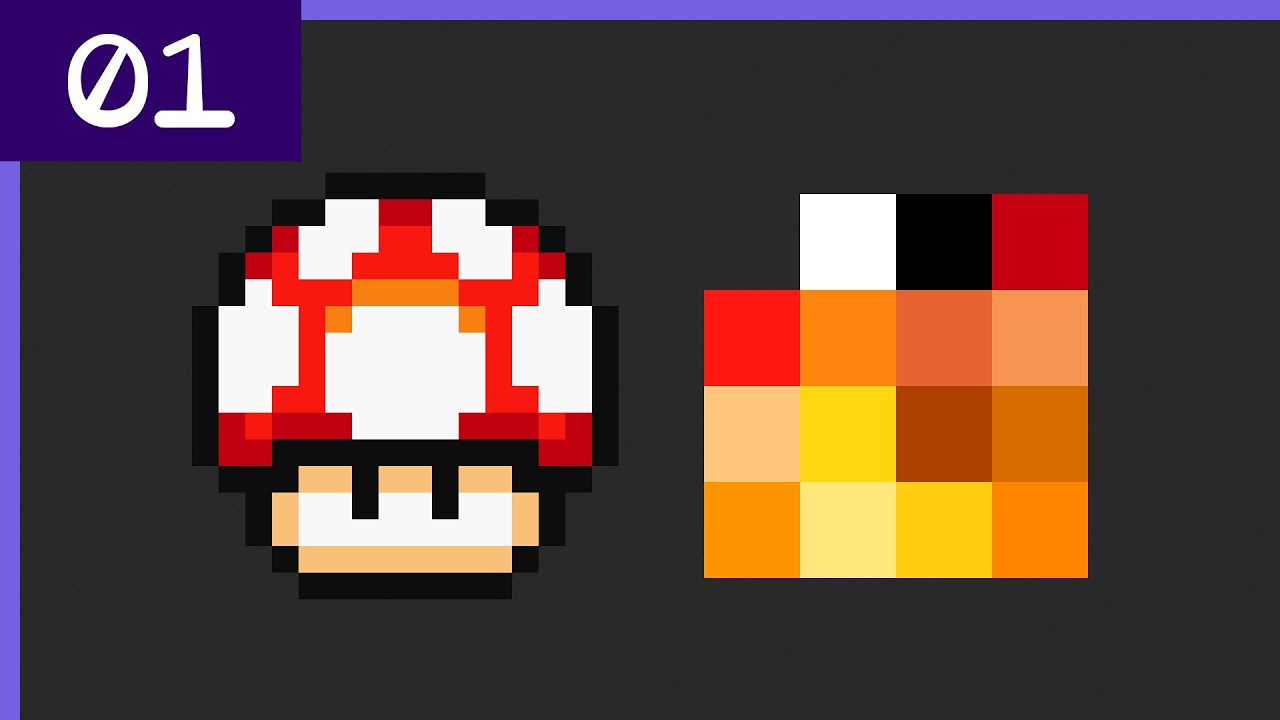
What the constraints forced
| Constraint | Number | What the artists did about it |
|---|---|---|
| Tile size | 8 by 8, 16 colours | Think in 8-pixel cells and 16-by-16 “metatiles” that share a palette and a flip20 |
| Palette per tile | one of eight, 15 colours | Keep a metatile inside one palette; give grass, stone, and wood a neutral palette reused across towns20 |
| Sprite sizes | 8/16/32/64 squares, 16-by-32 and 32-by-64 | A 16-by-24 hero is a 16-by-16 object plus two 8-by-8s, or a 16-by-32 with blank rows; Chrono Trigger’s taller Crono is stacked 16-by-16 blocks positioned per frame2127 |
| Sprite tile index | 9 bits, 512 tiles | A character’s whole pose set fits a tile budget: 181 tiles for an FF VI party member1 |
| Scanline cap | 32 sprites, 272 sprite pixels | Monsters go on background layers; four 16-wide heroes plus effects already press the limit214 |
| Flipping | horizontal and vertical, per sprite | Symmetric poses drawn once; Crono’s left foot is his right foot flipped27 |
| Colour math | add, subtract, half | Water, ghosts, and translucent text boxes by 50 percent blends; night by subtraction28 |
The pose budget is the number I keep returning to. The sprite editor lists 17 animations and 13 static poses for each FF VI character, 46 unique poses in all and about 92 with flips, built from six tiles a pose and heavy sharing between poses; the walk and the other three-pose animations play 1-2-1-3, so the displayed cycle is four frames.1 Yoshinori Kitase said FF VI had “more than double the patterns” of FF V, which is what let one sprite serve the field and the battle.7 Expression came from frames, not pixels.
Shibuya’s method
Kazuko Shibuya drew the sprites for Final Fantasy I through VI and directed the Pixel Remaster re-draws. Her account of the work is the clearest statement of method in the record. On where a sprite starts: “As a rule, I would say I start with surfaces rather than lines,” and then “I start by filling out lots of big areas roughly then sort of refine them down, like sculpting.”8 On readability: “Players have to tell the characters apart, so I look at the design and include only the most distinctive features.”29 On why FF IV’s 16-by-16 sprites had no outlines: “each pixel was a matter of life or death so I didn’t have any leeway to think about using them in the outlines.”8 Sakaguchi added the consequence for animation: “they cannot lift their arms up very far, so the only way to make them express happiness is to spin around!”8

The illustrator and the pixel artist were different people with a text message between them. Sakaguchi: “When we order illustrations from Mr. Amano, we do it with text descriptions.”8 For Chrono Trigger, Akira Toriyama “only did the character illustrations and concept art,” and he never drew the rear views; the sprite team’s Uchiyama said, “We just had to guess.”30 Tetsuya Nomura drew FF VI’s final boss in a sketchbook “screen by screen,” scanned it, and built the sprite from the scan.31 By 1994 the pipeline was already hybrid: magic effects were modelled in a separate 3D tool and then overlaid.32
The three looks, measured
Writers call FF VI, Chrono Trigger, and Secret of Mana “the SNES look” as if it were one thing. It is three, and the difference is mostly outline policy. We took one lead character per game from a fan archive of per-animation rips, verified each was an exact 2× upscale, and classified every edge pixel of the standing frame as near-black (every channel at or below 40 of 255), mid-dark, or light.9
| Game, sprite | Near-black edge | Mid-dark | Light | Reading |
|---|---|---|---|---|
| Final Fantasy VI, Terra | 93% | 4% | 3% | Hard black silhouette |
| Breath of Fire II, Ryu | 59% | 37% | 4% | Black outline softened on the lit side |
| Chrono Trigger, Crono | 48% | 51% | 2% | Half black, half dark colour |
| Seiken Densetsu 3, Duran | 38% | 54% | 9% | Selective; black kept at the ground |
| Secret of Mana, Randi | 0% | 100% | 0% | No black; the outline is a darker local colour |
| EarthBound, Ness | 0% | 100% | 0% | No black; dark brown and navy edges |
The softer edge was a stated intent in the Mana series. Koichi Ishii, on Seiken Densetsu 3: “For shadows and the like, we’re using deep blues and purples instead of shades of black, to impart a sense of softness,” and his sprite and background artists worked together so figures sat in the scene: “If you completely ignore the background when you’re creating the sprites, then the sense of orientation of the scene gets completely messed up.”33 Chrono Trigger sat between, by design; its development kept the picture’s luminosity “between that of Secret of Mana and the Final Fantasy series.”34 One rule, applied to every sprite in the game, is what makes a cast look like a cast.
The remaster lesson
The Pixel Remaster (2021 to 2022) kept the 16-by-24 base and gave it leeway above and to the sides so arms could extend and capes flutter; for FF VI Shibuya finally got the pixel she had wanted in 1994: “At the time, I desperately wished I could have just one more pixel on top. My wish came true in this remaster.”35 The art was redone “with the intention of displaying it on an LCD screen,” because the originals were plotted for a CRT’s smear.35 The controversy that followed was about typography, not sprites: the launch font was a thin modern face, and the pixel font that followed took about 7,500 Japanese characters to make.36 The cautionary contrast is the 2014 mobile port of FF VI, whose smoothed redraws Kotaku described as looking “as if they’d been accidentally thrown in a washing machine.”37 Draw for the screen you ship on, and treat the font as art.
2. Pokémon’s tile system, generation by generation
Square’s artists had sixteen colours and a 24-megabit cartridge. Game Freak’s had four shades and a Game Boy, and the system they built to cope is the clearest teaching example in the medium, because every generation of it is now readable in the pret decompilations. I read the numbers that follow from the source files, not from fan wikis.38
The Game Boy draws a 160-by-144 screen from 8-by-8 tiles at two bits per pixel, four shades, with 40 hardware objects and no more than ten on any scanline.39 Pokémon Red loads a tileset of up to 96 tiles, builds the world from 32-by-32 “blocks” of four-by-four tiles, and stores a town as one byte per block; no blockset in the game exceeds 128 blocks. Pallet Town is 10 by 9 blocks, which is 320 by 288 pixels, exactly two screens wide and two high.40 Collision is a list of the 8-by-8 tile IDs you may stand on; the engine tests one tile, the lower-left of the cell in front of you.41 Water is a single tile whose sixteen bytes are bit-rotated one pixel right for four updates and left for four; flowers are one tile swapped between three stored frames in the pattern 1-1-2-3; the whole animation system fires about every twenty frames.42 A character is four 8-by-8 objects, drawn as six frames, a standing pose and a step pose for each of three facings, with right-facing frames made by flipping left, and for up and down the walk cycle is stand, step, stand, step-flipped, so one drawn step frame yields both legs.43 The trick I like most costs nothing: when a sprite stands on the tileset’s grass tile, the engine sets the background-priority bit on its two lower objects, and the grass draws over the legs.6
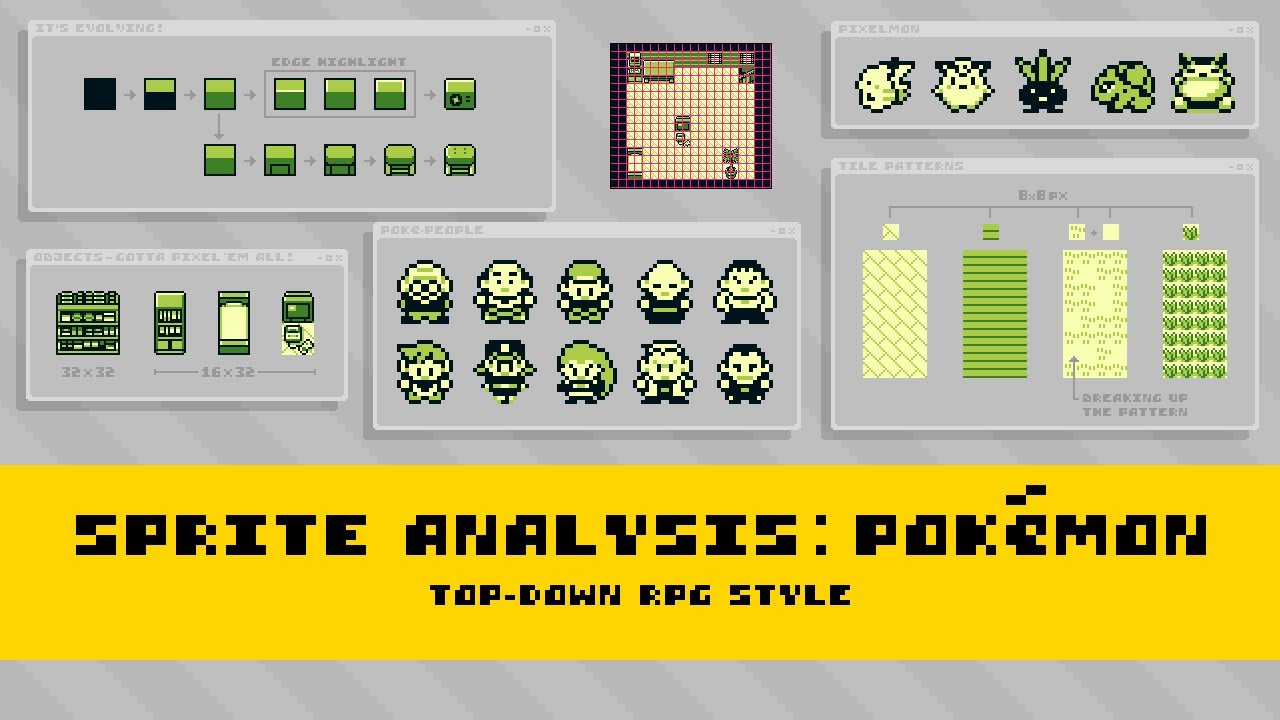
Gold, Silver and Crystal kept the block format and spent the Game Boy Color’s new hardware on two things. Tilesets grew to 192 tiles across two VRAM banks, and every tile took one of eight named palettes (GRAY, RED, GREEN, WATER, YELLOW, BROWN, ROOF, TEXT). The palettes were defined separately for morning, day, night, dark and indoors, so time of day in Johto is a 64-byte palette reload, not a second set of art.44 Collision moved to one typed byte per 16-by-16 quadrant of each block (FLOOR, WALL, TALL_GRASS, WATER, DOOR, LADDER and so on), which is the real reason Gen 2 plays as a 16-pixel game while storing 32-pixel blocks.44 Variety came from palettes: the five “people” palettes share the same skin tone and differ only in one colour, so one sheet recoloured five ways populates a town.45
Ruby, Sapphire and Emerald are the mature model, and the one a modern engine should copy. A tileset is 512 primary tiles shared by the whole region plus 512 secondary tiles per town, with thirteen 16-colour palettes between them. A metatile is sixteen bytes: eight GBA screen entries, two layers of two-by-two tiles, each entry carrying a tile ID, two flip bits and a palette. Its attribute word adds an eight-bit behaviour (tall grass, ledge, door, PC, 240 values in all) and a layer type: Normal, where the top layer covers sprites; Covered, where nothing does; Split, where the player walks between the two.2 A map cell is sixteen bits, ten for the metatile, two for collision, four for elevation, and elevation 15 lets a bridge be walked over and under.46 The overworld uses three hardware background layers for the map, scrolled together, and a fourth, fixed, for text, so a roof or canopy occludes the player by being on the layer with higher priority rather than by any sorting.2 Littleroot is 20 by 20 metatiles, Petalburg 30 by 30, Rustboro 40 by 60, Lilycove 80 by 40.47
Characters became 16 by 32, one hardware sprite each, in a 144-by-32 sheet of nine frames: three facings and two steps per direction, east flipped from west. The walk plays step, stand, step, stand at eight ticks each, which is the bob everyone remembers.48 Tile animation runs off a frame counter: flowers on tick 0 of every sixteen, water on tick 1, the sand edge on tick 2, the waterfall on tick 3 and the land-water edge on tick 4, so the five DMA writes never land on the same frame.49 Reflections are a copy of the sprite at the lowest priority, flipped by an affine matrix, with a swapped palette, offset by the sprite’s height minus two. Shadows exist only while a sprite is airborne, on a ledge hop or a bike jump. Tall grass is now a five-frame sprite spawned on the cell and layered over the player’s lower half.50
| Gen 1 (Game Boy) | Gen 2 (Game Boy Color) | Gen 3 (Game Boy Advance) | |
|---|---|---|---|
| Tile | 8 by 8, 2 bpp | 8 by 8, 2 bpp, plus a palette nibble | 8 by 8, 4 bpp |
| Walk cell | 16 by 16; collision on one 8-by-8 tile | 16 by 16; one typed byte per quadrant | 16-by-16 metatile; collision and elevation per cell |
| Map unit stored | 32-by-32 block, one byte | same | 16-by-16 metatile, 10-bit ID in a 16-bit cell |
| Tileset | 96 tiles, up to 128 blocks | 192 tiles, 128 blocks outdoors | 512 + 512 tiles, 512 + 512 metatiles |
| Palettes | one, four shades | eight of four colours, per tile | thirteen of sixteen colours, per tile |
| Layers | one, plus a sprite priority bit | one, plus a per-tile priority bit | three for the map, one for text |
| Character | 16 by 16, six frames | 16 by 16, six frames | 16 by 32, nine frames |
Sources for the table are the pret repositories cited in this section.4044248
Two more things from the record. The Game Boy Color card game, which is the closest ancestor to a card collector’s world, draws every card illustration at 64 by 48 pixels in a four-colour palette of its own, embedded with the tiles and assigned to one palette slot when displayed, so Charizard gets cream, orange, red and near-black while an energy card gets white, two olive greys and a near-black.51 The rule is not the size; the rule is one quantised palette per card, one fixed frame, one zoom level. And Ken Sugimori’s account of the discipline is the one to pin above the desk: “Pixel art is incredibly deep. If you change the location of just one pixel in a sprite, it can give an entirely different impression.”52 His sprites were, in his words, “easy to understand” symbols of more complex designs, because the screen was small and the storage smaller.53 Red and Green shipped with about four programmers and fewer than ten artists.54
3. The modern masters, and what “triple-A pixel art” costs
Since 2010 the best pixel-art games have been made by teams of one to twenty-five on hardware with no limits, so every constraint they kept was a choice. Their choices cluster.
They fix a canvas that integer-scales. Celeste’s 320 by 180 multiplies by six to 1080p; Pedro Medeiros: “That’s what I call my game canvas.”3 Sea of Stars renders at 640 by 360, and its “Pixel Perfect” option, as a player explains on the studio’s Steam FAQ thread, “will add a black border around the display so that the pixels will appear crisp rather than blurry.”55 Animal Well is 320 by 180 and turns its scanline filter off when the viewport is too small to draw scanlines honestly.56 Hyper Light Drifter is 480 by 270; Alx Preston: “Our game is 480p. It’s low resolution, and very intentionally so.”57 Shovel Knight chose 400 by 240 to match the NES’s 240 visible lines, so, in Yacht Club’s words, “each Shovel Knight pixel is really 4.5×4.5 pixels at 1080p.”58 Godot’s documentation now recommends 640 by 360 as the baseline because it scales to 720p, 1080p, 1440p and 4K without bars.59
| Canvas | 720p | 1080p | 4K | Used by |
|---|---|---|---|---|
| 320 by 180 | 4× | 6× | 12× | Celeste, Animal Well |
| 400 by 240 | 3× | 4.5× | 9× | Shovel Knight |
| 480 by 270 | 2.67× | 4× | 8× | Hyper Light Drifter |
| 640 by 360 | 2× | 3× | 6× | Sea of Stars, Godot’s recommendation |
They never mix pixel densities. Medeiros’s rule for scaling: “you can only do this in 100% increments of the original image,” and when two densities are unavoidable, “elements at 100% and others at 200%, but never at 150%.”60 Celeste goes further and keeps three “worlds” that never leak into one another: “Game, UI, and Map. Pixel art, high resolution, and 3D, respectively.”3 The UI is its own layer at its own scale, composited after the world is upscaled. Octopath Traveler on the first Switch rendered its world at 576p in handheld while keeping the UI at 720p, the same separation by a different route.61
They choose a lighting tier and pay for it. At the bottom, Moonlighter has no dynamic lighting at all; night in its town is “the superposition of sprites to give the impression of light.”10 One step up, Celeste draws every light as a mask into one 2,048-pixel texture, a grid of 64 slots with one colour channel per light, so 256 lights fit one texture and occluders cut their shadows out of the spotlight before the shader multiplies colour by mask.11 Above that, Eastward is “a 3D game with a 2D perspective,” and its team “hand painted in the bump map one by one” for every asset so real lights could shade flat sprites.12 Animal Well’s Billy Basso rejected engine point lights because their smooth gradients clash with pixel art, wrote his own rim-light shader, and runs a full-screen fluid simulation for smoke and water.62 Dead Cells gets normal maps free by rendering 3D models “in a very small size and without antialiasing” and shading them with a toon shader.63 At the top, Sea of Stars spent its first six months building lighting that “appeared visually consistent with the pixel art,” and HD-2D puts sprite billboards in a lit Unreal scene with depth of field, bloom, colour grading, lens flares and vignette.6465 Tomoya Asano, who produces the HD-2D games, says it “costs more than you’d think.”13 And the players of Octopath Traveler II switch the depth of field and bloom off because “the edges of the screen would blur out hiding paths.”13

They animate with fewer frames than you think, and move colours instead. Dead Cells characters are fifty pixels tall, and Motion Twin’s 3D animation workflow had hit 30 frames a second on its earlier prototype, ScarKrow, before the pixelation step was added for Dead Cells.63 Sub-pixel animation is the craft’s quiet weapon: to move a small sprite a small distance, “don’t move the sprite,” the tutorial says, “move its colors,” and six faded colours were enough to read a breath on its 50-pixel character.66 Octopath mass-produced motions with Photoshop’s Puppet Warp and then corrected pixels by hand.65 Animal Well animates its creatures procedurally, each limb on its own path, and Basso avoids squash-and-stretch and screen shake on purpose.67
They lock a palette and share it. Raymond Schlitter’s method is ramps of nine swatches with a 20-degree hue shift per step and 45 degrees between ramps, desaturating at the bright end because otherwise “you’ll end up with intense eye burning colors.”68 Cassette Beasts keeps 120 monsters coherent “by sharing the same pool of around 20 colours,” like an action-figure line with a fixed set of plastics.69 Shovel Knight allows four or five colours plus transparency per sprite where the NES allowed three.58 The community’s fixed palettes (Resurrect 64, Apollo, Endesga 32) exist because the discipline works.70
They size the art to the team. Stardew Valley is one person and 16-by-16 tiles; Eric Barone on his next game: “Sticking with the 16×16 tile size helps keep the amount of art manageable for a game with such a big scope.”71 Sabotage Studio grew from seven people on The Messenger to about twenty-five on Sea of Stars.72 Animal Well is one person, seven years, a custom C++ engine, 33 megabytes, and a world of exactly 256 rooms because room IDs are one byte.73 Eastward’s studio grew from its three founders to about twelve full-time people, with more than 200 characters, animated in Aseprite.74 The Switch 2 removed the old handheld compromise: a 1080p handheld screen and 1080p or 4K TV output, so 320-by-180 and 640-by-360 canvases can be integer in either mode, and 4K output is capped at 60 frames.75
4. The craft, as rules with numbers
What follows is the grammar of a three-quarter top-down town, as the practitioners state it. Where I have turned a practice into a number for our own use, I say so.
- The view is an orthographic tilt, not a perspective. The LPC style guide puts the camera at “roughly 60 degrees” with no perspective; Schlitter describes the same view as looking at a house from 45 degrees above, where “you see about 3/4 of both the roof and facade,” and adds the governing clause: “uniformity takes priority over realism.”7677 Verticals stay vertical, the front face is foreshortened, the roof is not rotated, and every object obeys the same rules.
- The grid is 16; the authoring rhythm is 32. Schlitter: “16x16px is probably the most common size and is sure to do your pixels justice.”78 Stardew and the GBA games agree; Pokémon’s Game Boy blocks and LPC’s grid are 32. Author tiles and collide on 16, and design houses and large trees in pairs of tiles.
- Layers solve the tall-tile problem. Stardew’s map layers, back to front, are Back (terrain), Buildings (collision), Paths, Front (“drawn on top of the player if the player is North of them but behind the player if the player is south”) and AlwaysFront.79 Pokémon’s Normal, Covered and Split metatile types are the same idea with the sorting done by hardware priority.2
- A terrain transition is 47 tiles. A blob set is “a 47 tile subset of a 2-edge 2-corner Wang tileset”; the bit weights are north 1, north-east 2, east 4, south-east 8, south 16, south-west 32, west 64, north-west 128, and a corner counts only when both of its edges do, which collapses 256 masks to 47 silhouettes.8081 Fences and hedges are 16-tile edge sets. Tiled’s terrain sets and LDtk’s rule groups both implement these directly.8283
- Trees are leaf bundles over a trunk, with the shadow underneath. Schlitter builds canopies from bundles whose base unit is “a small 2x2px square,” with “4 or 5 colors per bundle,” and places his trees “in staggered overlapping rows to create a solid forest pattern.” On shadows he is practical first: “It’s most practical for game design to center the shadow directly under the tree,” though he likes to “cast it off to one side for a more dynamic look”; shadows should be “subtle and not cast out long in any particular direction,” and of the drop shadows under his walls, “they should not exceed a tile in length.”84
- Colour is ramps, not swatches. Hue-shift toward warm as a ramp brightens and toward cool as it darkens, 20 degrees a step at most; saturation peaks mid-ramp.68 LPC’s rule in three words: “No pure colors!”; shadows “towards the closest purple,” highlights “towards the closest yellow.”76 Per sprite, Schlitter recommends “only about 5 colors” until shading is confident, and Cure’s law holds: “If you can’t make a good sprite in 4 colors, using 40 colors isn’t going to help.”8586
- One outline rule, applied everywhere. LPC: world outlines “a darker version of the current color, or a dark color generally, not black”; character outlines “black or near black, no selective outlining.”76 The SNES table in section 1 shows what happens when a studio picks differently; the point is to pick once.
- Name the three mistakes and grep for them. Jaggies, a pixel out of a line’s rhythm; banding, “when neighbor pixels end at the same x or y coordinate on the underlying grid”; pillow shading, concentric bands that ignore the light.86 Anti-alias only long shallow steps, never 45-degree or straight lines, and keep the softening inside the sprite’s own colours rather than against whatever lies behind it, since the game decides the backdrop.8687 Dithering on a 16-pixel world almost never: some sprites, as Pixel Parmesan puts it, “are simply too small to dither relative to the amount of detail they can possibly contain.”88
- Characters: three drawn directions, a four-step walk, an idle that moves. Stardew’s farmer is 16 by 32, drawn in a fixed order (body, pants, shirt, accessories, hair, hat, arms) with hats in 20-by-20 cells; the walk is four steps of three unique frames.8990 Pokémon Emerald’s is step, stand, step, stand.48 Schlitter: the head “takes up a third to half of the total sprite,” draw up, down and side and mirror the side, and for idles, “It doesn’t even have to make sense, just move.”9192
- Text is art. Bitmap fonts render at integer multiples only; Daniel Linssen’s m5x7 page says “use font size 16, 32, 48, etc”.93 Pokémon Emerald’s text-window frame is a 24-by-24 image, three by three hardware tiles, which is a nine-slice, and Aseprite’s slices carry the nine-patch centre into the export JSON.9495
- Juice, in a calm world, is weather. The reference talks on screen shake and hit-stop were built around a shooter and a Breakout clone; a collector’s town wants Stardew’s weather vocabulary (sun, rain, storm, wind with pollen or leaves, snow) and footsteps that come from a tile property rather than new art.969798
- The pipeline is a build step. Aseprite’s command line exports packed sheets with JSON (
--sheet-type packed --shape-padding 2 --extrude --format json-array --list-tags --list-slices), and the two-pixel padding plus extrusion guards each frame’s edges against bleeding from the frame beside it.99100

5. The Apple way: three architectures, one recipe, and the arithmetic
Our problem has two halves that pull against each other. The world wants integer-scaled, nearest-sampled, unlit texels placed on whole pixels. The one thing in it that is real, the collector’s favourite card, wants to be a shaded 3D object that rises out of the flat world and is covered by the shelf it sits on, which means it must live in the same depth buffer as the tiles. Any design that composites the card as a second layer loses that occlusion and fakes the moment. Three Apple architectures can hold both halves, with different costs.
| SpriteKit | RealityKit as a 2D engine | Metal, low-res then one integer upscale | |
|---|---|---|---|
| Pixel sampling | SKTexture.filteringMode = .nearest on every texture; mipmaps off101 |
A full MTLSamplerDescriptor on the material, .nearest and .notMipmapped; MipmapsMode.none on the texture14 |
Your sampler; you own every filter111 |
| Tile map | SKTileMapNode: chunked, one draw call per visible chunk when every tile shares one atlas, adjacency rules102 |
One MeshDescriptor for the whole map, one draw call; GPU instancing for props from iOS 26109 |
Your vertex buffer |
| Sprite frames | Atlas textures and SKAction.animate |
textureCoordinateTransform offset and scale per quad (iOS 18)15 |
Per-instance UV rectangles |
| The 3D card | SK3DNode hosts SceneKit, which Apple deprecated at WWDC25 and moved into maintenance mode103 |
An ordinary entity in the same scene and depth buffer, lit by a light the unlit world ignores | A third pass you write |
| Renderer defaults | Fine for pixels | Motion blur and HDR tone mapping on by default; depth of field, camera grain and antialiasing set off explicitly16 | None |
| Frame rate | Automatic ProMotion pacing113 | Apple’s performance article describes a 60 fps limit114 | 120 Hz with CADisplayLink and the CADisableMinimumFrameDurationOnPhone key113 |
| Panel-exact pixels | No control of the view’s scale filter | No contentScaleFactor on RealityView |
drawableSize = bounds × nativeScale, per QA1909112 |
| Known traps | Labels cannot be nearest-filtered; an iOS 9 regression once ignored .nearest |
Camera scale has a one-line description and no units; a forum report says projection with the orthographic camera returns wrong values104105 |
You write the atlas packer, text, input and scene graph |
For a pure 2D game SpriteKit is still the fastest path, and it is maintained, not deprecated. For a world that needs one true 3D object, RealityKit is the right engine, and every pixel-art requirement has a documented API. Metal is the escape hatch for the two things RealityKit cannot promise, 120 Hz and panel-exact scaling; the documented step is RealityRenderer, which renders the same entities into your own texture for a nearest upscale pass you present yourself.110
The recipe
// One texel is k device pixels, with k a whole number. Pixels, not points.
let pixelsTall = Float(size.height * displayScale)
let k = max(1, (pixelsTall / (20 * 16)).rounded(.down))   // aim for about 20 tiles tall
let worldTall = pixelsTall / k                            // world units are texels
var camera = OrthographicCameraComponent()
camera.scale = worldTall / 2                        // measured: scale is half the view's height
cameraEntity.components.set(camera)

// Nearest sampling, no mipmaps, alpha test instead of blending.
let sampler = MTLSamplerDescriptor()
sampler.minFilter = .nearest
sampler.magFilter = .nearest
sampler.mipFilter = .notMipmapped
let texture = try TextureResource(image: sheet, options: .init(semantic: .color, mipmapsMode: .none))
var material = UnlitMaterial()
material.color = .init(tint: .white, texture: .init(texture, sampler: .init(sampler)))
material.opacityThreshold = 0.5
material.textureCoordinateTransform = .init(
    offset: [Float(col) / Float(cols), 1 - Float(row + 1) / Float(rows)],
    scale: [1 / Float(cols), 1 / Float(rows)], rotation: 0)

// Switch the AR defaults off.
content.renderingEffects.motionBlur = .disabled
content.renderingEffects.depthOfField = .disabled
content.renderingEffects.cameraGrain = .disabled
content.renderingEffects.antialiasing = .none
content.renderingEffects.dynamicRange = .standard
Three notes on that code. Apple documents OrthographicCameraComponent.scale only as “A floating-point value the camera uses to scale entities”; the half-height relationship is ours, measured on the simulator (320 world units spanned 746.67 points at 3× with seven pixels per texel, which is 320 × 7 ÷ 3).104 opacityThreshold is the cut-out path pixel art wants: “RealityKit discards pixels with opacity values less than the opacityThreshold” and renders the rest fully opaque, so there is no edge blending and no sort-order problem.15 And the defaults matter more than any sampler: RealityView “applies an effect that introduces motion blur for virtual objects” and “a high dynamic range effect, along with tone mapping” unless you turn them off.16 Our walkers were smeared mid-step until we did. Every sprite’s x and y and the camera are rounded to whole world units each frame, after easing, so no texel sits between pixels, while depth and the 3D card’s motion stay continuous; and because of the forum-reported projection bug we compute the tap’s world point ourselves from the camera position, k and the display scale rather than asking RealityKit.105107
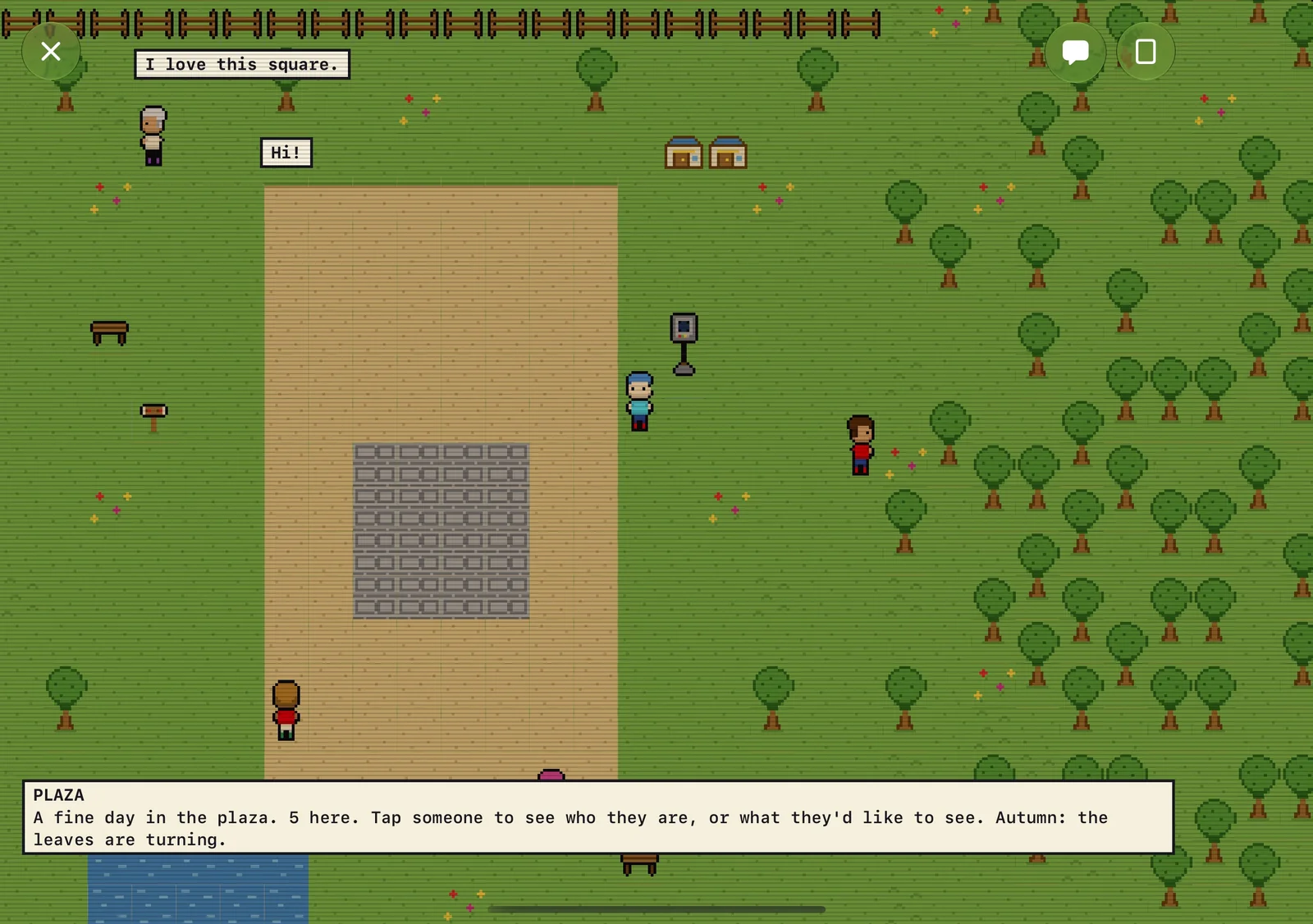
The scaling arithmetic
The 3× scale factor has no relationship to a 16-pixel grid; what matters is the pixel count. With 16-texel tiles and a target of about twenty tiles top to bottom, k = floor(pixelsTall ÷ 320). Two strategies follow from the remainder: fit as many tiles as fit (wide screens see more world, no bars), or hold exactly twenty tall and give the rest to bars. Every row below is computed from Apple’s spec pages and the Xcode 27 simulator profiles.17118
| Device and orientation | Points | Pixels | k | Tiles visible (W × H) | Bars for exactly 20 tall |
|---|---|---|---|---|---|
| iPhone 18 Pro Max, portrait | 440 × 956 | 1320 × 2868 | 8 | 10.3 × 22.4 | 308 px |
| iPhone 18 Pro, portrait | 402 × 874 | 1206 × 2622 | 8 | 9.4 × 20.5 | 62 px |
| iPhone Duo outer, portrait | 466 × 678 | 1398 × 2034 | 6 | 14.6 × 21.2 | 114 px |
| iPhone Duo inner, open (landscape) | 951 × 669 | 2853 × 2007 | 6 | 29.7 × 20.9 | 87 px |
| iPhone Duo inner, portrait | 669 × 951 | 2007 × 2853 | 8 | 15.7 × 22.3 | 293 px |
| iPad Pro 13-inch, landscape | 1376 × 1032 | 2752 × 2064 | 6 | 28.7 × 21.5 | 144 px |
| Apple TV 4K | 1920 × 1080 at 2× | 3840 × 2160 | 6 | 40.0 × 22.5 | 240 px |
None of these heights divides by 320, so on current devices “exactly twenty tiles” always means bars; 2868 ÷ 320 = 8.96 on the 18 Pro Max is the closest any of them comes to a clean 9. The HIG asks games to “look good and behave well at various aspect ratios” and to “Design for the full-screen experience,” which argues for showing more world rather than bars, and that is what we do in the plaza, while rooms shown whole centre themselves instead.115 At k = 8 on a 3× display a five-texel font is 13.3 points and at k = 6 it is 10 points, under the HIG’s 11-point minimum, so the dialogue text lives in SwiftUI at UI scale rather than in the world.115 For pixel-art icons and nine-slice frames inside that SwiftUI chrome, Image.interpolation(.none) keeps them crisp.116
The iPhone Duo’s inner display is the one place the arithmetic is not finished. Apple’s spec sheet gives the panel as 1878 by 2670 pixels; the simulator profile gives the logical framebuffer as 2007 by 2853 at scale 3.0, so UIKit renders 669 by 951 points at 3× and the compositor must downsample by about 0.936 to the glass, which is exactly the behaviour Apple’s Technical Q&A QA1909 describes for Plus-class phones. That puts UIScreen.nativeScale near 2.807, and six logical pixels per texel become about 5.6 panel pixels.17112120 The plaza looks right in the simulator, which shows the logical framebuffer, and will be very slightly soft on hardware; only a Metal-owned drawable at nativeBounds avoids it, and the first step is to log nativeScale on a device. The outer display divides cleanly (1398 ÷ 466 = 3.0).
Two bugs we found, and one capture artefact
The card viewer went black on its second and third openings while its scene was identical, frame for frame, to the first. The cause was an opacity animation on a SwiftUI view that contained the RealityView’s Metal layer; animating .opacity across that boundary left the layer unpainted. The fix was to stop animating the view and fade a black veil overlay out instead. Under a loaded simulator the first paint still arrives late, by as much as twelve seconds, so our UI walk reads the last of a series of timed brightness samples rather than the first.
The second was in our tools, not the renderer. When you capture the Duo simulator’s inner display from the host (xcrun simctl io <udid> screenshot --display=primary-1), the image refreshes only when Core Animation re-composites; RealityKit frames alone do not trigger it, so a walking player looks frozen in the captures while moving on screen. Capturing from inside the test bundle via XCUIScreen.screens[1] shows the truth. Both of these cost a day each and neither is in any document I could find, which is the reason they are here.
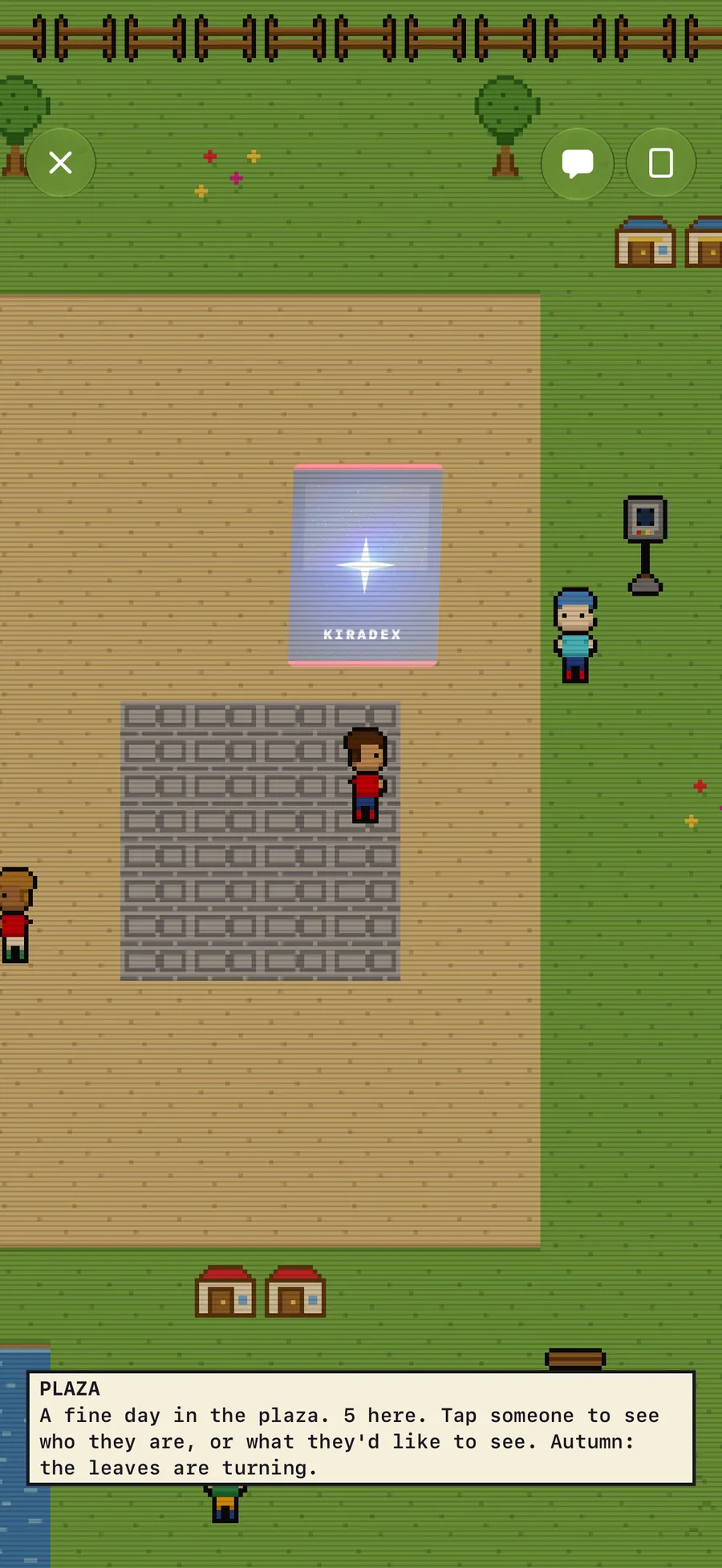
6. The case study: judging our plaza, then rebuilding it by rule
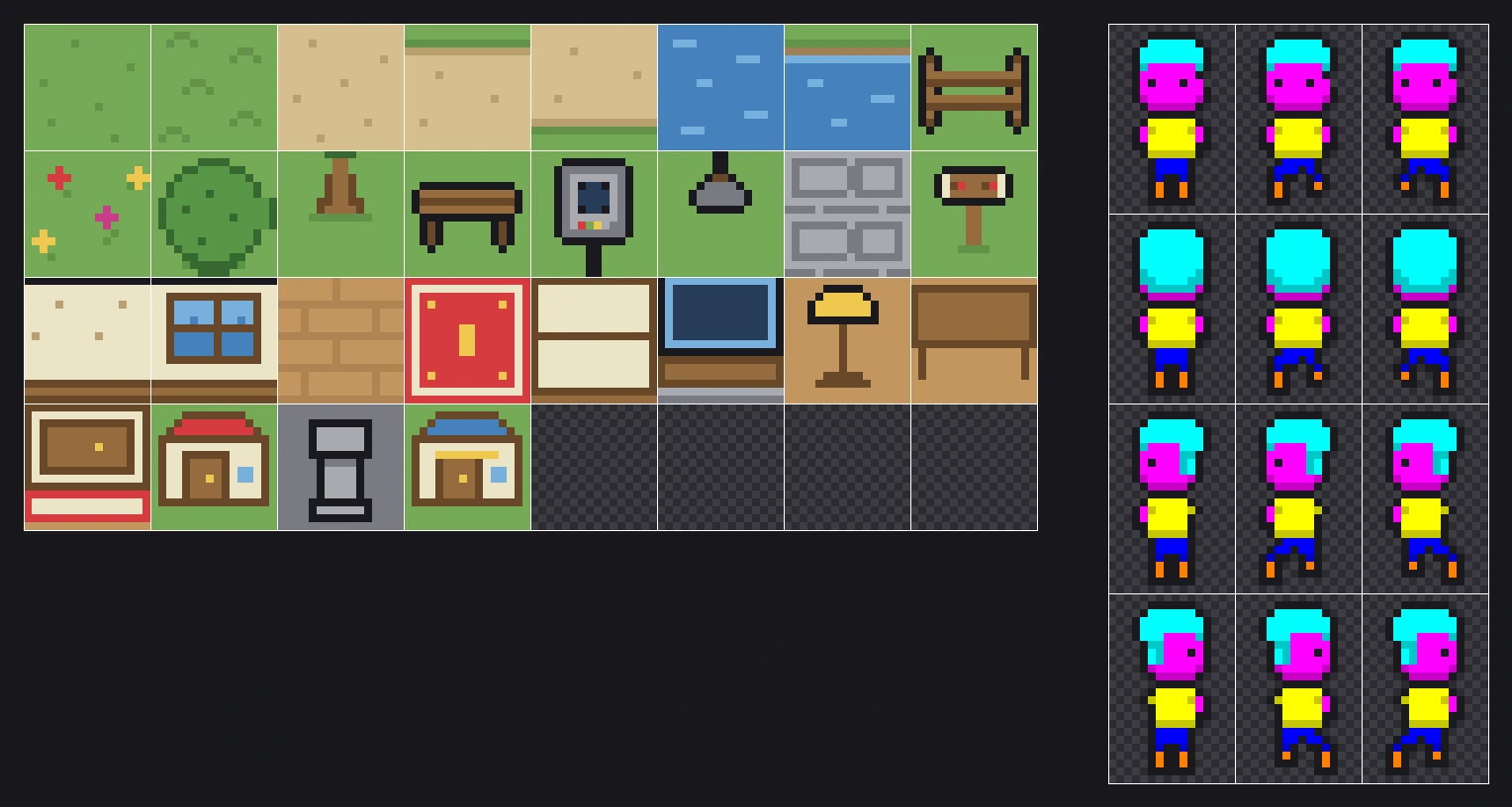
Here is the honest audit of Kiradex World as it shipped in TestFlight build 18, held against sections 1 to 4. The ground was a 28-tile set of ad-hoc colours typed into text grids, flat colour with no ramps and no agreed light. The collector was a 48-by-96 sheet with a two-frame walk, no idle, no shadow, and an outline policy that changed per sprite. There was no overhead layer, so nothing could pass behind a canopy or under a roof; no autotiles, so every lawn-to-path edge was a ruler; no elevation. The engine underneath was sound (one mesh for the map, nearest sampling, integer scale, the card in the same depth buffer), and the art on top of it would have embarrassed a Game Boy.
The brief
The spec that follows is ours, derived from the sourced practices above; where a number is a recommendation rather than a fact, it is a recommendation.
- Projection and grid. Orthographic three-quarter view, one light from the top left, verticals vertical. Tiles 16 by 16; houses and large trees on a 32-pixel rhythm; rooms 10-by-8 to 12-by-9 tiles; the town between Petalburg’s 30 by 30 and Rustboro’s 40 by 60.
- Layers, in draw order. Ground (autotiled lawn, path, plaza stone, water), detail (variants, flowers, baked shadows), objects (y-sorted by their base: people, benches, lamps, trunks, facades, with collision), overhead (roofs, canopies, railings, always above people), lights (additive lamp sprites, swapped at dusk), weather, and the UI at its own scale. Stardew’s five layers, with Pokémon’s Normal case, the top layer over the player, as the overhead.
- Autotiles. 47-tile blob sets for lawn-to-path, lawn-to-water, lawn-to-cliff and plaza-to-path; 16-tile edge sets for fences and hedges; three lawn variants weighted so the repetition hides. Water four frames at 250 ms (Emerald’s eight steps at sixteen ticks is the reference cadence); flowers two frames; lamps two states plus a night flicker.
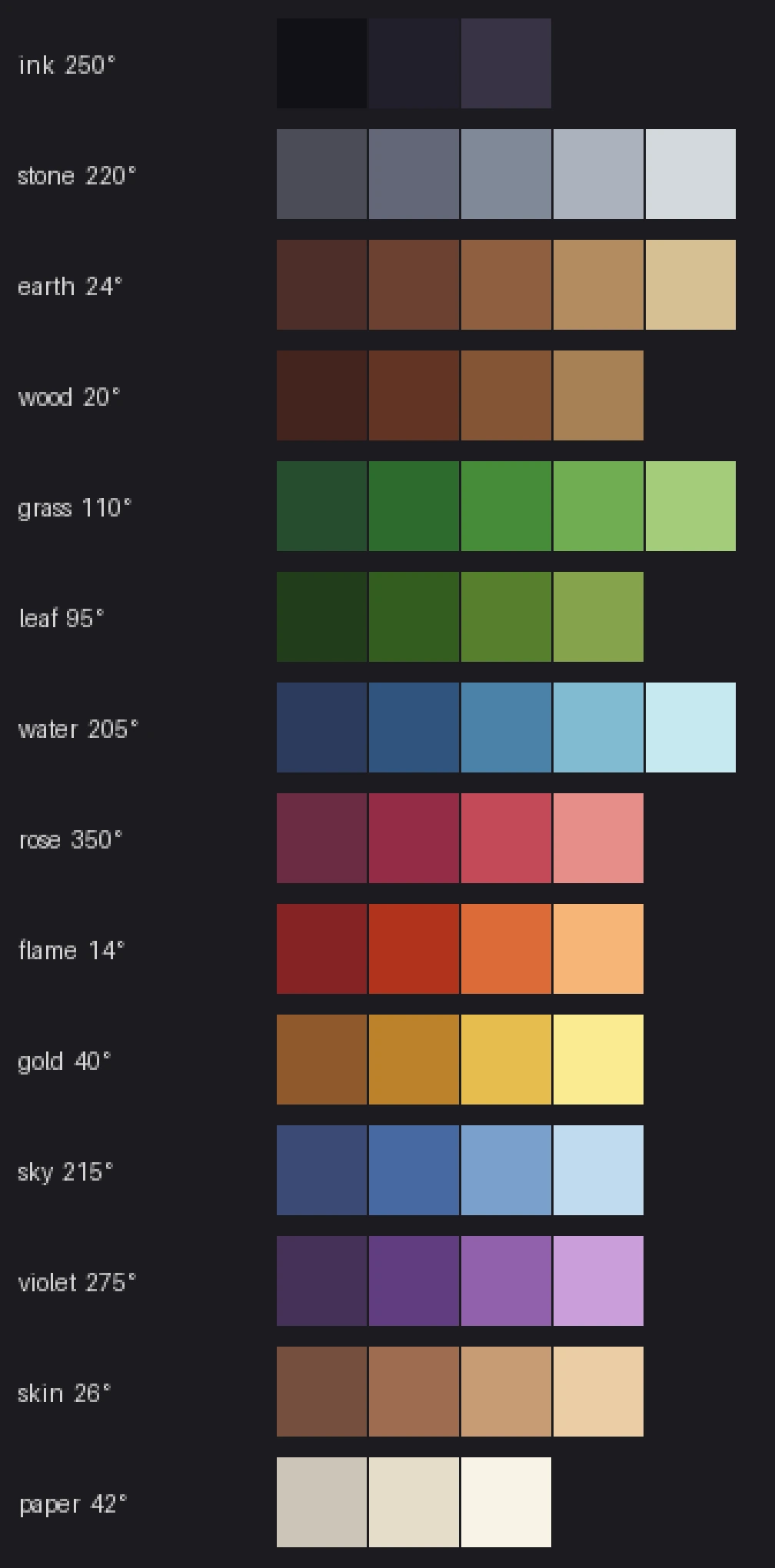
- Palette. One master palette, 48 to 64 colours in six to eight hue-shifted ramps, saturation peaking mid-ramp, no pure colours, interiors from the cooler half. At most eight colours per sprite and six per tile. Dusk and night as one multiply tint over the world plus hand-drawn emissive variants for lamps, windows and the kiosk sign.
- Characters. A 16-wide, 24-tall figure in a 16-by-32 cell, head nine to ten pixels, one-pixel eyes, no mouth, feet on the bottom tile so y-sorting uses the base, eight pixels of headroom for hats and the raised card. Three drawn directions and a mirrored fourth, with a drawn right-facing set only for the card raise because a held card is asymmetric. Walk four frames at 125 ms; idle a two-frame one-pixel bob; raise-card three frames (anticipation, raise, hold). Paper-doll layers in Stardew’s order, each a full sheet on the body’s grid, hats anchored per direction. A 12-by-4 blob shadow under every person and tree.
- Outlines. Near-black on characters, dark local colour on the world, never inside a tile.
- Text. m5x7 at integer multiples in a 24-by-24 nine-slice box, two lines, typewriter reveal, a two-frame advance arrow. The one deliberate exception to the pixel density is the collector’s real card: the shaded 3D card the engine already raises over the player, three tiles tall, in the same scene. The small card in the raised hand is a sprite on the held layer, and the two never pretend to be the same object.
The forge
We are not drawing this art in an image editor, and we are not generating it from prompts. The U.S. Copyright Office’s January 2025 report concludes that “prompts do not alone provide sufficient control” for authorship, and a tileset without an author is a tileset anyone may lift from the app; the same report protects “creative modifications of the outputs” and work where AI assists rather than stands in.18 Circular 33 puts ideas, procedures, systems and methods of operation outside copyright, which is where a projection, a tile size and a layer scheme live, while specific tiles and sprites are protected expression, and names are protected, if at all, as trademarks; so the clean path is to own every pixel’s provenance.19 Our forge is a small Python program under scripts/forge/ that draws every tile and sprite from hand-set rules against one master palette. The palette module builds 58 colours in fourteen hue-shifted ramps and exports a GIMP palette file for review. The raster is indexed: a sprite is a grid of colour names, and a pixel can only ever be a palette entry or one of nine marker colours the app recolours per collector. The terrain module draws lawn, packed earth, flagstones and water, then generates all 47 blob transitions by painting the outer terrain over the inner one along a wobbling boundary with rounded outer corners and a rim colour. Every random choice is a fixed hash of its position, so a rebuild is identical byte for byte, and every rule is a line of code a person wrote and can defend.
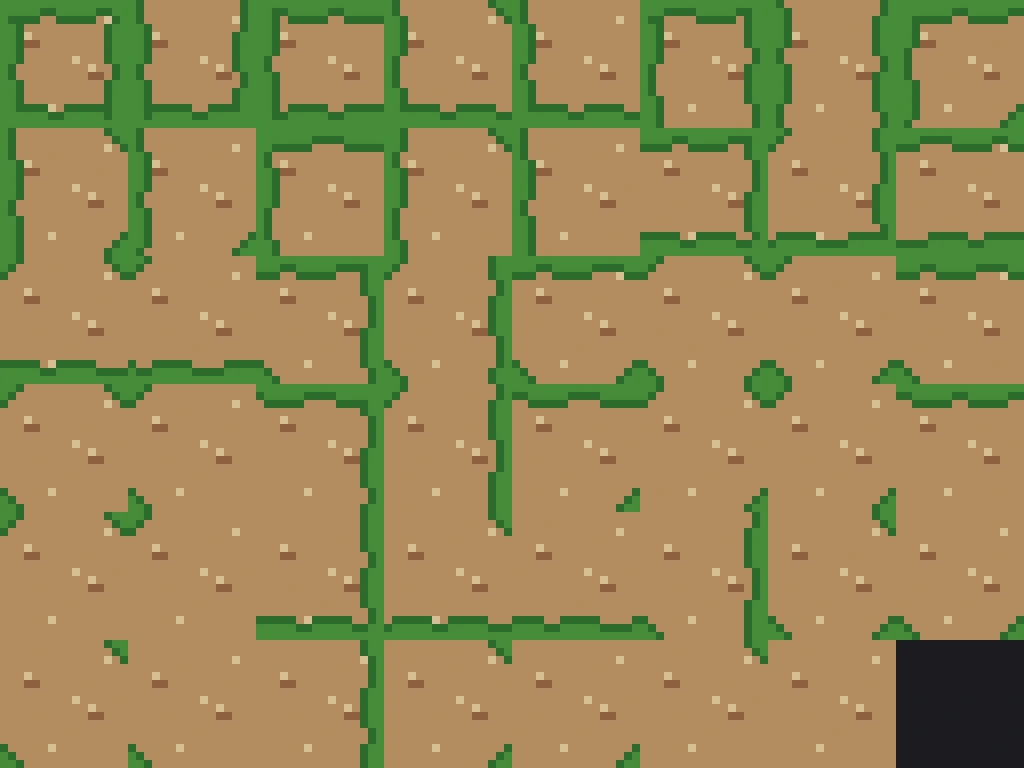
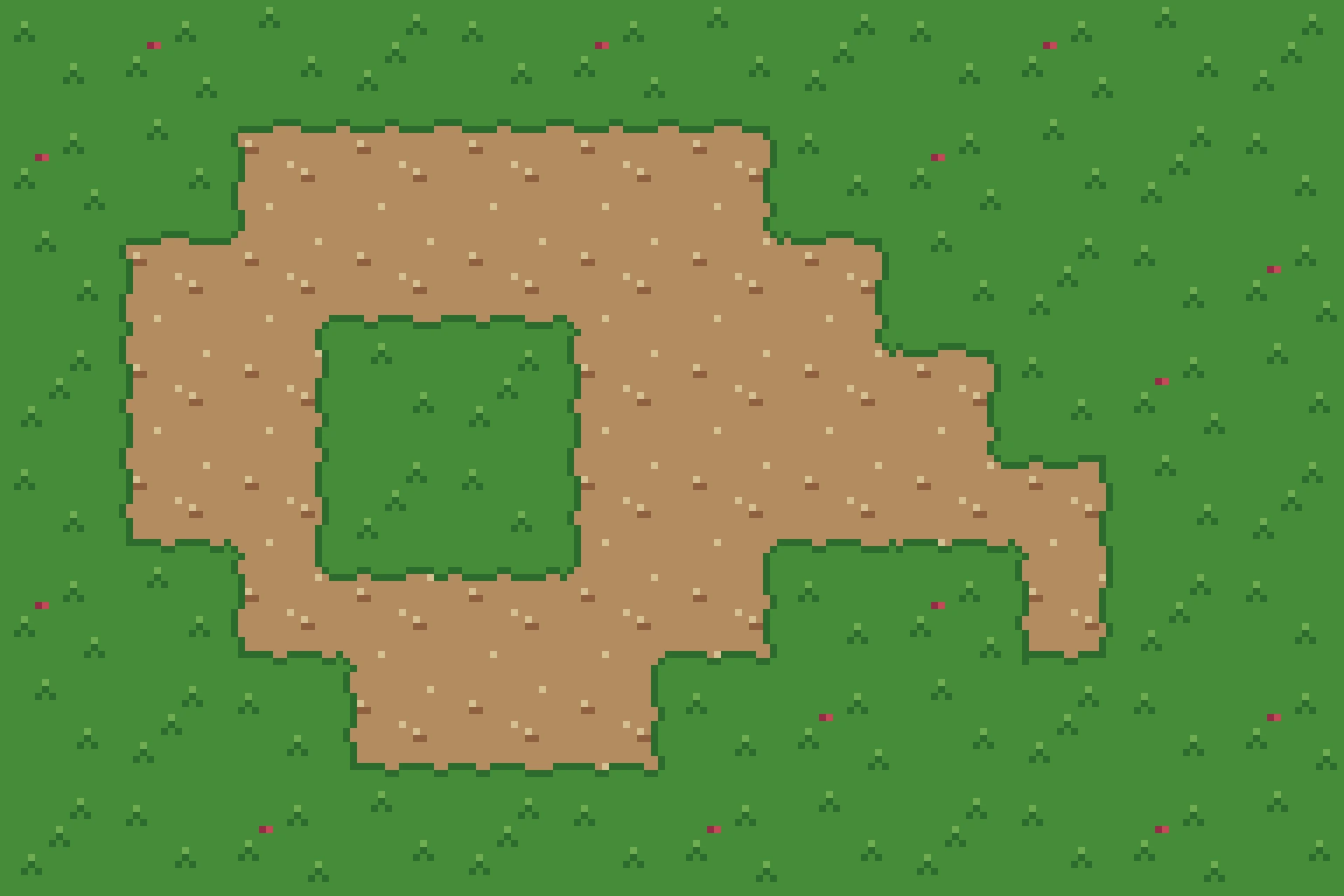
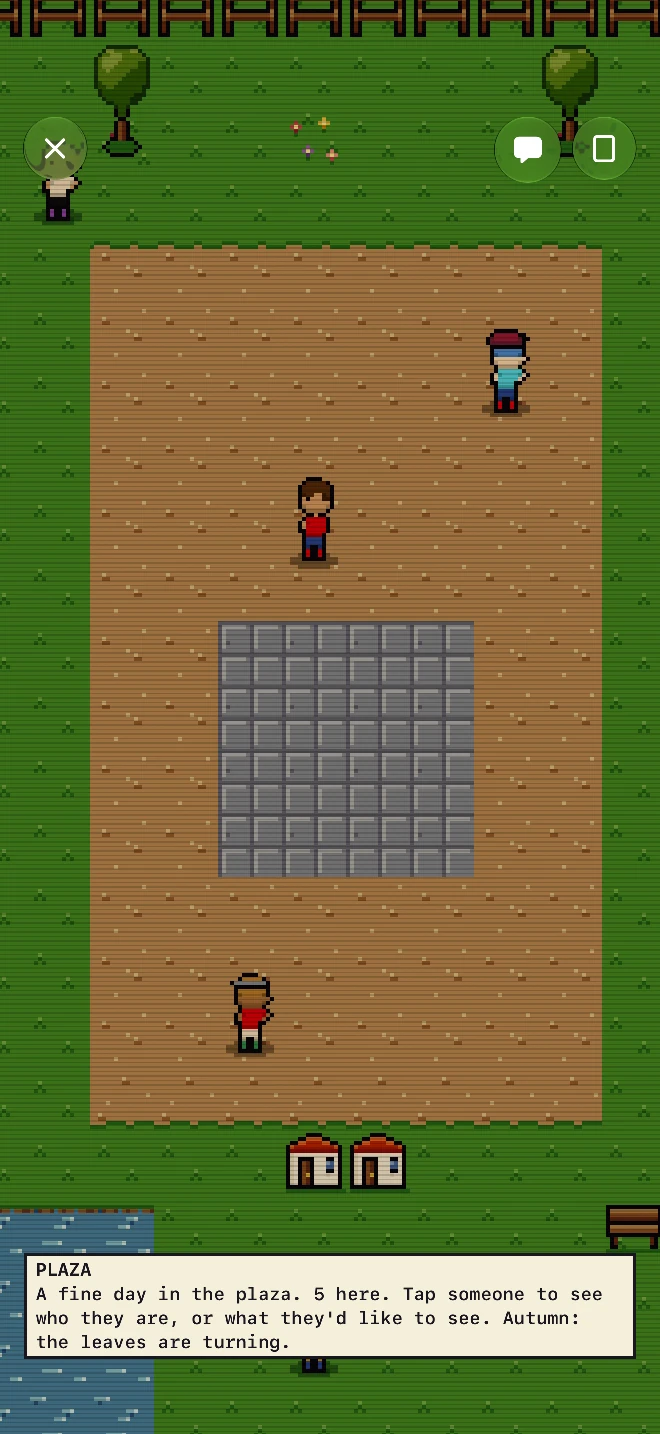
The first field was the proof the method works at all. The characters and the 28 tiles the engine names followed in the same program the next morning: a 16-by-24 figure in a 16-by-32 cell, drawn as body, hair, hat and held-card layers that keep the marker colours the app swaps for each collector’s look, with a two-frame idle, a four-frame walk and a three-frame card raise; trees as leaf bundles over a trunk with the shadow underneath; a plaster wall that carries no baseboard because the same tile fills the masonry beyond a room and a baseboard stripes the whole screen; water in four frames the ground steps through four times a second. The capture below is the simulator walk that passed with them. The plaza still lays the engine’s 28 named tiles, so its side edges stay straight until the JSON maps bring the blob sets.
Rooms, the hall, props and the larger town follow in the same program, with Aseprite-compatible sheets and JSON out the other end so the Swift loader never changes when the art does.
What the world will do
The art program is in service of mechanics, and the research into collecting games changed the order of work. The showcase is the card: the world stays matte and the real card is the only shaded object, because in Pokémon TCG Pocket a one-card display board and a thirty-card album are showcase enough for a game downloaded more than a hundred million times.129 Rooms get a furnishing cap of sixteen, the Secret Base number, because a cap is what turns a shelf into a composition; visits are read-only, a like is once a day, and the room’s total never decreases, which is Club Penguin’s rule for igloos.122124 Visitors earn a flag per room with ranks at 30, 100 and 500, the ranks ORAS used to make walking into strangers’ bases the main verb.125 A report arrives every Sunday grading the room, with its point sources listed, the Happy Home Academy’s rhythm.123 The weekly hall borrows Stardew’s grange display, not Pokémon’s contests: nine pedestals, a base score, a diversity bonus across eras and sets, item points from the scan record, three thresholds, and judging a stranger can understand at a glance.121 Chat stays a tree of preset lines (greetings, answers, collecting talk, reactions) with vocabulary unlocked by play, the way Emerald’s Hipster unlocked one Trendy Saying each time record mixing brought him; never typed text, because Club Penguin’s word filter blocked “mom” and still, by its own help pages, let some offensive messages through,133124 and the FTC’s 2022 order required Epic to turn voice and text chat off by default for children and teens.126124131 One small gift per friend per day, with friendship ranks at 1, 7, 30 and 90 days, is Pokémon GO’s ladder.127 Patron flair stays on the name-plate and the room skin and never touches a pedestal slot or a judging bonus; the cozy-games paper’s warning that “fanciness can often create social comparison pressure” is the limit.128 Nothing random is ever sold.
The engine work that follows the art: layered tile maps loaded from JSON instead of hard-coded rows, animated tiles on a shared cadence, an overhead layer with y-sorted occlusion, paper-doll sprites composed per frame, and the server’s map, NPC and parity tables updated to match.
Since publishing
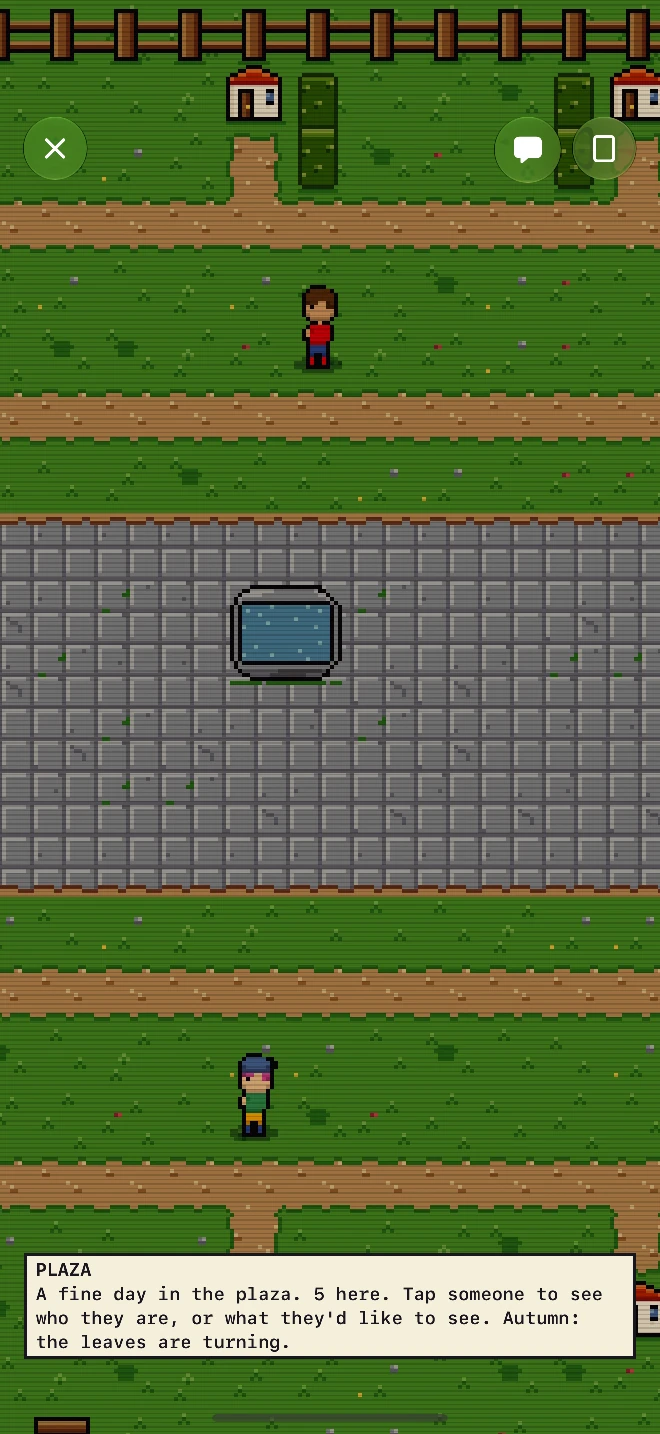
October 3, 2026, later the same day. The JSON maps landed. The plaza is now a 40-by-30 town the forge exports with its ground autotiled from the blob sets (so the path’s side edges wobble too), the woods drawn twelve tiles out as a second index map, and one map of letters, exported to the app and the server alike, which the app reads for feet and triggers and the server for feet. The same pass added the town’s furniture, drawn by the same rules: a fence that encloses the whole map and turns its corners (a sixteen-piece edge set), hedges, lamp posts whose heads glow after dark beside the kiosk’s screen, a fountain in the square, rocks, bushes, a stump, a crate, a barrel and a signpost; and the ground stopped repeating, with eight lawn variants, four path and four stone. The capture below is the walk that passed with it.
Two things this guide does not settle are getting their own research and their own posts: the people, whose chunky figure still reads as a toy and whose clothes, hair and customization deserve the depth the masters gave them, and the buildings, which are single tiles here and should be modular, multi-tile structures with interiors and floors. When those posts exist, the links will appear here.
Key Takeaways
If you draw the art
- Fix the cell, the palette and the light before the first tile: 16-by-16 tiles, a 16-by-24 figure in a 16-by-32 cell, 48 to 64 colours in hue-shifted ramps, light from the top left. Every master in this guide worked from the constraint outward.
- Pick one outline rule and apply it to the whole cast. FF VI’s 93 percent black edge and Secret of Mana’s zero percent are both coherent; a cast that mixes them is not.9
- Spend frames on expression and colours on motion: FF VI’s 46 poses, Emerald’s step-stand-step-stand, and sub-pixel animation that moves colours rather than the sprite.14866
- Transitions are 47 tiles; fences are 16; trees are leaf bundles with the shadow directly beneath. Draw the rule once and let the editor place it.8084
If you build it on Apple platforms
- Stay in RealityKit when one object must be real 3D in a flat world; it shares the depth buffer, and every pixel-art need has a documented API. Choose SpriteKit for a pure 2D game, and keep
RealityRendereras the Metal escape hatch for 120 Hz and panel-exact pixels.14110 - Switch the AR defaults off on day one: motion blur and HDR tone mapping are on unless you disable them, and the recipe sets depth of field, camera grain and antialiasing off as well, since each would smear texels.16
- Do the scale arithmetic in pixels:
k = floor(pixelsTall ÷ 320), round every sprite’s x and y and the camera to whole world units, and readUIScreen.nativeScaleon real hardware before trusting the simulator, especially on iPhone Duo.112118 - In our RealityView, animating the containing view’s opacity left it black; fade a veil over it instead. Capture the Duo’s inner display from inside the test bundle, not from the host. Add
LSSupportsGameModeso Game Mode “minimizes background activity for smoother gameplay and more consistent frame rates.”117
If you run the studio
- Match the art scale to the team: Eric Barone keeps 16-by-16 tiles so one person can draw a Stardew-sized world, and Sabotage grew from seven people to about 25 while making Sea of Stars.7172
- Choose the Moonlighter-to-Celeste lighting tier unless you have six months of engine time; the HD-2D tier “costs more than you’d think” and its own players turn the effects off.101113
- Own the provenance of every pixel. Purely prompt-generated art is not protectable, by the Copyright Office’s own conclusion, and mixed cases are judged one by one; hand-drawn art, and art drawn by rules a person wrote, keeps a human author’s provenance.18
- In a world for collectors, make the collected thing the only glossy object, cap the room, grade it on Sundays, let likes only go up, and never type: Daniel Cook’s “Remove chat and you remove 95% of all positive social behavior” is true, which is why the preset lines have to carry the answers a kid would otherwise type.130
FAQ
What tile size should a top-down pixel-art game use?
Sixteen by sixteen. It is the cell Pokémon has used since the Game Boy’s 16-pixel walk square, the cell Stardew Valley is built on, and the one Raymond Schlitter calls “the most balanced size to work with.”4079132 Characters sit in a 16-by-32 cell with the body about 24 pixels tall; houses and large trees are designed in pairs of tiles.
SpriteKit or RealityKit for pixel art on iOS?
SpriteKit for a game with no 3D object: tile maps with adjacency rules, lights with normal maps, and filteringMode = .nearest is the whole fix.101102 RealityKit when one thing in the scene must be shaded 3D in the same depth buffer as the tiles; an orthographic camera, UnlitMaterial with an explicit blend mode or an opacity threshold, a nearest sampler and no mipmaps are all documented, and iOS 26 adds instancing and a post-processing hook.104106108109 SpriteKit’s one 3D bridge, SK3DNode, rests on SceneKit, which Apple put into maintenance mode at WWDC25.103
How do you get integer scaling on an iPhone screen?
Work in pixels. Multiply the view’s points by displayScale, divide the height by 320 (twenty tiles of sixteen), take the floor, and that is your device pixels per texel: 8 on an iPhone 18 Pro Max, 6 on the open iPhone Duo, the 13-inch iPad Pro and a 4K Apple TV.17119 Round the camera and every sprite’s x and y to whole world units each frame. Decide whether the remainder becomes more visible world or letterbox bars; no current iPhone height divides by 320. On iPhone Duo’s inner display, check UIScreen.nativeScale on hardware, because the panel’s 1878-by-2670 pixels do not match the 2007-by-2853 framebuffer the simulator shows.112
Can AI generate the pixel art for a game?
It can generate images; prompts alone do not give you a copyright in what they generate. The U.S. Copyright Office’s 2025 report concludes that purely AI-generated material is not protected and that “prompts do not alone provide sufficient control,” while human creative modifications of an output and AI used “to assist rather than stand in for human creativity” are protected.18 For a shipping game the practical consequence is that a tileset generated wholesale from prompts, with no human expression added, has no copyright to enforce, and its training provenance is unknowable; where a person did add expression, the Office judges the contribution case by case. Draw it, or write the rules that draw it, and document which is which.
Where is the legal line for a world “inspired by Pokémon”?
Style, method and system are not protected; specific expression is. Circular 33 excludes “any idea, procedure, process, system, method of operation, concept, principle, or discovery” from copyright.19 A three-quarter town of 16-pixel tiles, two-layer metatiles, a step-stand walk and a 47-tile shoreline is a method. Pallet Town’s tiles, the creatures, the Poké Ball and the type symbols are expression, and the names are trademarks. Kiradex draws every tile and sprite from its own rules in its own palette, and the only Pokémon imagery anywhere in the app is the real card the user scanned.
Why does a terrain transition need exactly 47 tiles?
Because a tile’s appearance depends on eight neighbours (four edges and four corners), which is 256 combinations, but a corner only matters when both of the edges beside it are also present. Collapsing the 256 masks under that rule leaves 47 distinct silhouettes, which is why Tiled’s documentation names “the 47-tile Blob tileset” as the usual reduced form of a mixed set.808182
How this guide was made. The six research dossiers behind it were compiled with Claude agents on October 2, 2026, and every number in the text was then re-read from the primary source named in the notes: the pret decompilations, Apple’s documentation (through its JSON endpoints), the developers’ own talks and posts, and translated interviews at Shmuplations, Nova Crystallis and Lava Cut Content. The sprite measurements, the scaling arithmetic, the RealityKit camera measurement and the Kiradex forge are my own work and are labelled as such. Where a claim rests on a single source, the note says so.
Related on this site: iPhone Duo for Developers derives the inner display’s point size and the 1.42 ratio the scaling table above rests on; Prepare Your App for iPhone Duo is the worked example of the fold, the reserved regions and the HUD rules the plaza now follows; Xcode 27.1 Beta: Your App in the iPhone Duo Simulator covers the simulator and the Device Hub poses the captures came from; RealityKit and the Spatial Mental Model is the RealityKit grounding for section 5; Metal 4 Essentials covers the API the escape hatch would be built on; and Recreating MacPaint in the Browser is the last time I rebuilt a pixel renderer from a primary source.
Sources
-
FF6hacking Wiki, “Sprites (FF3us tutorial),” accessed October 2, 2026, https://www.ff6hacking.com/wiki/doku.php?id=ff3%3Aff3us%3Atutorial%3Asprites. ↩↩↩↩↩
-
pret,
pokeemerald/include/global.fieldmap.h(metatile and map-cell layout, layer types),pokeemerald/include/fieldmap.h(NUM_TILES_IN_PRIMARY 512,NUM_TILES_TOTAL 1024,NUM_PALS_TOTAL 13,NUM_TILES_PER_METATILE 8), andpokeemerald/include/constants/metatile_behaviors.h(the 240 behaviours), accessed October 2, 2026, https://github.com/pret/pokeemerald/blob/master/include/global.fieldmap.h, https://github.com/pret/pokeemerald/blob/master/include/fieldmap.h, https://github.com/pret/pokeemerald/blob/master/include/constants/metatile_behaviors.h. ↩↩↩↩↩ -
Pedro Medeiros, “Consistency,” Saint11, accessed October 2, 2026, https://saint11.art/blog/consistency/. ↩↩↩
-
Fabien Sanglard, “Why Did the SNES Have Two PPUs?” accessed October 2, 2026, https://fabiensanglard.net/snes_ppus_why/. ↩↩↩
-
gbdev, “Tile Data,” Pan Docs, accessed October 2, 2026, https://gbdev.io/pandocs/Tile_Data.html; pret,
pokered/gfx/tilesets(96-tile sets), https://github.com/pret/pokered/tree/master/gfx/tilesets. ↩ -
pret,
pokered/engine/gfx/sprite_oam.asm(theUNDER_GRASSpriority bit), accessed October 2, 2026, https://github.com/pret/pokered/blob/master/engine/gfx/sprite_oam.asm. ↩↩ -
“Final Fantasy VI Developer Roundtable (1994),” trans. Shmuplations, accessed October 2, 2026, https://shmuplations.com/ff6rt/. ↩
-
“Final Fantasy 35th Anniversary Special Interview, Part 2,” transcription, Nova Crystallis, July 2023, accessed October 2, 2026, https://novacrystallis.com/2023/07/final-fantasy-35th-anniversary-special-interview-part-2-of-2-transcription/. ↩↩↩↩↩
-
Author’s measurement, October 2, 2026, of the standing frame of one lead character per game from the per-animation rips at videogamesprites.net (each verified as an exact 2× nearest-neighbour upscale); an edge pixel is any opaque pixel with a transparent four-neighbour; “near-black” means every channel at or below 40 of 255. Archive: http://www.videogamesprites.net/. ↩↩↩
-
“Moonlighter: Building Pixel Art & Preparing for Switch,” 80.lv, accessed October 2, 2026, https://80.lv/articles/moonlighter-building-pixel-art-preparing-for-switch. ↩↩↩
-
Noel Berry, “Remaking Celeste’s Lighting,” accessed October 2, 2026, https://noelberry.ca/posts/celeste_lighting/. ↩↩↩
-
“Eastward’s Creators Share Insights on Making Pixel Art Adventures,” Game Developer, accessed October 2, 2026, https://www.gamedeveloper.com/art/eastward-s-creators-share-insights-on-making-pixel-art-adventures. ↩↩
-
“Triangle Strategy Producers Talk HD-2D and Why Other Devs Haven’t Used It,” Nintendo Life, May 2022, accessed October 2, 2026, https://www.nintendolife.com/news/2022/05/triangle-strategy-producers-talk-hd-2d-and-why-other-devs-havent-used-it; player workaround thread for Octopath Traveler II, Steam Community, https://steamcommunity.com/app/1971650/discussions/0/3777994452130450169/. ↩↩↩↩
-
Apple Developer Documentation, “MaterialParameters.Texture.Sampler.init(:),” accessed October 2, 2026, https://developer.apple.com/documentation/realitykit/materialparameters/texture/sampler-swift.struct/init(:); “TextureResource.MipmapsMode,” https://developer.apple.com/documentation/realitykit/textureresource/mipmapsmode. ↩↩↩
-
Apple Developer Documentation, “UnlitMaterial.opacityThreshold,” accessed October 2, 2026, https://developer.apple.com/documentation/realitykit/unlitmaterial/opacitythreshold; “UnlitMaterial.textureCoordinateTransform,” https://developer.apple.com/documentation/realitykit/unlitmaterial/texturecoordinatetransform-swift.property. ↩↩↩
-
Apple Developer Documentation, “RealityViewRenderingEffects,” accessed October 2, 2026, https://developer.apple.com/documentation/realitykit/realityviewrenderingeffects. ↩↩↩↩
-
Author’s arithmetic from Apple’s published panel sizes (iPhone Duo: https://www.apple.com/iphone-duo/specs/; iPhone 18 Pro: https://www.apple.com/iphone-18-pro/specs/) and the Xcode 27 simulator device profiles, October 2, 2026; the full table appears in section 5. ↩↩↩↩
-
U.S. Copyright Office, Copyright and Artificial Intelligence, Part 2: Copyrightability (January 2025), accessed October 2, 2026, https://www.copyright.gov/ai/Copyright-and-Artificial-Intelligence-Part-2-Copyrightability-Report.pdf. ↩↩↩↩
-
U.S. Copyright Office, Circular 33: Works Not Protected by Copyright, accessed October 2, 2026, https://www.copyright.gov/circs/circ33.pdf. ↩↩↩
-
SNESdev Wiki, “SNES PPU for NES developers,” accessed October 2, 2026, https://snes.nesdev.org/wiki/SNES_PPU_for_NES_developers. ↩↩↩
-
SNESdev Wiki, “Sprites,” accessed October 2, 2026, https://snes.nesdev.org/wiki/Sprites. ↩↩↩↩
-
SNESdev Wiki, “Backgrounds,” accessed October 2, 2026, https://snes.nesdev.org/wiki/Backgrounds. ↩
-
Wikipedia, “Mode 7,” accessed October 2, 2026, https://en.wikipedia.org/wiki/Mode_7. ↩
-
SuperFamicom.org cartridge database entries for Final Fantasy IV, V and VI and Chrono Trigger, accessed October 2, 2026, https://superfamicom.org/info/final-fantasy-4, https://superfamicom.org/info/final-fantasy-5, https://superfamicom.org/info/final-fantasy-6 and https://superfamicom.org/info/chrono-trigger; FF V’s 16 megabits also in Kokubo’s words (“This time we’ve got 16Mb”) in the FF V interview at note 26. ↩
-
“Chrono Trigger Developer Interview (1995),” trans. Shmuplations, accessed October 2, 2026, https://shmuplations.com/chronotrigger/ (Tokita: “you could fit four FFIV’s into this cart”; Kamata: “I think about 6 of the 8 megs was used for graphics”). ↩
-
“Final Fantasy V Developer Interview (1992),” trans. Shmuplations, accessed October 2, 2026, https://shmuplations.com/ffv/. ↩
-
Chrono Compendium forums, “Sprite assembly data,” topic 2872, accessed October 2, 2026, https://www.chronocompendium.com/Forums/index.php?topic=2872.0. ↩↩
-
SNESdev Wiki, “Color math,” accessed October 2, 2026, https://snes.nesdev.org/wiki/Color_math. ↩
-
“Kazuko Shibuya,” UT Magazine, Uniqlo, accessed October 2, 2026, https://www.uniqlo.com/jp/en/contents/feature/ut-magazine/s134/. ↩
-
“Chrono Trigger Developer Interviews (1995), Part 2,” trans. Shmuplations, accessed October 2, 2026, https://shmuplations.com/chronotrigger2/. ↩
-
“Tetsuya Nomura on Final Fantasy VI,” Final Fantasy Portal Site, accessed October 2, 2026, https://na.finalfantasy.com/topics/528. ↩
-
“Final Fantasy VI Developer Interviews (1994),” trans. Shmuplations, accessed October 2, 2026, https://shmuplations.com/ff6/. ↩
-
“Seiken Densetsu 3 Developer Interview (1995),” trans. Shmuplations, accessed October 2, 2026, https://shmuplations.com/seikendensetsu3/. ↩↩
-
Wikipedia, “Chrono Trigger” (development section, citing Yasuhiko Kamata), accessed October 2, 2026, https://en.wikipedia.org/wiki/Chrono_Trigger. ↩
-
“Interview: Discussing Final Fantasy Pixel Remaster Sprites and Designs,” Siliconera, accessed October 2, 2026, https://www.siliconera.com/interview-discussing-final-fantasy-pixel-remaster-sprites-and-designs/. ↩↩
-
“Square Enix Details the Considerable Amount of Work That Went into the Fonts of Final Fantasy Pixel Remaster,” GoNintendo, accessed October 2, 2026, https://gonintendo.com/contents/21170-square-enix-details-the-considerable-amount-of-work-that-went-into-the-fonts-of. ↩
-
Jason Schreier, “Oh No, Square Enix, What Have You Done to Final Fantasy,” Kotaku, accessed October 2, 2026, https://kotaku.com/oh-no-square-enix-what-have-you-done-to-final-fantasy-1502268040. ↩
-
The pret decompilation projects (pokered, pokecrystal, pokeemerald, pokefirered, poketcg), GitHub master as of October 2, 2026, https://github.com/pret. Tile counts were read from the PNG dimensions and byte sizes of the files named in the notes that follow. ↩
-
gbdev, “Graphics” and “Object Attribute Memory (OAM),” Pan Docs, accessed October 2, 2026, https://gbdev.io/pandocs/Graphics.html and https://gbdev.io/pandocs/OAM.html. ↩
-
pret,
pokered/data/tilesets/tileset_headers.asm,pokered/gfx/blocksets/, andpokered/constants/map_constants.asm, accessed October 2, 2026, https://github.com/pret/pokered/blob/master/data/tilesets/tileset_headers.asm, https://github.com/pret/pokered/tree/master/gfx/blocksets, https://github.com/pret/pokered/blob/master/constants/map_constants.asm. ↩↩↩ -
pret,
pokered/data/tilesets/collision_tile_ids.asmandpokered/home/overworld.asm, accessed October 2, 2026, https://github.com/pret/pokered/blob/master/data/tilesets/collision_tile_ids.asm and https://github.com/pret/pokered/blob/master/home/overworld.asm. ↩ -
pret,
pokered/home/vcopy.asm(UpdateMovingBgTiles), accessed October 2, 2026, https://github.com/pret/pokered/blob/master/home/vcopy.asm. ↩ -
pret,
pokered/data/sprites/facings.asmandpokered/gfx/sprites/, accessed October 2, 2026, https://github.com/pret/pokered/blob/master/data/sprites/facings.asm and https://github.com/pret/pokered/tree/master/gfx/sprites. ↩ -
pret,
pokecrystal/home/map.asm(LoadTilesetGFX),pokecrystal/gfx/tilesets/johto_palette_map.asm,pokecrystal/gfx/tilesets/bg_tiles.pal, andpokecrystal/constants/collision_constants.asm, accessed October 2, 2026, https://github.com/pret/pokecrystal/blob/master/home/map.asm, https://github.com/pret/pokecrystal/blob/master/gfx/tilesets/johto_palette_map.asm, https://github.com/pret/pokecrystal/blob/master/gfx/tilesets/bg_tiles.pal, https://github.com/pret/pokecrystal/blob/master/constants/collision_constants.asm. ↩↩↩ -
pret,
pokecrystal/gfx/overworld/npc_sprites.pal, accessed October 2, 2026, https://github.com/pret/pokecrystal/blob/master/gfx/overworld/npc_sprites.pal. ↩ -
pret,
pokeemerald/include/global.fieldmap.h; Porymap manual, “Editing Map Collisions,” accessed October 2, 2026, https://huderlem.github.io/porymap/manual/editing-map-collisions.html. ↩ -
pret,
pokeemerald/data/layouts/layouts.json, accessed October 2, 2026, https://github.com/pret/pokeemerald/blob/master/data/layouts/layouts.json. ↩ -
pret,
pokeemerald/src/data/object_events/object_event_anims.handpokeemerald/graphics/object_events/pics/people/, accessed October 2, 2026, https://github.com/pret/pokeemerald/blob/master/src/data/object_events/object_event_anims.h and https://github.com/pret/pokeemerald/tree/master/graphics/object_events/pics/people. ↩↩↩↩ -
pret,
pokeemerald/src/tileset_anims.c, accessed October 2, 2026, https://github.com/pret/pokeemerald/blob/master/src/tileset_anims.c. ↩ -
pret,
pokeemerald/src/field_effect_helpers.c(reflections, shadows, the grass effect’s placement) andpokeemerald/src/data/field_effects/field_effect_objects.h(the five-frame tall-grass sprite), accessed October 2, 2026, https://github.com/pret/pokeemerald/blob/master/src/field_effect_helpers.c and https://github.com/pret/pokeemerald/blob/master/src/data/field_effects/field_effect_objects.h. ↩ -
pret,
poketcg/Makefile(thergbgfx --colors embedded --auto-paletterule) andpoketcg/src/gfx/cards/, accessed October 2, 2026, https://github.com/pret/poketcg/blob/master/Makefile and https://github.com/pret/poketcg/tree/master/src/gfx/cards. Palette values read fromcharizard.pnganddoublecolorlessenergy.png. ↩ -
“Pokémon: 2000 Developer Interview with Ken Sugimori and Shigeru Miyamoto,” trans. Shmuplations, accessed October 2, 2026, https://shmuplations.com/pokemon/. ↩
-
“Sugimori & Masuda Developer Interview (Nintendo Online Magazine, July 2000),” trans. Anthony Madry, Lava Cut Content, accessed October 2, 2026, https://lavacutcontent.com/sugimori-masuda-developer-interview/. ↩
-
Nintendo, “Iwata Asks: Pokémon HeartGold Version & SoulSilver Version,” part 3, accessed October 2, 2026, https://www.nintendo.com/en-gb/Iwata-Asks/Iwata-Asks-Pokemon-HeartGold-Version-SoulSilver-Version/Iwata-Asks-Pokemon-HeartGold-Version-SoulSilver-Version/3-Just-Being-President-Was-A-Waste-/3-Just-Being-President-Was-A-Waste–225951.html; Sugimori on the artist count (“Maybe just under ten”) in “Iwata Asks: Pokémon Black and White,” transcript at https://pocketmonsters.net/content/Iwata_Asks_BW. ↩
-
Soleil (HylianAngel), comment on “Sea of Stars: Frequently Asked Questions,” a Steam Community thread opened by Sabotage Studio’s SaboMath, accessed October 3, 2026, https://steamcommunity.com/app/1244090/discussions/0/5913784177847747164/. The 640×360 figure and the Pixel Perfect description are the commenter’s words, not the studio’s. ↩
-
Billy Basso, reply on internal resolution and scanlines, Animal Well Steam Community, accessed October 2, 2026, https://steamcommunity.com/app/813230/discussions/0/4361250264577867864/. ↩
-
“Resolution Doesn’t Matter With 2D Games, Says Hyper Light Drifter Developer,” Nintendo Life, November 2014, accessed October 2, 2026, https://www.nintendolife.com/news/2014/11/resolution_doesnt_matter_with_2d_games_says_hyper_light_drifter_developer; the 480×270 figure is Preston’s in “Road to the IGF: Heart Machine’s Hyper Light Drifter,” Game Developer, https://www.gamedeveloper.com/design/road-to-the-igf-heart-machine-s-i-hyper-light-drifter-i-. ↩
-
Yacht Club Games, “Breaking the NES for Shovel Knight,” accessed October 2, 2026, https://www.yachtclubgames.com/blog/breaking-the-nes/. ↩↩
-
Godot Engine documentation, “Multiple resolutions,” accessed October 2, 2026, https://docs.godotengine.org/en/stable/tutorials/rendering/multiple_resolutions.html. ↩
-
Pedro Medeiros, “Scaling,” Saint11, accessed October 2, 2026, https://saint11.art/blog/scaling/. ↩
-
“Video: Octopath Traveler Earns Digital Foundry’s Respect for Blending Old With New,” Nintendo Life, July 2018, accessed October 2, 2026, https://www.nintendolife.com/news/2018/07/video_octopath_traveler_earns_digital_foundryrs_respect_for_blending_old_with_new. ↩
-
“Why Animal Well’s Home-Brewed Engine Was Key to Its Success,” Game Developer, accessed October 2, 2026, https://www.gamedeveloper.com/design/why-animal-well-s-home-brewed-engine-was-key-to-its-success. ↩
-
Thomas Vasseur, “Art Design Deep Dive: Using a 3D Pipeline for 2D Animation in Dead Cells,” Game Developer, accessed October 2, 2026, https://www.gamedeveloper.com/production/art-design-deep-dive-using-a-3d-pipeline-for-2d-animation-in-i-dead-cells-i-. ↩↩
-
Wikipedia, “Sea of Stars (video game),” development section, citing The Making of Sea of Stars, The Escapist, at 15:00, accessed October 2, 2026, https://en.wikipedia.org/wiki/Sea_of_Stars and https://www.youtube.com/watch?v=NvsDBAcKFDw. ↩
-
Acquire Corp., “Octopath Traveler” presentation, UNREAL FEST EAST 2018 (Epic Games Japan slides), accessed October 2, 2026, https://www.docswell.com/s/EpicGamesJapan/KXPWY5-UE4_UFE2018_ACQUIRE_OCTOPATHTRAVELER; Wikipedia, “HD-2D,” https://en.wikipedia.org/wiki/HD-2D. ↩↩
-
“Give Your Sprites Depth with Sub-Pixel Animation,” 2D Will Never Die, accessed October 2, 2026, https://2dwillneverdie.com/tutorial/give-your-sprites-depth-with-sub-pixel-animation/. ↩↩
-
“Creature Feature: The Surreal Pixel Art and Animation of Animal Well,” Game Developer, accessed October 2, 2026, https://www.gamedeveloper.com/art/creature-feature-the-surreal-pixel-art-and-animation-of-animal-well. ↩
-
Raymond Schlitter, “Pixelblog 1: Color Palettes,” Slynyrd, January 2018, accessed October 2, 2026, https://www.slynyrd.com/blog/2018/1/10/pixelblog-1-color-palettes. ↩↩
-
“Cassette Beasts Interview,” Pocket Tactics, accessed October 2, 2026, https://www.pockettactics.com/cassette-beasts/interview. ↩
-
Lospec palette pages for Resurrect 64, Apollo, and Endesga 32, accessed October 2, 2026, https://lospec.com/palette-list/resurrect-64, https://lospec.com/palette-list/apollo, https://lospec.com/palette-list/endesga-32. ↩
-
“Getting Started with Pixel Art: An Interview with Eric Barone,” Mental Nerd, accessed October 2, 2026, https://mentalnerd.com/blog/getting-started-pixel-art-interview/; Wikipedia, “Stardew Valley,” https://en.wikipedia.org/wiki/Stardew_Valley. ↩↩
-
“Sea of Stars: Sabotage Director Thierry Boulanger Interview,” MobileSyrup, September 2023, accessed October 2, 2026, https://mobilesyrup.com/2023/09/07/sea-of-stars-sabotage-director-thierry-boulanger-interview/. ↩↩
-
“The Scratch Coding and Discipline at the Heart of Animal Well,” Game Developer, accessed October 2, 2026, https://www.gamedeveloper.com/programming/the-scratch-coding-and-discipline-at-the-heart-of-animal-well; Wikipedia, “Animal Well,” https://en.wikipedia.org/wiki/Animal_Well. ↩
-
“Road to the IGF: Pixpil’s Eastward,” Game Developer, accessed October 2, 2026, https://www.gamedeveloper.com/business/road-to-the-igf-pixpil-s-i-eastward-i-; Wikipedia, “Eastward (video game),” https://en.wikipedia.org/wiki/Eastward_(video_game). ↩
-
Nintendo, “Nintendo Switch 2: More details about features,” accessed October 2, 2026, https://www.nintendo.com/en-gb/Hardware/Nintendo-Switch-2/Nintendo-Switch-2-More-details-about-features-2790188.html. ↩
-
Liberated Pixel Cup, “LPC Style Guide,” accessed October 2, 2026, https://lpc.opengameart.org/static/LPC-Style-Guide/build/styleguide.html. ↩↩↩
-
Raymond Schlitter, “Pixelblog 3: Graphical Projections, Part 1,” Slynyrd, March 2018, accessed October 2, 2026, https://www.slynyrd.com/blog/2018/3/14/pixelblog-3-graphical-projections-1. ↩
-
Raymond Schlitter, “Pixelblog 20: Top Down Tiles,” Slynyrd, August 2019, accessed October 2, 2026, https://www.slynyrd.com/blog/2019/8/27/pixelblog-20-top-down-tiles. ↩
-
Stardew Valley Wiki, “Modding:Maps,” accessed October 2, 2026, https://stardewvalleywiki.com/Modding:Maps. ↩↩
-
cr31 (via Boris the Brave’s mirror), “The Blob Tileset,” accessed October 2, 2026, http://www.boristhebrave.com/permanent/24/06/cr31/stagecast/wang/blob.html. ↩↩↩
-
Boris the Brave, “Classification of Tilesets,” November 2021, accessed October 2, 2026, https://www.boristhebrave.com/2021/11/14/classification-of-tilesets/. ↩↩
-
Tiled documentation, “Using Terrains,” accessed October 2, 2026, https://doc.mapeditor.org/en/stable/manual/terrain/. ↩↩
-
LDtk documentation, “Auto-layers,” accessed October 2, 2026, https://ldtk.io/docs/general/auto-layers/. ↩
-
Raymond Schlitter, “Pixelblog 44: Top Down Trees,” “Pixelblog 21: Top Down Objects,” and “Pixelblog 43: Top Down Tiles, Part 2,” Slynyrd, accessed October 2, 2026, https://www.slynyrd.com/blog/2023/5/22/pixelblog-44-top-down-trees, https://www.slynyrd.com/blog/2019/9/18/pixelblog-21-top-down-objects, https://www.slynyrd.com/blog/2023/3/26/pixelblog-43-top-down-tiles-part-2. ↩↩
-
Raymond Schlitter, “Pixelblog 7: Developing Style,” Slynyrd, July 2018, accessed October 2, 2026, https://www.slynyrd.com/blog/2018/7/14/pixelblog-7-developing-style. ↩
-
Cure, “The Pixel Art Tutorial,” PixelJoint forums, accessed October 2, 2026, https://pixeljoint.com/forum/forum_posts.asp?TID=11299. ↩↩↩
-
Pedro Medeiros, “Anti-Alias and Banding,” Saint11, accessed October 2, 2026, https://saint11.art/pixel_art_articles/article5/. ↩
-
“Dithering for Pixel Artists,” Pixel Parmesan, accessed October 2, 2026, https://pixelparmesan.com/blog/dithering-for-pixel-artists. ↩
-
Stardew Valley Wiki, “Modding:Farmer sprite,” accessed October 2, 2026, https://stardewvalleywiki.com/Modding:Farmer_sprite. ↩
-
Stardew Valley Wiki, “Modding:Hats,” accessed October 2, 2026, https://stardewvalleywiki.com/Modding:Hats. ↩
-
Raymond Schlitter, “Pixelblog 22: Top Down Character Sprites,” Slynyrd, October 2019, accessed October 2, 2026, https://www.slynyrd.com/blog/2019/10/21/pixelblog-22-top-down-character-sprites. ↩
-
Raymond Schlitter, “Pixelblog 8: Intro to Animation,” Slynyrd, August 2018, accessed October 2, 2026, https://www.slynyrd.com/blog/2018/8/19/pixelblog-8-intro-to-animation. ↩
-
Daniel Linssen, “m5x7,” itch.io, accessed October 2, 2026, https://managore.itch.io/m5x7. ↩
-
pret,
pokeemerald/graphics/text_window/(frame1.png, 24 by 24 pixels), accessed October 2, 2026, https://github.com/pret/pokeemerald/tree/master/graphics/text_window. ↩ -
Aseprite documentation, “Slices,” accessed October 2, 2026, https://www.aseprite.org/docs/slices/. ↩
-
Jan Willem Nijman (Vlambeer), “The Art of Screenshake,” INDIGO Classes 2013, accessed October 2, 2026, https://www.youtube.com/watch?v=AJdEqssNZ-U. ↩
-
Martin Jonasson and Petri Purho, “Juice It or Lose It,” GDC Europe 2012, accessed October 2, 2026, https://www.youtube.com/watch?v=Fy0aCDmgnxg. ↩
-
Stardew Valley Wiki, “Weather,” and the
Typetile property in “Modding:Maps,” accessed October 2, 2026, https://stardewvalleywiki.com/Weather and https://stardewvalleywiki.com/Modding:Maps. ↩ -
Aseprite documentation, “Command Line Interface,” accessed October 2, 2026, https://www.aseprite.org/docs/cli/. ↩
-
CodeAndWeb, “TexturePacker: Texture Settings,” accessed October 2, 2026, https://www.codeandweb.com/texturepacker/documentation/texture-settings. ↩
-
Apple Developer Documentation, “SKTexture.filteringMode” and “SKTextureFilteringMode,” accessed October 2, 2026, https://developer.apple.com/documentation/spritekit/sktexture/filteringmode and https://developer.apple.com/documentation/spritekit/sktexturefilteringmode. ↩↩
-
Apple Developer Documentation, “SKTileMapNode,” accessed October 2, 2026, https://developer.apple.com/documentation/spritekit/sktilemapnode; Apple, “What’s New in SpriteKit,” WWDC16 session 610 (transcript mirror), https://nonstrict.eu/wwdcindex/wwdc2016/610/. ↩↩
-
Apple, “Bring your SceneKit project to RealityKit,” WWDC25 session 288, accessed October 2, 2026, https://developer.apple.com/videos/play/wwdc2025/288/. ↩↩
-
Apple Developer Documentation, “OrthographicCameraComponent” and “OrthographicCameraComponent.scale,” accessed October 2, 2026, https://developer.apple.com/documentation/realitykit/orthographiccameracomponent and https://developer.apple.com/documentation/realitykit/orthographiccameracomponent/scale. The half-height relationship is the author’s measurement in the Kiradex renderer, October 2026. ↩↩↩
-
Apple Developer Forums, thread 768467 (a RealityView crash on adding an orthographic camera, reported on macOS 15.0, which Apple’s engineer said should be fixed in the .2 releases; a February 2025 follow-up reports projection returning wrong values), accessed October 2, 2026, https://developer.apple.com/forums/thread/768467. ↩↩
-
Apple Developer Documentation, “UnlitMaterial,” accessed October 2, 2026, https://developer.apple.com/documentation/realitykit/unlitmaterial. ↩
-
Apple Developer Documentation, “RealityView” and “SceneEvents.Update,” accessed October 2, 2026, https://developer.apple.com/documentation/realitykit/realityview and https://developer.apple.com/documentation/realitykit/sceneevents/update. ↩
-
Apple Developer Documentation, “PostProcessEffect” and “PostProcessEffectContext,” accessed October 2, 2026, https://developer.apple.com/documentation/realitykit/postprocesseffect and https://developer.apple.com/documentation/realitykit/postprocesseffectcontext. ↩
-
Apple Developer Documentation, “MeshInstancesComponent,” accessed October 2, 2026, https://developer.apple.com/documentation/realitykit/meshinstancescomponent; Apple, “What’s new in RealityKit,” WWDC25 session 287, https://developer.apple.com/videos/play/wwdc2025/287/; Apple Developer Forums, thread 694561 (no instancing before iOS 26), https://developer.apple.com/forums/thread/694561. ↩↩
-
Apple Developer Documentation, “RealityRenderer,” accessed October 2, 2026, https://developer.apple.com/documentation/realitykit/realityrenderer. ↩↩
-
Apple Developer Documentation, “MTLSamplerMinMagFilter” and the sample “Customizing render pass setup,” accessed October 2, 2026, https://developer.apple.com/documentation/metal/mtlsamplerminmagfilter and https://developer.apple.com/documentation/metal/customizing-render-pass-setup. ↩
-
Apple, Technical Q&A QA1909, “Supporting native screen scale in your graphics application,” and Metal Best Practices Guide, “Native Screen Scale,” accessed October 2, 2026, https://developer.apple.com/library/archive/qa/qa1909/_index.html and https://developer.apple.com/library/archive/documentation/3DDrawing/Conceptual/MTLBestPracticesGuide/NativeScreenScale.html. ↩↩↩↩
-
Apple Developer Documentation, “Optimizing iPhone and iPad apps to support ProMotion displays,” accessed October 2, 2026, https://developer.apple.com/documentation/quartzcore/optimizing-iphone-and-ipad-apps-to-support-promotion-displays. ↩↩
-
Apple Developer Documentation, “Improving the Performance of a RealityKit App,” accessed October 2, 2026, https://developer.apple.com/documentation/realitykit/improving-the-performance-of-a-realitykit-app. ↩
-
Apple Human Interface Guidelines, “Designing for games,” updated June 9, 2025, accessed October 2, 2026, https://developer.apple.com/design/human-interface-guidelines/designing-for-games. ↩↩
-
Apple Developer Documentation, “Image.interpolation(:),” accessed October 2, 2026, https://developer.apple.com/documentation/swiftui/image/interpolation(:). ↩
-
Apple Developer Documentation, “LSSupportsGameMode,” accessed October 2, 2026, https://developer.apple.com/documentation/bundleresources/information-property-list/lssupportsgamemode. ↩
-
Xcode 27 simulator device profiles (
capabilities.plistunder/Library/Developer/CoreSimulator/Profiles/DeviceTypes/), read by the author on October 2, 2026: iPhone Duo displays 1398 × 2034 and 2007 × 2853 at scale 3.0; iPhone 18 Pro Max 1320 × 2868 at 3.0; iPad Pro 13-inch (M5) 2064 × 2752 at 2.0. ↩↩ -
Apple, “iPad Pro: Tech Specs,” accessed October 2, 2026, https://www.apple.com/ipad-pro/specs/. ↩
-
Blake Crosley, “iPhone Duo for Developers,” blakecrosley.com, September 2026, https://blakecrosley.com/blog/iphone-duo-for-developers. ↩
-
Stardew Valley Wiki, “Stardew Valley Fair” (grange display scoring), accessed October 2, 2026, https://stardewvalleywiki.com/Stardew_Valley_Fair. ↩
-
Serebii, “Pokémon Ruby & Sapphire: Secret Bases,” accessed October 2, 2026, https://www.serebii.net/rubysapphire/secretbase.shtml. ↩
-
Nookipedia, “Happy Home Academy,” accessed October 2, 2026, https://nookipedia.com/wiki/Happy_Home_Academy. ↩
-
That Penguin Game, “Your Igloo” and “Chat Modes” (Club Penguin help archive), accessed October 2, 2026, https://thatpenguingame.com/club-penguin-help/game-help/your-igloo/ and https://thatpenguingame.com/club-penguin-help/safety/chat-modes/. ↩↩↩
-
Serebii, “Pokémon Omega Ruby & Alpha Sapphire: Super-Secret Bases,” accessed October 2, 2026, https://www.serebii.net/omegarubyalphasapphire/supersecretbases.shtml. ↩
-
pret,
pokeemerald/src/data/easy_chat/easy_chat_groups.hand the group word lists, accessed October 2, 2026, https://github.com/pret/pokeemerald/blob/master/src/data/easy_chat/easy_chat_groups.h; the Trendy Saying unlock rule (one word each time the Hipster arrives by record mixing) is inpokeemerald/src/easy_chat.c, https://github.com/pret/pokeemerald/blob/master/src/easy_chat.c. ↩ -
Serebii, “Pokémon GO: Friends,” accessed October 2, 2026, https://www.serebii.net/pokemongo/friends.shtml. ↩
-
Project Horseshoe, “Cozy Games” (2017), republished at Lost Garden, accessed October 2, 2026, http://lostgarden.com/2018/01/24/cozy-games/. ↩
-
“Pokémon TCG Pocket: Binder and Card Showcase Guide,” Game Rant, accessed October 2, 2026, https://gamerant.com/pokemon-tcg-pocket-binder-card-showcase-album-guide/; Wikipedia, “Pokémon Trading Card Game Pocket,” https://en.wikipedia.org/wiki/Pok%C3%A9mon_Trading_Card_Game_Pocket. ↩
-
Daniel Cook, “Game design patterns for building friendships,” Lost Garden, January 2017, accessed October 2, 2026, https://lostgarden.com/2017/01/27/game-design-patterns-for-building-friendships/; and “Kind Games: Designing for Prosocial Multiplayer,” July 2023, https://lostgarden.com/2023/07/08/kind-games-designing-for-prosocial-multiplayer/. ↩
-
U.S. Federal Trade Commission, “Fortnite Video Game Maker Epic Games to Pay More Than Half a Billion Dollars over FTC Allegations,” December 2022, accessed October 2, 2026, https://www.ftc.gov/news-events/news/press-releases/2022/12/fortnite-video-game-maker-epic-games-pay-more-half-billion-dollars-over-ftc-allegations. ↩
-
Raymond Schlitter, “Pixelblog 35: Top Down Interiors,” Slynyrd, November 2021, accessed October 3, 2026, https://www.slynyrd.com/blog/2021/11/30/pixelblog-35-top-down-interiors. ↩
-
Wikipedia, “Lane Merrifield” (Club Penguin’s filter “filtering seemingly innocuous terms, such as ‘mom’; and blocking both telephone numbers and email addresses”), accessed October 3, 2026, https://en.wikipedia.org/wiki/Lane_Merrifield. ↩











