Warp: 终端焕然一新
Warp如何重新发明终端:块输出、底部锚定输入、原生AI集成和可分享工作流。附代码示例。
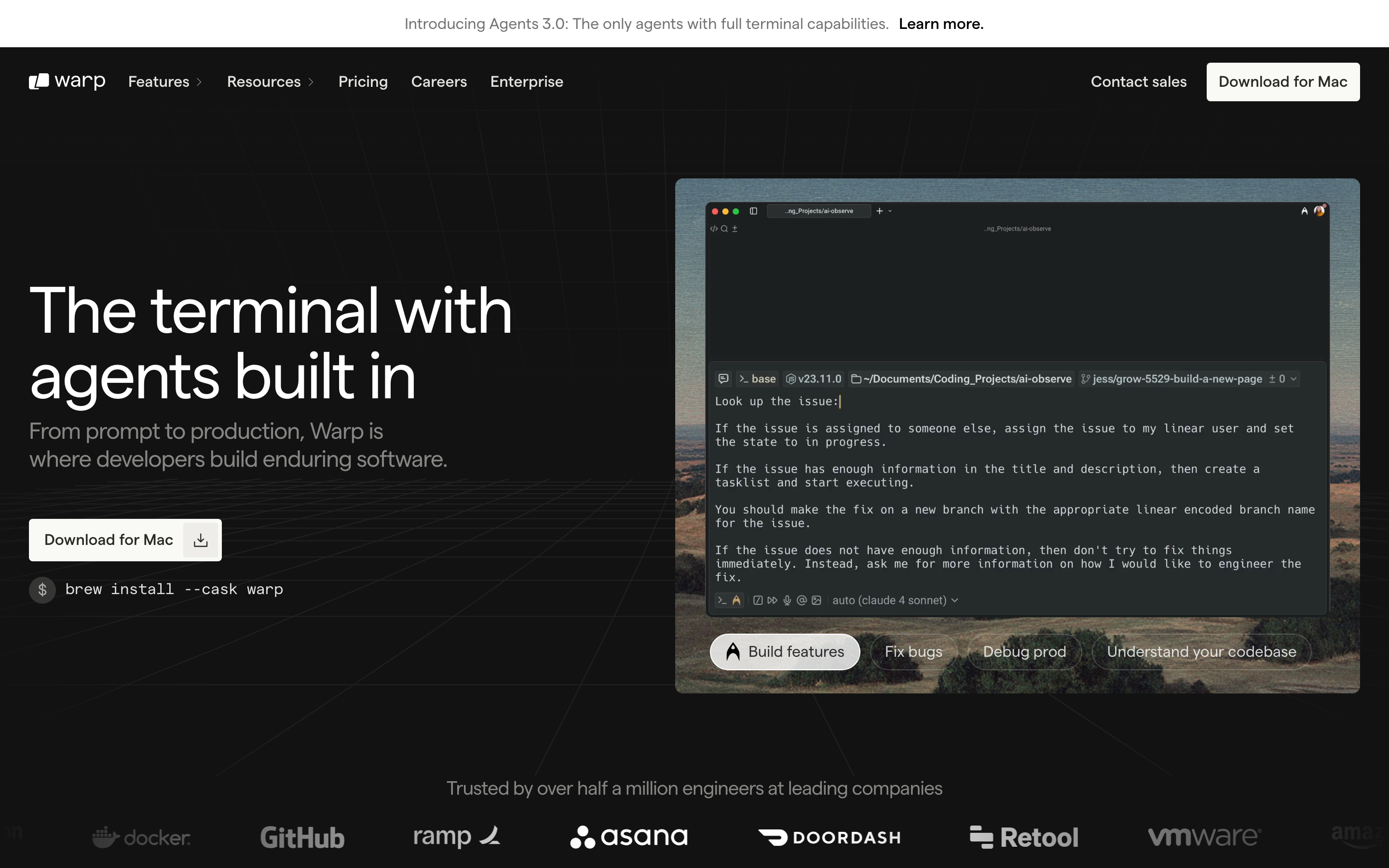
"我们相信终端是有史以来最强大的工具之一,但它也是最令人望而生畏的工具之一。" — Zach Lloyd,Warp CEO
Warp 是一款现代终端,它在命令行的原始力量与现代应用程序的易用性之间架起了桥梁。它证明了开发者工具不必为了创新而牺牲熟悉感。
Warp 的重要性
Warp 将最古老的开发者工具——终端——重新构想为适应现代时代的样子,同时没有放弃使其强大的核心特性。
主要成就: - 基于块的架构,将命令视为一等对象 - AI 集成感觉是原生的,而非后期拼凑的 - 现代编辑体验(选择、撤销、多光标) - 协作功能(Warp Drive、共享工作流) - 使用 Rust 构建,在不牺牲功能的情况下实现高性能
核心要点
- 基于块的输出将混乱转化为对象 - 将每个命令及其输出视为离散的、可选择的单元,使得复制、分享、导航和 AI 上下文成为可能,这是连续文本流无法提供的
- 底部固定输入借鉴了聊天界面的熟悉感 - 固定输入位置消除了寻找提示符的认知负担;用户始终知道在哪里输入
- AI 集成必须是可选且透明的 - 显示实际生成的命令,提供解释模式,并让每个 AI 建议都可以通过单个按键取消
- 增量式创新保留了强大功能 - 添加现代化便利而不移除能力;专家可以忽略新功能,而新手可以从中受益
- 开发者工具可以是协作的 - 可共享的块和工作流证明,即使是传统上单独使用的工具也能从社交功能中受益
核心设计理念
桥接问题
终端面临一个独特的挑战:它必须同时服务于使用了数十年的专家用户和觉得它令人生畏的新手。Warp 的解决方案是增量式的——添加现代化便利而不移除强大功能。
TRADITIONAL TERMINAL
┌─────────────────────────────────────────────────────────────┐
│ $ git status                                                │
│ On branch main                                              │
│ Your branch is up to date with 'origin/main'.              │
│                                                             │
│ Changes not staged for commit:                              │
│   (use "git add <file>..." to update what will be...)      │
│   modified: src/app.py                                      │
│                                                             │
│ $ _                                                         │
│                                                             │
│ (everything is undifferentiated text)                       │
└─────────────────────────────────────────────────────────────┘

WARP'S APPROACH
┌─────────────────────────────────────────────────────────────┐
│  ┌─ Block 1 ─────────────────────────────────────────────┐  │
│  │ $ git status                            [^] [Copy]    │  │
│  ├───────────────────────────────────────────────────────┤  │
│  │ On branch main                                        │  │
│  │ Your branch is up to date with 'origin/main'.        │  │
│  │                                                       │  │
│  │ Changes not staged for commit:                        │  │
│  │   modified: src/app.py                               │  │
│  └───────────────────────────────────────────────────────┘  │
│                                                             │
│  ┌─ Input ───────────────────────────────────────────────┐  │
│  │ Type a command...                        [AI] [Cmd+P] │  │
│  └───────────────────────────────────────────────────────┘  │
└─────────────────────────────────────────────────────────────┘

Key insight: Each command+output is a selectable, shareable block
模式库
1. 基于块的输出架构
Warp 最重要的创新是将每个命令及其输出视为离散的"块",而非连续的文本。
块的强大之处:
| 功能 | 传统终端 | Warp 块 |
|---|---|---|
| 选择 | 仅字符/行 | 整个输出作为单元 |
| 复制 | 手动选择 | 一键复制 |
| 分享 | 截图或粘贴 | 块链接 |
| 导航 | 滚动文本 | 块间跳转 |
| AI 上下文 | 无 | 块即上下文窗口 |
实现模式:
// Block data structure
const Block = {
  id: 'block-uuid',
  command: 'git status',
  timestamp: Date.now(),
  output: {
    text: '...',
    exitCode: 0,
    duration: 234, // ms
  },
  metadata: {
    cwd: '/Users/dev/project',
    env: { /* snapshot */ },
  }
};

// Block interactions
const BlockActions = {
  copy: (block) => copyToClipboard(block.output.text),
  share: (block) => generateShareableLink(block),
  rerun: (block) => executeCommand(block.command, block.metadata.cwd),
  edit: (block) => openCommandEditor(block.command),
};
视觉处理:
/* Block container styling */
.block {
  --block-bg: var(--surface-secondary);
  --block-border: 1px solid var(--border-subtle);
  --block-radius: 8px;

  background: var(--block-bg);
  border: var(--block-border);
  border-radius: var(--block-radius);
  margin-bottom: 12px;

  /* Hover reveals actions */
  &:hover .block-actions {
    opacity: 1;
  }
}

.block-command {
  font-family: var(--font-mono);
  font-size: 14px;
  padding: 8px 12px;
  border-bottom: 1px solid var(--border-subtle);
  display: flex;
  justify-content: space-between;
  align-items: center;
}

.block-output {
  padding: 12px;
  font-family: var(--font-mono);
  font-size: 13px;
  line-height: 1.5;
  white-space: pre-wrap;
}

.block-actions {
  opacity: 0;
  transition: opacity 150ms ease;
  display: flex;
  gap: 4px;
}
2. 底部固定输入
与传统终端中输入跟随输出出现不同,Warp 将输入区域固定在底部,类似于聊天应用程序。
为什么这种方式有效:
TRADITIONAL (Input follows output)
┌────────────────────────────────────────┐
│ output line 1                          │
│ output line 2                          │
│ output line 3                          │
│ $ _  ← Input moves as output grows     │
│                                        │
│                                        │
│                                        │
└────────────────────────────────────────┘

WARP (Fixed input position)
┌────────────────────────────────────────┐
│ output line 1                          │
│ output line 2                          │
│ output line 3                          │
│                                        │
├────────────────────────────────────────┤
│ $ _  ← Input always here (consistent)  │
└────────────────────────────────────────┘
心智模型优势: - 可预测:输入始终在同一位置 - 熟悉感:与聊天界面相似(Messages、Slack) - 高效:无需滚动寻找提示符 - 宽敞:支持多行的全功能编辑器
实现:
.terminal-layout {
  display: flex;
  flex-direction: column;
  height: 100vh;
}

.output-area {
  flex: 1;
  overflow-y: auto;
  padding: 16px;
}

.input-area {
  flex-shrink: 0;
  border-top: 1px solid var(--border-primary);
  padding: 12px 16px;
  background: var(--surface-primary);

  /* Modern text editor feel */
  min-height: 48px;
  max-height: 200px; /* Expandable for multi-line */
}
3. AI 集成模式
Warp 的 AI 功能展示了如何将 AI 集成到专业工具中,同时避免让用户产生依赖感。
三种 AI 辅助模式:
1. 自然语言输入
┌────────────────────────────────────────────────────────────┐
│ "find all python files modified in the last week"         │
│                                                            │
│ ↓ AI 转换为:                                              │
│                                                            │
│ find . -name "*.py" -mtime -7                             │
│                                                            │
│ [运行] [编辑] [解释]                                        │
└────────────────────────────────────────────────────────────┘

2. 主动式 AI(上下文建议)
┌────────────────────────────────────────────────────────────┐
│ $ git push origin main                                     │
│ error: failed to push some refs                           │
│                                                            │
│ ┌─ AI 建议 ───────────────────────────────────────────┐   │
│ │ 💡 你的分支落后于远程分支。尝试:                     │   │
│ │    git pull --rebase origin main                    │   │
│ │                                        [应用] [×]   │   │
│ └─────────────────────────────────────────────────────┘   │
└────────────────────────────────────────────────────────────┘

3. 解释模式(教育功能)
┌────────────────────────────────────────────────────────────┐
│ $ tar -xzvf archive.tar.gz                                │
│                           [解释此命令]                      │
│                                                            │
│ ┌─ 解释 ──────────────────────────────────────────────┐   │
│ │ tar:归档工具                                        │   │
│ │  -x:解压文件                                        │   │
│ │  -z:使用 gzip 解压缩                                │   │
│ │  -v:详细模式(显示文件)                             │   │
│ │  -f:指定文件名                                      │   │
│ └─────────────────────────────────────────────────────┘   │
└────────────────────────────────────────────────────────────┘
关键设计决策:
- 主动选择而非被动退出:AI 建议会根据上下文出现,但不会打断工作流程
- 透明的转换过程:当 AI 生成命令时,显示实际的命令内容
- 注重教育:解释模式帮助用户学习,而非制造依赖
- 可随时关闭:每个 AI 元素都可以通过单个按键忽略
4. 命令面板模式
Warp 实现了现代化的命令面板(Cmd+P),让用户无需记忆快捷键即可访问各种功能。
┌────────────────────────────────────────────────────────────────────┐
│  搜索命令、设置、工作流...                                           │
├────────────────────────────────────────────────────────────────────┤
│  最近使用                                                          │
│  ├─ 向右分割面板                                     Cmd+D         │
│  ├─ 切换 AI 建议                                 Cmd+Shift+A       │
│  └─ 打开设置                                         Cmd+,         │
│                                                                    │
│  命令                                                              │
│  ├─ 新建标签页                                       Cmd+T         │
│  ├─ 关闭标签页                                       Cmd+W         │
│  ├─ 跳转到区块...                                    Cmd+G         │
│  └─ 分享区块                                     Cmd+Shift+S       │
│                                                                    │
│  工作流                                                            │
│  ├─ 部署到生产环境                                                  │
│  ├─ 运行测试套件                                                    │
│  └─ 更新依赖                                                       │
└────────────────────────────────────────────────────────────────────┘
设计原则:
- 模糊搜索:输入"spl pan"可匹配"Split pane"
- 显示快捷键:在搜索过程中教会用户快捷操作
- 最近项目优先:根据使用习惯个性化排序
- 分类展示:将相关命令分组显示
5. 工作流:可分享的命令序列
Warp 的工作流功能允许用户保存和分享命令序列,在脚本和书签之间架起桥梁。
# 示例工作流:部署到生产环境
name: "Deploy to Production"
description: "Run tests, build, and deploy"
author: "@team"
steps:
  - command: "npm test"
    description: "Run test suite"
  - command: "npm run build"
    description: "Build for production"
  - command: "git push origin main"
    description: "Push to trigger deploy"
界面处理:
┌─ 工作流:部署到生产环境 ─────────────────────────────────────────┐
│                                                                  │
│  步骤 1/3                                                        │
│  ┌─────────────────────────────────────────────────────────────┐ │
│  │ $ npm test                                                  │ │
│  │                                                             │ │
│  │ 运行测试套件                                                 │ │
│  └─────────────────────────────────────────────────────────────┘ │
│                                                                  │
│  [运行] [跳过] [取消工作流]                        (*) ( ) ( )    │
└──────────────────────────────────────────────────────────────────┘
视觉设计系统
色彩系统
:root {
  /* 深色主题(默认)*/
  --bg-primary: #0D0D0D;
  --bg-secondary: #1A1A1A;
  --bg-tertiary: #262626;

  --text-primary: #FFFFFF;
  --text-secondary: #A3A3A3;
  --text-muted: #737373;

  --border-subtle: rgba(255, 255, 255, 0.08);
  --border-primary: rgba(255, 255, 255, 0.12);

  /* 语义化颜色 */
  --color-success: #22C55E;
  --color-error: #EF4444;
  --color-warning: #F59E0B;
  --color-info: #3B82F6;

  /* AI 强调色 */
  --color-ai: #A855F7;  /* 紫色用于 AI 功能 */

  /* 选中和聚焦状态 */
  --color-selection: rgba(59, 130, 246, 0.3);
  --color-focus: #3B82F6;
}
字体排版
:root {
  /* 终端输出使用等宽字体 */
  --font-mono: 'JetBrains Mono', 'Fira Code', 'SF Mono', monospace;

  /* UI 界面使用无衬线字体 */
  --font-sans: 'Inter', -apple-system, BlinkMacSystemFont, sans-serif;

  /* 字号 */
  --text-xs: 11px;
  --text-sm: 13px;
  --text-base: 14px;
  --text-lg: 16px;

  /* 针对代码优化的行高 */
  --line-height-tight: 1.3;
  --line-height-normal: 1.5;
  --line-height-relaxed: 1.7;
}

/* Terminal output */
.terminal-text {
  font-family: var(--font-mono);
  font-size: var(--text-base);
  line-height: var(--line-height-normal);
  font-variant-ligatures: contextual;
  font-feature-settings: 'calt' 1;  /* Enable ligatures */
}

/* UI elements */
.ui-text {
  font-family: var(--font-sans);
  font-size: var(--text-sm);
  font-weight: 500;
}
动画模式
块出现动画
@keyframes block-enter {
  from {
    opacity: 0;
    transform: translateY(-4px);
  }
  to {
    opacity: 1;
    transform: translateY(0);
  }
}

.block {
  animation: block-enter 150ms ease-out;
}
AI 建议展开
@keyframes suggestion-reveal {
  from {
    opacity: 0;
    transform: translateY(8px);
    max-height: 0;
  }
  to {
    opacity: 1;
    transform: translateY(0);
    max-height: 200px;
  }
}

.ai-suggestion {
  animation: suggestion-reveal 200ms ease-out;
}

.ai-suggestion.dismissing {
  animation: suggestion-reveal 150ms ease-in reverse;
}
加载状态
/* Streaming output indicator */
.block.executing::after {
  content: '';
  display: inline-block;
  width: 8px;
  height: 16px;
  background: var(--color-focus);
  animation: cursor-blink 1s step-end infinite;
}

@keyframes cursor-blink {
  50% { opacity: 0; }
}

/* AI thinking indicator */
.ai-thinking {
  display: flex;
  gap: 4px;
}

.ai-thinking span {
  width: 6px;
  height: 6px;
  background: var(--color-ai);
  border-radius: 50%;
  animation: thinking-pulse 1.4s infinite ease-in-out both;
}

.ai-thinking span:nth-child(1) { animation-delay: 0s; }
.ai-thinking span:nth-child(2) { animation-delay: 0.16s; }
.ai-thinking span:nth-child(3) { animation-delay: 0.32s; }

@keyframes thinking-pulse {
  0%, 80%, 100% { transform: scale(0.6); opacity: 0.5; }
  40% { transform: scale(1); opacity: 1; }
}
对我们工作的启示
1. 增量式创新
添加现代功能的同时不削弱原有能力。专家用户可以忽略新功能;新手则从中受益。
2. 结构化混沌
基于块的架构将无差别的文本转化为可操作的对象。寻找机会为非结构化内容添加结构。
3. 持久化的 UI 锚点
固定的输入位置降低了认知负担。用户无需四处寻找输入位置。
4. AI 作为助手而非替代品
显示实际命令,而不仅仅是结果。解释模式起到教学作用,而非制造依赖。
5. 协作式命令行
可分享的块和工作流证明,即使是传统的单人工具也可以具备社交功能。
常见问题
什么是 Warp 的块状架构?
Warp 不再将终端输出视为连续滚动的文本,而是将每个命令及其输出结构化为独立的"块"。每个块都是一个可选择、可复制、可分享的单元,附带元数据(时间戳、退出码、执行时长)。这使得一键复制、链接分享、命令间跳转以及为 AI 提供聚焦的上下文窗口成为可能。
为什么 Warp 将输入区放在底部而非内联位置?
传统终端将输入光标与输出内联,这意味着它会随着输出增长而移动。Warp 将输入区锚定在底部(类似聊天应用),提供一个可预测的位置,消除了寻找输入位置的认知负担。这也使得功能完备的多行编辑器和现代编辑能力成为可能。
Warp 如何整合 AI 而不制造依赖?
Warp 的 AI 以三种模式运行:自然语言转换(显示实际生成的命令)、上下文建议(可选择启用且可关闭)以及解释模式(教用户命令的作用)。核心原则是透明——AI 始终展示其生成的内容,让用户学习而非依赖。
什么是 Warp 工作流?
工作流是以 YAML 格式保存的可分享命令序列。它们弥合了一次性命令和完整脚本之间的鸿沟,允许团队分享常用操作流程(如部署步骤),并为每个步骤提供说明。工作流可以通过命令面板发现并逐步执行。
为什么 Warp 选择用 Rust 实现?
Rust 提供内存安全和高性能,且没有垃圾回收停顿,这对于延迟敏感的终端至关重要。它还支持 Warp 将块作为带有丰富元数据的结构化数据处理的架构,同时保持用户对原生应用所期望的响应速度。











