Flighty: Data Visualization Done Right
How Flighty won Apple Design Award 2023: 15 smart states, Live Activities, and airport-inspired data visualization. With SwiftUI implementation patterns.
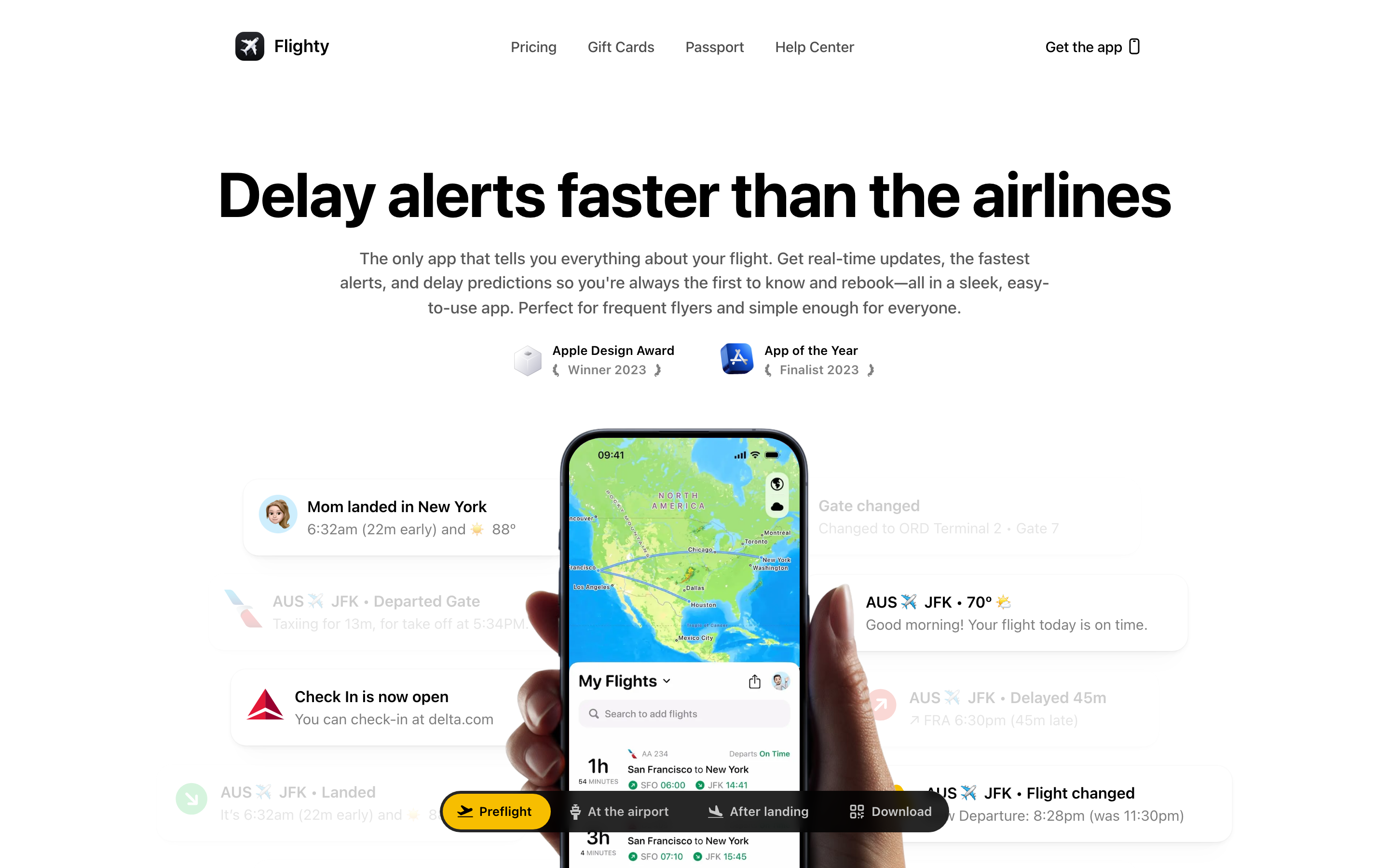
Flighty: Data Visualization Done Right
“We want Flighty to work so well that it feels almost boringly obvious.”
Flighty turns complex flight data into glanceable information. Winner of Apple Design Award 2023 for Interaction, it’s a masterclass in presenting dense data through calm, clear design inspired by decades of airport signage.
Why Flighty Matters
Founded by former Apple employee Ryan Jones after a frustrating flight delay, Flighty has become the gold standard for iOS data visualization.
Key achievements:
- Apple Design Award 2023 (Interaction)
- iPhone App of the Year Finalist 2023
- First app to fully leverage Live Activities
- 15 context-aware smart states
- Industry-leading delay predictions
Key Takeaways
- Borrow from proven systems - Airport departure boards have 50+ years of optimization; Flighty adapts this visual language for mobile
- Context-aware states reduce cognitive load - 15 smart states ensure users see exactly what they need at each phase of travel
- “Boringly obvious” is the goal - If the app just works without friction, you’ve succeeded
- Pack, wrap, and color your data - Present insights, not raw data; color-code status so users don’t have to interpret
- Offline-first for unreliable connectivity - Flights go offline; the app must work without connection, especially in-flight
Core Design Philosophy
Airport Signage as Design Language
Flighty’s design is built on a real-world analogy: airport departure boards.
AIRPORT DEPARTURE BOARD (50+ years of refinement)
───────────────────────────────────────────────────────────────────
FLIGHT   DESTINATION      GATE    TIME    STATUS
UA 1234  San Francisco    B22     14:30   ON TIME
DL 567   New York JFK     C15     15:00   DELAYED
AA 890   Chicago O'Hare   A08     15:45   BOARDING

One line per flight. Essential info only. Decades of optimization.

FLIGHTY'S TRANSLATION
───────────────────────────────────────────────────────────────────
[Flight card with same information density]
[Color-coded status]
[Time-appropriate details]
Key insight: “Those airport boards have one line per flight, and that’s a good guiding light—they’ve had 50 years of figuring out what’s important.”
Travel Context Awareness
Flighty understands that travel is stressful. The design must reduce cognitive load, not add to it.
Design principles: 1. Most important info above the fold 2. Progressive disclosure for details 3. Color-coded status (green = good, yellow = warning, red = problem) 4. Data is “packed, wrapped, and colored” so users don’t have to interpret
Pattern Library
1. The 15 Smart States
Flighty’s signature innovation: 15 context-aware states that show exactly what you need, exactly when you need it.
Timeline of states:
24 HOURS BEFORE
┌─────────────────────────────────────────┐
│ UA 1234 → SFO                           │
│ Tomorrow at 2:30 PM                     │
│ Confirmation: ABC123                    │
│ Head to Terminal 2                      │
└─────────────────────────────────────────┘

3 HOURS BEFORE
┌─────────────────────────────────────────┐
│ UA 1234 → SFO                           │
│ Gate B22 • Boards 2:00 PM               │
│ Leave for airport by 12:15 PM           │
│ [View full timeline →]                  │
└─────────────────────────────────────────┘

AT GATE
┌─────────────────────────────────────────┐
│ UA 1234 → SFO     [ON TIME]            │
│ Gate B22 • Boarding in 12 min           │
│ Seat 14A • Window                       │
│ [Your plane is here ✓]                  │
└─────────────────────────────────────────┘

WALKING TO PLANE
┌─────────────────────────────────────────┐
│ UA 1234 → SFO     [BOARDING]           │
│ Your seat: 14A (Window)                 │
│ ▓▓▓▓▓▓▓▓░░ 80% boarded                 │
└─────────────────────────────────────────┘

IN FLIGHT (offline)
┌─────────────────────────────────────────┐
│  SFO ──────●───────────── JFK           │
│            │                            │
│     2h 15m remaining                    │
│     Arrive ~5:45 PM local               │
└─────────────────────────────────────────┘

LANDED
┌─────────────────────────────────────────┐
│ ✓ Arrived at JFK                        │
│ Your gate: C15 → Connection gate: D22   │
│ 8 min walk • Terminal map [→]          │
└─────────────────────────────────────────┘
Implementation concept:
enum FlightState: CaseIterable {
    case farOut          // > 24 hours
    case dayBefore       // 24 hours
    case headToAirport   // ~3 hours
    case atAirport       // At terminal
    case atGate          // Gate area
    case boarding        // Boarding started
    case onBoard         // Seated
    case taxiing         // Moving to runway
    case inFlight        // Airborne
    case descending      // Approaching
    case landed          // Touched down
    case atGateDest      // Arrived at gate
    case connection      // Connecting flight
    case completed       // Trip done
    case delayed         // Any delay state
}

struct SmartStateEngine {
    func currentState(for flight: Flight, context: TravelContext) -> FlightState {
        let now = Date()
        let departure = flight.scheduledDeparture

        // Contextual factors
        let isAtAirport = context.currentLocation.isNear(flight.departureAirport)
        let isBoarding = flight.boardingStatus == .active
        let isAirborne = flight.status == .inFlight

        switch true {
        case isAirborne:
            return flight.altitude > 10000 ? .inFlight : .taxiing
        case isBoarding && isAtAirport:
            return .boarding
        case isAtAirport && departure.timeIntervalSinceNow < 3600:
            return .atGate
        case isAtAirport:
            return .atAirport
        case departure.timeIntervalSinceNow < 3 * 3600:
            return .headToAirport
        case departure.timeIntervalSinceNow < 24 * 3600:
            return .dayBefore
        default:
            return .farOut
        }
    }

    func displayContent(for state: FlightState, flight: Flight) -> StateContent {
        switch state {
        case .headToAirport:
            return StateContent(
                headline: "\(flight.number) → \(flight.destination.code)",
                primary: "Gate \(flight.gate) • Boards \(flight.boardingTime.formatted())",
                secondary: "Leave for airport by \(flight.recommendedDeparture.formatted())",
                action: "View full timeline"
            )
        case .inFlight:
            return StateContent(
                headline: flight.routeVisualization,
                primary: "\(flight.remainingTime.formatted()) remaining",
                secondary: "Arrive ~\(flight.estimatedArrival.formatted())",
                action: nil
            )
        // ... other states
        }
    }
}
2. Live Activities & Dynamic Island
Flighty was the first app to fully leverage iOS 16’s Live Activities, setting the standard for the feature.
Dynamic Island states:
COMPACT (Minimal)
╭──────────────────────────────────╮
│ [^] B22  │  *  │  2:30 -> 1h 45m │
╰──────────────────────────────────╯
  Gate      Status    Time/Duration

EXPANDED (Long press)
╭────────────────────────────────────────╮
│  UA 1234 to San Francisco              │
│  ───────────────────────────────────   │
│  Gate B22        Boards 2:00 PM        │
│  Seat 14A        On Time ✓             │
│                                        │
│  [Open Flighty]     [Share ETA]        │
╰────────────────────────────────────────╯

IN-FLIGHT (Offline capable)
╭──────────────────────────────────╮
│  SFO ●════════○──── JFK          │
│         2h 15m                   │
╰──────────────────────────────────╯
SwiftUI implementation pattern:
import ActivityKit
import WidgetKit

struct FlightActivityAttributes: ActivityAttributes {
    public typealias ContentState = FlightStatus

    let flightNumber: String
    let origin: Airport
    let destination: Airport
    let gate: String
    let seat: String

    struct FlightStatus: Codable, Hashable {
        let departureTime: Date
        let arrivalTime: Date
        let status: Status
        let boardingStatus: BoardingStatus
        let progress: Double  // 0.0 to 1.0 for in-flight
        let phase: FlightPhase

        enum Status: String, Codable { case onTime, delayed, cancelled }
        enum BoardingStatus: String, Codable { case notStarted, boarding, closed }
        enum FlightPhase: String, Codable { case preBoarding, boarding, taxiing, inFlight, landed }
    }
}

struct FlightLiveActivity: Widget {
    var body: some WidgetConfiguration {
        ActivityConfiguration(for: FlightActivityAttributes.self) { context in
            // Lock Screen view
            LockScreenView(context: context)
        } dynamicIsland: { context in
            DynamicIsland {
                // Expanded view
                DynamicIslandExpandedRegion(.leading) {
                    VStack(alignment: .leading) {
                        Text(context.attributes.flightNumber)
                            .font(.headline)
                        Text("to \(context.attributes.destination.city)")
                            .font(.caption)
                    }
                }
                DynamicIslandExpandedRegion(.trailing) {
                    VStack(alignment: .trailing) {
                        Text("Gate \(context.attributes.gate)")
                        Text(context.state.status.displayText)
                            .foregroundStyle(context.state.status.color)
                    }
                }
                DynamicIslandExpandedRegion(.bottom) {
                    if context.state.phase == .inFlight {
                        FlightProgressBar(progress: context.state.progress)
                    } else {
                        Text("Boards \(context.state.boardingTime.formatted())")
                    }
                }
            } compactLeading: {
                // Compact left side
                Text(context.attributes.gate)
                    .font(.caption)
            } compactTrailing: {
                // Compact right side
                Text(context.state.departureTime, style: .timer)
            } minimal: {
                // Minimal (when multiple activities)
                Image(systemName: "airplane")
            }
        }
    }
}
3. Flight Progress Visualization
Flighty shows flight progress through multiple visual metaphors.
Route line with plane indicator:
LINEAR PROGRESS (Primary)
───────────────────────────────────────────────────────────────────
SFO ════════════════●════════════════════════════════════ JFK
    [Departed 45m ago]    ↑ You are here        [2h 15m remaining]

CIRCULAR PROGRESS (Compact)
        ╭───────╮
       /    ●    \
      │     |     │    ← Progress arc fills clockwise
      │     |     │
       \    ↓    /     2h 15m remaining
        ╰───────╯

HEAT MAP (Lifetime Stats)
[Map with route lines of varying thickness]
Thick line = frequently traveled route
Thin line = traveled once
SwiftUI implementation:
struct FlightProgressView: View {
    let progress: Double  // 0.0 to 1.0
    let origin: Airport
    let destination: Airport
    let remainingTime: TimeInterval

    var body: some View {
        GeometryReader { geometry in
            ZStack {
                // Route line
                Path { path in
                    let startX: CGFloat = 40
                    let endX = geometry.size.width - 40
                    let y = geometry.size.height / 2

                    path.move(to: CGPoint(x: startX, y: y))
                    path.addLine(to: CGPoint(x: endX, y: y))
                }
                .stroke(Color.secondary.opacity(0.3), lineWidth: 3)

                // Progress line
                Path { path in
                    let startX: CGFloat = 40
                    let endX = geometry.size.width - 40
                    let progressX = startX + (endX - startX) * progress
                    let y = geometry.size.height / 2

                    path.move(to: CGPoint(x: startX, y: y))
                    path.addLine(to: CGPoint(x: progressX, y: y))
                }
                .stroke(Color.accentColor, lineWidth: 3)

                // Origin marker
                Circle()
                    .fill(Color.secondary)
                    .frame(width: 8, height: 8)
                    .position(x: 40, y: geometry.size.height / 2)

                // Plane icon at current position
                Image(systemName: "airplane")
                    .foregroundStyle(Color.accentColor)
                    .position(
                        x: 40 + (geometry.size.width - 80) * progress,
                        y: geometry.size.height / 2
                    )

                // Destination marker
                Circle()
                    .fill(Color.secondary)
                    .frame(width: 8, height: 8)
                    .position(x: geometry.size.width - 40, y: geometry.size.height / 2)

                // Labels
                HStack {
                    Text(origin.code)
                        .font(.caption.bold())
                    Spacer()
                    Text(destination.code)
                        .font(.caption.bold())
                }
                .padding(.horizontal, 20)
            }
        }
        .frame(height: 60)
    }
}
4. Connection Assistant
When landing with a connecting flight, Flighty shows both gates with your live location.
CONNECTION VIEW
┌─────────────────────────────────────────┐
│ Connection: 45 minutes                  │
│                                         │
│ ┌─────────────────────────────────────┐ │
│ │                                     │ │
│ │   [Terminal Map]                    │ │
│ │                                     │ │
│ │   [*] You -> -> -> -> -> [>] D22     │ │
│ │   C15            8 min walk         │ │
│ │                                     │ │
│ └─────────────────────────────────────┘ │
│                                         │
│ [!] Tight connection - start moving     │
└─────────────────────────────────────────┘
Implementation:
struct ConnectionAssistantView: View {
    let arrival: Flight
    let departure: Flight
    let userLocation: CLLocationCoordinate2D?

    var connectionTime: TimeInterval {
        departure.scheduledDeparture.timeIntervalSince(arrival.estimatedArrival)
    }

    var walkingTime: TimeInterval {
        // Calculate based on gate distance and typical walking speed
        TerminalMap.walkingTime(from: arrival.arrivalGate, to: departure.gate)
    }

    var isTight: Bool {
        connectionTime < walkingTime + 15 * 60  // Less than 15 min buffer
    }

    var body: some View {
        VStack(spacing: 16) {
            // Header
            HStack {
                Text("Connection")
                    .font(.headline)
                Spacer()
                Text(connectionTime.formatted())
                    .font(.title2.bold())
                    .foregroundStyle(isTight ? .orange : .primary)
            }

            // Map with route
            TerminalMapView(
                from: arrival.arrivalGate,
                to: departure.gate,
                userLocation: userLocation
            )
            .frame(height: 200)
            .clipShape(RoundedRectangle(cornerRadius: 12))

            // Gate info
            HStack {
                GateLabel(gate: arrival.arrivalGate, label: "Arrival")
                Spacer()
                Text("\(Int(walkingTime / 60)) min walk")
                    .font(.caption)
                    .foregroundStyle(.secondary)
                Spacer()
                GateLabel(gate: departure.gate, label: "Departure")
            }

            // Warning if tight
            if isTight {
                HStack {
                    Image(systemName: "exclamationmark.triangle.fill")
                        .foregroundStyle(.orange)
                    Text("Tight connection - start moving")
                        .font(.callout)
                }
                .padding()
                .background(Color.orange.opacity(0.1))
                .clipShape(RoundedRectangle(cornerRadius: 8))
            }
        }
        .padding()
    }
}
5. Passport & Lifetime Stats
Flighty turns travel history into beautiful, shareable visualizations.
PASSPORT PAGE
┌─────────────────────────────────────────┐
│           [^] FLIGHTY PASSPORT          │
│                                         │
│  [Custom artwork with travel themes]    │
│                                         │
│  ───────────────────────────────────    │
│  2024                                   │
│                                         │
│  47 flights                             │
│  89,234 miles                           │
│  23 airports                            │
│  12 countries                           │
│                                         │
│  Most visited: SFO (23 times)           │
│  Longest flight: SFO → SIN (8,447 mi)  │
│  ───────────────────────────────────    │
│                                         │
│  [Share] [View Details]                 │
└─────────────────────────────────────────┘
Visual Design System
Color Palette
extension Color {
    // Status colors (airport-inspired)
    static let flightOnTime = Color(hex: "#10B981")    // Green
    static let flightDelayed = Color(hex: "#F59E0B")   // Amber
    static let flightCancelled = Color(hex: "#EF4444") // Red
    static let flightBoarding = Color(hex: "#3B82F6")  // Blue

    // UI colors
    static let flightPrimary = Color(hex: "#1F2937")
    static let flightSecondary = Color(hex: "#6B7280")
    static let flightBackground = Color(hex: "#F9FAFB")
    static let flightCard = Color(hex: "#FFFFFF")

    // Accent
    static let flightAccent = Color(hex: "#6366F1")    // Indigo
}
Typography
struct FlightyTypography {
    // Flight numbers and gates (need to stand out)
    static let flightNumber = Font.system(size: 20, weight: .bold, design: .monospaced)
    static let gate = Font.system(size: 24, weight: .bold, design: .rounded)

    // Time displays
    static let time = Font.system(size: 18, weight: .medium, design: .monospaced)
    static let countdown = Font.system(size: 32, weight: .bold, design: .monospaced)

    // Status and labels
    static let status = Font.system(size: 14, weight: .semibold)
    static let label = Font.system(size: 12, weight: .medium)
    static let body = Font.system(size: 16, weight: .regular)
}
Animation Philosophy
Purposeful Motion
Flighty’s animations serve function, not decoration.
// Status change animation
struct StatusBadge: View {
    let status: FlightStatus

    var body: some View {
        Text(status.displayText)
            .font(.caption.bold())
            .padding(.horizontal, 8)
            .padding(.vertical, 4)
            .background(status.color)
            .foregroundStyle(.white)
            .clipShape(Capsule())
            .contentTransition(.numericText())  // Smooth number changes
            .animation(.spring(response: 0.3), value: status)
    }
}

// Progress bar animation
struct AnimatedProgress: View {
    let progress: Double

    var body: some View {
        GeometryReader { geo in
            Rectangle()
                .fill(Color.accentColor)
                .frame(width: geo.size.width * progress)
                .animation(.linear(duration: 60), value: progress)  // Slow, continuous
        }
    }
}
Lessons for Our Work
1. Real-World Analogies Guide Design
Airport signage has 50+ years of optimization. Borrow from proven systems.
2. Context-Aware States Reduce Cognitive Load
15 smart states means users never see irrelevant information.
3. Boring Obvious Is the Goal
If the app “just works,” you’ve succeeded. Friction is failure.
4. Pack, Wrap, Color Your Data
Don’t show raw data. Present insights. Color-code status.
5. Offline-First for Mobile
Flights go offline. The app must work without connection.
Frequently Asked Questions
How do Flighty’s 15 smart states work?
Flighty monitors your flight status, location, and time to automatically show the most relevant information. States range from “far out” (24+ hours before) through “head to airport,” “at gate,” “boarding,” “in flight,” and “landed.” Each state surfaces different details: confirmation numbers early, gate info when relevant, remaining flight time while airborne, and connection guidance after landing.
What makes Flighty’s Live Activities implementation special?
Flighty was the first app to fully leverage iOS 16’s Live Activities and Dynamic Island. The implementation includes compact views showing gate and countdown, expanded views with full flight details, and an offline-capable in-flight progress visualization that works without connectivity. The design treats Live Activities as a primary interface, not an afterthought.
How does Flighty handle offline scenarios?
Flighty downloads flight data and stores it locally before departure. In-flight progress continues based on scheduled timing and known aircraft performance. The app pre-calculates arrival estimates, connection times, and gate information. When connectivity returns, data syncs and updates with any changes. This offline-first approach is essential since flights spend hours without internet.
Why does Flighty use airport signage as its design inspiration?
Airport departure boards have been refined over 50+ years to communicate flight information quickly to stressed travelers in busy environments. They use one line per flight, color-coded status, and essential information only. Flighty adapts this proven visual language for mobile, using the same principles of density, clarity, and status indication that airports have optimized for decades.
How does the connection assistant calculate tight connections?
The connection assistant compares your arrival time with the next departure, then calculates walking time based on gate distance within the terminal. It factors in typical walking speeds and terminal layouts. If the buffer drops below 15 minutes, the app flags it as a tight connection and shows a live map with your current location, destination gate, and walking route.











