Flighty: 제대로 된 데이터 시각화
Flighty가 Apple Design Award 2023을 수상한 방법: 15개 스마트 상태, Live Activities, 공항 영감 데이터 시각화. SwiftUI 구현 패턴 포함.
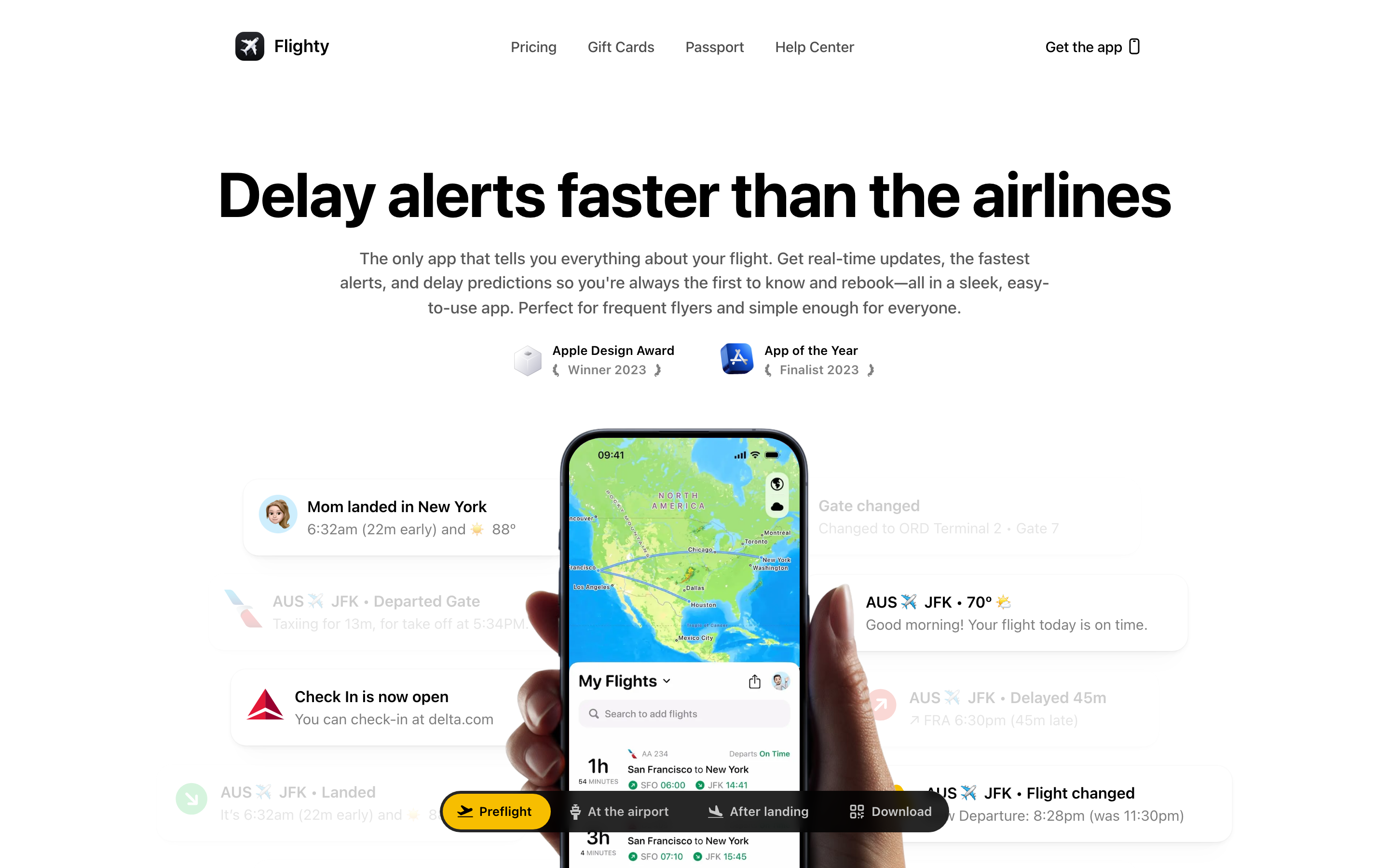
"우리는 Flighty가 너무나 잘 작동해서 당연하게 느껴질 정도가 되길 원합니다."
Flighty는 복잡한 항공편 데이터를 한눈에 파악할 수 있는 정보로 변환합니다. 2023년 Apple Design Award 인터랙션 부문 수상작으로, 수십 년간 다듬어진 공항 안내판에서 영감을 받은 차분하고 명확한 디자인을 통해 밀도 높은 데이터를 제시하는 방법의 교과서입니다.
Flighty가 중요한 이유
전 Apple 직원 Ryan Jones가 불쾌한 항공편 지연을 겪은 후 설립한 Flighty는 iOS 데이터 시각화의 표준이 되었습니다.
주요 성과: - 2023년 Apple Design Award (인터랙션 부문) - 2023년 올해의 iPhone 앱 최종 후보 - Live Activities를 완전히 활용한 최초의 앱 - 15가지 상황 인식 스마트 상태 - 업계 최고의 지연 예측
핵심 요점
- 검증된 시스템에서 차용하라 - 공항 출발 안내판은 50년 이상의 최적화 역사가 있습니다. Flighty는 이 시각적 언어를 모바일에 맞게 적용합니다
- 상황 인식 상태가 인지 부하를 줄인다 - 15가지 스마트 상태로 사용자가 여행의 각 단계에서 정확히 필요한 정보만 볼 수 있습니다
- "당연하게 느껴지는 것"이 목표다 - 앱이 마찰 없이 그냥 작동한다면, 성공한 것입니다
- 데이터를 압축하고, 정리하고, 색상을 입혀라 - 원시 데이터가 아닌 인사이트를 제시하고, 상태를 색상으로 구분해 사용자가 해석할 필요가 없게 하세요
- 불안정한 연결에 대비한 오프라인 우선 - 비행 중에는 오프라인이 됩니다. 앱은 특히 비행 중에도 연결 없이 작동해야 합니다
핵심 디자인 철학
디자인 언어로서의 공항 안내판
Flighty의 디자인은 실제 세계의 비유에 기반합니다: 바로 공항 출발 안내판입니다.
AIRPORT DEPARTURE BOARD (50+ years of refinement)
───────────────────────────────────────────────────────────────────
FLIGHT   DESTINATION      GATE    TIME    STATUS
UA 1234  San Francisco    B22     14:30   ON TIME
DL 567   New York JFK     C15     15:00   DELAYED
AA 890   Chicago O'Hare   A08     15:45   BOARDING

One line per flight. Essential info only. Decades of optimization.

FLIGHTY'S TRANSLATION
───────────────────────────────────────────────────────────────────
[Flight card with same information density]
[Color-coded status]
[Time-appropriate details]
핵심 인사이트: "공항 안내판은 항공편당 한 줄입니다. 이것이 좋은 기준이 됩니다—그들은 무엇이 중요한지 50년간 연구해왔으니까요."
여행 상황 인식
Flighty는 여행이 스트레스를 준다는 것을 이해합니다. 디자인은 인지 부하를 줄여야지, 늘려서는 안 됩니다.
디자인 원칙: 1. 가장 중요한 정보는 스크롤 없이 보이는 영역에 2. 세부 정보는 점진적 공개 3. 색상으로 구분된 상태 (초록 = 양호, 노랑 = 주의, 빨강 = 문제) 4. 데이터를 "압축, 정리, 색상 처리"하여 사용자가 해석할 필요 없게
패턴 라이브러리
1. 15가지 스마트 상태
Flighty의 핵심 혁신: 필요한 것을 필요한 순간에 정확히 보여주는 15가지 상황 인식 상태.
상태 타임라인:
24 HOURS BEFORE
┌─────────────────────────────────────────┐
│ UA 1234 → SFO                           │
│ Tomorrow at 2:30 PM                     │
│ Confirmation: ABC123                    │
│ Head to Terminal 2                      │
└─────────────────────────────────────────┘

3 HOURS BEFORE
┌─────────────────────────────────────────┐
│ UA 1234 → SFO                           │
│ Gate B22 • Boards 2:00 PM               │
│ Leave for airport by 12:15 PM           │
│ [View full timeline →]                  │
└─────────────────────────────────────────┘

AT GATE
┌─────────────────────────────────────────┐
│ UA 1234 → SFO     [ON TIME]            │
│ Gate B22 • Boarding in 12 min           │
│ Seat 14A • Window                       │
│ [Your plane is here ✓]                  │
└─────────────────────────────────────────┘

WALKING TO PLANE
┌─────────────────────────────────────────┐
│ UA 1234 → SFO     [BOARDING]           │
│ Your seat: 14A (Window)                 │
│ ▓▓▓▓▓▓▓▓░░ 80% boarded                 │
└─────────────────────────────────────────┘

IN FLIGHT (offline)
┌─────────────────────────────────────────┐
│  SFO ──────●───────────── JFK           │
│            │                            │
│     2h 15m remaining                    │
│     Arrive ~5:45 PM local               │
└─────────────────────────────────────────┘

LANDED
┌─────────────────────────────────────────┐
│ ✓ Arrived at JFK                        │
│ Your gate: C15 → Connection gate: D22   │
│ 8 min walk • Terminal map [→]          │
└─────────────────────────────────────────┘
구현 컨셉:
enum FlightState: CaseIterable {
    case farOut          // > 24 hours
    case dayBefore       // 24 hours
    case headToAirport   // ~3 hours
    case atAirport       // At terminal
    case atGate          // Gate area
    case boarding        // Boarding started
    case onBoard         // Seated
    case taxiing         // Moving to runway
    case inFlight        // Airborne
    case descending      // Approaching
    case landed          // Touched down
    case atGateDest      // Arrived at gate
    case connection      // Connecting flight
    case completed       // Trip done
    case delayed         // Any delay state
}

struct SmartStateEngine {
    func currentState(for flight: Flight, context: TravelContext) -> FlightState {
        let now = Date()
        let departure = flight.scheduledDeparture

        // Contextual factors
        let isAtAirport = context.currentLocation.isNear(flight.departureAirport)
        let isBoarding = flight.boardingStatus == .active
        let isAirborne = flight.status == .inFlight

        switch true {
        case isAirborne:
            return flight.altitude > 10000 ? .inFlight : .taxiing
        case isBoarding && isAtAirport:
            return .boarding
        case isAtAirport && departure.timeIntervalSinceNow < 3600:
            return .atGate
        case isAtAirport:
            return .atAirport
        case departure.timeIntervalSinceNow < 3 * 3600:
            return .headToAirport
        case departure.timeIntervalSinceNow < 24 * 3600:
            return .dayBefore
        default:
            return .farOut
        }
    }

    func displayContent(for state: FlightState, flight: Flight) -> StateContent {
        switch state {
        case .headToAirport:
            return StateContent(
                headline: "\(flight.number) → \(flight.destination.code)",
                primary: "Gate \(flight.gate) • Boards \(flight.boardingTime.formatted())",
                secondary: "Leave for airport by \(flight.recommendedDeparture.formatted())",
                action: "View full timeline"
            )
        case .inFlight:
            return StateContent(
                headline: flight.routeVisualization,
                primary: "\(flight.remainingTime.formatted()) remaining",
                secondary: "Arrive ~\(flight.estimatedArrival.formatted())",
                action: nil
            )
        // ... other states
        }
    }
}
2. Live Activities & Dynamic Island
Flighty는 iOS 16의 Live Activities를 완벽하게 활용한 최초의 앱으로, 이 기능의 표준을 정립했습니다.
Dynamic Island 상태:
COMPACT (최소화)
╭──────────────────────────────────╮
│ [^] B22  │  *  │  2:30 -> 1h 45m │
╰──────────────────────────────────╯
  게이트    상태      시간/소요시간

EXPANDED (길게 누르기)
╭────────────────────────────────────────╮
│  UA 1234 to San Francisco              │
│  ───────────────────────────────────   │
│  Gate B22        Boards 2:00 PM        │
│  Seat 14A        On Time ✓             │
│                                        │
│  [Open Flighty]     [Share ETA]        │
╰────────────────────────────────────────╯

IN-FLIGHT (오프라인 지원)
╭──────────────────────────────────╮
│  SFO ●════════○──── JFK          │
│         2h 15m                   │
╰──────────────────────────────────╯
SwiftUI 구현 패턴:
import ActivityKit
import WidgetKit

struct FlightActivityAttributes: ActivityAttributes {
    public typealias ContentState = FlightStatus

    let flightNumber: String
    let origin: Airport
    let destination: Airport
    let gate: String
    let seat: String

    struct FlightStatus: Codable, Hashable {
        let departureTime: Date
        let arrivalTime: Date
        let status: Status
        let boardingStatus: BoardingStatus
        let progress: Double  // 비행 중 0.0에서 1.0
        let phase: FlightPhase

        enum Status: String, Codable { case onTime, delayed, cancelled }
        enum BoardingStatus: String, Codable { case notStarted, boarding, closed }
        enum FlightPhase: String, Codable { case preBoarding, boarding, taxiing, inFlight, landed }
    }
}

struct FlightLiveActivity: Widget {
    var body: some WidgetConfiguration {
        ActivityConfiguration(for: FlightActivityAttributes.self) { context in
            // Lock Screen view
            LockScreenView(context: context)
        } dynamicIsland: { context in
            DynamicIsland {
                // Expanded view
                DynamicIslandExpandedRegion(.leading) {
                    VStack(alignment: .leading) {
                        Text(context.attributes.flightNumber)
                            .font(.headline)
                        Text("to \(context.attributes.destination.city)")
                            .font(.caption)
                    }
                }
                DynamicIslandExpandedRegion(.trailing) {
                    VStack(alignment: .trailing) {
                        Text("Gate \(context.attributes.gate)")
                        Text(context.state.status.displayText)
                            .foregroundStyle(context.state.status.color)
                    }
                }
                DynamicIslandExpandedRegion(.bottom) {
                    if context.state.phase == .inFlight {
                        FlightProgressBar(progress: context.state.progress)
                    } else {
                        Text("Boards \(context.state.boardingTime.formatted())")
                    }
                }
            } compactLeading: {
                // Compact left side
                Text(context.attributes.gate)
                    .font(.caption)
            } compactTrailing: {
                // Compact right side
                Text(context.state.departureTime, style: .timer)
            } minimal: {
                // Minimal (when multiple activities)
                Image(systemName: "airplane")
            }
        }
    }
}
3. 비행 진행 상황 시각화
Flighty는 다양한 시각적 메타포를 통해 비행 진행 상황을 보여줍니다.
비행기 표시가 있는 경로 라인:
LINEAR PROGRESS (Primary)
───────────────────────────────────────────────────────────────────
SFO ════════════════●════════════════════════════════════ JFK
    [45분 전 출발]    ↑ 현재 위치        [2시간 15분 남음]

CIRCULAR PROGRESS (Compact)
        ╭───────╮
       /    ●    \
      │     |     │    ← 진행 호가 시계 방향으로 채워짐
      │     |     │
       \    ↓    /     2시간 15분 남음
        ╰───────╯

HEAT MAP (Lifetime Stats)
[다양한 두께의 경로 라인이 있는 지도]
굵은 라인 = 자주 이용한 경로
얇은 라인 = 한 번 이용한 경로
SwiftUI 구현:
struct FlightProgressView: View {
    let progress: Double  // 0.0 to 1.0
    let origin: Airport
    let destination: Airport
    let remainingTime: TimeInterval

    var body: some View {
        GeometryReader { geometry in
            ZStack {
                // Route line
                Path { path in
                    let startX: CGFloat = 40
                    let endX = geometry.size.width - 40
                    let y = geometry.size.height / 2

                    path.move(to: CGPoint(x: startX, y: y))
                    path.addLine(to: CGPoint(x: endX, y: y))
                }
                .stroke(Color.secondary.opacity(0.3), lineWidth: 3)

                // Progress line
                Path { path in
                    let startX: CGFloat = 40
                    let endX = geometry.size.width - 40
                    let progressX = startX + (endX - startX) * progress
                    let y = geometry.size.height / 2

                    path.move(to: CGPoint(x: startX, y: y))
                    path.addLine(to: CGPoint(x: progressX, y: y))
                }
                .stroke(Color.accentColor, lineWidth: 3)

                // 출발지 마커
                Circle()
                    .fill(Color.secondary)
                    .frame(width: 8, height: 8)
                    .position(x: 40, y: geometry.size.height / 2)

                // 현재 위치의 비행기 아이콘
                Image(systemName: "airplane")
                    .foregroundStyle(Color.accentColor)
                    .position(
                        x: 40 + (geometry.size.width - 80) * progress,
                        y: geometry.size.height / 2
                    )

                // 도착지 마커
                Circle()
                    .fill(Color.secondary)
                    .frame(width: 8, height: 8)
                    .position(x: geometry.size.width - 40, y: geometry.size.height / 2)

                // 라벨
                HStack {
                    Text(origin.code)
                        .font(.caption.bold())
                    Spacer()
                    Text(destination.code)
                        .font(.caption.bold())
                }
                .padding(.horizontal, 20)
            }
        }
        .frame(height: 60)
    }
}
4. 환승 어시스턴트
환승 항공편이 있는 경우 착륙 시 Flighty는 두 게이트와 사용자의 실시간 위치를 함께 보여줍니다.
CONNECTION VIEW
┌─────────────────────────────────────────┐
│ 환승 시간: 45분                          │
│                                         │
│ ┌─────────────────────────────────────┐ │
│ │                                     │ │
│ │   [터미널 지도]                       │ │
│ │                                     │ │
│ │   [*] 현재 위치 -> -> -> -> [>] D22   │ │
│ │   C15            도보 8분             │ │
│ │                                     │ │
│ └─────────────────────────────────────┘ │
│                                         │
│ [!] 환승 시간이 촉박합니다 - 이동을 시작하세요 │
└─────────────────────────────────────────┘
구현:
struct ConnectionAssistantView: View {
    let arrival: Flight
    let departure: Flight
    let userLocation: CLLocationCoordinate2D?

    var connectionTime: TimeInterval {
        departure.scheduledDeparture.timeIntervalSince(arrival.estimatedArrival)
    }

    var walkingTime: TimeInterval {
        // 게이트 간 거리와 일반적인 보행 속도를 기반으로 계산
        TerminalMap.walkingTime(from: arrival.arrivalGate, to: departure.gate)
    }

    var isTight: Bool {
        connectionTime < walkingTime + 15 * 60  // 15분 미만의 여유 시간
    }

    var body: some View {
        VStack(spacing: 16) {
            // 헤더
            HStack {
                Text("Connection")
                    .font(.headline)
                Spacer()
                Text(connectionTime.formatted())
                    .font(.title2.bold())
                    .foregroundStyle(isTight ? .orange : .primary)
            }

            // 경로가 표시된 지도
            TerminalMapView(
                from: arrival.arrivalGate,
                to: departure.gate,
                userLocation: userLocation
            )
            .frame(height: 200)
            .clipShape(RoundedRectangle(cornerRadius: 12))

            // 게이트 정보
            HStack {
                GateLabel(gate: arrival.arrivalGate, label: "Arrival")
                Spacer()
                Text("\(Int(walkingTime / 60)) min walk")
                    .font(.caption)
                    .foregroundStyle(.secondary)
                Spacer()
                GateLabel(gate: departure.gate, label: "Departure")
            }

            // Warning if tight
            if isTight {
                HStack {
                    Image(systemName: "exclamationmark.triangle.fill")
                        .foregroundStyle(.orange)
                    Text("Tight connection - start moving")
                        .font(.callout)
                }
                .padding()
                .background(Color.orange.opacity(0.1))
                .clipShape(RoundedRectangle(cornerRadius: 8))
            }
        }
        .padding()
    }
}
5. 패스포트 및 평생 통계
Flighty는 여행 기록을 아름답고 공유 가능한 시각화로 변환합니다.
PASSPORT PAGE
┌─────────────────────────────────────────┐
│           [^] FLIGHTY PASSPORT          │
│                                         │
│  [Custom artwork with travel themes]    │
│                                         │
│  ───────────────────────────────────    │
│  2024                                   │
│                                         │
│  47 flights                             │
│  89,234 miles                           │
│  23 airports                            │
│  12 countries                           │
│                                         │
│  Most visited: SFO (23 times)           │
│  Longest flight: SFO → SIN (8,447 mi)  │
│  ───────────────────────────────────    │
│                                         │
│  [Share] [View Details]                 │
└─────────────────────────────────────────┘
비주얼 디자인 시스템
컬러 팔레트
extension Color {
    // Status colors (airport-inspired)
    static let flightOnTime = Color(hex: "#10B981")    // Green
    static let flightDelayed = Color(hex: "#F59E0B")   // Amber
    static let flightCancelled = Color(hex: "#EF4444") // Red
    static let flightBoarding = Color(hex: "#3B82F6")  // Blue

    // UI colors
    static let flightPrimary = Color(hex: "#1F2937")
    static let flightSecondary = Color(hex: "#6B7280")
    static let flightBackground = Color(hex: "#F9FAFB")
    static let flightCard = Color(hex: "#FFFFFF")

    // Accent
    static let flightAccent = Color(hex: "#6366F1")    // Indigo
}
타이포그래피
struct FlightyTypography {
    // Flight numbers and gates (need to stand out)
    static let flightNumber = Font.system(size: 20, weight: .bold, design: .monospaced)
    static let gate = Font.system(size: 24, weight: .bold, design: .rounded)

    // Time displays
    static let time = Font.system(size: 18, weight: .medium, design: .monospaced)
    static let countdown = Font.system(size: 32, weight: .bold, design: .monospaced)

    // Status and labels
    static let status = Font.system(size: 14, weight: .semibold)
    static let label = Font.system(size: 12, weight: .medium)
    static let body = Font.system(size: 16, weight: .regular)
}
애니메이션 철학
목적이 있는 모션
Flighty의 애니메이션은 장식이 아닌 기능을 위해 존재합니다.
// Status change animation
struct StatusBadge: View {
    let status: FlightStatus

    var body: some View {
        Text(status.displayText)
            .font(.caption.bold())
            .padding(.horizontal, 8)
            .padding(.vertical, 4)
            .background(status.color)
            .foregroundStyle(.white)
            .clipShape(Capsule())
            .contentTransition(.numericText())  // Smooth number changes
            .animation(.spring(response: 0.3), value: status)
    }
}

// Progress bar animation
struct AnimatedProgress: View {
    let progress: Double

    var body: some View {
        GeometryReader { geo in
            Rectangle()
                .fill(Color.accentColor)
                .frame(width: geo.size.width * progress)
                .animation(.linear(duration: 60), value: progress)  // Slow, continuous
        }
    }
}
우리 작업을 위한 교훈
1. 실제 세계의 비유가 디자인을 이끈다
공항 안내 표지판은 50년 이상의 최적화 과정을 거쳤습니다. 검증된 시스템에서 차용하세요.
2. 맥락 인식 상태가 인지 부하를 줄인다
15개의 스마트 상태 덕분에 사용자는 불필요한 정보를 보지 않습니다.
3. 지루할 정도로 명확한 것이 목표다
앱이 “그냥 작동하면” 성공한 것입니다. 마찰은 실패입니다.
4. 데이터를 압축하고, 감싸고, 색상으로 구분하라
원시 데이터를 그대로 보여주지 마세요. 인사이트를 제시하세요. 상태를 색상으로 구분하세요.
5. 모바일은 오프라인 우선으로
비행 중에는 오프라인이 됩니다. 앱은 연결 없이도 작동해야 합니다.
자주 묻는 질문
Flighty의 15가지 스마트 상태는 어떻게 작동하나요?
Flighty는 항공편 상태, 위치, 시간을 모니터링하여 가장 관련성 높은 정보를 자동으로 표시합니다. 상태는 “아직 멀었음”(24시간 이상 전)부터 “공항으로 이동,” “게이트 도착,” “탑승 중,” “비행 중,” “착륙”까지 다양합니다. 각 상태는 서로 다른 세부 정보를 표시합니다: 초기에는 예약 확인 번호, 관련 시점에는 게이트 정보, 비행 중에는 남은 비행 시간, 착륙 후에는 환승 안내를 제공합니다.
Flighty의 Live Activities 구현이 특별한 이유는 무엇인가요?
Flighty는 iOS 16의 Live Activities와 Dynamic Island를 완전히 활용한 최초의 앱입니다. 구현에는 게이트와 카운트다운을 보여주는 컴팩트 뷰, 전체 항공편 세부 정보가 있는 확장 뷰, 연결 없이도 작동하는 오프라인 지원 비행 진행 시각화가 포함됩니다. 이 디자인은 Live Activities를 부가 기능이 아닌 주요 인터페이스로 취급합니다.
Flighty는 오프라인 상황을 어떻게 처리하나요?
Flighty는 출발 전에 항공편 데이터를 다운로드하고 로컬에 저장합니다. 비행 중 진행 상황은 예정된 시간과 알려진 항공기 성능을 기반으로 계속됩니다. 앱은 도착 예상 시간, 환승 시간, 게이트 정보를 미리 계산합니다. 연결이 복구되면 데이터가 동기화되고 변경 사항이 업데이트됩니다. 항공편이 인터넷 없이 몇 시간을 보내기 때문에 이러한 오프라인 우선 접근 방식은 필수적입니다.
Flighty가 공항 안내 표지판을 디자인 영감으로 사용하는 이유는 무엇인가요?
공항 출발 안내판은 50년 이상 다듬어져 바쁜 환경에서 스트레스받는 여행객에게 항공편 정보를 빠르게 전달합니다. 항공편당 한 줄, 색상으로 구분된 상태, 필수 정보만 사용합니다. Flighty는 이 검증된 시각 언어를 모바일에 맞게 적용하여, 공항이 수십 년간 최적화해 온 동일한 밀도, 명확성, 상태 표시 원칙을 사용합니다.
환승 어시스턴트는 촉박한 환승을 어떻게 계산하나요?
환승 어시스턴트는 도착 시간과 다음 출발 시간을 비교한 다음, 터미널 내 게이트 거리를 기반으로 도보 시간을 계산합니다. 일반적인 걷는 속도와 터미널 레이아웃을 고려합니다. 여유 시간이 15분 미만으로 떨어지면 앱이 촉박한 환승으로 표시하고 현재 위치, 목적지 게이트, 도보 경로가 포함된 실시간 지도를 보여줍니다.











