Get Bananas
A handwritten shopping list for iPhone, iPad, Mac, and Apple Watch — that Claude can edit while your hands are full.
Shipped April 2026. SwiftUI on every device. A Claude Desktop extension shipped inside the Mac app. Twenty-nine languages, each with hand-curated seed shopping data so the first list a user sees feels native, not translated. No server, no account, no API key. One JSON file in your iCloud container is the entire backend.

Claude can change your shopping list.
Get Bananas ships a Claude Desktop extension inside the Mac app itself. Open Settings on the Mac, click Install Extension, and Claude Desktop pops up an install prompt. Accept, open a new chat, and Claude has five tools that can read and edit your real shopping list. Ask "what's on my list?" — it tells you. Ask "add eggs and milk" — they appear on your iPhone the next time iCloud sweeps through.
There is no signup, no API key, no server of ours. The extension is a .mcpb bundle that talks to a Node.js MCP server, which reads and writes a single JSON file in your own iCloud Drive container.
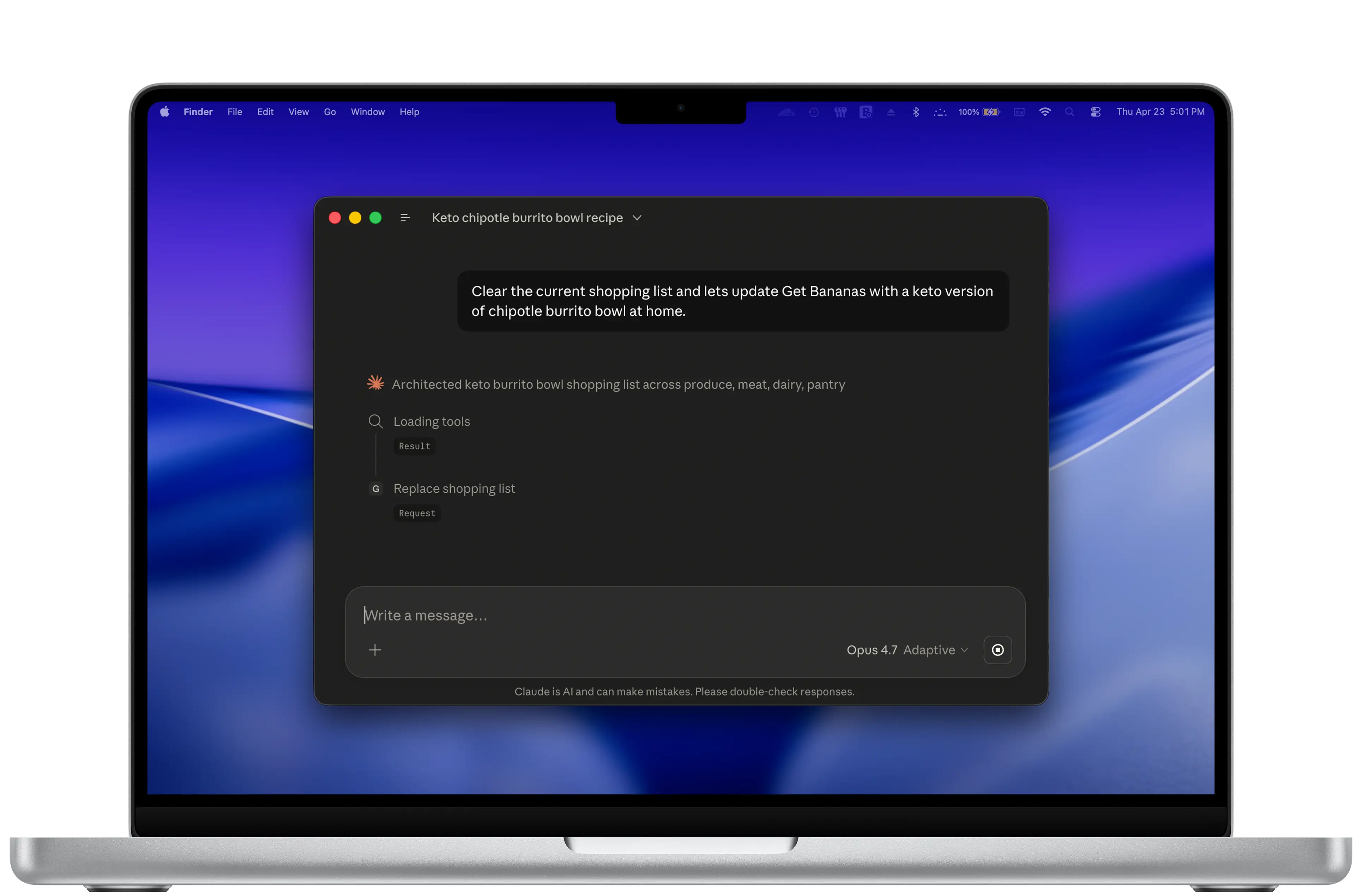
update_shopping_list, drafts the replacement, and stages the call before any change lands.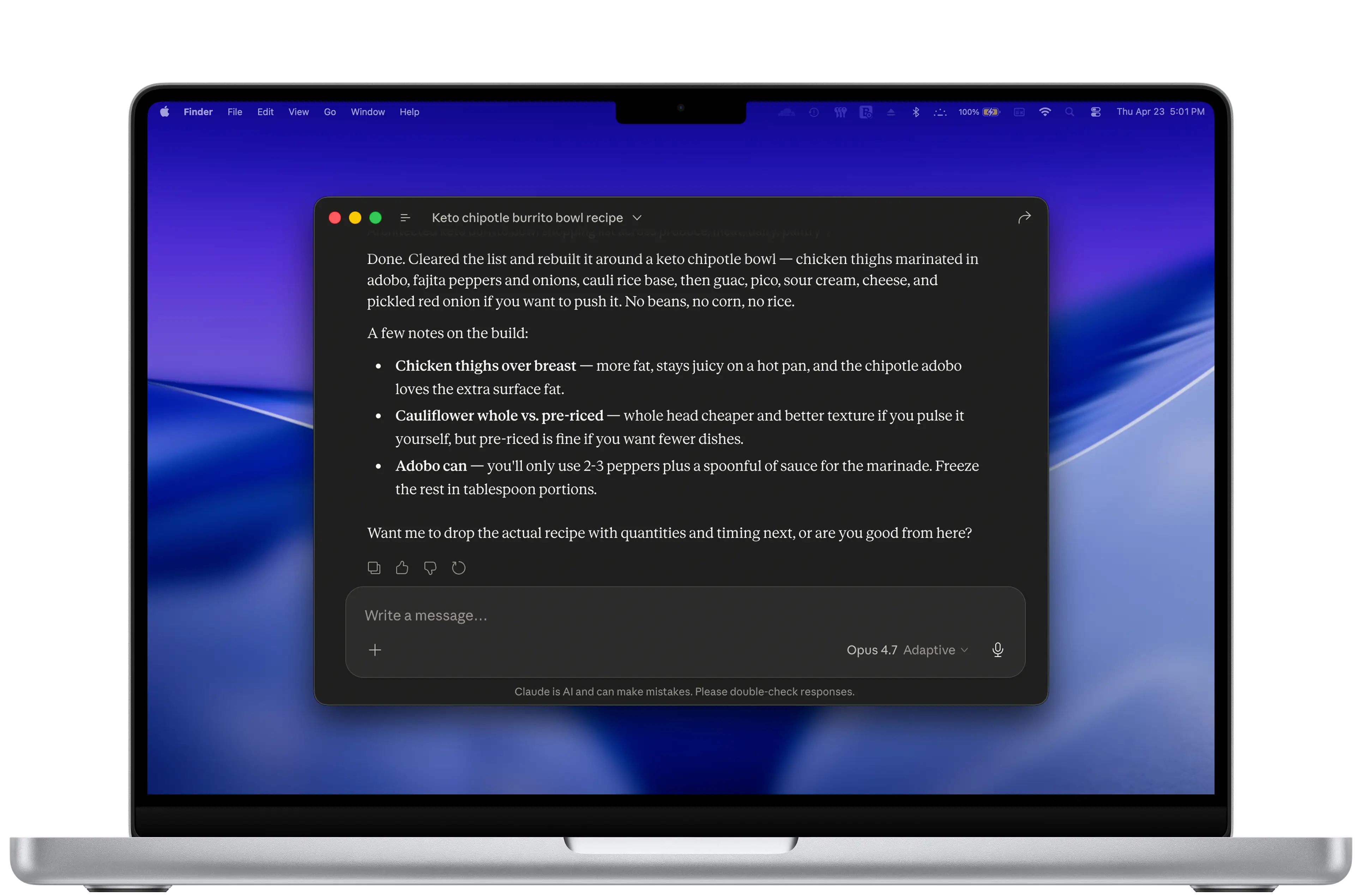
Five tools, one job each.
The tool surface is intentionally small. Claude can read the list, add an item, remove one, update one, or replace the whole thing. There are no clever convenience helpers and no read-modify-write wrappers; the surface follows what you'd actually ask for in conversation.
- get_shopping_listRead the current list
- add_itemAppend a new item
- remove_itemRemove a single item
- update_itemCheck, uncheck, rename, or change amount
- update_shopping_listWholesale replace (e.g. "start a Thanksgiving list")
Installed from inside the app.
The Mac app's Settings has an Install Extension button. Tapping it opens a bundled get-bananas.mcpb file with NSWorkspace, which Claude Desktop registers as an extension and asks the user to confirm. The entire install is one NSWorkspace.shared.open() call on a file shipped inside the app bundle — because the platform handed us the right primitive: a file format that means "register me with Claude."
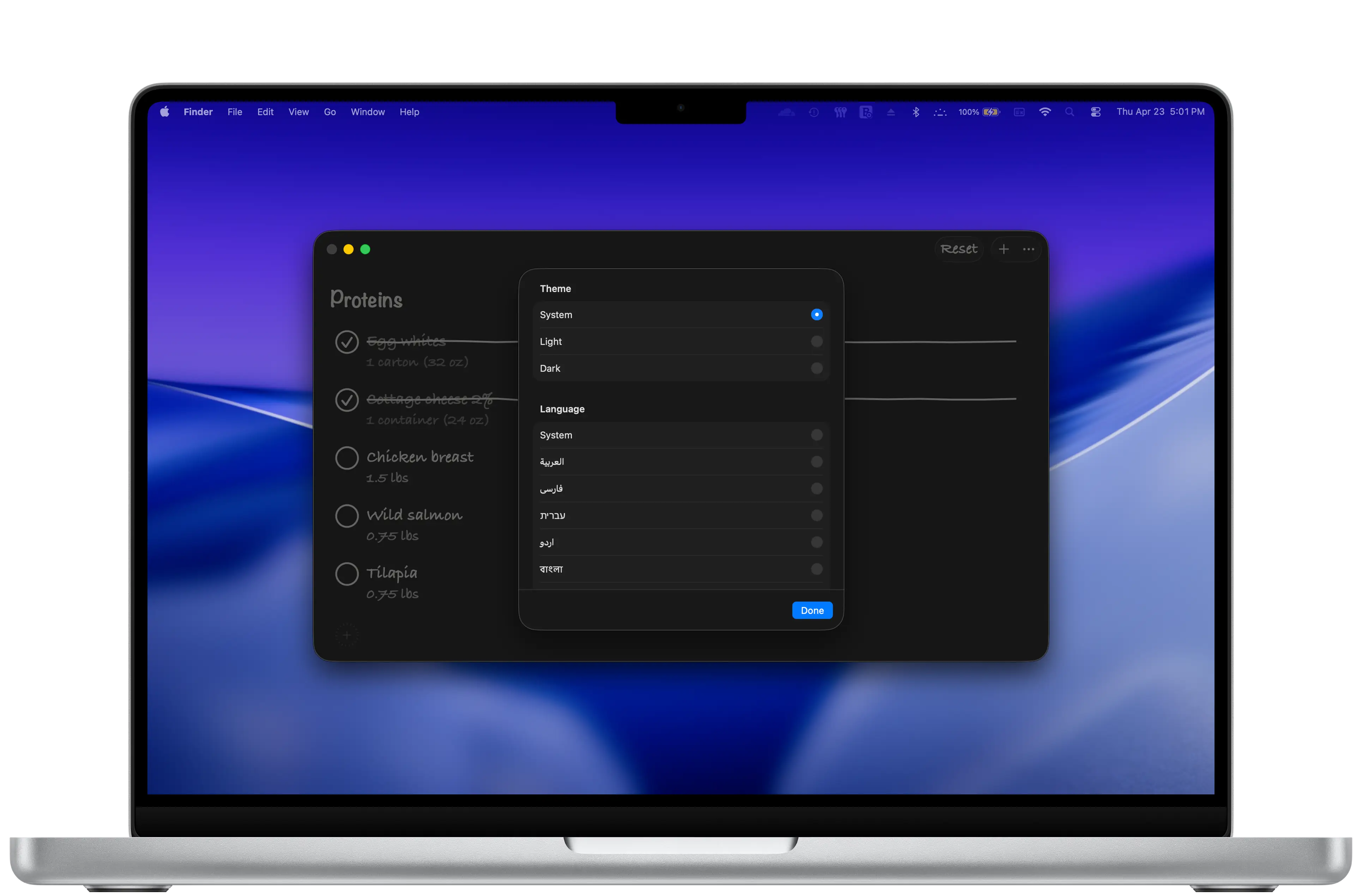
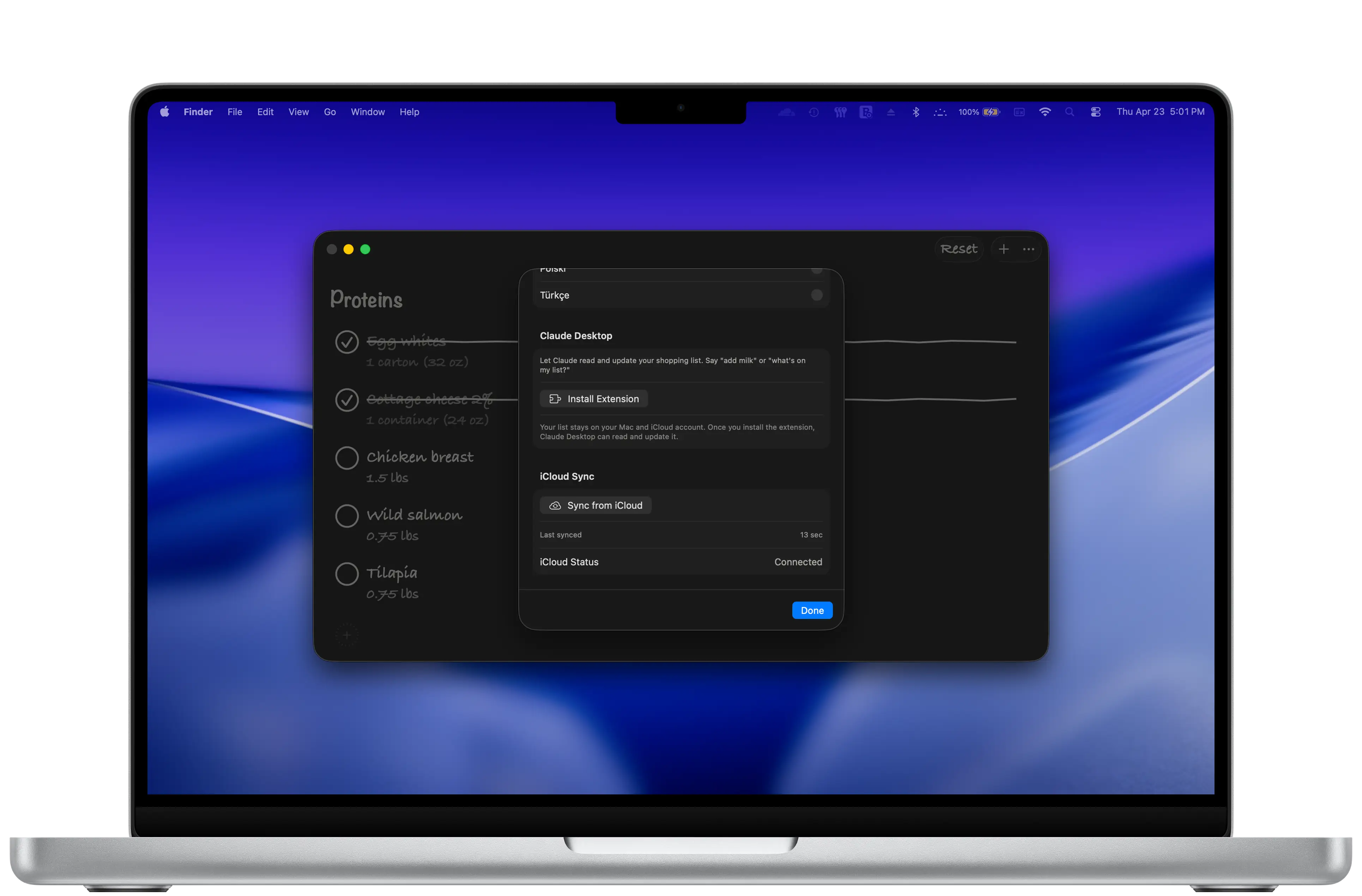
.mcpb with Claude.private func installExtension() { guard let extensionURL = Bundle.main.url( forResource: "get-bananas", withExtension: "mcpb" ) else { extensionMessage = "Error: Extension not found in app bundle." return } let opened = NSWorkspace.shared.open(extensionURL) if opened { extensionMessage = "Check Claude Desktop for the install prompt..." } else { extensionMessage = "Couldn't open the extension. Make sure Claude Desktop is installed." } }
This pattern is going to matter for a lot of native apps. The extension lives inside your app bundle, ships when the app ships, and updates when the app updates — no separate registry, no per-user setup, no "copy this URL into a config file." If you want Claude to be able to do something inside your app, you put the something inside the app and let the OS introduce them.
Pen on paper, with persistence.
Shopping lists are written by hand, on paper, with a pen. The app reads as that. Caveat-style handwritten letterforms for the section headers, light pen-thin lines for the dividers, hollow circles for the unchecked items. When you tap to check something off, the app draws a hand-drawn line through the text — and every line is slightly different.


The strikethrough is a SwiftUI Shape, and every checkmark is unique.
The hand-drawn line is a custom SwiftUI Shape with twenty path segments. Each segment endpoint gets a small random vertical offset between -1.5 and +1.5 points. The result: every strikethrough drawn at runtime is slightly different from the one before. Across a list of twenty items, no two lines are identical — the way no two pen strokes ever are.
struct HandDrawnStrikethrough: Shape {
    func path(in rect: CGRect) -> Path {
        var path = Path()
        let startY = rect.midY
        let segments = 20
        let segmentWidth = rect.width / CGFloat(segments)

        path.move(to: CGPoint(x: 0, y: startY))

        for i in 1...segments {
            let x = CGFloat(i) * segmentWidth
            let randomOffset = CGFloat.random(in: -1.5...1.5)
            let y = startY + randomOffset
            path.addLine(to: CGPoint(x: x, y: y))
        }
        return path
    }
}
It is twelve lines of code. It is also the difference between an app that looks handwritten and one that feels handwritten. A static SVG strikethrough would have shipped on the same day, with the same pixel count, and read as decoration.

Look closely at the two checked items above. The lines through 'Egg whites' and 'Cottage cheese 2%' are different shapes — different waver, different angle. They were generated 200 milliseconds apart by the same Shape, drawing fresh randomness each time. That's the whole identity of the app: small honest variation, baked into the layout.
Twenty-nine languages, with native shopping data.
The first list a Japanese user opens is not a translated American grocery run. It's tamagiro in a tanpaku-shitsu section — egg whites, in a Proteins section that uses the term you'd actually find on a shelf in Tokyo. Twenty-nine localizations on the App Store, and each non-English locale ships its own hand-curated SeedData-{locale}.json with culturally appropriate sample items and section names. Arabic gets biyad al-bayd in al-burutinat. Hebrew gets helbonei beitza in helbonim. Twenty-nine seed files, written by hand, not run through a string translator.


RTL is a free win if you stop fighting it.
SwiftUI treats .leading and .trailing as semantic directions, not .left and .right as fixed ones. Lay the screen out semantically once, and Arabic and Hebrew flip the entire layout for free — the section header swaps to the right, the check circle swaps to the left of the text, the Reset and More buttons rotate to the opposite corner. We did not write a line of RTL-specific code for this.


The hand-drawn strikethrough lives on top of all of this and never has to know the locale. The Shape sits in a ZStack over the item-name Text and draws across that bounding box; the surrounding row is what gets mirrored by SwiftUI's RTL layout. The line ends up where it should — over the text — without a single language conditional in the Shape code.
One JSON file in your iCloud container.
The cross-device interchange is a single file in your own iCloud Drive: BananaList.json, in the Get Bananas container. The MCP server reads and writes that exact file. The iOS, iPad, Mac, and Watch apps read and write that exact file. iCloud handles the sync — Apple's free, encrypted-at-rest, end-to-end-private-when-Advanced-Data-Protection-is-on infrastructure. Ours is none.
// iCloud path for Banana List data
const ICLOUD_FILE_PATH = path.join(
  os.homedir(),
  "Library/Mobile Documents/iCloud~com~941apps~Banana-List/Documents/BananaList.json"
);

// Lock file for atomic operations
const LOCK_FILE_PATH = ICLOUD_FILE_PATH + ".lock";
const LOCK_TIMEOUT_MS = 5000;
Every path the MCP server touches is a sibling of that JSON file. The lock file lives next to it (.lock, atomic writes, five-second timeout that self-cleans if it goes stale). Writes go to a process-tagged temp file (.tmp.{pid}) and then atomically rename onto the real path. The entire concurrency model — Claude vs. the running app — fits in one acquire/release function.
On each device, SwiftData is the local store. The iCloud JSON is the wire format. SwiftData stays fast and queryable on-device; the JSON stays simple and human-readable for sync and for Claude to manipulate. Two stores with one job each — neither tries to be both.
What this lets us promise.
No 941 Apps server. No analytics. No login. No API key for Claude — you already authenticated with Claude Desktop. No subscription. The extension is open source so anyone curious can read the entire data path: it's the JSON file, and that's all it ever touches. Your shopping list never leaves your iCloud container through any infrastructure of ours.
The job is the list.
A shopping list is one job. Capture an item the moment you think of it, check it off as you find it, get the list out of your way the rest of the time. The product is the job. Not a recipe app, not a meal planner, not a barcode scanner, not a price tracker, not an inventory manager. The list is the deliverable.
The Claude integration earns its place specifically because it accelerates capture and editing in the cases where typing on a phone is the wrong tool: standing at the stove with garlic-smelling hands, talking through the week's meals out loud, copying twelve items off a recipe card without retyping each one. Delegating those moments to Claude keeps the rest of the app small.
Everything that isn't list, capture, checkoff, or that delegation is a different product. Different products belong in different apps.
What isn't in Get Bananas.
Most shopping-list apps have a roadmap that ends in "becoming Instacart." That isn't this one. Get Bananas refuses to grow into a grocery platform on purpose. Here's the explicit list of things it does not do:
- No barcode scanning
- No prices, totals, or budgeting
- No recipe import or meal planning
- No aisle navigation or store maps
- No web app
- No account, no login, no email collection
- No shared lists with other users (only your own iCloud, across your own devices)
- No analytics, ever
- No ads, no subscription, no Pro tier
- No nag screens, no in-app upsell
Get Bananas is $0.99. You pay once and you own it. The MCP server is open source. The data is yours and lives in your iCloud Drive. The job is fast capture, fast checkoff, and delegating edits to Claude when your hands are full of cilantro. Everything else is somebody else's app.
Get Bananas.
Available now on the App Store for iPhone, iPad, Mac, and Apple Watch. Install the Claude Desktop extension from inside the Mac app.