941 Apps · Case study · October 2026
Kiradex
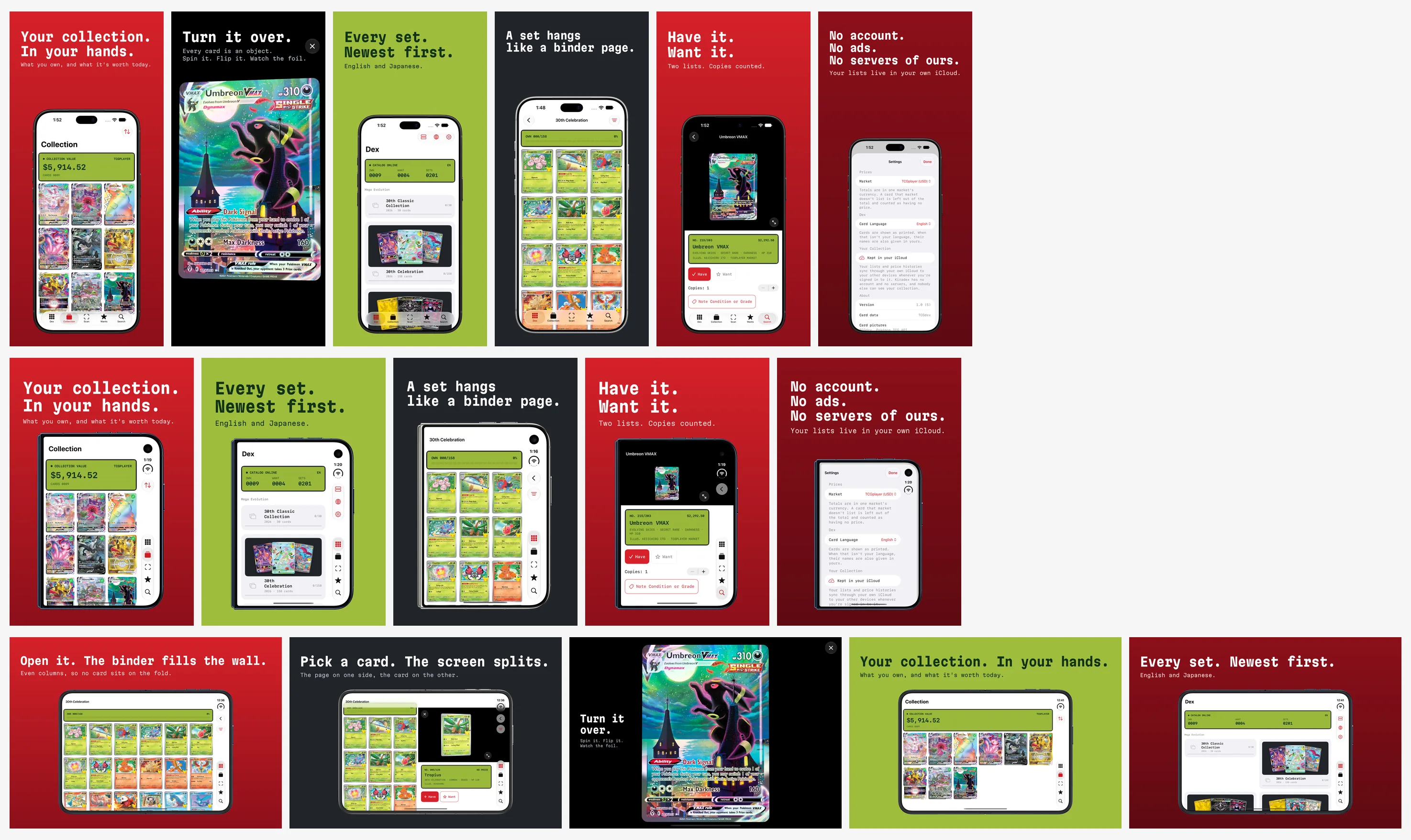
A collector's dex for Pokémon cards, built in four days around the card as an object. This is the device the app opens from, drawn live by kiradex.app: drag it to turn it, tap it to open it. Below: how it was designed and built, with the code, the before-and-afters and the numbers.
kiradex.app On 941apps.com On the App Store Free · iPhone and iPhone Duo
No. 001 · Progress
Four days, by the clock
The first commit is from the evening of October 1. By 05:27 the next morning build 1 was on TestFlight; by the evening of October 4, build 39 was in App Review. The loop was the same each time: a feature, a UI walk on the simulator that captures every screen in every pose, a TestFlight build, and a note in the roadmap saying what was done and what was left. The log below is the repository's own, with the times it records.
- The base project. By 23:27, thirteen commits later: the Dex with Japanese sets, the 3D card and its foil, Have and Want with copies, value over time, an iCloud store, search, and a catalog that answers from disk when the network does not.
- Build 1 on TestFlight.
- The scanner. Hold up a card, the device names it. Build 2.
- The device in 3D, and the Dex served from a bundled index so it answers at once and offline. Build 5.
- Skins (Kira Black by default), then the collector: a profile, levels and pins judged from the cards, Game Center; then patron support through Apple. Builds 6 to 8.
- The plaza, spiked: pixel sprites on a tile map in RealityKit with the real 3D card rising out of it; a presence server on Railway two hours later; seven prototypes by 19:02 (your room, townsfolk, show and tell, quests, the day's light, the wall of pins, the show hall). Builds 9 to 17.
- Made for iPhone Duo: the world full screen, the fold kept clear, the split decided from the space. Build 18.
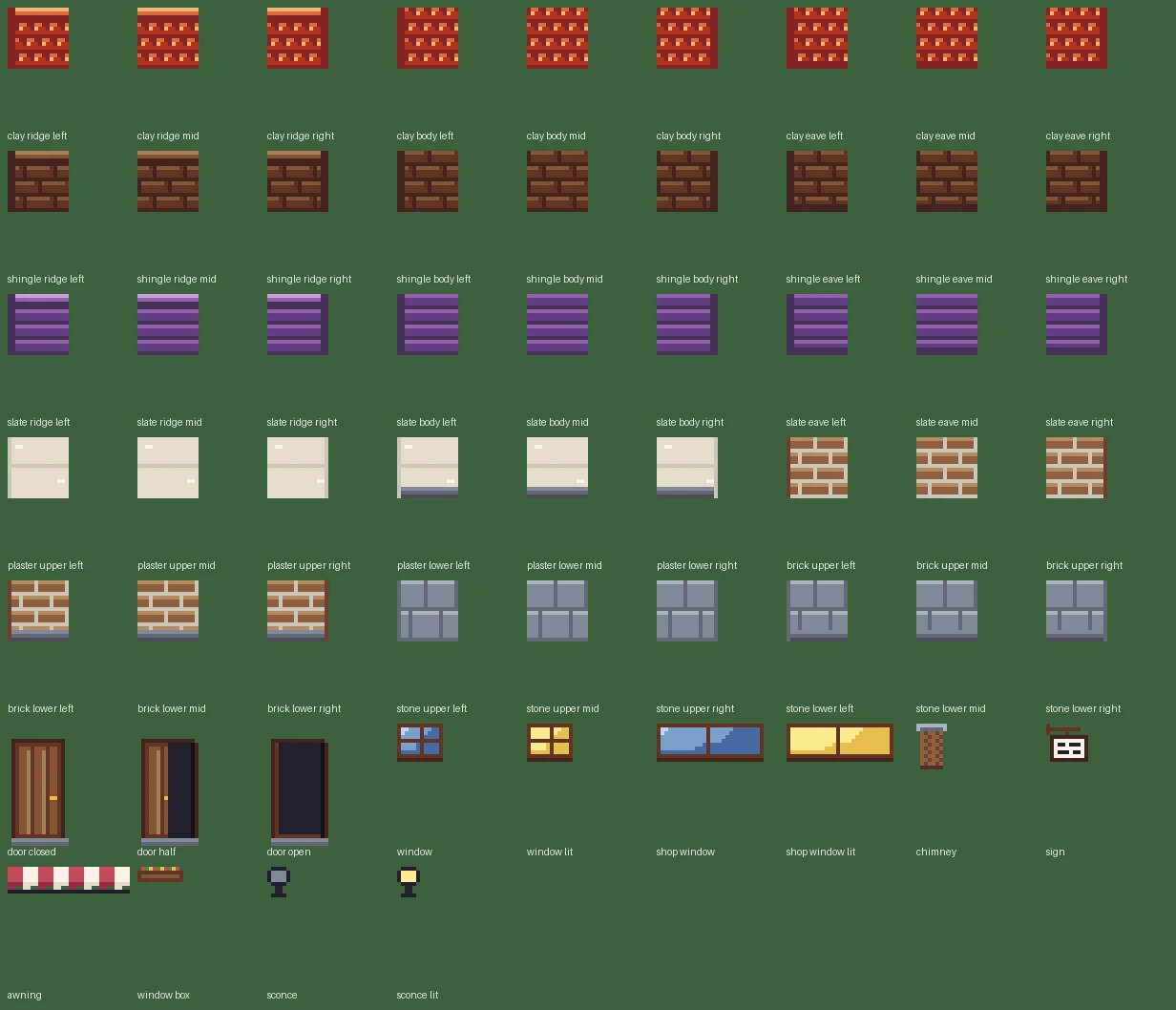
- The forge. Every tile and sprite drawn by rule from one palette; the town authored as a letter map and laid by blob sets; the collector as paper-doll layers. Builds 19 and 20.
- The collector rebuilt as a 26-pixel figure with a wardrobe, a figure string and a creator. Build 21.
- Buildings from a kit: a town of seven, doors that open, lit windows, interiors with a stair. Builds 22 and 23.
- The afternoon pass: the wardrobe doubled to fifty pieces, light and air, chimney smoke, the town on two levels with a wall, stairs and a market, the collector redrawn with forty-three frames. Builds 24 to 36.
- A legibility gate for the wardrobe: the forge refuses a piece that would not read, and the pieces that failed were redrawn. Build 37.
- Illustrators, kiradex.app links that open the app, two pins and a quest to scan for. Build 38.
- Build 39, submitted. 1.0 in App Review, archived from Xcode 27 through a fence that keeps the Duo code for the SDK that has it.
- On the App Store. 1.0 Ready for Sale; 1.0.1, built with the 27.1 SDK so the Duo gets its layout, followed the next day, a week before the phone ships.
- 121commits
- 39TestFlight builds
- 16,259lines of Swift
- 238tests, plus the walks
No. 002 · Design
The card as an object
Collector apps had turned into price tickers. The thing a collector does with a card is hold it under a lamp and tilt it, so that is what the app is built around: each card is a 3D object on a stage you can spin and flip, and the foil is not a picture of foil. It is a Metal surface shader on a RealityKit card that reads the angle between the eye and the card every frame and builds the light from it: rainbow bands that slide with the tilt, a bar of sheen that sweeps the face, glitter where each fleck catches the light at its own angle, and for etched cards two crossed sets of fine ridges, about three to the millimetre, that light up as the card turns across them.
// The eye direction in the card's own frame: xy is how far the card is
// tilted away from face-on, and in which direction.
float3 eye = normalize(normalize(params.geometry().view_direction()) * basis);
float2 tilt = eye.xy;

// Rainbow bands that slide across the card as it tilts.
float band = dot(p, float2(0.9, 1.5)) * 1.6 + tilt.x * 2.4 + tilt.y * 1.8;
float3 rainbow = spectrum(band);

// A soft bar of light that sweeps the face.
float sweep = dot(p - 0.5, normalize(float2(1.0, 0.55))) - (tilt.x * 0.9 + tilt.y * 0.6);
float sheen = exp(-sweep * sweep * 14.0);

// Glitter: one fleck per cell, each catching the light at its own angle.
float facing = 0.5 + 0.5 * cos(6.2831853 * (seed * 5.0 + tilt.x * 3.5 + tilt.y * 2.5));
float glitter = dot_ * pow(facing, 8.0) * step(0.5, seed);

// Face-on the foil is quiet, tilted it wakes.
float wake = saturate(0.35 + length(tilt) * 1.6);
The catalog has no foil masks, so where the foil sits is inferred from a card's rarity and finishes: the picture box of a standard frame for a holo, everything but the picture for a reverse holo, the whole face for a full-art, and the ridges for an etched card. It is one procedural pattern; per-era patterns are on the list.
The app opens from a device, because a dex should be a thing. A clamshell handheld built from RealityKit primitives, in one of four skins (Kira Black with a holographic edge is the default; Field Cream, Ember, Tide): the camera starts tight on the viewfinder's dark glass, which is the launch screen's colour so the two are continuous, pulls back as the lights come on, the lid swings open on its hinge, the LCD boots, and the camera goes in through the screen to the app. The materials are made one frame after the app's first frame, because compiling their shaders on a fresh install takes a moment the launch screen would otherwise hang on.

onHingeChange handler replays it when the phone opens.No. 003 · Engineering
A scanner with no server
Nothing is sent anywhere to be recognised. The camera's frames are read as text on the phone with Vision, and what it reads is looked up in an index of every card that ships with the app: 21,256 English and 12,781 Japanese cards, with their numbers and names. The rule for a match is the one a collector would use, written down.
/// The card a reading is of, with the other cards it could be.
///
/// A match is only called certain when two things agree: the collector
/// number with its set size, and the name. Either alone is a guess the
/// collector is asked to confirm.
func match(_ reading: ScanReading) -> ScanMatch? {
    // 1. The collector number. Number and set size together narrow
    //    twenty thousand cards to a handful.
    let numbered = numbered(by: reading)

    // The longest name standing in each title. A card whose name is
    // only part of it is a different card: Charizard is not the card
    // when the title says Dark Charizard, nor カブト when it says カブトプス.
    let longest = tokens.map { name(in: $0) }
    …
    if agreeing.count == 1 {
        return ScanMatch(candidates: [cards[agreeing[0]]], isCertain: true)
When the camera cannot read a mark printed as an emblem (VMAX, ex), the name is tried without it; when the same name and number exist in two sets, the set's own mark, name or year decides, if the camera caught one. A grading label in the frame is read for grader, grade and certificate number, and a graded card is registered as one. Rapid mode registers certain matches without asking, with an Undo.
For a raw card the scanner measures the one part of a grade a camera can: the centering. The card is found in the frame, squared up, its borders measured, and the result given the way graders write it, 55/45, with the highest grade that centering alone allows. Corners, edges and surface are not judged, and the app says so. A guess at wear from the front was tried and taken out: on catalog scans of unworn cards it saw wear on 7 of 29, because borders are printed mottled, striped or silver depending on the era. The grading research that followed, what six graders actually allow at each grade and why a ruler is too coarse, is its own post.
- How Card Centering Is Judged, and How to Measure ItPSA, BGS, CGC, SGC, TAG and ACE, from their own pages; one raw card gets four answers; and the brief that came back to the app.
- Pokémon Card Rarity and Set Symbols, English and JapaneseHow to read a card's bottom line, which is what the scanner reads.
No. 004 · Engineering
Two displays, one source tree
iPhone Duo goes on sale on October 23 on iOS 27.1, and what an app gets on it is decided by the SDK stamped in its binary. Kiradex was walked through eight kinds of screen in each of six poses on the simulator, with a script capturing both displays at every stop, and read against Apple's four checks. It passed more than expected, and failed in places no reading of the code had flagged.
The app's own page for the phone, kiradex.app/duo, shows the device in its four poses and what the app does in each.
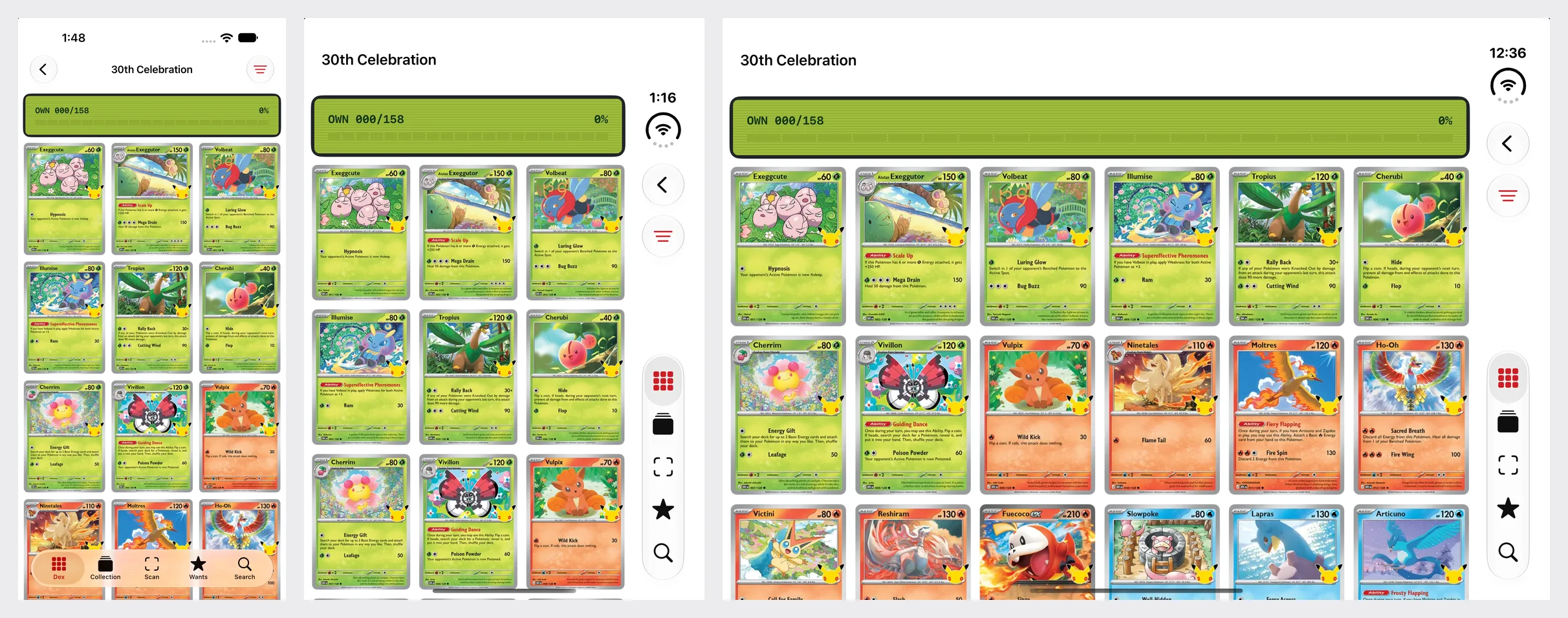
What came free
- The bars. A
TabView, aNavigationStackin four of the five tabs and toolbar items that are each aLabelput every bar in the rail, closed or open, with no Duo code. - The fold, for the split. One
ArrangementViewdivides the open display between the page and the inspector; in the Book pose it moves its divider onto the fold and leaves the 40-point band empty by itself. - Sheets arrive centred on the inner display and move to the leading side of the fold in the Book pose.
- The hinge, as an event. One
onHingeChangehandler replays the opening when the phone unfolds.
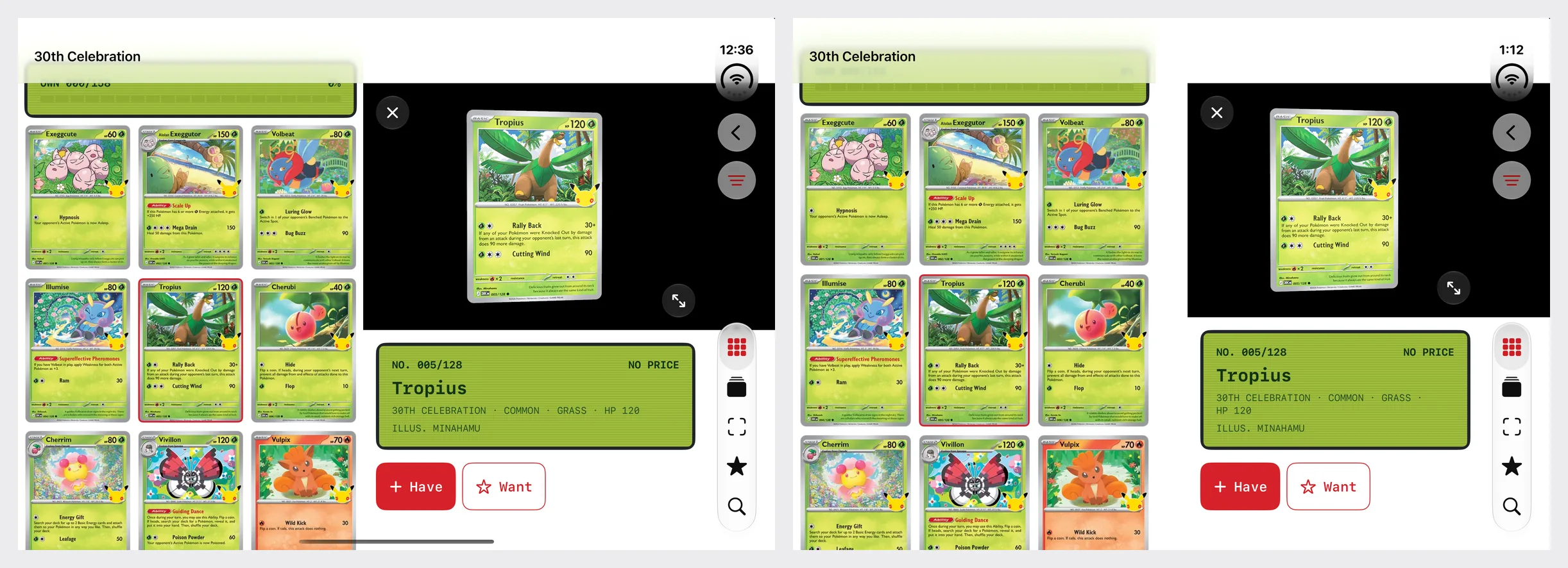
What the walk caught
- A sheet with one text button reserved the rail and left it empty: 374 points of width instead of 450. A symbol on the button, or
.toolbarVerticalBehavior(.disabled), fixes it. - The full-screen card ran under the camera on the outer display, a 37-point occlusion the system reports to any view that asks.
- Turned, the split stacked: one row of cards above an inspector.
.split.axes(.horizontal)is the documented control. - A card open while unfolding landed in neither layout: the compact screen, stretched to 951 points.
- Even columns, centred on the wrong line: the fourth card sat across the fold, because the grid was centred on the content area, not the division frame.
- Regular width is not "the Duo". A 6.9-inch iPhone on its side is regular width too, and the same branch cut off its buttons. Nothing about that was new in iOS 27; it had never been walked.
Then the calendar. The build the store accepts comes from Xcode 27 and the 27.0 SDK; the build that behaves properly on a Duo needs the 27.1 SDK, and #available does not help, because the compiler still has to find the symbol. SwiftUI's module version differs between the SDKs (8.0.84 in 27.0, 8.0.85 in 27.1), so the four 27.1-only call sites sit behind a fence the compiler reads, and the same tree builds under both toolchains. That is how 1.0 went into App Review from Xcode 27 while the Duo build waits for the store to open to 27.1.
#if canImport(SwiftUI, _version: 8.0.85)
if #available(iOS 27.1, *) {
    // An ArrangementView keeps both halves even when one is empty,
    // so it only exists while there is a card to inspect. Half
    // open, its divider moves onto the fold by itself.
    ArrangementView { page } secondary: { inspector }
        .arrangementViewStyle(.split)
} else {
    sideBySide(page, inspector)
}
#else
sideBySide(page, inspector)
#endif
- Prepare Your App for iPhone Duo: A Worked ExampleThe whole job on Kiradex: the SDK stamp, every pose walked, what it found, the fence, screenshots for two displays, and a brief for a coding agent.
- Xcode 27.1 Beta: Your App in the iPhone Duo SimulatorWhat the SDK adds, what the device profile says, and what a probe reports per pose.
No. 005 · Design and engineering
A town drawn by rule
The collector has a profile: a handle the app makes up from short word lists, never typed; a pixel-art figure with a wardrobe; three favourite cards from what is owned; a level from the collection alone, worked out every time so every device agrees with nothing stored, level = √(xp / 40) + 1; thirteen pins for feats in Kiradex's own language; and a plaza where collectors walk around together and show off a card. The plaza was spiked in an afternoon and shipped in build 18. Then it was judged honestly, in public:
The engine underneath it was sound (one mesh for the map, nearest sampling, integer scale, the card in the same depth buffer), and the art on top of it would have embarrassed a Game Boy.From the audit of build 18, in the first pixel-art post
The fix was not to draw better by hand, and not to generate art from prompts, which the Copyright Office's January 2025 report says do not alone provide sufficient control for a copyright. It was to measure the games that set the rules, write the rules down with numbers, and build a forge: a Python program under scripts/forge/ that draws every tile and sprite from hand-set rules against one master palette of 58 colours in fourteen hue-shifted ramps, and exports Aseprite-compatible sheets and JSON so the Swift loader never changes when the art does.
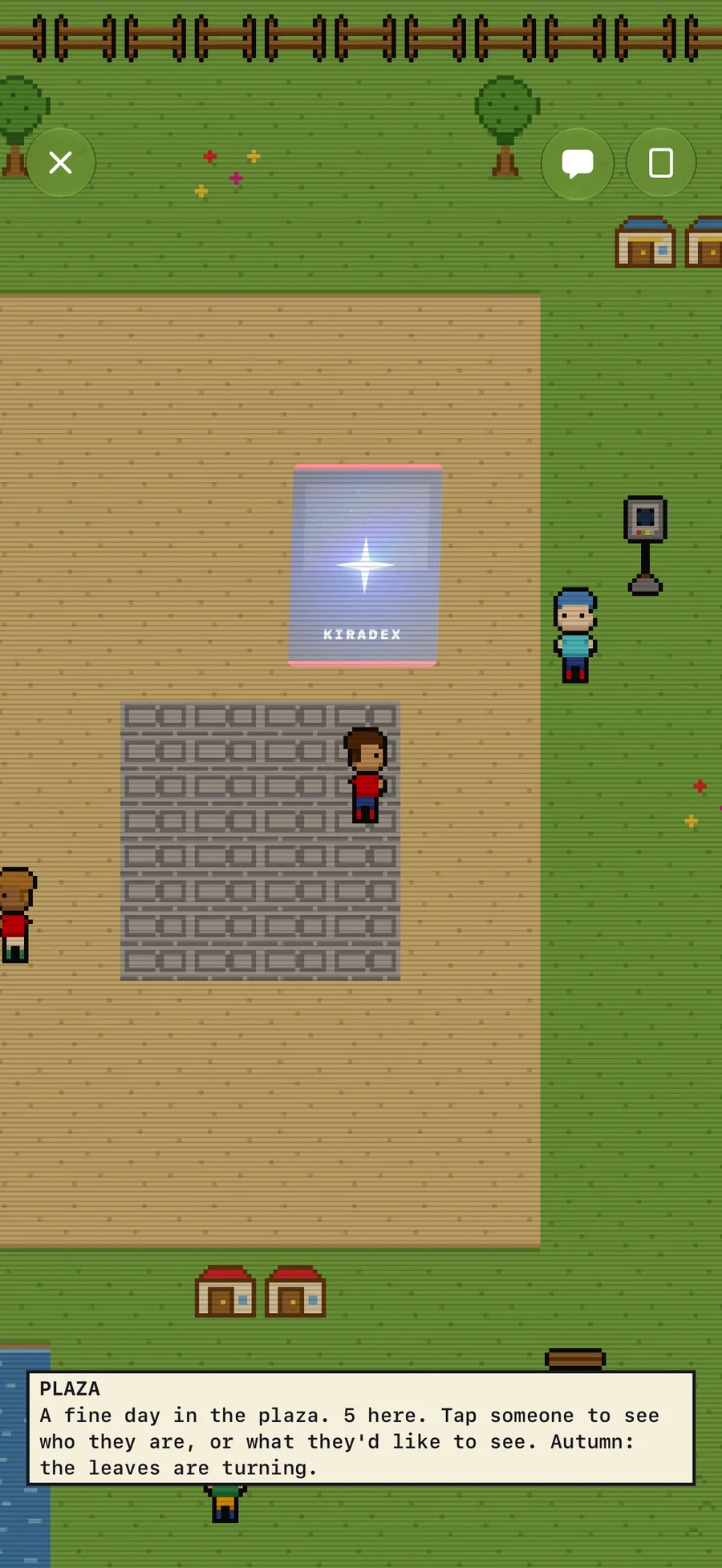
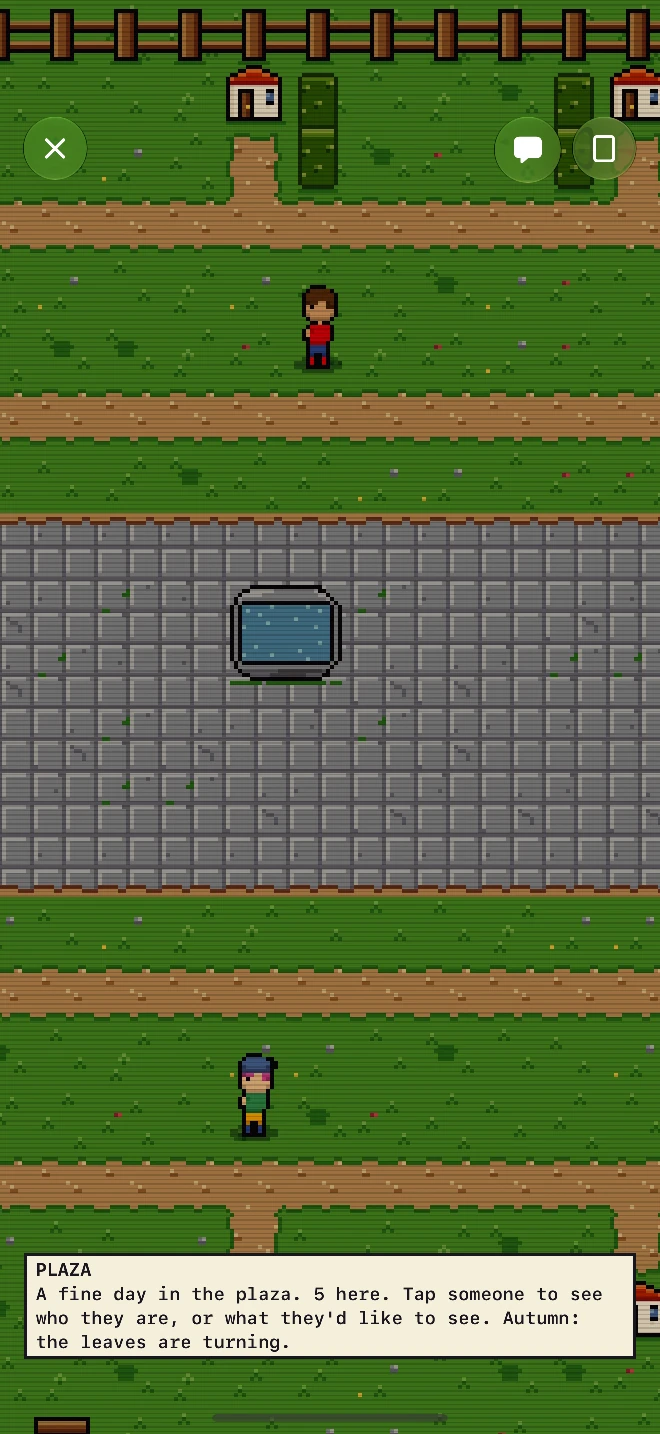
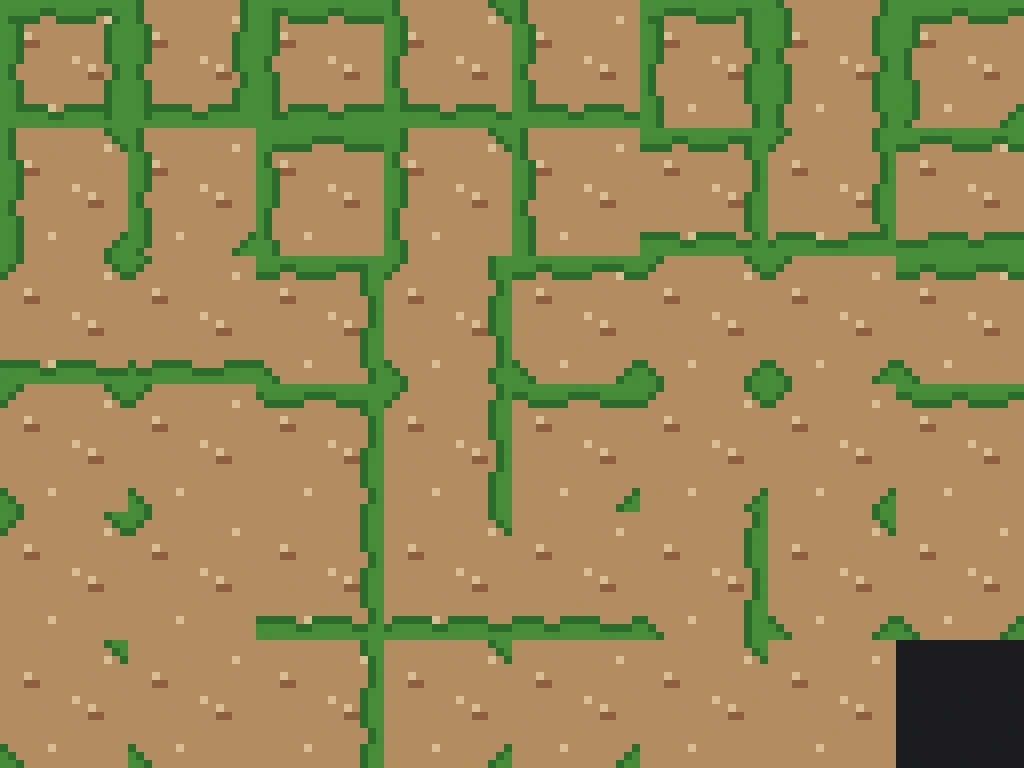
The people
The sprites of the canon were measured into three bands by how much of them is head; Kiradex's figure sits in the RPG band with Final Fantasy VI and Stardew. The collector was rebuilt as a 26-pixel figure in a 32-by-32 cell, then redrawn at 30 with brows, a mouth, hands and feet, through four facings and forty-three frames: a breath, a blink, a six-frame walk, the card raise, a wave, a stretch, a run, a seat and twelve emotes. Clothes are layers on one grid, not paint on one body, in Stardew's order; a hat trims the hair above its brim by rule rather than by drawing every combination. A look is a string, 2.sk4.hr3-7.tp3-8-12, which is the saved value, the wire value and the cache key, and the server repairs one it does not recognise before passing it on.
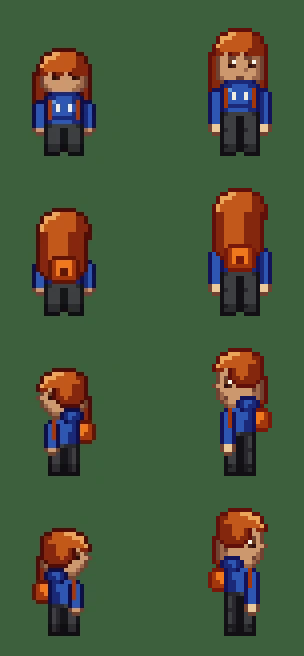

Two numbers from the engineering under it. The app composes a figure from 8-bit index planes and a 256-entry table per look rather than swapping marker colours in RGBA layers: composing a look takes tens of microseconds on a Mac (27 on the shipped sheets with thirteen planes worn), while creating a TextureResource costs about half a millisecond with a long tail, so a room of forty eight-layer looks arriving at once is about two frames at 60 Hz, and the next step the measurements point to is an atlas. And the Swift test suite composes one figure (long hair, a hoodie, boots, a backpack) and compares every pixel with the image the forge composed for the same figure with its own Python composer: zero differing pixels, or the test fails.
The gate
On build 36 the owner's note was that the accessories, beards, hats and clothes were hard to tell apart. Measured first: on an iPhone 18 Pro Max the plaza runs at eight device pixels a texel, so a texel is 0.44 mm and the 30-pixel collector is 80 points. Then the forge measured every piece against the slot's default, pixels changed and pixels that change the outline, and every piece against every other piece of its slot, and the complaint became numbers: thirty-eight cases that would not read. Build 37 made the forge refuse them: a piece must change twelve pixels facing down and four in profile (eight for shoes and faces, which have less room); a hat, a hairstyle or a back piece must change the outline; no two pieces of a slot may differ by fewer than twelve pixels. Everything the rule found was redrawn, and the creator now shows each slot close, at a whole number of device pixels per texel, because a pixel is never scaled unevenly.

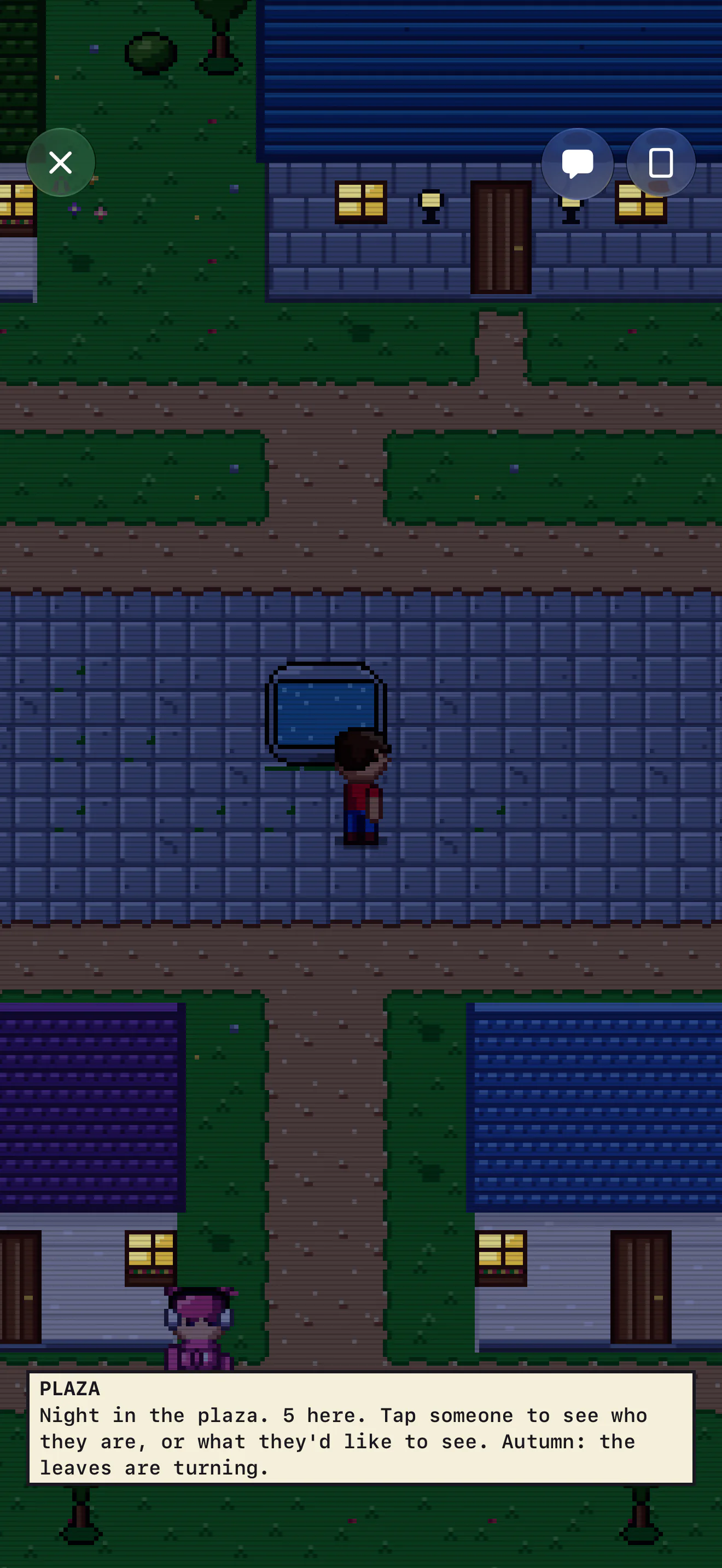
Each of these was researched before it was built, from the games' decompilations and their makers' own accounts, and each has a post that shows its measurements and the brief that came out of them. There are seven so far.
- Pixel-Art Worlds on iPhone: What the 16-Bit Masters KnewThe constraints, the tile systems, the RealityKit recipe (and the AR defaults that blurred our walkers), and the plaza's audit and rebuild.
- Pixel-Art People: Characters and a Creator on iPhoneSprites measured into three bands, the paper-doll systems, the figure string, and the legibility gate.
- Pixel-Art Structures: Houses, Halls and Interiors on iPhoneFootprints, kits, priority bits and doors, measured from source; the 58-piece kit and the town of seven.
- Pixel-Art Motion: Walks, Cameras and Doors on iPhoneHow Red, Crystal and Emerald walk, lock the camera and fade, and a 60 Hz brief for the walk, doors and haptics.
- Pixel-Art Rooms: Furniture Grids, Caps and ScoringHow Emerald, Animal Crossing, Habbo, Stardew and FFXIV cap, grid and score a room, and the furnishing brief.
- Pixel-Art Routes: Map Connections and Districts on iPhoneThe land between towns: routes, seams, gates and map screens.
- A Pixel Town Alive When Nobody Is Online: NPCs and GhostsEmerald's 158 townspeople, Stardew's schedules, presence buffers and Apple's child rules.
No. 006 · The site
The site is the demo
kiradex.app puts a 3D model of the device on the page, closed and floating, and a tap opens it onto a small version of the app running in the browser against the same catalog: the device at the top of this page is that page's device, in a frame. The model is ios27-duo-kit on three.js with the shell made Kiradex's, the foil shader above ported from Metal to GLSL, and a plasma globe charging up where the device will stand while it loads.
The rest of the site is a reference built from the public catalog, each page a way into the device: a page for every set listed card by card (216 English, 116 Japanese), with its chase cards and every number as the card prints it; a page for every species (1,025) with every printing it is on in both languages; a page for every illustrator (410) with every card they drew; and the numbers, counted from the catalog on the day the site was built. A link from the site opens the app on the same card for anyone who has it.
No. 007 · The rules
The rules we set ourselves
Kiradex is an independent collector's tool, not affiliated with, sponsored or endorsed by Nintendo, Creatures Inc., GAME FREAK inc. or The Pokémon Company, and the app and site are built so that stays plainly true. The name is ours. Nothing of theirs is in the world: no creatures, no logos, no lettering, no character art; the pins and the town are drawn in Kiradex's own language, from a palette and a kit we made. Card pictures are fetched from the public catalog at run time for identification, never bundled, never on a share image, and each is shown whole, credited to its illustrator and its set. The game's name appears where it belongs: as the plain description of what the cards are.
- Honoring the Old Pokémon Games Without Borrowing ThemWhat made the Game Boy games feel alive, measured from their decompilations; the fan-game and Palworld record by law; and the homage brief.
No. 008 · Where it stands
On sale, with the limits said out loud
SwiftUI and SwiftData on iOS 27, the collection mirrored through the owner's private CloudKit database, RealityKit for the device and the card, Metal for the foil, Vision for the scanner, a small Python forge for the art and a small server for the plaza that keeps nothing. 1.0 went on sale on October 14, free, and 1.0.1, the build from the 27.1 SDK with the iPhone Duo layout, followed on October 15, a week before the phone ships on October 23. kiradex.app carries the link.
What is still true, and said in the app: the catalog has scans for Japanese sets from 2022 onward, so older Japanese sets list their cards without pictures; a price history starts the day a card is added, because there is no server to backfill it; the foil is one procedural pattern; and on the simulators the full-screen viewer sometimes comes up black on a second or third opening, which has not been reproduced on a phone and is fixed before 1.0.1 if one shows it.
The pictures on this page show the app as it runs, with card images from the public catalog it reads; the cards belong to their owners. Card data and prices: TCGdex (TCGplayer, Cardmarket). Species names: PokéAPI. The device model on the site: ios27-duo-kit (Apache-2.0) and three.js (MIT). iPhone is a trademark of Apple Inc.