MCP-Server neben einer iOS-App: Zwei Agenten-Ökosysteme, eine Liste

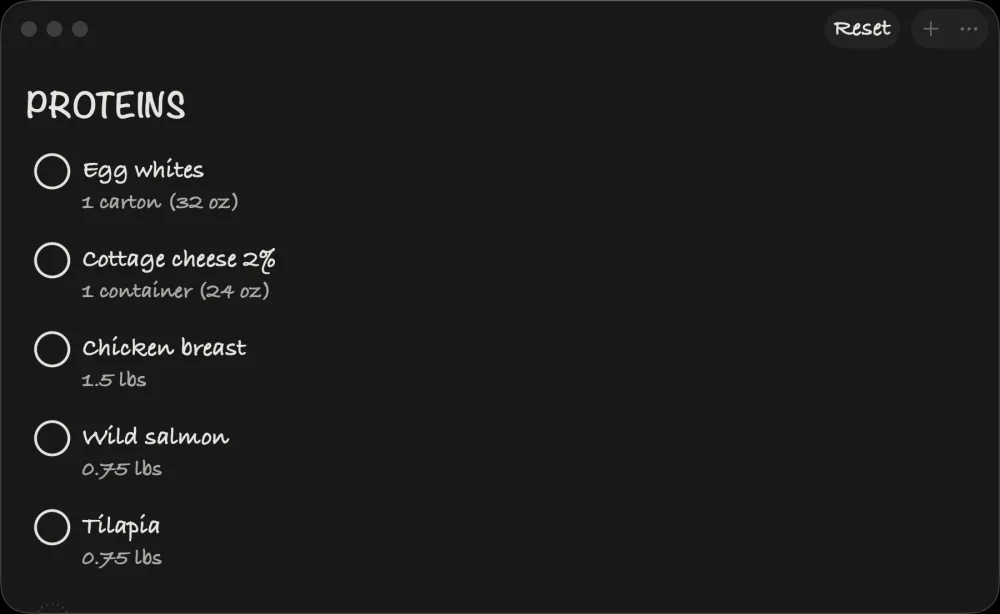
Get Bananas, meine SwiftUI-Einkaufslisten-App, läuft auf iOS, macOS, watchOS und visionOS.1 Sie lebt zudem in Claude Desktop als .mcpb-MCP-Erweiterung und stellt fünf Tools bereit: get_shopping_list, add_item, remove_item, update_item, update_shopping_list.2
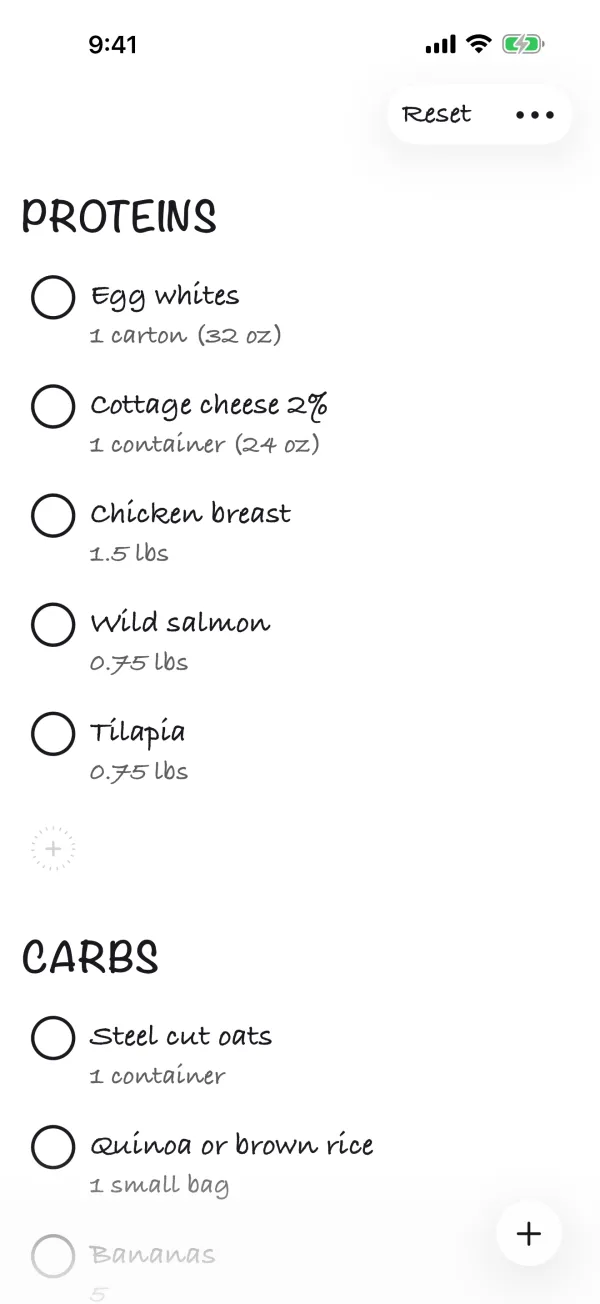 Wenn Sie Claude bitten „Bananen, Milch und Brot auf meine Liste setzen”, ruft Claude
 add_item dreimal auf, und beim nächsten Öffnen der App auf meinem Handy sind die Einträge da. Kein Server. Kein Konto. Kein API-Schlüssel. Die Brücke ist eine einzige JSON-Datei plus fünf Schichten Schleifenvermeidung, die ich nachrüsten musste, nachdem v1.0 sich selbst in drei Minuten in eine 4-MB-Datei geschrieben hatte.
Die interessante Frage ist: wie? SwiftData ist ausschließlich Apple-Plattform-Laufzeit und aus einem Node.js-Prozess heraus nicht lesbar.3 Das native CloudKit-Framework benötigt das passende Entitlement com.apple.developer.icloud-services und die Apple Developer Team-Identifier; der MCP-Subprozess von Claude Desktop hat weder das eine noch das andere und kann CKContainer somit nicht so nutzen, wie meine signierte App es tut. CloudKit Web Services existiert zwar, dessen Verwendung würde aber das Pflegen einer separaten Token-/Auth-Brücke zwischen dem Desktop-Prozess und Apples Servern erfordern.4 Die naheliegenden Wege sind also versperrt.
Der Weg, den ich gegangen bin, ist älter und seltsamer. Die Get-Bananas-App und ihr MCP-Server teilen sich den Zustand über eine JSON-Datei in iCloud Drive. Die Swift-App führt ein SwiftData-Modell für die App-interne Persistenz und exportiert nach jeder Änderung über NSFileCoordinator eine Datei BananaList.json in ihren iCloud-Drive-Container. Der Node.js-MCP-Server liest und schreibt dieselbe Datei mit einem 5-Sekunden-Exklusiv-Dateisperre, Erkennung verwaister Sperren und atomarem Temp-File-Rename-Schreiben. iCloud Drive übernimmt die geräteübergreifende Synchronisierung. Heute liest und schreibt Claude Desktop dieselbe Quelle der Wahrheit vom Mac aus; der App-Intents-Adapter für Apple Intelligence ist die nächste Oberfläche – gegen dieselbe Datei.
Dieser Essay handelt davon, warum diese Anordnung funktioniert, was sie kostet und wo sie auseinanderfällt.
TL;DR
- Get Bananas stellt seine Einkaufsliste über einen ausgelieferten MCP-Server für Claude Desktop bereit. Dasselbe Dateiformat wird als Nächstes einen App-Intents-Adapter für Apple Intelligence unterstützen.
- Das Integrations-Substrat ist iCloud Drive plus eine JSON-Datei, kein CloudKit, kein Server, kein Dienst.
- Swift-App: SwiftData
@Model ShoppingItemfür In-App-Geschwindigkeit; iCloud-Drive-JSON-Export für Portabilität. - MCP-Server: 575 Zeilen Node.js, Dateisperre mit Erkennung verwaister Sperren, läuft innerhalb des
.mcpb-Bundles von Claude Desktop. - Trade-off: Dateibasiertes JSON synchronisiert langsamer als CloudKit und birgt Merge-Konflikt-Risiken, funktioniert aber mit jedem Agenten-Ökosystem, das eine Datei lesen kann.
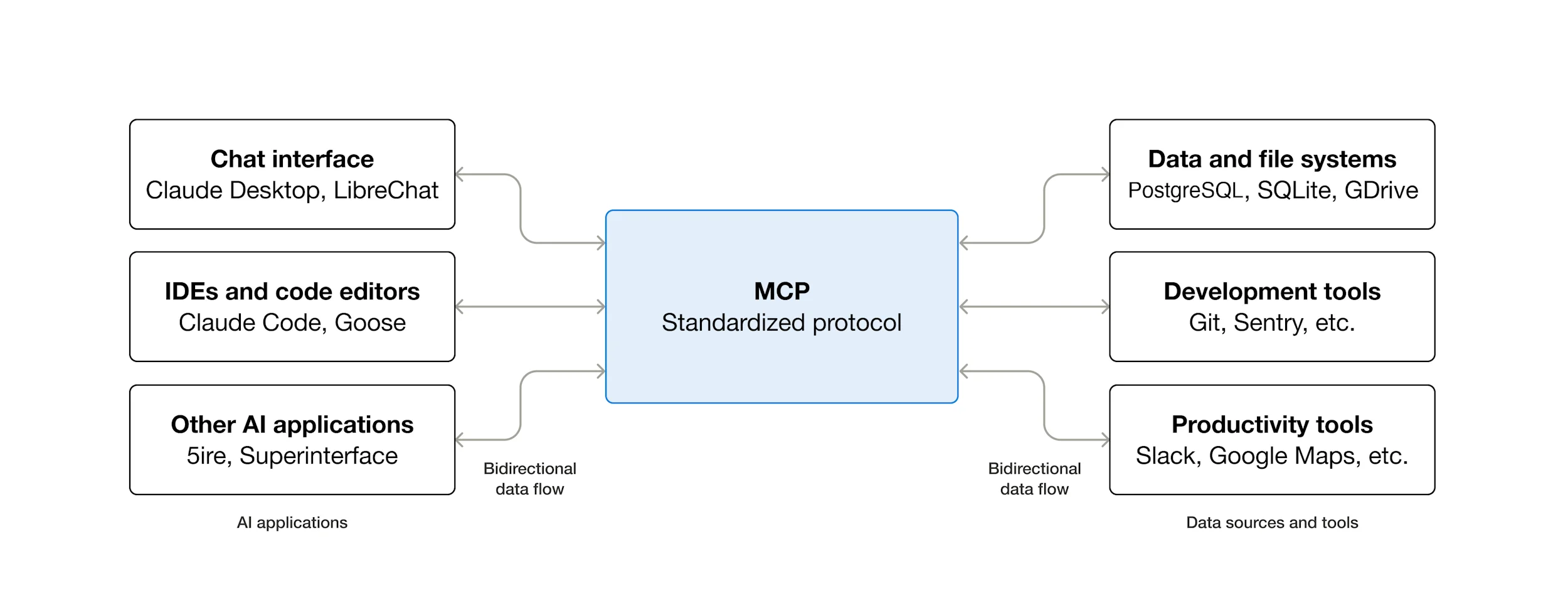
Die Model-Context-Protocol-Architektur, wie von Anthropic dokumentiert. Ein MCP-Host (Claude Desktop) verbindet sich mit einem oder mehreren MCP-Servern (get-bananas.mcpb in diesem Artikel), die jeweils Tools, Ressourcen und Prompts bereitstellen, die der Host aufrufen kann. Quelle: modelcontextprotocol.io.11
Die Architektur auf einer Seite
┌─────────────────────────────────────────────────────────┐
│                    Get Bananas iOS app                  │
│  SwiftUI views → SwiftData @Model ShoppingItem          │
│              ↓ (debounced 0.5s, atomic write)           │
│       iCloudBackupManager.swift                         │
│              ↓                                          │
│  ~/Library/Mobile Documents/.../BananaList.json         │
└──────────────────────────┬──────────────────────────────┘
                           │
                  iCloud Drive sync
                           │
┌──────────────────────────┴──────────────────────────────┐
│              Claude Desktop on Mac                      │
│              ↑                                          │
│  get-bananas.mcpb (Node.js MCP server)                  │
│   - acquireLock() with 5s timeout                       │
│   - readShoppingList() / writeShoppingList()            │
│   - 5 tools: get/add/remove/update/replace              │
│              ↑                                          │
│       JSON-RPC (stdio) ← Claude                         │
└─────────────────────────────────────────────────────────┘
Zwei Oberflächen. Eine Datei. Die gesamte Brücke ist die Datei.
Die Swift-Seite: SwiftData für Geschwindigkeit, JSON für Portabilität
In der App ist die Einkaufsliste ein SwiftData-@Model. Echter Produktionscode:5
@Model
final class ShoppingItem {
    @Attribute(.unique) var id: UUID
    var name: String
    var amount: String
    var section: String
    var isChecked: Bool
    var isOptional: Bool
    var sortOrder: Int
    var lastModified: Date?
}
Das ist die In-Memory-Wahrheit. Jeder Tastenanschlag, jeder Checkbox-Tap, jede Sektionsänderung schreibt in SwiftData. SwiftData treibt die SwiftUI-Views. Die App fühlt sich nativ an, weil sie nativ ist. Der Backup-Trigger ist hash-basiert: ein .onChange(of: computeItemsHash())-Watcher feuert nur, wenn sich id, name, amount, section, checked oder optional eines Eintrags ändern – niemals bei einer reinen No-Op-Bearbeitung.
Der Trick ist, dass SwiftData nicht die prozessübergreifende Wahrheit ist. Es ist der prozessübergreifende Cache. Jede Änderung wird 500 ms entprellt und schreibt dann über Apples koordinierten Schreib-API eine JSON-Datei in den iCloud-Drive-Container der App:6
// iCloudBackupManager.swift, paraphrased
private let fileName = "BananaList.json"
static let backupDebounceDelay: TimeInterval = 0.5
static let ignoreBackupAfterSyncWindow: TimeInterval = 5.0
static let maxRetries = 3

// Real pre-write content check + NSFileCoordinator
let coordinator = NSFileCoordinator(filePresenter: nil)
coordinator.coordinate(writingItemAt: backupURL, options: [], error: &err) { url in
    try jsonString.write(to: url, atomically: true, encoding: .utf8)
}
NSFileCoordinator ist der unterstützte Weg, eine Datei zu schreiben, die andere Prozesse (und der iCloud-Drive-Daemon) gleichzeitig lesen könnten.16 Bevor dieser Schreibvorgang stattfindet, liest der Manager die existierende Datei und überspringt das Schreiben vollständig, wenn das JSON Byte für Byte übereinstimmt. Das reduziert überflüssigen iCloud-Drive-Traffic, sobald ein SwiftData-Änderungsbeobachter für eine No-Op-Bearbeitung feuert. Beim restore versucht der Manager bis zu drei Wiederholungen mit exponentiellem Backoff (1 s, 2 s, 4 s, Gesamtbudget 7 s), weil NSMetadataQuery eine Dateiänderung meldet, bevor iCloud Drive die neuen Bytes tatsächlich heruntergeladen hat.6
Die Codable-Form der Datei ist absichtlich tolerant. ShoppingListExport dekodiert mit Standardwerten für jedes fehlende Feld und filtert Einträge mit leeren Namen heraus:7
struct ShoppingListExport: Codable {
    var sections: [String]
    var items: [ShoppingItemData]

    struct ShoppingItemData: Codable {
        var id: UUID
        var name: String
        var amount: String
        var section: String
        var optional: Bool
        var checked: Bool

        init(from decoder: Decoder) throws {
            let container = try decoder.container(keyedBy: CodingKeys.self)
            self.id = try container.decodeIfPresent(UUID.self, forKey: .id) ?? UUID()
            self.name = try container.decodeIfPresent(String.self, forKey: .name) ?? ""
            self.amount = try container.decodeIfPresent(String.self, forKey: .amount) ?? ""
            // ...
        }

        var isValid: Bool {
            !name.trimmingCharacters(in: .whitespacesAndNewlines).isEmpty
        }
    }
}
Der defensive Decoder ist Absicht. Was auch immer das JSON als Nächstes schreibt (ein MCP-Server, ein zukünftiger Shortcut, ein manuelles Einfügen), wird unweigerlich ein Feld vergessen. Die Swift-Seite fängt das ab. Das geteilte Dateiformat ist der Vertrag; der Swift-Decoder ist die nachsichtige Partei.
Die Node-Seite: Ein 575-Zeilen-MCP-Server, der dieselbe Datei liest
Der MCP-Server lebt in mcp-extension/server/index.js, ausgeliefert als get-bananas.mcpb für das Erweiterungssystem von Claude Desktop. Er öffnet vom macOS-Host aus dieselbe iCloud-Drive-Datei:2
const ICLOUD_FILE_PATH = path.join(
  os.homedir(),
  "Library/Mobile Documents/iCloud~com~941apps~Banana-List/Documents/BananaList.json"
);
Fünf Tools: ein reines Lese-Tool (get_shopping_list), drei Read-Modify-Write-Tools auf Eintragsebene (add_item, remove_item, update_item) und ein Bulk-Replace-Tool (update_shopping_list), das schreibt, ohne vorher zu lesen. Der MCP-Server stellt die Datei zudem als separate, schreibgeschützte Resource für Clients bereit, die den Resource-API bevorzugen. Jeder Schreibvorgang läuft über eine Dateisperre mit Wiederherstellung verwaister Sperren:
const LOCK_FILE_PATH = ICLOUD_FILE_PATH + ".lock";
const LOCK_TIMEOUT_MS = 5000;

async function acquireLock() {
  const startTime = Date.now();
  while (Date.now() - startTime < LOCK_TIMEOUT_MS) {
    try {
      fs.writeFileSync(LOCK_FILE_PATH, String(process.pid), { flag: 'wx' });
      return true;
    } catch (err) {
      if (err.code === 'EEXIST') {
        const stat = fs.statSync(LOCK_FILE_PATH);
        if (Date.now() - stat.mtimeMs > LOCK_TIMEOUT_MS) {
          fs.unlinkSync(LOCK_FILE_PATH);  // stale lock recovery
          continue;
        }
        await new Promise(resolve => setTimeout(resolve, 50));
      } else {
        throw err;
      }
    }
  }
  throw new Error("Could not acquire file lock; please try again.");
}
Das Lock-Pattern ist älter als Node.js. fs.writeFileSync mit dem 'wx'-Flag ist die plattformübergreifende Variante von O_EXCL | O_CREAT. Existiert die Lock-Datei und ist älter als 5 Sekunden, geht der Server davon aus, dass der vorherige Halter abgestürzt ist, und übernimmt sie. Existiert sie und ist frisch, wartet der Server 50 ms und versucht es erneut. Nach insgesamt 5 Sekunden gibt er auf.8
Die Sperre synchronisiert ausschließlich Node-seitige Schreiber untereinander (eine zweite MCP-Aufruf während die erste noch mitten im Schreiben ist). Sie koordiniert nicht mit der Swift-App, die über NSFileCoordinator und String.write(atomically:) schreibt und BananaList.json.lock niemals berührt. Echte Swift/Node-Überlappungen werden zwei schwächeren Mechanismen überlassen: Die Swift-App entprellt 500 ms vor dem Schreiben, MCP-Schreibvorgänge erfolgen nur auf Benutzeranfrage, und jede Restkollision fällt in iCloud Drives Last-Write-Wins-Auflösung auf Datei-Granularität durch.
Die Schreibvorgänge selbst nutzen das Atomic-Temp-then-Rename-Pattern, mit einer JSON-Parse-Prüfung dazwischen:
const tempPath = ICLOUD_FILE_PATH + ".tmp." + process.pid;
fs.writeFileSync(tempPath, jsonString, "utf8");

// Verify the temp file is valid JSON before renaming
JSON.parse(fs.readFileSync(tempPath, "utf8"));

// Atomic rename - either the new file or the old file, never partial
fs.renameSync(tempPath, ICLOUD_FILE_PATH);
fs.renameSync auf demselben Dateisystem ist POSIX-atomar: Ein Leser in einem anderen Prozess sieht entweder die alte oder die neue Datei, niemals halbgeschriebene Bytes.17 Den Temp-Pfad an process.pid zu binden verhindert, dass zwei MCP-Server-Instanzen (selten, aber möglich, falls der Benutzer Claude Desktop neu installiert ohne neu zu starten) sich gegenseitig die Temp-Dateien überschreiben. Das JSON.parse mitten im Schreibvorgang ist ein Paranoia-Schritt: Sollte die Serialisierung selbst ungültiges JSON erzeugt haben, bricht die Funktion vor dem Rename ab und lässt die kanonische Datei unangetastet.
Warum iCloud Drive, nicht CloudKit
Die Entscheidung, die diese Architektur überhaupt funktionieren lässt, ist die Verwendung von iCloud Drive (dateibasiert) statt CloudKit (record-basiert) für die prozessübergreifende Wahrheit. CloudKit ist das, was Apple für App-zu-App-Synchronisierung empfiehlt. Es bietet höhere Konfliktauflösung, serverseitige Push-Mechanismen und zonenbasierte Partitionierung.9 Der native CKContainer-API ist Apple-Plattform-only und entitlement-gated, sodass ein Claude-Desktop-Subprozess ihn nicht so verwenden kann wie meine signierte App. Apple veröffentlicht zwar CloudKit Web Services für Nicht-Apple-Plattform-Clients, aber dessen Nutzung würde das Bereitstellen eines Server-zu-Server-Tokens, die Einbindung in den MCP-Server und die Pflege einer separaten Auth-Brücke erfordern: nicht unmöglich, aber ein erheblicher Infra-Aufwand für eine Einkaufsliste.4
Der MCP-Server läuft unsandboxed auf macOS als Subprozess von Claude. Er hat keine Apple-Developer-Signaturkette, keinen Team-Identifier-Match mit dem CloudKit-Container meiner App und keinen konfigurierten CloudKit-Web-Services-Token.
iCloud Drive hingegen präsentiert sich als regulärer Dateisystem-Speicherort. Apples unterstützter API ist FileManager.url(forUbiquityContainerIdentifier:) für die App-Seite;14 auf macOS ist der aufgelöste Speicherort für Get Bananas ~/Library/Mobile Documents/iCloud~com~941apps~Banana-List/Documents/BananaList.json. Dieser Pfad ist ein macOS-spezifisches Implementierungsdetail dafür, wo iCloud Drive den Container offenlegt, aber für Claude Desktop, das auf demselben Mac läuft, ist es einfach eine Datei. Jeder Prozess mit Lesezugriff auf das Home-Verzeichnis des Benutzers kann sie lesen und schreiben. Das gilt auch für einen zukünftigen Shortcut, ein zukünftiges SwiftBar-Plugin, ein zukünftiges llama.cpp-Skript, das der Benutzer lokal ausführt. Alles, was eine Datei lesen kann, kann sich integrieren.
Der Preis ist, dass die iCloud-Drive-Synchronisierung langsamer ist als CloudKit (Sekunden, nicht Sub-Sekunden) und schwächere Konfliktsemantik hat (Last-Write-Wins auf Datei-Granularität, kein Merge auf Record-Ebene). Für eine Einkaufsliste mit vielleicht 30 Einträgen spielt keiner dieser Kosten eine Rolle. Für eine schreibintensive App mit 10.000 Zeilen und gleichzeitigen Editoren würden beide Kosten dominieren.
Fünf Schichten Schleifenvermeidung
Das kniffligste Stück Code auf der Swift-Seite ist die Schleifenvermeidung. Ohne sie: Der MCP-Server schreibt das JSON, iCloud Drive synchronisiert es nach iOS, das NSMetadataQuery der iOS-App bemerkt die Änderung, die App importiert das JSON wieder in SwiftData, der Import löst einen SwiftData-Änderungsbeobachter aus, der Beobachter feuert ein entprelltes Backup, das entprellte Backup schreibt das JSON, iCloud Drive synchronisiert es zurück. Ich habe die naive Version in v1.0 ausgeliefert und beim Testen zugesehen, wie eine 30-Eintrag-Einkaufsliste in drei Minuten auf 4 MB anwuchs.10
Die ausgelieferte Version verwendet fünf gestapelte Schutzmechanismen, nicht nur einen. Jeder schützt einen anderen Timing-Edge-Case:
// Layer 1: Thread-safe sync counter (re-entrant guard)
private let syncLock = NSLock()
private var _syncCount: Int = 0
var isSyncing: Bool { syncCount > 0 }

// Layers 1 + 2: shouldSkipBackup gates outbound writes
var shouldSkipBackup: Bool {
    if isSyncing { return true }                                      // Layer 1
    if let lastSync = lastSyncTime,
       Date().timeIntervalSince(lastSync) < Constants.ignoreBackupAfterSyncWindow {
        return true                                                   // Layer 2
    }
    return false
}

// Layer 3 (in NSMetadataQuery handler): drop changes within 2s of our own backup
if let lastBackup = lastBackupTime,
   Date().timeIntervalSince(lastBackup) < Constants.ignoreChangesWindow {
    return
}

// Layer 4: exact mod-date match = our own backup coming back via iCloud
if let lastBackupMod = lastBackupModificationDate, modDate == lastBackupMod {
    return
}

// Layer 5: monotonic mod-date guard against re-processing the same version
if let lastSynced = lastSyncedModificationDate, modDate <= lastSynced {
    return
}
| Schicht | Wo | Was sie abfängt |
|---|---|---|
| 1. Sync-Zähler > 0 | Ausgehender Schreibpfad | Wiedereintretende Schreibvorgänge, die ausgelöst werden, während ein Sync-from-iCloud aktiv läuft |
| 2. 5-s-Post-Sync-Fenster | Ausgehender Schreibpfad | Verzögerte @Model-onChange-Callbacks, die SwiftData nach Abschluss des Imports feuert |
| 3. 2-s-Post-Backup-Fenster | Eingehender NSMetadataQuery-Handler |
Lokale Dateisystem-Events, die direkt nach dem eigenen Schreibvorgang der App feuern |
| 4. Exakter Mod-Date-Match | Eingehender Handler | iCloud Drive, das das eigene Backup geräteübergreifend zurückspielt |
| 5. Monotonisches Mod-Date | Eingehender Handler | NSMetadataQuery, das sowohl DidUpdate als auch DidFinishGathering für eine einzelne Änderung feuert |
Die ersten beiden Schichten sichern den ausgehenden Schreibpfad: Soll ich gerade nach iCloud exportieren? Die übrigen drei sichern den eingehenden NSMetadataQuery-Handler: Soll ich diese Änderung in SwiftData importieren? Keine Seite alleine reicht aus. Ein einzelner Sync-Round-Trip kann je nachdem, welches Event zuerst feuert, durch Schutzmechanismen auf beiden Seiten kommen, daher braucht jeder Pfad seine eigenen Verteidigungen.
Die Lehre verallgemeinert sich auf jede „geteilte Datei mit zwei Schreibern”-Architektur: Mod-Time-basierte Änderungserkennung ist notwendig, aber nicht hinreichend. Sie brauchen eine stabile Identität für „Schreibvorgänge, die ich verursacht habe”, die mindestens einen Round-Trip durch die Sync-Schicht überlebt. Das Nächstliegende, was iCloud Drive Ihnen dafür bietet, ist das Modifikationsdatum der Datei zum Zeitpunkt des Schreibens. Halten Sie es fest. Vergleichen Sie es beim Rückweg.
Was ich anders bauen würde
Vier Lehren aus dem Ausliefern.
Der defensive Codable auf der Swift-Seite verdient seinen Platz. Der MCP-Server wurde dreimal umgeschrieben. Bei jedem Umschreiben wurde mindestens einmal vergessen, ein Feld zu setzen. Der Swift-Decoder hat jede Variante absorbiert und die App ist nie abgestürzt. Würde ich nochmal anfangen, würde ich noch mehr Felder in „decode mit Default” statt „erforderlich” verschieben. Der Vertrag zwischen den beiden Schreibern ist konstruktionsbedingt fragil.7
Das Lock-Timeout sollte inhaltsbewusst sein, nicht nur mtime-basiert. Fünf Sekunden sind kurz. Wenn der Mac des Benutzers auf langsamem WLAN läuft oder das iOS-Gerät nach langer Hintergrundzeit wiederhergestellt wird, kann eine iCloud-Drive-Synchronisierung von BananaList.json.lock länger als 5 Sekunden brauchen, um sich zu propagieren. Der MCP-Server sieht dann eine verwaiste Sperre, die in Wirklichkeit noch gehalten wird. Die Lösung ist, die Stale-Lock-Prüfung an die im Lock-File geschriebene PID zu koppeln: Meldet kill(pid, 0) einen noch laufenden Prozess, brechen Sie die Sperre nicht, egal wie alt die mtime aussieht. Der aktuelle Code schreibt die PID, liest sie aber nie zurück.
Das Tool update_shopping_list war ein Fehler. Es ersetzt die gesamte Liste. Claude Desktop ruft es gelegentlich auf, wenn eine Einzeleintrags-Operation ausgereicht hätte, woraufhin ein nicht-trivialer Teil der Liste des Benutzers verschwindet. Ich hätte nur die vier Tools auf Eintragsebene (get, add, remove, update) ausliefern und Claude zwingen sollen, sie zu komponieren. Die Annotation destructiveHint: true des MCP-Protokolls markiert das Tool zwar als destruktiv,11 aber Claude legt das nicht immer dem Benutzer offen, bevor es aufgerufen wird. Das Bulk-Replace-Tool ist bequem für den LLM und gefährlich für den Benutzer. Das Vorhandensein eines Schutzmechanismus auf Protokollebene ersetzt nicht das Nicht-Ausliefern der Fußangel.
Der gemeinsame JSON-Export braucht ein Versionsfeld. ShoppingListExport dekodiert mit toleranten Defaults, was funktioniert, bis zu dem Tag, an dem ich ein Feld umbenenne, statt eines hinzuzufügen. Ein schemaVersion: 1 am Anfang des JSON würde es beiden Seiten erlauben, eine zukünftige Breaking Change zu erkennen und den Lesevorgang abzulehnen, statt stillschweigend ein fehlerhaftes Modell zu erzeugen. Migrationen wären weiterhin manuell, aber zumindest wäre der Fehlermodus laut statt stiller Datenverlust.
Wann dieses Pattern nicht zu verwenden ist
Ablehnung ist Teil des Designs.
Sind die Daten reguliert (Gesundheit, Finanzen, alles mit einer Compliance-Aufbewahrungsrichtlinie), ist das benutzerkontrollierte Dateisystem von iCloud Drive das falsche Substrat. CloudKit verfügt über Logging und Audit Trails; benutzerlesbare JSON-Dateien nicht.
Liegt das prozessübergreifende Latenzbudget unter einer Sekunde, wird iCloud Drive es nicht erreichen. In meinen Tests dauert die iCloud-Drive-Synchronisierung bei einer gesunden Verbindung üblicherweise Sekunden statt Sub-Sekunden; Apple veröffentlicht kein engeres SLA, und langsame Netzwerke verlängern es. CloudKits push-basierte Zustellung ist für Record-Level-Updates spürbar schneller. Ein Echtzeit-Kollaborationsprodukt benötigt CloudKit (oder einen dedizierten Sync-Server).
Entwickelt sich das Schema schnell weiter, häuft das Codable-mit-Defaults-Pattern Schulden an. Jedes neue Feld erfordert eine „Default für alte Dateien”-Entscheidung, die schnell altert. JSON-Dateisynchronisierung eignet sich am besten für stabile Schemata mit überwiegend additiven Änderungen.
Was das für Apps bedeutet, die von mehreren Agenten-Ökosystemen erreichbar sein wollen
Das Muster ist einfach genug zum Wiederholen. Drei Bestandteile:
- Ein SwiftData-
@Modelfür die App-interne Persistenz. Treibt die UI an, schnell, nativ. - Ein Codable-JSON-Export, der bei entprellter Änderung in iCloud Drive geschrieben wird. Defensiver Decoder. Stabiles Schema. Die geteilte Datei ist der Vertrag.
- Ein kleiner Adapter für jedes Agenten-Ökosystem, der dieselbe Datei mit einer Dateisperre liest und schreibt. Node.js für Claude Desktop. Ein zukünftiger App Intent + AppEntity für Apple Intelligence. Ein zukünftiges Shell-Skript für was auch immer als Nächstes erscheint.
Das Muster ist portabel, weil das Integrations-Substrat das Dateisystem ist. Jede heute existierende Agenten-Laufzeit (Claude Desktop, Cursor, Goose, Cline) und die meisten, die nächstes Jahr erscheinen werden, können eine Datei lesen.11 CloudKit kann das nicht. Native Sync-Engines können das nicht. Der kleinste gemeinsame Nenner gewinnt, wenn das Ziel Reichweite über LLM-Ökosysteme hinweg ist.
Anthropic und Apple sind sich uneinig darüber, wie ein Agent aussehen sollte. App Intents sagen: Es ist eine typisierte Swift-Deklaration, die Apple Intelligence on-device auflöst. MCP sagt: Es ist ein JSON-RPC-Server mit einer Tool-Liste, die jeder LLM aufrufen kann. Beide haben in ihren jeweiligen Ökosystemen recht. Get Bananas behandelt keines von beiden als Quelle der Wahrheit und lässt das Dateisystem vermitteln.12
Beim nächsten Mal, wenn ich eine App ausliefere, die zwei Agenten-Oberflächen haben soll, werde ich mit dem Dateiformat beginnen, vor dem Entitätsmodell.
FAQ
Was ist .mcpb und wie funktioniert es?
Ein .mcpb ist das Bundle-Format für MCP-Erweiterungen von Anthropic für Claude Desktop. Es ist ein ZIP-Archiv, das eine manifest.json mit der Beschreibung der Tools, den Einstiegspunkt des MCP-Servers (Node.js, Python usw.), ein Icon und Metadaten enthält. Claude Desktop installiert es per Einzelklick wie eine Browser-Erweiterung und führt den Server als lokalen Subprozess aus. Der MCP-Server spricht JSON-RPC über stdio.1115 Get Bananas liefert seinen Server auf diese Weise gebündelt aus.
Warum nicht die neue App-Intents-zu-MCP-Brücke verwenden?
Es gibt keine. App Intents (Apples Framework) und MCP (das Protokoll von Anthropic) sind unabhängig voneinander. Apple Intelligence ruft App Intents über seinen eigenen Resolver auf. Claude Desktop ruft MCP-Server über seine eigene Laufzeit auf. Eine App, die beide Oberflächen wünscht, liefert beide aus; eine automatische Brücke gibt es nicht.1213
Könnte man das ohne iCloud Drive machen?
Ja, mit Einschränkungen. Jeder gemeinsame, beschreibbare Dateispeicherort funktioniert: ein Ordner in ~/Documents, eine Netzwerkfreigabe, ein S3-gemountetes FUSE-Dateisystem. iCloud Drive ist bequem, weil es bereits auf jedem Mac ist, der Claude Desktop ausführt, und auf jedem iOS-Gerät, das der Benutzer besitzt. Eine Nicht-iCloud-Datei würde den Benutzer zwingen, die Synchronisierung separat einzurichten.
Was passiert bei einem Schreibkonflikt?
Die 5-Sekunden-Dateisperre plus 50-ms-Wiederholungen behandeln gleichzeitige MCP-seitige Schreiber (z. B. einen zweiten MCP-Aufruf, der eintrifft, während der erste mitten im Schreiben ist). Sie koordiniert nicht mit der Swift-App, die über ihren eigenen Coordinator schreibt. Wenn Swift und Node sich tatsächlich überlappen (selten, angesichts der 500-ms-Entprellung von Swift und der Tatsache, dass MCP-Schreibvorgänge nur auf Benutzeranfragen feuern), löst iCloud Drive auf Datei-Granularität auf: Last Write Wins. Der isValid-Filter des Swift-Decoders verwirft anschließend alles Fehlerhafte.
Warum keine CRDTs oder Operational Transform?
Übertrieben für Einkaufslisten mit 30 Einträgen. CRDTs sind die richtige Wahl, wenn überlappende gleichzeitige Bearbeitungen üblich sind und Sie deterministische Merge-Semantik benötigen (kollaborative Dokumenten-Editoren, Mehrspieler-Spiele). Für eine Einkaufsliste, bei der eine Person über Claude Einträge hinzufügt und eine andere sie auf dem Weg zum Laden über die iOS-App abhakt, ist Last-Write-Wins-mit-Entprellung korrekt.
Zwei Agenten-Ökosysteme, eine Einkaufsliste. Die Brücke ist iCloud Drive plus eine JSON-Datei mit einem nachsichtigen Decoder, und das genügt. Der kleinste gemeinsame Nenner ist keine Einschränkung. Er ist das Einzige, worauf sich beide Ökosysteme einigen.
Quellenverzeichnis
-
Get Bananas des Autors, eine SwiftUI- + SwiftData-Einkaufslisten-App für iOS, macOS, watchOS und visionOS, veröffentlicht von 941 Apps. ↩
-
Get Bananas liefert einen MCP- (Model Context Protocol) Server, gebündelt als
get-bananas.mcpbfür Claude Desktop. Bereitgestellte Tools:get_shopping_list,add_item,remove_item,update_item,update_shopping_list. Der Server umfasst 575 Zeilen Node.js inmcp-extension/server/index.js. ↩↩ -
Apple Developer, „SwiftData”-Framework. Verfügbar ab iOS 17, macOS 14, watchOS 10, visionOS 1. Nur zur Laufzeit; keine serverseitigen oder prozessübergreifenden Bindings. ↩
-
Apple Developer, „CloudKit”-Framework. Der native
CKContainer-API erfordert das Entitlementcom.apple.developer.icloud-servicesund einen passenden Apple Developer Team-Identifier. Apple veröffentlicht zudem CloudKit Web Services für Nicht-Apple-Plattform-Clients, deren Verwendung jedoch eine separate Token-/Auth-Brücke erfordert, die Get Bananas nicht pflegt. ↩↩ -
Produktionscode in
Banana List/Item.swift. Das FeldlastModifiedwurde später für die Konfliktauflösung der iCloud-Synchronisierung hinzugefügt. ↩ -
Produktionscode in
Banana List/iCloudBackupManager.swift. Konstanten leben inBanana List/Constants.swift. ↩↩ -
Produktionscode in
Banana List/ShoppingListExport.swift. Custom Decoder mitdecodeIfPresent-Defaults plusisValid-Filter beim Import. ↩↩ -
POSIX-Semantik von
O_EXCL | O_CREAT; Node.js stellt dieselbe Atomarität überfs.writeFileSync(path, data, { flag: 'wx' })bereit. Siehe Node.js fs documentation. ↩ -
Apple Developer, „Designing for CloudKit”. Push-basierte Synchronisierung, Konfliktauflösung auf Record-Ebene, Zonen-Partitionierung. ↩
-
Debugging-Notizen des Autors. Der Endlosschleifen-Vorfall erzeugte aus einer 30-Eintrag-Einkaufsliste in 3 Minuten eine 4-MB-
BananaList.json, bevor die Sync-Counter-Logik gelandet war. ↩ -
Anthropic, „Model Context Protocol”. Offenes Protokoll für die LLM-Tool-Nutzung; Multi-Runtime (Claude Desktop, Cline, Goose usw.). ↩↩↩↩
-
Analyse des Autors in App Intents Are Apple’s New API to Your App. Die These der zwei parallelen Verträge angewandt auf System-AI-Oberflächen (Apple) und plattformübergreifende LLM-Tool-Nutzung (Anthropic). ↩↩
-
Apple Developer, „App Intents framework”. Apples typisiert-deklarative Tool-Nutzungs-Oberfläche für Siri, Spotlight und Apple Intelligence. ↩
-
Apple Developer, „FileManager url(forUbiquityContainerIdentifier:)”. Der unterstützte API zum Auflösen der iCloud-Drive-Container-URL einer App. Der macOS-Pfad unter
~/Library/Mobile Documents/ist das Implementierungsdetail des Host-OS, wo iCloud Drive den Container offenlegt; der symbolische API ist das, was Apps aufrufen sollten. ↩ -
Anthropic, „Desktop Extensions”. Das
.mcpb-Format ist ein ZIP-Archiv mitmanifest.json, MCP-Server-Einstiegspunkt, Icon und Metadaten. Einzelklick-Installation in Claude Desktop; führt den gebündelten Server als lokalen Subprozess über stdio JSON-RPC aus. ↩ -
Apple Developer, „NSFileCoordinator”. Koordiniert Lese- und Schreibvorgänge auf eine Datei zwischen Prozessen, die sich auf dasselbe Koordinationsprotokoll einlassen; erforderlich, wenn der
bird-Daemon von iCloud Drive,NSMetadataQuery-getriebene Beobachter und die App selbst denselben Pfad berühren können. ↩ -
POSIX
rename(2)ist atomar erforderlich, wenn Quelle und Ziel auf demselben Dateisystem liegen. Der lokale Mirror von iCloud Drive unter~/Library/Mobile Documents/ist ein einzelnes APFS-Volume, sodassfs.renameSynczwischen einer benachbarten Temp-Datei und dem kanonischen Pfad aus Sicht jedes Lesers atomar ist. Siehe POSIX rename specification. ↩











