CARROT Weather: Personality as a Design Differentiator
How CARROT Weather proves utility apps can have character through dynamic theming, sarcastic AI, and data-rich visualization.
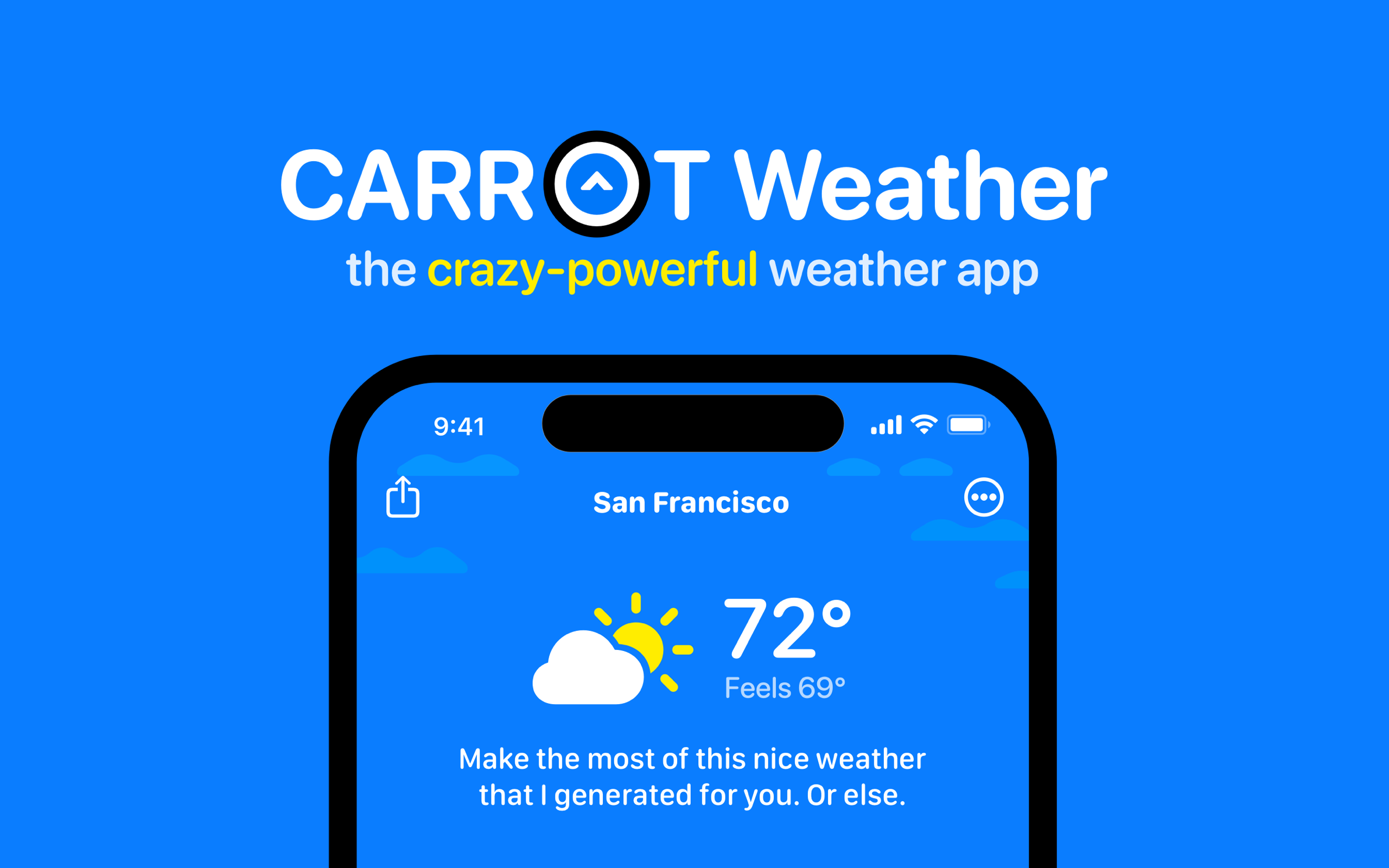
CARROT Weather: Personality as a Design Differentiator
“A utility app can have a personality.” — Brian Mueller, CARROT Weather developer
Weather apps are boring — and developer Brian Mueller believed they did not have to be. While every competitor fights over data accuracy and widget density, CARROT Weather competes on the experience of checking the weather. A sarcastic AI character comments on conditions, rewards exploration with secret locations, and adjusts its tone from “friendly” to “homicidal” based on user preference. Apple recognized this balance of substance and character with an Apple Design Award.
Key Takeaways
- Personality is a legitimate differentiator - Users choose CARROT because of its character, not despite it; five configurable personality levels let users calibrate the experience from gentle to aggressive
- Dynamic theming is functional, not decorative - The app’s color scheme changes with weather conditions, making the background itself a weather report before the user reads a single number
- Marketing restraint amplifies product personality - The website is deliberately plain (white background, system font) so the colorful, personality-rich app screenshots pop through contrast
- Ultra-thin type weights communicate data elegance - The 72px temperature display at weight 200 is enormous but not overwhelming; heavy weight at that size would dominate the interface
- Data density and humor coexist - CARROT shows more weather data than most competitors while wrapping every surface in personality; even error messages and loading states have character
Why CARROT Weather Matters
CARROT is not gimmick-first design. The personality is layered on top of genuinely excellent weather data: multiple sources (Dark Sky/Apple Weather, AccuWeather, Foreca), radar maps, air quality indexes, astronomical data, and severe weather alerts. Brian Mueller has maintained CARROT as a solo developer since 2013, iterating through every major Apple platform — iPhone, iPad, Apple Watch, Mac, and widgets.
Key achievements:
- Won an Apple Design Award for design excellence
- Proved that personality-driven utility apps can sustain a premium price over a decade
- Built platform-specific excellence across Watch complications, iOS widgets, and iPad layouts (each designed for its platform, not scaled down)
- Demonstrated that a solo developer can compete with well-funded weather apps through design differentiation rather than data licensing
Core Design Principles
1. Dynamic Environmental Theming
CARROT’s color scheme changes with weather conditions. Clear skies produce bright blue gradients, storms bring dark moody backgrounds, snow introduces pale whites, and extreme heat triggers amber-orange palettes. This is more than aesthetic — the app’s appearance IS the weather report.
CARROT'S CONDITION-DRIVEN PALETTE:
┌───────────────┬──────────────────────┬──────────────────────┐
│ Condition     │ Primary              │ Secondary            │
├───────────────┼──────────────────────┼──────────────────────┤
│ Clear Day     │ rgb(76, 175, 250)    │ rgb(42, 130, 220)    │
│ Clear Night   │ rgb(25, 30, 60)      │ rgb(10, 15, 40)      │
│ Cloudy        │ rgb(140, 150, 165)   │ rgb(100, 110, 125)   │
│ Rain          │ rgb(60, 80, 110)     │ rgb(35, 50, 75)      │
│ Snow          │ rgb(200, 210, 225)   │ rgb(170, 185, 200)   │
│ Thunderstorm  │ rgb(40, 30, 55)      │ rgb(20, 15, 35)      │
│ Hot           │ rgb(255, 120, 50)    │ rgb(230, 80, 30)     │
│ Extreme       │ rgb(200, 30, 30)     │ rgb(140, 15, 15)     │
└───────────────┴──────────────────────┴──────────────────────┘
Each condition maps to a two-color gradient rendered top to bottom. Transitions between conditions animate over one second with ease-in-out timing, so the background shifts smoothly as forecasts change. The result: the app never looks the same twice. A static, consistent theme would undermine the dynamic personality that defines the product.
2. Data Visualization With Character
CARROT shows more weather data than most competitors — custom radar maps with smooth animations, hourly temperature graphs with gradient fills, precipitation probability timelines, UV index, wind speed, and air quality. The visualization layer uses a semantic color vocabulary: blue for precipitation, red-orange for heat, gray for overcast, green for good air quality, red for poor.
The data hierarchy is clear despite the density. Current temperature appears giant and centered (72px at ultra-light weight 200 with -2px tracking). The hourly forecast occupies a scrollable horizontal strip. Details live in expandable cards. This organization lets CARROT present comprehensive data without overwhelming users who just want to know if they need an umbrella.
The CARROT character — a sinister-cute robot eye — delivers commentary throughout in a distinct typographic voice (18px, weight 500, often italic), separated from the data typography so the personality layer never interferes with information retrieval.
3. Personality at Every Surface
Five personality levels — friendly, snarky, aggressive, homicidal, and a custom “professional” mode — let users calibrate how much character they want. This is not a single joke bolted onto a weather app. Error messages are jokes. Loading states have personality. Empty states have commentary. Even the settings screen has character.
An achievement and gamification system — secret locations, unlockable features, hidden interactions — rewards exploration. This is unusual for a utility app and reinforces the personality-driven design philosophy. Users discover features through play rather than tutorials.
4. Marketing Restraint as Amplifier
The marketing site is surprisingly restrained: white background (#FFFFFF), system font (-apple-system, BlinkMacSystemFont, “Helvetica Neue”), 40px H1, 28px H2, 16px body text in near-black (#252525). Clean product screenshots are the primary visual content. There are no hero animations, no gradient backgrounds, and no web design tricks.
This restraint is strategic. The contrast between the calm white site and the colorful, personality-rich app screenshots creates immediate visual interest. The site’s job is to be a clean frame; the product sells itself through the screenshots within that frame.
Transferable Patterns
The dynamic theming pattern is CARROT’s most transferable contribution. Any application that responds to external conditions — weather, time of day, user mood, system state — can use condition-driven gradients to encode information visually:
:root {
  /* Marketing palette — clean and conventional */
  --color-background: #FFFFFF;
  --color-text: #252525;
  --color-text-secondary: #858585;
  --color-accent: #FF9500;  /* CARROT brand orange */
  --color-surface: #F8F9FA;

  /* Dynamic weather palette (JS-driven) */
  --weather-primary: rgb(76, 175, 250);
  --weather-secondary: rgb(42, 130, 220);

  /* Typography — system font, invisible */
  --font-sans: -apple-system, BlinkMacSystemFont, "helvetica neue", sans-serif;

  /* Shadows */
  --shadow-card: 0 2px 8px rgba(0, 0, 0, 0.08);
}

/* Temperature display — large, ultra-thin */
.temperature {
  font-size: 72px;
  font-weight: 200;
  letter-spacing: -2px;
  line-height: 1.0;
}

/* Weather background — dynamic gradient */
.weather-bg {
  background: linear-gradient(
    180deg,
    var(--weather-primary) 0%,
    var(--weather-secondary) 100%
  );
  transition: background 1s ease;
}

/* AI personality text — distinct from data */
.carrot-says {
  font-weight: 500;
  font-style: italic;
  color: rgba(255, 255, 255, 0.9);
}
For SwiftUI, the dynamic theme pattern maps cleanly to an environment-aware struct:
struct WeatherTheme {
    let primary: Color
    let secondary: Color
    let text: Color

    static let clearDay = WeatherTheme(
        primary: Color(red: 76/255, green: 175/255, blue: 250/255),
        secondary: Color(red: 42/255, green: 130/255, blue: 220/255),
        text: .white
    )
    static let storm = WeatherTheme(
        primary: Color(red: 40/255, green: 30/255, blue: 55/255),
        secondary: Color(red: 20/255, green: 15/255, blue: 35/255),
        text: .white
    )
}

// Giant temperature display — ultra-thin weight
Text("72\u{00B0}")
    .font(.system(size: 72, weight: .ultraLight))
    .tracking(-2)
    .foregroundStyle(.white)

// Dynamic weather gradient background
LinearGradient(
    colors: [theme.primary, theme.secondary],
    startPoint: .top,
    endPoint: .bottom
)
.animation(.easeInOut(duration: 1.0), value: theme)
.ignoresSafeArea()
The data visualization colors — temperature high (rgb(255,85,55)), temperature low (rgb(65,155,255)), precipitation (rgb(80,180,255)), UV (rgb(255,200,50)), wind (rgb(120,220,180)) — form a complete semantic vocabulary applicable to any data-rich application that uses color to encode meaning.
Design Lessons
Personality requires substance underneath. CARROT’s humor works because the weather data is genuinely excellent. Multiple data sources, comprehensive metrics, and thoughtful visualizations earn the user’s trust; the personality then elevates the experience. Humor without substance is a gimmick. Substance without personality is forgettable.
Let users calibrate character intensity. Five personality levels mean users who love aggressive humor and users who want mild snark can both be served. Configurable personality avoids alienating users while preserving the brand identity.
Use marketing restraint when the product is visually rich. CARROT’s website is deliberately boring so the app screenshots carry the entire visual argument. When your product is the spectacle, the marketing site should be a clean frame, not a competing show.
Dynamic appearance is information. The weather-driven color scheme means users absorb the general forecast before consciously reading data. This pattern applies to any application where environmental or contextual state can be encoded visually — server dashboards, fitness apps, trading platforms.
Avoid static design in inherently dynamic products. A consistent, unchanging theme would undermine CARROT’s core proposition. When the content changes constantly (weather, stock prices, health metrics), the interface should reflect that dynamism rather than imposing false consistency.
Frequently Asked Questions
What makes CARROT Weather’s design distinctive?
CARROT combines three unusual elements: dynamic environmental theming (the app’s color scheme changes with weather conditions), a configurable AI personality (five levels from friendly to homicidal), and an achievement system that rewards exploration. The result is a utility app that feels different every time you open it, with personality woven into every surface including error messages and loading states.
How does CARROT balance data density with personality?
Through clear visual hierarchy. The current temperature appears at 72px ultra-light weight, giant and centered. Hourly forecasts occupy a scrollable strip. Detailed metrics live in expandable cards. The AI character’s commentary uses a distinct typographic voice (different weight, sometimes italic or monospaced) that is visually separated from the data layer, so personality never interferes with information retrieval.
What can designers learn from CARROT Weather?
That personality is a viable competitive strategy for utility apps. In a market where every weather app competes on the same data sources, CARROT differentiates through experience design. The practical takeaway: dynamic theming (condition-driven gradients), configurable personality intensity, and marketing restraint (letting the product’s visual richness sell itself against a plain white backdrop) are all transferable patterns.
How does CARROT handle platform-specific design?
Apple Watch complications, iOS widgets, iPad layouts, and Mac interfaces are each designed for their specific platform — not scaled-down versions of the phone app. Watch complications show minimal data (temperature and icon), widgets use the dynamic color system at glance-appropriate density, and the iPad layout takes advantage of the larger canvas for side-by-side data panels.
Why is CARROT’s marketing site so plain compared to the app?
It is deliberate contrast. The white-background, system-font marketing site creates a calm frame that makes the colorful, personality-rich app screenshots pop. If the website were as visually intense as the app, the screenshots would blend into the background noise. Restraint in marketing amplifies the product’s visual impact.
References
- CARROT Weather — Official product page and feature overview
- CARROT Weather on the App Store — iOS, iPadOS, watchOS, and macOS app listing
- Brian Mueller / Meet CARROT — Developer homepage and other CARROT apps
- Apple Design Awards — Award history and criteria
- CARROT Weather on Product Hunt — Community reception and launch history
- CARROT Weather Press Kit — Media assets and brand guidelines











